Application Menu

General
 The application menu (hamburger button) is where you will be able to access the majority of the functions within Infinity, it is accessible in the top left of Infinity via the button just above My Infinity.
Please note that all of the options below may also be available in the quick access toolbar. You can right click on any option in the application menu and you will be offered the option to add or remove it from the quick access toolbar. You can also setup the Quick Access Toolbar from the User Options section.

 New
New

|
Click here to create a new record. This includes candidates, companies, jobs, interviews and placements. Please see the creating records information for more information. |
Advanced Find

|
Click here to find records. These include candidates, companies, locations, contacts, jobs, interviews and placements. Please see finding your records part of the manual for more information. |
Search

|
Click here to do searches (Ad Hoc) for candidates, companies, locations, contacts, jobs and placements. Please see the ad Hoc Search Setup Options section for more details. |
Calendar

|
Click here to launch your calendar. Please see the area on calendars for more information. |
Tasks

|
Click here to launch your tasks. Please see the area on tasks for moreinformation. |
TalentGraph (Preview)
Access our TalentGraph integration, complete searches of the TalentGraph and send profiles to icapture to process as a candidate or send to Leads to process as a client. See the Talentgraph section for more details
NB: - TalentGraph is a subscription feature, speak to your account manager for current prices.
Leads
Click here to launch the Leads list, record and manage potential candidate and / or contacts, enabling you to record and manage them prior to committing to adding them into Infinity itself. See the Leads section for more details
My Shortlist
 Click here to view the shortlist entries per user. It will default to the currently logged in user. This list will show the shortlist entries that have had a change in shortlist stage in the last 30 days.
Use the previous 30 days or next 30 days to show other date ranges.

Temps

Hover on this to access the Temp planners:
- Shift Planner - Review Temp Jobs and Shifts, match Temps to shifts, managing your Temp workers
- Temp Planner - Review Temp candidates using quick and full searching and Temp placement searching
NB:- Right clicking on a panel will enable you to add the panel to the quick access toolbar
Privacy Audit
 Privacy Audit is Infinity's GDPR management feature that will keep compliance. Access lists of candidates that require review relating to their Privacy Audit status.

If you wish to access Privacy Audit settings see the Administration area.

|
Access system wide lists of candidates that require lawful basis process to be completed Consent / L.I.
Manage Privacy Audit for candidates
See GDPR section for more details See Candidate Privacy Audit section for more details See Suppression Lists for more details See Automatic Restrictions section for more details See Subject Access Request for more details
|
||||||||||||

|
Access system wide list of candidates that Lawful Basis has expired Contractual / Legal
|
||||||||||||
|
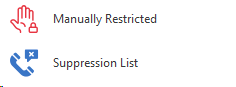
Displays candidates that have been manually restricted, see Restrictions section for more details | ||||||||||||
| Displays any candidates that have been added to the suppression list whilst being deleted, see Suppression List section for more details |







AWR

|
Between 10 to 12 Weeks - Display all candidates that have been on contract or temp placement for 10 to 12 weeks, to help manage Agency Worker Regulations. Please see the section on the AWR for more details |
|
|
Over 12 Weeks - Display all candidates that have been on contract or temp placement for over 12 weeks that have not had AWR Checked ticked. Please see the section on the AWR for more details |
CV Submit
 Click here to launch the CV submit comms centre. If you want to submit a CV to a job or speculatively you can do it here. Please see the section on CV submit for more details.
iResearch
 iResearch allows you to search for candidates via social media sites such as Linked-in or twitter and at either attach their profile to an existing record, or create a new record by parsing a PDF or their social media profile through i-capture.
Information
 Information boards are for you to be able to view information relating to important parts of the recruitment cycle for example who is on interview or had a placement created. This is presented in a diary format and also identifies Permanent and contract starters and finishers. Click here to go to the information boards area.
Queues
 These are lists of data that you may want to access within Infinity for all users, such as candidates that have been recently added, the CV pool and sms messages sent. Please click here to go to the Queues area.
Expiring Items
 Here you can view all expiring quals & certs, purchase order numbers and driving licence checks. See the Expiring Items section for more details.
Organisational Chart
 This shows an organisation chart of your internal company, including locations and employees. See the Organisational Chart section for more details
Data Management
 Access tools to complete merging of candidates, companies and locations. See Data Management section for more details
|
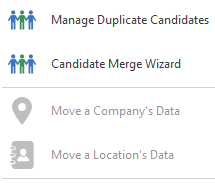
Review and merge a list of potentially duplicate records - Infinity will use data within records to identify high, medium and low matching records for you to review. |
| Manually merge candidate records - if you have duplicated and wish to immediately merge then you can use this tool. | |
|
Move a company's locations and jobs to another company - generally used to move duplicated company data or if a company has had a merger. Greyed out if you do not have appropriate permission or have integration with a payroll |
|
|
Move a location's contacts and jobs to another location within the same company - used where a location has been duplicated or has closed down a location. Greyed out if you do not have appropriate permission |
My Settings

|

|
Here you can define your personal options such as default templates that you would prefer to use, what skin you wish to see and what icons you would like to appear on your quick access toolbar. Please click here for more options |
|||||||||||||

|
This will allow you to change your current Infinity password, if the option is greyed out then you do not have permission to change password, please speak to the system administrator or click here to view user administration content |
||||||||||||||

|
Infinity needs to know the users exchange password to allow exchange sync to work. If you change your exchange password then Infinity will ask for the new password after log on. Alternatively you can use then button to change password. |
||||||||||||||

|
Removes all the remember me details stored in Outlook. See Outlook section for more details on the Outlook integration. |
||||||||||||||
|
|
|
||||||||||||||




 Hint: You can reset you Panel Layout (My Infinity and Favourites) from
Admin

|
The Administration options are those that you will use to maintain your database. It is likely that only a systems administrator will use this menu and therefore this is covered in the Infinity Administrator manual this can be downloaded from the Infinity Self Help area on our website. You will only be able to view this area if you have the appropriate admin rights
|

|
Here you can create templates that can be used throughout the comm's centre. You will only have access to this section if you have the appropriate admin rights, for further information on this section please speak to your system administrator or click here to view template administration.
|

|
Here you can create Builders such as Headers and footers, cover pages or bespoke templates for submitting CV’s. You will only have access to this section if you have the appropriate admin rights, for further information on this section please speak to your system administrator or click here to view CV Builder administration.
|

|
This section will open up a wizard where you can create back office information - to Create new sectors and currencies then please refer to the separate Admin Manual. You will only be able to view this area if you have the appropriate admin rights Please click here to go to Back Office Sectors / Currencies area in the Company Financials section. |
Help

|

|
Launch the internal Help manual, you can also access Help by pressing F1. Please see the Getting Started section for more details. |

|
Technical Support
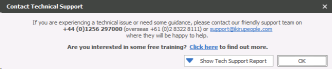
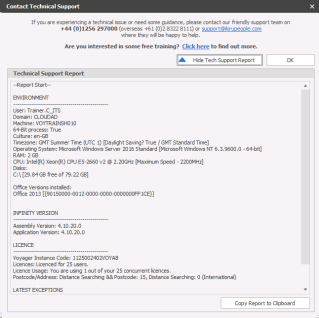
Access some key contact numbers and environmental information If you have an issue with Infinity and require assistance from Voyager Support, a diagnostic support ticket can be sent directly to Voyager Support. You should contact Voyager Support in the normal way (phone / email) and tell them a diagnostic report has been sent. From the Application Menu, click Help – Technical Support
Click ‘Show Tech Support Report’
Click Copy Report to Clipboard - when logging technical support emails it is recommended to include this hardware information to ensure support can assist in a timely manner |
|

|
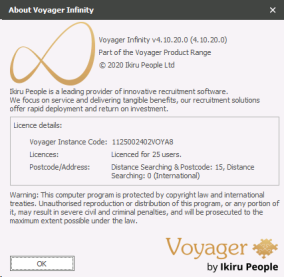
About
About - access the version and licence details of Infinity you are currently running
|
Exit
 Click to close Infinity, each open record will close individually and will prompt to save any changes.
NB: - you can also close Infinity via the top right close button
Contact Details
If you require further assistance please contact Ikiru People using the details published on www.ikirupeople.com
Visit our Customer Portal at https://portal.ikirupeople.com/ for future events and clinics.
FeedbackIf you would like to make suggestions or have found any errors with this Help section please contact our Support team.
Copyright © 2026 Voyager by Ikiru People Ltd. All rights reservedVersion 4.87
Voyager Software is a brand of Ikiru People Ltd, a subsidiary of Dillistone Group Plc. The group is a leading global provider of software and services that enable recruitment agencies and in-house recruiters to better manage their selection process and address the training needs of individuals. Across its brands – which include Voyager Software (recruitment software UK & Australia), Dillistone FileFinder executive search software, GatedTalent, the global database of the world’s leading executives, Talentis.Global – the next generation of recruitment software and also ISV.Online, provider of online pre-employment skills testing and training tools. Dillistone Group serves thousands of clients worldwide. Ikiru People Ltd: Registration Number 02043300. Registered in England & Wales.
 |  |  |  |