Business Rules Administration 
 Business Rules Walkthrough available click here
General
What are Business Rules?
Business Rules are used in Infinity to inform the user of the need to comply with certain business critical conditions or rules.
Note – Those with Mid Office integration will need to have the Infinity – MO business rule switched on to ensure fields required are completed, you cannot edit this rule due to integration requirements
There are 3 Rule Types:
- Prevent
- Warn
- Follow Up
There are 3 Process Types which are used as the basis for each rule:
- Submitting a CV
- The Interview is confirmed
- The Placement is awaiting confirmation
Business Rules can be very simple such as a warning message appearing during the CV Submit process to inform you that a Candidate has not an Internal Interview or that the Terms of Business have not been received from the client.
You can also prevent processes within Infinity so that users cannot continue until a Business Rule condition has been met – such as the candidate’s work permit is not valid so you will be unable to confirm a Placement until the condition has been met and the work permit becomes valid.
 Creating Business Rules
- Launch Administration from the application menu and select the Business Rules tab.
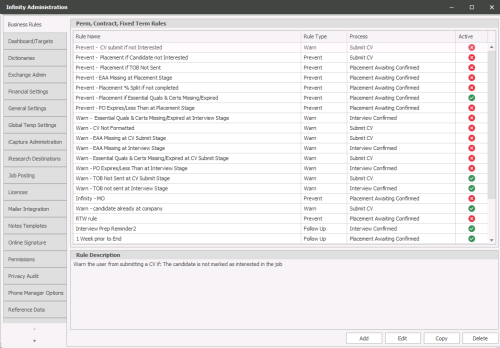
- Select
 and the ‘Add Business Rule’ page will be displayed.
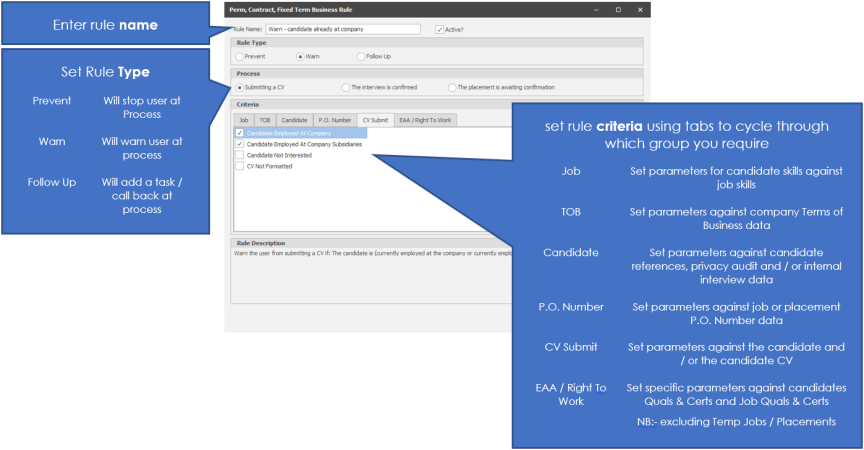
- Enter a name for the Business Rule – this will be displayed to the user on screen when a Business Rule is triggered so ensure it is clear and user-friendly. A Business Rule must have a unique name.
- The Active check box is pre-ticked; this means that the Business Rule will be active as soon as it has been created. If you do not wish it to be active then just remove the tick with a single click.
Rule Types

- Prevent – select this type and the user will be prevented from submitting a CV or confirming an interview or confirming a placement unless the rule parameters have been met.
- Warn – select this type and the user will be warned but will still be allowed to continue with the action of submitting a CV or confirming an interview or confirming a placement if the rule parameters have not been met.
- FollowUp – select Follow Up to trigger a date related task that will be created; for example follow up tasks to remind you that a candidate has been at a placement for a week or a month etc. when they are submitting a CV or confirming an interview or confirming a placement.
Finally, you can only select one Rule Type per Business Rule; however you can create unlimited numbers of Business Rules if you need to create similar workflow processes.
Next select the Process Type; your Business Rule will be based on one of the three processes, submitting a CV, the interview is confirmed, and the placement is awaiting confirmation.
Process Types

- Submitting a CV – select this process if the Business Rule should be triggered during the CV submittal process.
- The interview is confirmed – select this process if the Business Rule should be triggered when confirming an Interview.
- The placement is awaiting confirmation - select this process if the Business Rule should be triggered when logging the event in the Placement of awaiting confirmation.
You must select a Process Type for every Business Rule you create.
Finally, you can only select one Process Type per Business Rule; however you can create unlimited numbers of Business Rules if you need to create similar workflow processes.
Business Rules Criteria
The next stage is to select the criteria and complete your Business Rule.
The Criteria section is divided into tabs.
The criteria choices will change depending on the Rule Type and Process Type selected.
You can select multiple criteria choices per Business Rule, but you must select at least 1.
Criteria Choices
- Rule Type: Prevent Process Type: Submitting a CV
- Rule Type: Warn Process Type: Submitting a CV
- Rule Type: Follow UpProcess Type: Submitting a CV – criteria choices are not applicable for
this workflow process.
- Rule Type: Prevent Process Type: The interview is confirmed
- Rule Type: Warn Process Type: The interview is confirmed
- Rule Type: Follow UpProcess Type: The interview is confirmed
- Rule Type: Prevent Process Type: The Placement is awaiting confirmation
- Rule Type: WarnProcess Type: The Placement is awaiting confirmation
- Rule Type: Follow UpProcess Type: The Placement is awaiting confirmation
Available Tabs:

|
Job criteria:
|
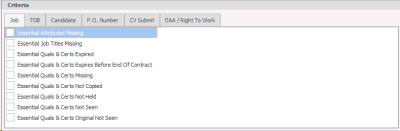
The Job tab contains job related criteria to enable you to build the Business Rule based on Essential Job Titles, Attributes and Quals & Certs which may be missing, expired, not held etc.
An example of a Business Rule:
You wish to prevent a Candidate’s CV being submitted to a client if the Candidate does not have the essential attributes assigned to the Job.
|
|
TOB criteria:
|
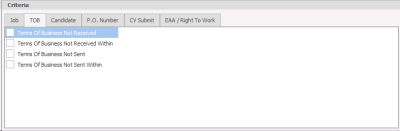
The TOB tab contains TOB related criteria to enable you to build the Business Rule based on the status of Terms of Business activity.
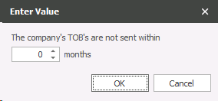
Two of the criteria can be set with ‘not sent / received within’ duration period.
An example of a Business Rule:
You wish to prevent a Candidate’s CV being submitted to a client if the Terms of Business have not been received.
Remember that the TOB information is maintained in Financial Information on the Company page. |
|
Candidate criteria:
|
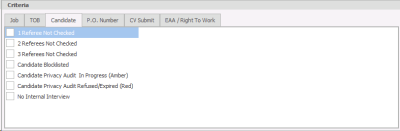
The Candidate tab contains Candidate related criteria to enable you to build the Business Rule based on whether the Candidate has had an Internal Interview.
An example of a Business Rule:
You wish to warn the user that the Candidate who is being submitted has not had an Internal Interview. |
|
P.O. Number criteria:
|
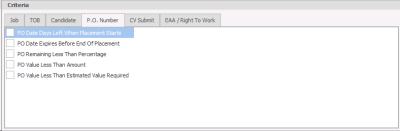
The PO Number tab contains PO Number related criteria to enable you to build the Business Rule based on PO Number value and / or expiry dates.
An example of a Business Rule:
You wish to prevent a Candidate being placed at a client without a valid PO Number.
Remember that PO Numbers are maintained in Financial Information on the Company page.
|
|
CV Submit criteria:
|
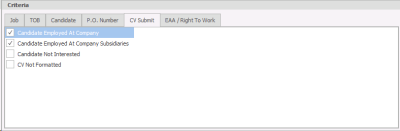
The PO Number tab contains CV Submit related criteria to enable you to build the Business Rule based on various data facts.
An example of a Business Rule:
You wish to prevent a Candidate’s CV being submitted to a client if the Candidate has been or is employed at the client company or one of their subsidiaries.
|
|
EAA / Right To Work criteria:
EAA / Right to Work Options
Run Now button |
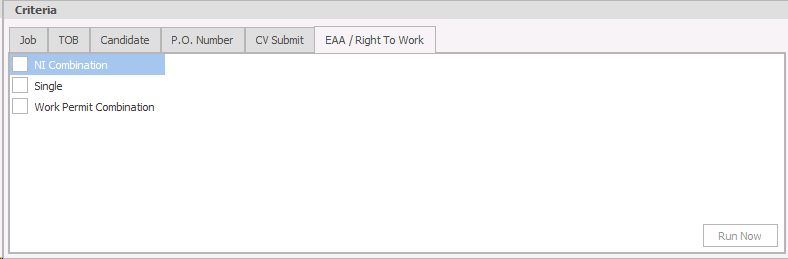
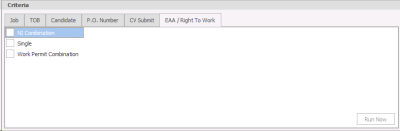
The EAA / Right to Work tab contains Employment Agency Act / Right to Work related criteria to enable you to build the Business Rule using 3 options:
The single option enables you to accept someone who is eligible to work with a single qualification such as an EU Passport. The candidate only needs to match one of the options ticked to be eligible to work.
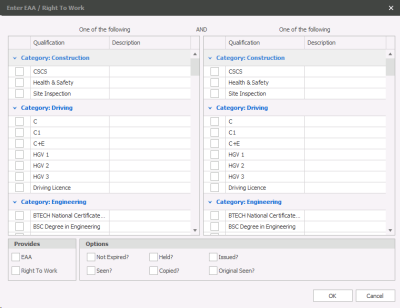
The NI Combination and Work Permit Combinations enable you to create combinations of qualifications / right to work options and accept someone who is eligible to work with these combinations.
How do I create my combinations?
|

Summary of the Criteria Choices
|
|
Prevent |
Warn |
Follow up |
|---|---|---|---|
|
Submit CV |
|
|
|
|
Interview |
|
|
|
|
Placement |
|
|
|
Rule Descriptions
As you build your Business Rules there is a helpful information panel ‘Rule Description’ which displays in clear terms the detail of each Business Rule. The Rule Description panel is displayed under the Criteria section.
Here are a couple of examples for Rules Descriptions:

And finally, when you have completed building your Business Rule click OK and you will be returned to the Business Rules overview page.
Business Rules Quick Summary
Here’s a summary of creating / editing / copying / deleting Business Rules:
- Use Business Rules to comply with certain business critical conditions or rules.
- Name each Business Rule with a clear, user friendly name
- Remember the Business Rule will be Active by default
- Select one of the three Rule Types; Prevent, Warn, Follow Up
- Select one of the three process Types
- Use the Criteria Tab options to build the detail of each Business Rule
- Refer to the Rule Description panel to ensure each rule meets the workflow needs
- Save the Business Rule
Editing a business rule
Once you start using Business Rules within Infinity you may find you’ll need to edit existing Rules.
- Launch the Administration menu via the Application menu
- Select the Business Rules tab; a list of existing Business Rules will be displayed
- Select the Business Rule you wish to edit with a single click
- Click
 and the Business Rules details page will be displayed and ready for you to edit.
 - When you have made the changes click
 .
. - If you wish to abandon the changes click
 and any changes you have made will not be saved.
 We suggest that before you edit existing Business Rules make a copy of the rule you are about to edit using the
  option. You can deactivate the original rule after the editing process is completed.
Copy a Business Rule
The Copy option is particularly useful when maintaining existing Business Rules. Use it as a tool when creating new rules which are similar to existing ones, simply copy and ‘tweak’ the copied rule. Using Copy can reduce the amount of time spent administrating Business Rules as it copies all the Business Rule criteria.
- Launch Administration from the Application menu
- Select the Business Rules Tab; a list of existing Business Rules will be displayed
- Select the Business Rule you wish to copy with a single click
- Click
- The copy will be automatically created and will appear at the bottom of the list of existing Business Rules. It will be displayed with the text ‘copy’ at the end of the Business Rule name.

Delete a Business Rule
Although the  option is available, we suggest that you do not delete existing Business Rules. Instead, simply de-activate the Business Rule by editing it and removing the tick from the Active check box. Then the Business Rule will not appear within any work flow in Infinity, but you have the option to re-activate it at a later stage if you require.
However, if you still wish to delete a Business Rule then you may do so.
- Launch Administration from the Application menu
- Select the Business Rules Tab; a list of existing Business Rules will be displayed
- Select the Business Rule you wish to delete with a single click
- Click

- The Business Rule will be deleted and no longer appear in the list of Business Rules.

Contact Details
If you require further assistance please contact Ikiru People using the details published on www.ikirupeople.com
Visit our Customer Portal at https://portal.ikirupeople.com/ for future events and clinics.
FeedbackIf you would like to make suggestions or have found any errors with this Help section please contact our Support team.
Copyright © 2026 Voyager by Ikiru People Ltd. All rights reservedVersion 4.87
Voyager Software is a brand of Ikiru People Ltd, a subsidiary of Dillistone Group Plc. The group is a leading global provider of software and services that enable recruitment agencies and in-house recruiters to better manage their selection process and address the training needs of individuals. Across its brands – which include Voyager Software (recruitment software UK & Australia), Dillistone FileFinder executive search software, GatedTalent, the global database of the world’s leading executives, Talentis.Global – the next generation of recruitment software and also ISV.Online, provider of online pre-employment skills testing and training tools. Dillistone Group serves thousands of clients worldwide. Ikiru People Ltd: Registration Number 02043300. Registered in England & Wales.
 |  |  |  |