
Temp Walkthrough
Temp processing within Infinity allows for fast matching of candidates to specific shifts, much of the processes require configuration to gain maximum efficiencies.
Three Main processes for Temp Workers, you may require to use all three at some points, depending on requirements:
- Full Process
- Retrospective Process
- Direct Placements
 Not sure what Type of Job you need to create? click here
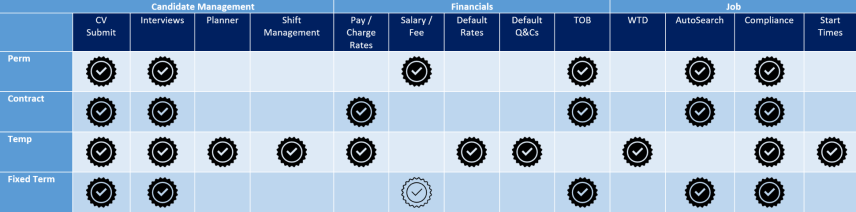
Contract
- Has a Start Date & End Date
- Contracts are typically longer term than Temp jobs
- The Shortlist process is used to manage recruitment
- You can search for candidates based on ‘Availability Date’
- The candidate is paid the ‘pay rate’ and the Client is charged the ‘charge rate’.
- Candidates can be any worker type e.g. Ltd Company, PAYE
Temp
- Each Temp job consists of one or more shifts
- Temps are typically shorter term than contract jobs, or jobs that are rolling week to week
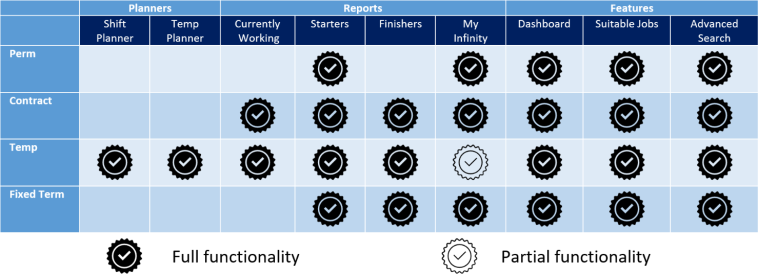
- The ‘Shift Planner’ and ‘Temp Planner’ screens are used to manage recruitment
- The Shortlist process is used to manage recruitment (Temp jobs can be marked as a shortlist job)
- Each candidate has a calendar, and you can search candidates who are available for specific shift(s), based on the availability in their calendar
- The candidate is paid the ‘pay rate’ and the Client is charged the ‘charge rate’
- Candidates can be any worker type e.g. Ltd Company, PAYE
Perm
- Has a Start Date only
- The Shortlist process is used to manage recruitment
- A one off Fee is charged, and the Candidate is paid by the Client
Fixed Term
- Has a Start Date & End Date
- The Shortlist process is used to manage recruitment
- A one off Fee is charged, and the Candidate is paid by the Client
Full Process - Job \ Shift Planner
-
- Adding Temp jobs, utilise quick search within the Shift Planner to place. Managing workers via Shift Planner or Temp Planner
| CONSIDER | PRO's | CON's |
|
Shift Planner uses Temp job data so: Need to have shift details to fully utilise availability calendars Do you follow best practice for skilling candidates (job titles) and marking as Temp Do you need compliance visibility within search results (quick search displays compliance components) |
Greater awareness of unfilled shifts (reporting, Voyager BI) Utilise Shift Planner "quick search"to place individually or in bulk Re-enforces best practices for skilling candidates Visibility to compliance checks from results Utilise shortlist steps by making the job a shortlist job (allowing you to visualise CV submissions and interviews) |
Adding job data that may never be filled Perceived as slower (although it is only the same amount of data as you would eventually input) |
Retrospective Process - Temp Planner \ Place
- Using Temp Planner to identify available candidates and directly place candidates. Managing workers via Shift Planner or Temp Planner
| CONSIDER | PRO's | CON's |
|
Temp Planner uses candidate data so: You don't know specific shift details You need to review alternative candidate data* |
Manage "gangs" or worker by job title, status etc... Directly place individually or in bulk, inputting job and shift data |
No unfilled shift data to report missed opportunities Unable to have visibility to compliance checks until trying to place |
Direct Placement - Place
- Placing candidates directly from a candidate, job, search rejob, Temp Planner or Shift Planner
| CONSIDER | PRO's | CON's |
|
Click on Place Candidate button directly in records: Freedom to place any candidate from a variety of records |
Freedom to place any candidate Perceived as quick (although the same amount of data as you would eventually input) |
Generally only placing individually Unable to have visibility to compliance checks until trying to place |
Click here for a more detailed overview
Need more information, click below:

|
Temp Candidate - marking candidates as Temp and assigning Job Titles |

|
Temp Job - creating Temp Job and setting up shifts |

|
Temp Planner - Review of Temp candidates availability, directly place and manage shifts |

|
Shift Planner - All-in-one Planner, review unfilled, filled and cancelled / removed shifts, all shift functions available |

|
Shift Patterns - Quickly add long term shifts and / or a frequent rotation of shifts to a Temp calendar |

|
Temp Placement - Access Temp placement records to make specific adjustments |
|
|
Direct Placing - Placing candidates directly into Temp jobs |
Contact Details
If you require further assistance please contact Ikiru People using the details published on www.ikirupeople.com
Visit our Customer Portal at https://portal.ikirupeople.com/ for future events and clinics.
FeedbackIf you would like to make suggestions or have found any errors with this Help section please contact our Support team.
Copyright © 2026 Voyager by Ikiru People Ltd. All rights reservedVersion 4.87
Voyager Software is a brand of Ikiru People Ltd, a subsidiary of Dillistone Group Plc. The group is a leading global provider of software and services that enable recruitment agencies and in-house recruiters to better manage their selection process and address the training needs of individuals. Across its brands – which include Voyager Software (recruitment software UK & Australia), Dillistone FileFinder executive search software, GatedTalent, the global database of the world’s leading executives, Talentis.Global – the next generation of recruitment software and also ISV.Online, provider of online pre-employment skills testing and training tools. Dillistone Group serves thousands of clients worldwide. Ikiru People Ltd: Registration Number 02043300. Registered in England & Wales.
 |  |  |  |