Administration Appendix B – Grid Functions / Shortcuts
 IMPORTANT: ALT and F10 keys both activate the accelerator keys
Moving within a grid
|
Key Combination |
Action / results |
|
Set focus in a grid then use: |
|
|
Arrow keys – up and down |
to move up and down each row |
|
Arrow keys – left and right |
to move from cell to cell on the same row – in a direction left and right |
|
Tab key |
to move across each row, cell by cell and then down to the next row |
|
Shift Tab Key |
to move backwards in each cell and then up to the previous row |
|
Home and End keys |
when in Toggle View [i.e. on Find Results Grid] move from 1st record to the last record |
|
Page up / Page Down |
when in Toggle View [i.e. on Find Results Grid] move through record cards – in next / previous mode |
Go to
|
Key Combination |
Action / results |
|
To go to the first row/card in the grid: |
|
|
press CTRL+HOME |
in Grid Views goes to the first row/card |
|
press HOME or CTRL + Home |
in Card Views and Layout Views goes to the first row/card |
|
To go to the last row/card in the grid: |
|
|
press CTRL+END |
in Grid Views goes to the last row/card |
|
press END or CTRL + END |
in Card Views and Layout Views goes to the last row/card |
Using Find within a Grid Row
|
Key Combination |
Action / results |
|
Click into the Cell of the row you wish to find |
|
|
Enter the characters you wish to find. In Grid Views, you can locate a data row by typing the initial characters of the values contained in this row |
|
|
Do the following to locate the nearest row that contains a specific value in a specific column. Focus any cell in the column against which a search will be performed |
|
|
Type the initial character(s) of the value to be located |
The nearest row that contains the specified value in the clicked column will be located |
|
|
|
|
press CTRL+DOWN ARROW |
To proceed with the search in the forward direction |
|
press CTRL+UP ARROW |
To proceed with the search in the backward direction |
|
press BACKSPACE |
To erase the previously typed characters in the search string |

Selecting / editing Rows & Columns
|
Key Combination |
Action / results |
|
Single click on row – F2 |
Puts the grid into edit mode – e.g. in Contact grid |
|
Control + Shift |
Multi selection of rows – e.g. in Find All results |
|
Control + Click |
Select individual row |
|
Control+ A |
Select all rows in grid – e.g. Find All results |
|
Enter key |
When selection pointer is on the row / record you wish to open |
Copy Records to Clipboard
|
Key Combination |
Action / results |
|
Click on selected record Control + C |
Copies text to clipboard |
Expand / Collapse Group Rows in Grid Views
|
Key Combination |
Action / results |
|
Click the row's expand button |
expand / collapse a group row |
|
Double-click the indicator cell corresponding to the group row |
Expand a group row |
Expand / Collapse Cards in Card and Layout Views
|
Key Combination |
Action/results |
|
Click a card's Expand button |
Expands card |
|
Click a card’s collapse button |
Collapses card |
|
|
|

Sorting
|
Key Combination |
Action/results |
|
click the target column's header until an UP or Down Arrow icon |
The Up and Down Arrows indicate ascending and descending sort orders respectively. |
|
Click a column header while holding the SHIFT key down, until an UP or Down Arrow icon is displayed within the header. Right-click a column header and select Sort Ascending or Sort Descending from the context menu that will appear. |
To sort records by column values while preserving existing sort conditions, do one of the following.
|
|
click a column header while holding down the CTRL key |
To remove sorting by a column |
Quick Access & Frame Short Cut keys
|
Press Alt key to activate |
|
|
|
|
|
Alt + A + P |
Opens application menu |
|
Alt + A + N |
Opens New Menu in app menu |
|
ALT + A + N + CA |
Opens New Menu in app menu – selects New Candidate |
|
ALT + A + N + CO |
Opens New Menu in app menu – selects New Company |
|
ALT + A + N + J |
Opens New Menu in app menu – selects New Job |
|
ALT + A + N + I |
Opens New Menu in app menu – selects New Interview |
|
ALT + A + N + P |
Opens New Menu in app menu – selects New Placement |
|
Alt + A + F |
Opens Find Menu in app menu |
|
ALT + A + F + CA |
Opens Find Menu in app menu – selects Find Candidate |
|
ALT + A + F + CO |
Opens Find Menu in app menu – selects Find Company |
|
ALT + A + F + J |
Opens Find Menu in app menu – selects Find Job |
|
ALT + A + F + I |
Opens Find Menu in app menu – selects Find Interview |
|
ALT + A + F + P |
Opens Find Menu in app menu – selects Find Placement |
|
ALT + A + F + A |
Opens Find Menu in app menu – selects Find All |
|
Alt + A + SE |
Opens Search Menu in app menu |
|
ALT + A + SE + CA |
Opens Search Menu in app menu – selects Search Candidate |
|
ALT + A + SE + CO |
Opens Search Menu in app menu – selects Search Company |
|
ALT + A + SE + L |
Opens Search Menu in app menu – selects Search Location |
|
ALT + A + SE + CN |
Opens Search Menu in app menu – selects Search Contacts |
|
ALT + A + SE + J |
Opens Search Menu in app menu – selects Search Jobs |
|
ALT + A + SE + P |
Opens Search Menu in app menu – selects Placement |
|
ALT + A + CA |
Launches Calendar |
|
ALT + A + T |
Launches Task List |
|
ALT + A + SH |
Launches Shortlist |
|
ALT + A + AW |
Launches AWR menu |
|
ALT + A + AW + B |
Launches AWR menu between 10 & 12 weeks |
|
ALT + A + AW + O |
Launches AWR menu over 12 weeks |
|
ALT + A + CV |
Launches CV Submit |
|
ALT + A + SO |
Launches Social Media menu |
|
ALT + A + SO + L |
Launches Linked In |
|
ALT + A + I |
Launches Information Boards Menu |
|
ALT + A + I + IN |
Launches Internal Interview Information Board |
|
ALT + A + I + IT |
Launches Interview Information Board |
|
ALT + A + I + P |
Launches Placement Information Board |
|
ALT + A + Q |
Launches Queues menu |
|
ALT + A + Q + CA |
Launches Candidate iCapture |
|
ALT + A + Q + I |
Launches iCapture CV Pool |
|
ALT + A + Q + CN |
Launches candidates added in last 30 days |
|
ALT + A + Q + S |
Launches SMS |
|
ALT + A + Q + B |
Launches Broadbean |
|
ALT + A + Q + O |
Launches Own Website |
|
ALT + A + O |
Launches Organisation Chart [have questioned why this is here] |
|
ALT + A + AD |
Launches Administration options |
|
ALT + N |
Launches New |
|
ALT + N + CA |
Launches New candidate |
|
ALT + N + CO |
Launches New company |
|
ALT + N + J |
Launches New job |
|
ALT + N + I |
Launches New interview |
|
ALT + N + P |
Launches New Placement |
|
ALT + F + I |
Launches Find |
|
ALT + F + I + CA |
Launches Find Candidate |
|
ALT + F + I + CO |
Launches Find Company |
|
ALT + F + I + J |
Launches Find Job |
|
ALT + F + I + P |
Launches Find Placement |
|
ALT + F + I + A |
Launches Find All |
|
ALT + F + N |
Sets focus into the Find All field |
|
ALT + S + E |
Launches Search |
|
ALT + S + E + CA |
Launches Search Candidates |
|
ALT + S + E + CO |
Launches Search Company |
|
ALT + S + E + LO |
Launches Search location |
|
ALT + S + E + CN |
Launches Search contact |
|
ALT + S + E + J |
Launches Search job |
|
ALT + S + E + P |
Launches Search Placement |
|
ALT + C + A |
Launches Calendar |
|
ALT + T |
Launches Task |
|
ALT + R |
Launches Reports |
|
ALT + C + N |
Launches iCapture inbox |
|
ALT + C + V |
Launches CV Submit |
|
ALT + S + O + L |
Launches Social Media – Linked In |
|
ALT + I |
Launches Information boards |
|
ALT + I + I + N |
Launches internal interview board |
|
ALT + I + I + T |
Launches Interview Board |
|
ALT + I + P |
Launches Placement Board |
|
ALT + P |
Launches Product Templates |
|
ALT + Q |
Launches Quick menu |
|
ALT + Q + C + A |
Launches Candidate Quick Email Templates menu |
|
ALT + Q + C + O |
Launches Company Quick Email Templates menu |
|
ALT + Q + C + N |
Launches Candidate Quick SMS Templates menu |
|
ALT + Q + C + M |
Launches Company Quick SMS Templates menu |

Candidate Ribbon Short Cut Keys
|
Open Candidate page - Press Alt key to activate |
|
|
|
|
|
Alt + C |
Puts focus on the first option on the ribbon |
|
Left & Right cursor keys |
Moves the focus left and right along the ribbon |
|
ALT + C + S + A |
Save |
|
ALT + C + U |
Undo |
|
ALT + C + D |
Delete |
|
ALT + C + E |
Edit |
|
ALT + C + A + D |
Event Logger |
|
ALT + C + C + O |
Comms Centre |
|
ALT + C + C + V |
CV Submit |
|
ALT + C + A + T |
Attachments |
|
ALT + C + A + U |
Automap |
|
ALT + C + I |
Internal Interview |
|
ALT + C + R |
Reports |
|
ALT + C + F + I |
Filter |
|
ALT + C + F + A |
Favourites |
|
ALT + C + S + H |
Share |

Company Ribbon Short Cut Keys
|
Open Company page - Press Alt key to activate |
|
|
|
|
|
Alt + C |
Puts focus on the first option on the ribbon |
|
Left & Right cursor keys |
Moves the focus left and right along the ribbon |
|
ALT + C + S + A |
Save |
|
ALT + C + U |
Undo |
|
ALT + C + D |
Delete |
|
ALT + C + E + D |
Edit |
|
ALT + C + A + D |
Event Logger |
|
ALT + C + C + O |
Comms Centre |
|
ALT + C + A + T |
Attachments |
|
ALT + C + A + U |
Automap |
|
ALT + C + O |
Organisation Chart |
|
ALT + C + E + M |
Employees |
|
ALT + C + C + V |
CV Submit |
|
ALT + C + T + R |
Transfer |
|
ALT + C + A + N |
Add New Job |
|
ALT + C + F + I |
Financial Information |
|
ALT + C + R |
Reports |
|
ALT + C + F + L |
Filter |
|
ALT + C + F + A |
Favourites |
|
ALT + C + S + H |
Share |

Job Ribbon Short Cut Keys
|
Open Job page - Press Alt key to activate |
|
|
|
|
|
Alt + C |
Puts focus on the first option on the ribbon |
|
Left & Right cursor keys |
Moves the focus left and right along the ribbon |
|
ALT + C + S + A |
Save |
|
ALT + C + U |
Undo |
|
ALT + C + D |
Delete |
|
ALT + C + E |
Edit |
|
ALT + C + A + D |
Event Logger |
|
ALT + C + C + O |
Comms Centre |
|
ALT + C + A + T |
Attachments |
|
ALT + C + A + U |
Automap |
|
ALT + C + C + P |
Copy Job – Standard |
|
ALT + C + C + Y |
Copy Job Advanced |
|
ALT + C + N |
New Interview |
|
ALT + C + R |
Reports |
|
ALT + C + F |
Favourites |
|
ALT + C + S + H |
Share |
|
ALT + C + S + E |
Search |

Interview Ribbon Short Cut Keys
|
Open Interview page - Press Alt key to activate |
|
|
|
|
|
Alt + C |
Puts focus on the first option on the ribbon |
|
Left & Right cursor keys |
Moves the focus left and right along the ribbon |
|
ALT + C + S + A |
Save |
|
ALT + C + U |
Undo |
|
ALT + C + D |
Delete |
|
ALT + C + E |
Edit |
|
ALT + C + A + D |
Event Logger |
|
ALT + C + C + O |
Comms Centre |
|
ALT + C + A + T |
Attachments |
|
ALT + C + C + R |
Create New Interview |
|
ALT + C + I |
Interview Invitation |
|
ALT + C + C + E |
Create Placement |
|
ALT + C + A + U |
Automap |
|
ALT + C + R |
Reports |
|
ALT + C + F |
Favourites |
|
ALT + C + S + H |
Share |

Placement Ribbon Short Cut Keys
|
Open Placement page - Press Alt key to activate |
|
|
|
|
|
Alt + C |
Puts focus on the first option on the ribbon |
|
Left & Right cursor keys |
Moves the focus left and right along the ribbon |
|
ALT + C + S + A |
Save |
|
ALT + C + U |
Undo |
|
ALT + C + D |
Delete |
|
ALT + C + E |
Edit |
|
ALT + C + A + D |
Event Logger |
|
ALT + C + C + O |
Comms Centre |
|
ALT + C + A + U |
Automap |
|
ALT + C + R |
Reports |
|
ALT + C + F |
Favourites |
|
ALT + C + S + H |
Share |

Comms Centre Ribbon Short Cut Keys
|
Open Comms Centre page - Press Alt key to activate |
|
|
|
|
|
Alt + E |
Activates the Alt Keys on ribbon |
|
Alt + EM |
|
|
Alt + ED |
Edit First |
|
Alt + J |
Just Send |
|
Alt + LO |
Log Options |
|
Alt + F |
Follow ups |
|
Alt + C |
Close |
|
Alt + P |
Plain Text |
|
Alt + HT |
HTML |
|
Alt + R |
Rich Text |
|
Alt + H + I |
High importance |
|
Alt + L + W |
Low importance |
|
Alt + S |
Sensitivity |
|
Alt + O |
Request delivery receipt |
|
Alt + I |
Request read receipt |
|
Alt + D + I |
Direct replies to |
|
Alt + D + E |
Delay delivery |
|
Alt + E + X |
Expires after |

Share Ribbon Short Cut Keys
|
Open Share page - Press Alt key to activate |
|
|
|
|
|
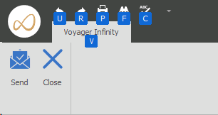
Alt + U |
Undo |
|
Alt + R |
Redo |
|
Alt + P |
|
|
Alt + F |
Find |
|
Alt + C |
Spell check |
|
Alt + V |
Voyager Infinity tab |
General Page Navigation
|
Control + Tab |
Cycle through open tabbed pages – i.e. Candidate, Job, Tasks etc. in a forward direction |
|
Shift + Control + Tab |
Cycle through open tabbed pages – i.e. Candidate, Job, Tasks etc. in a backward direction |
Notes Ribbon Short Cut Keys
|
Open Notes - Press Alt key to activate |
|
|
|
|
|
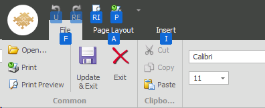
Alt |
Puts focus on the first option on the ribbon |
|
Left & Right cursor keys |
Moves the focus left and right along the ribbon |
|
ALT + U |
Undo |
|
ALT + R |
Re-do |
|
ALT + P + R |
Print Preview |
|
ALT + P + I |
|
|
ALT + F |
File |
|
ALT + P + A |
Page Layout |
|
ALT + I |
Insert |
|
ALT + D |
Design |
Short cut keys in Notes Editor with links to Devex
|
Key Combinations |
Resulting Action |
|
ALT+SHIFT+BACKSPACE |
|
|
ALT+SHIFT+LEFT ARROW |
|
|
ALT+SHIFT+RIGHT ARROW |
|
|
ALT+BACKSPACE |
|
|
ALT+I |
|
|
BACKSPACE |
|
|
CTRL+ALT+C |
|
|
CTRL+ALT+I |
|
|
CTRL+ALT+OEMPERIOD |
|
|
CTRL+ALT+R |
|
|
CTRL+ ALT + Subtract |
|
|
CTRL+ALT+T |
|
|
CTRL+ALT+V |
|
|
CTRL+SHIFT+D |
|
|
CTRL+SHIFT+8 |
|
|
CTRL+SHIFT+DOWN ARROW |
|
|
CTRL+SHIFT+END |
|
|
CTRL+SHIFT+ENTER |
|
|
CTRL+SHIFT+H |
|
|
CTRL+SHIFT+HOME |
|
|
CTRL+SHIFT+LEFT ARROW |
|
|
CTRL+SHIFT+OEMCOMMA |
|
|
CTRL+SHIFT+OEMPERIOD |
|
|
CTRL+SHIFT+OEMPLUS |
|
|
CTRL+SHIFT+PAGE DOWN |
|
|
CTRL+SHIFT+PAGE UP |
|
|
CTRL+SHIFT+RIGHT ARROW |
|
|
CTRL+SHIFT+UP ARROW |
|
|
CTRL+F9 |
|
|
CTRL+A |
|
|
CTRL+B |
|
|
CTRL+BACKSPACE |
|
|
CTRL+C |
|
|
CTRL+CLEAR |
|
|
CTRL+D |
|
|
CTRL+1 |
|
|
CTRL+2 |
|
|
CTRL+5 |
|
|
CTRL+DELETE |
|
|
CTRL+DOWN ARROW |
|
|
CTRL+E |
|
|
CTRL+END |
|
|
CTRL+ENTER |
|
|
CTRL+F |
|
|
CTRL+H |
|
|
CTRL+HOME |
|
|
CTRL+I |
|
|
CTRL+INSERT |
|
|
CTRL+J |
|
|
CTRL+K |
|
|
CTRL+L |
|
|
CTRL+LEFT ARROW |
|
|
CTRL+N |
|
|
CTRL+NUM 5 |
|
|
CTRL+O |
|
|
CTRL+OEMCLOSEBRACKETS (]) |
|
|
CTRL+OEMOPENBRACKETS ([) |
|
|
CTRL+OEMPLUS |
|
|
CTRL+P |
|
|
CTRL+PAGE DOWN |
|
|
CTRL+PAGE UP |
|
|
CTRL+R |
|
|
CTRL+RIGHT ARROW |
|
|
CTRL+S |
|
|
CTRL+SPACE |
|
|
CTRL + Subtract |
|
|
CTRL+U |
|
|
CTRL+UP ARROW |
|
|
CTRL+V |
|
|
CTRL+X |
|
|
CTRL+Y |
|
|
CTRL+Z |
|
|
DELETE |
|
|
DOWN ARROW |
|
|
END |
|
|
ENTER |
|
|
F3 |
|
|
F12 |
|
|
F9 |
|
|
HOME |
|
|
LEFT ARROW |
|
|
PAGE DOWN |
|
|
PAGE UP |
|
|
RIGHT ARROW |
|
|
SHIFT+DELETE |
|
|
SHIFT+DOWN ARROW |
|
|
SHIFT+END |
|
|
SHIFT+ENTER |
|
|
SHIFT+F3 |
|
|
SHIFT+HOME |
|
|
SHIFT+INSERT |
|
|
SHIFT+LEFT ARROW |
|
|
SHIFT+PAGE DOWN |
|
|
SHIFT+PAGE UP |
|
|
SHIFT+RIGHT ARROW |
|
|
SHIFT+SPACE |
|
|
SHIFT+TAB |
|
|
SHIFT+UP ARROW |
|
|
TAB |
|
|
UP ARROW |

 Contact Details
If you require further assistance please contact Ikiru People using the details published on www.ikirupeople.com
Visit our Customer Portal at https://portal.ikirupeople.com/ for future events and clinics.
FeedbackIf you would like to make suggestions or have found any errors with this Help section please contact our Support team.
Copyright © 2026 Voyager by Ikiru People Ltd. All rights reservedVersion 4.87
Voyager Software is a brand of Ikiru People Ltd, a subsidiary of Dillistone Group Plc. The group is a leading global provider of software and services that enable recruitment agencies and in-house recruiters to better manage their selection process and address the training needs of individuals. Across its brands – which include Voyager Software (recruitment software UK & Australia), Dillistone FileFinder executive search software, GatedTalent, the global database of the world’s leading executives, Talentis.Global – the next generation of recruitment software and also ISV.Online, provider of online pre-employment skills testing and training tools. Dillistone Group serves thousands of clients worldwide. Ikiru People Ltd: Registration Number 02043300. Registered in England & Wales.
 |  |  |  |