Permissions Administration

General
Every Infinity user can be granted the appropriate Permission depending on their role and individual access requirements.
Permissions are managed by assigning each user to a Security Role and finer adjustments can be made to individuals as necessary.
 Security roles
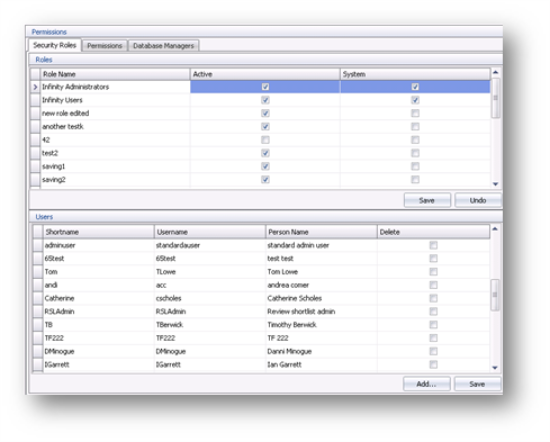
When Infinity is installed two security roles are set up as standard.
- Infinity Administrator
- Infinity Users
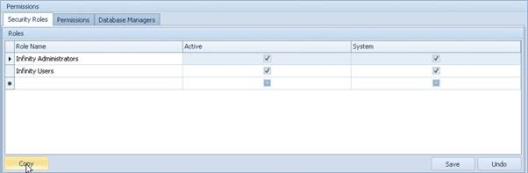
You are able to add new Security Roles, allocate Security Roles to a user and configure the default access levels for each Security Role. We would recommend that you utilise the Copy facility before making adjustments to the new role.
Each user is assigned a role and this controls their default access permissions in Infinity. You can create as many roles as you need.
Each User is allocated a Security Role, then if necessary further amendments can be made to individual User access rights and permissions as required. It is advisable to select a Security Role for every User and then amend if necessary.
Add and amend a security role
Click on a current role you wish to copy and click on Copy button:
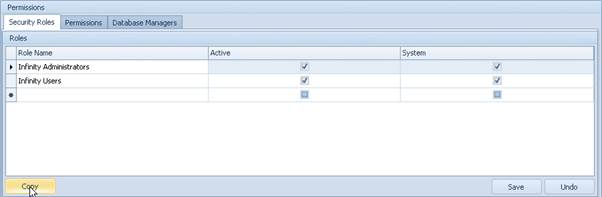
Enter the name of the new role:
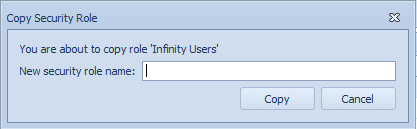
- Click
 and now add Users to the new Security Role.
Assign users to roles
- Highlight the Role that you would like to add Users to and click
 at the bottom of the User grid.
 - Select one or more Users from the list and click
 to assign them to the Security Role.
 - Click and the users will be displayed in the User grid.
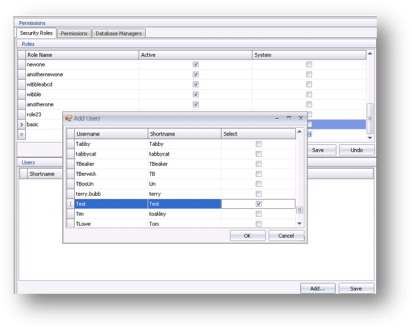
NB:- roles can also be assigned within the user administration area
To un-assign a User from a role
- Highlight the User that you would like to un-assign from a Security Role.
- Un-tick the User that you would like to un-assign.
- Click and he User will be un-assigned from the Security Role and can be assigned to another Role.
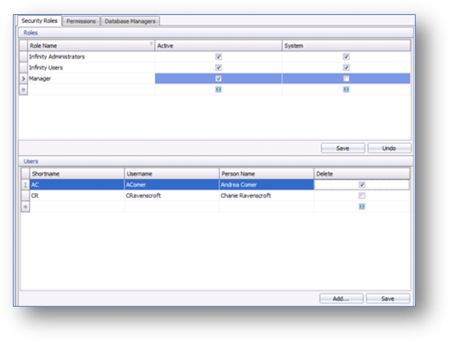
Permissions Tab
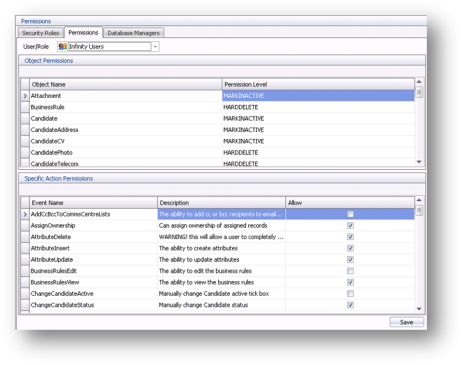
The permissions tab displays individual permissions for Users / Roles. Each object has a specific action and this enables you to configure the permissions and be very selective when assigning the right level of permission.
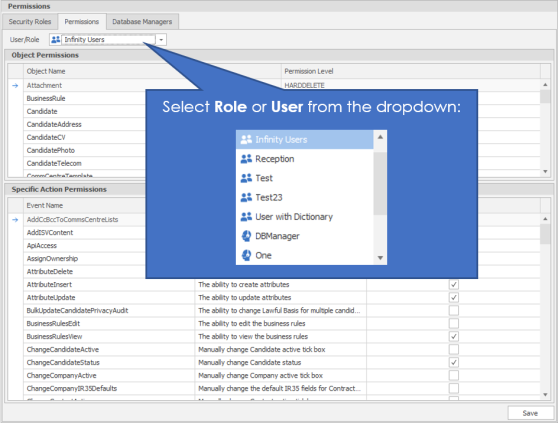
- Begin by selecting the User / Role from the drop down list, in our example we are using ‘Infinity Users’.
- There are two grids; Object Permissions and Specific Action Permissions.
Object Permissions
Warning! – making wholesale changes to the Object Permissions is not recommended as they are linked to one another and therefore may have further implications to other permissions and your general use of the system. Please contact support to assist you in making the desired changes. Specific Action Permissions are either on or off and therefore can be adjusted as required, see Specific Action Permissions section below for more details.

A 'Restore Default Object Permissions' button is available.
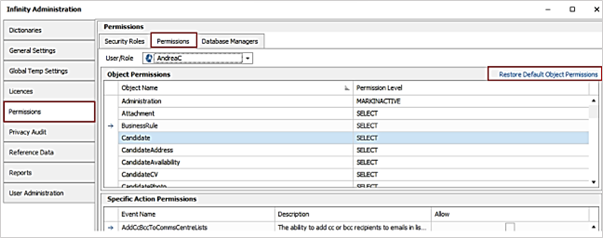
- This is available when a user is selected in the drop-down list (not a security role) and for administrators with ‘Database Manager’ permission only.
- The function restores all of the selected user's object permissions to ‘SELECT’ permission level, which is the default for new users.
- The button is also available when listing user permissions in Administration / User Administration / Edit User / ‘Permission’ button.
Object Permissions are the overall level that a user or administrator can be set to, the level that you set for object will affect all permissions given within those areas. Giving an object permission of select for example, means that you can only ever have read only access within the area selected i.e. if I choose Select for the object candidate record, then the whole candidate record will become read only and I will not be able to edit, amend or access any fields within the whole candidate record.
|
Permission
|
What you can do?
|
|
DENY |
Nothing (we do not recommend that you set Deny as it will not permit you to access the relevant screen in INFINTY – the database will error) |
|
SELECT |
Read Only |
|
UPDATE |
Read & Edit existing fields |
|
INSERT |
Read & Edit & Add |
|
MARK AS INACTIVE |
Read & Edit & Add & Tick the Mark as inactive box |
|
HARD DELETE |
Read & Edit & Add & Tick the Mark as inactive box & delete |
Specific Action Permissions
Below are the recommendations set for each permission level, obviously permissions set will vary from company to company depending on the functions you wish staff to be able to use. However please remember even if you have given someone the permission below this will be overwritten by the object permission. For example giving the permission below to edit or delete a CV won’t work if the overall object permission for Candidate CV is set to SELECT (read only).
|
|
|
Recommended for Admin |
Recommended for user |
|
AddCcBccToCommsCentreLists |
When sending emails from the Infinity comms centre you are able to cc and bcc people |
Yes |
Yes |
| AddISV Content | ability to add tests to a candidate if an ISV licence is present | Yes (if applicable) | Yes (if applicable) |
| APIAccess | The ability to log into the Infinity REST API | N/A | N/A |
|
AssignOwnership |
Ability to amend the owning consultant against a record |
Yes |
Yes |
|
AttributeDelete |
Ability to delete an attribute in the candidate’s record |
Yes |
Yes |
|
AttributeInsert |
Ability to insert an attribute in the candidate’s record |
Yes |
Yes |
|
AttributeUpdate |
Ability to change an attribute in the candidate’s record |
Yes |
Yes |
| BulkUpdateCandidatePrivacyAudit | The ability to change Lawful Basis for multiple candidates from Privacy Audit in My Infinity/ Application Menu | No | No |
| BulkUpdateGeneral | |||
|
BusinessRulesEdit |
The ability to go into the Business rules area in administration and make changes to business rules |
No |
No |
|
BusinessRulesView |
The ability to view Business rules that have failed or passed |
Yes |
Yes |
|
ChangeCandidateActive |
The ability To add or remove a tick that marks the candidate as either active or inactive (archived). |
Yes |
Yes |
|
ChangeCandidateStatus |
The ability Change the candidates status – i.e. from actively looking to not looking |
Yes |
Yes |
|
ChangeCompanyActive |
The ability To add or remove a tick that marks the Company as either active or inactive (archived). |
Yes |
Yes |
| ChangeCompanyIR35Defaults | Manually change the default IR35 fields for Contract and Temp jobs in Company financials | Yes (if applicable) | No |
|
ChangeContactActive |
The ability To add or remove a tick that marks the Contact as either active or inactive (archived). |
Yes |
Yes |
| ChangeContractualLegalLawfulBasisManually | The ability to manually edit the Contractual / Legal Basis & Expiry on Privacy Audit Candidate Page. If manually changed the candidate WILL NOT change automatically | No | No |
|
ChangeEAARightToWork |
The ability to add a tick to the EAA & right to work box |
Yes |
Yes |
|
ChangeInterviewStatus |
Ability to change the interview status from 1st to 2nd etc… |
Yes |
Yes |
| ChangeJobIR35Status | Manually change the IR35 Status on a Contract / Temp Job | Yes (if applicable) | No |
| ChangeJobIR35Verified | Manually change the IR35 verified Flag on a Contract / Temp Job | Yes (if applicable) | No |
|
ChangeJobStatus |
Ability to change the status of a job i.e. from unfilled to filled all places |
Yes |
Yes |
| ChangeLawfulBasisManually | The ability to manually edit the candidate Lawful Basis on the Privacy Audit - Candidate page. Without the permission it can only be changed from the Event Logger, Comms Centre, Outlook Add-in | No | No |
| ChangeLawfulBasisStatusManually | The ability to manually edit the candidate Lawful Basis status on the Privacy Audit - Candidate page. Without the permission it can only be changed from the Event Logger, Comms Centre, Outlook Add-in | No | No |
|
ChangeLocationActive |
Ability to tick the active tick box against client location to make it inactive or active |
Yes |
Yes |
|
ChangeOfferStatus |
Ability to change the offer status i.e. to awaiting confirmation or confirmed |
Yes |
Yes |
|
ChangePlacementStatus |
Ability to change the status of a placement to accepted or finished |
Yes |
Yes |
|
ChangeTOBFields |
The ability to edit the terms of business area including adding dates sent and received |
Yes |
Yes |
|
CloseSessions |
The ability to Completely log someone out of voyager via the Licenses tab in admin screen |
Yes |
No |
|
ConfirmPlacements |
The ability to change the status of a placement to 'Confirmed' |
Yes |
Yes |
|
CopyCV |
The ability to copy an original CV |
Yes |
Yes |
|
CreateCV |
The ability to create a new CV |
Yes |
Yes |
|
CreateCVBuilder |
The ability to create new CV builders |
No |
No |
| CreateSubjectAccessRequestReport | The ability to create a Subject Access Request report from the candidate Page Privacy Audit button | Yes | No |
| DashboardViewAllTeams | The ability to view all team dashboards | Yes (if applicable) | No |
| DashboardViewAllUsers | The ability to view all users dashbaords | Yes (if applicable) | No |
|
DashboardViewCompany |
The ability to view the dashboard results for the company |
Yes |
Yes |
|
DashboardViewYourTeam |
The ability to view the dashboard results for your team |
Yes |
Yes |
| DashboardViewYourTeamUsers | The ability to view all users within your team | Yes | No |
| DeleteBlocklistRecord | Allow the user to delete a blocklist record from Candidate or Company Blocklist using the Delete button | Yes | No |
| DeleteCandidateWithContractualLegalLawfulBasis | The ability to delete a candidate who has a lawful basis of Contractual / Legal | No | No |
|
DeleteCV |
The ability to delete a CV against a candidate record |
Yes |
Yes |
|
DeleteCVBuilder |
The ability to Delete a CV builder from the admin area |
No |
No |
| DeleteFilledJobShifts | The ability to delete job shifts that are filled | Yes | No |
| DeleteISVContent | The ability to delete incomplete tests from a candidate | Yes (if applicable) | Yes (if applicable) |
|
DenySectorAddObject |
Please ignore, no options on the front end. Sectors have not been implemented |
N/A |
N/A |
|
DenySectorRemoveObjec |
Please ignore, no options on the front end. Sectors have not been implemented |
N/A |
N/A |
|
DragDropCVIn |
The ability to drag CV’s in to the candidate record |
Yes |
Yes |
|
DragDropCVOut |
The ability to drag CV’s out of the candidate record and onto your desktop |
Yes |
Yes |
|
EditAttributesDictionary |
Ability to add new attributes to the dictionary (you must also have permission for attributes insert for this to work) |
Yes |
No |
|
EditCV |
The ability to open an existing CV document and make changes to it. |
Yes |
Yes |
| EditEvent | The ability to edit events | No | No |
| EditGlobalAndCompanyTempRates | The ability to edit global temp rates and company temp rates | Yes | No |
| EditJobAndPlacementTempRates | The ability to edit job temp rates and placement temp rates | Yes | No |
|
EditJobTitlesDictionary |
The ability to edit job titles in the skills dictionary (you must also have permission for job title insert for this to work) |
Yes |
No |
|
EditQualsAndCertsDictionary |
The ability to edit quals and certs in the dictionary (you must also have qualsandcerts insert for this to work) |
Yes |
No |
| ExportCandidateWorkingHours | The ability to export candidate working hours | Yes | Yes |
|
|
The ability to create a shortlist and then export a list of the results into an excel spreadsheet |
Yes |
No |
|
JobTitleDelete |
The ability to delete job title from the job titles tab in the candidate record |
Yes |
Yes |
|
JobTitleInsert |
The ability to insert a job title into the job title tab in the candidate record |
Yes |
Yes |
|
JobTitleUpdate |
The ability to amend a job title in the job title tab in the candidate record |
Yes |
Yes |
| MailChimpExport | The ability to export to MailChimp | Yes (if applicable) | No |
| MailChimpManageLists | The ability to manage MailChimp lists | Yes (if applicable) | No |
|
MaintainAccessRights |
The ability to give task and calendar permissions to other users. |
Yes |
Yes |
|
MaintainCompanyHierarchy |
Ability to edit Parents & Subsidiaries |
Yes |
Yes |
|
MaintainConsultantOrgChart |
The ability to maintain the consultant organisation chart |
Yes |
Yes |
|
MaintainICaptureQueue |
The ability to delete and move CV’s waiting to be processed in iCapture |
Yes |
Yes |
|
MaintainOrgChart |
The ability to amend and update the organisation chart in a company record |
Yes |
Yes |
| MaintainRestrictedCandidates | The ability to restrict or unrestrict candidates. Also to open restricted candidates | Yes | No |
| MaintainSuppressionList | The ability to un-suppress a candidate and view suppression list | No | No |
| MergeCandidate | The ability to merge candidates together | No | No |
| MobileAppCandidateContact | The ability to login to Infinity Connect mobile app | Yes | Yes |
|
OpenCV |
The ability to preview the CV in the pop out panel, but you’re not allowed to open it in word. |
Yes |
Yes |
|
PostJobsToBroadbean |
The ability to post jobs to Broadbean (additional Broadbean setup is required) |
Yes (If Applicable) |
Yes (If Applicable) |
|
PostJobsToOwnsite |
The ability to post jobs to your own site (additional setup is required) |
Yes (If Applicable) |
Yes (If Applicable) |
|
PostJobsToSEEK |
Only relevant to Australia |
N/a |
N/a |
|
ProcessImportedCandidates |
This permission does nothing |
N/a |
N/a |
|
ProcessImportedJobs |
This permission does nothing |
N/a |
N/a |
|
ProductTemplateEdit |
Ability to edit the product templates (We do not recommend that customers allow access to this) |
No |
No |
|
ProductTemplateView |
Ability to view product templates in the product template area, i.e. Max, Rich, Skinny |
Yes |
Yes |
|
QualsAndCertsDelete |
The ability to delete Quals and Certs from the quals and certs tab in the candidate record |
Yes |
Yes |
|
QualsAndCertsInsert |
The ability to insert Quals and Certs to the quals and certs tab in the candidate record |
Yes |
Yes |
|
QualsAndCertsUpdate |
The ability to update Quals and Certs to the quals and certs tab in the candidate record |
Yes |
Yes |
|
ReferenceDataDelete |
The ability to delete reference data from the admin area |
Yes |
No |
|
ReferenceDataInsert |
The ability to create reference data |
Yes |
No |
|
ReferenceDataUpdate |
The ability to alter reference data |
Yes |
Yes |
|
RemoveCommunicatedShortlistEntry |
The ability to remove shortlist entries with communicated stages complete |
Yes |
Yes |
|
RemoveInterviewShortlistEntry |
The ability to remove shortlist entries with interview stages complete |
Yes |
Yes |
|
RemoveOwnership |
The "remove ownership" permission doesn't do anything. |
N/a |
N/a |
|
RemovePlacementShortlistEntry |
The ability to remove shortlist entries with placement stages complete |
Yes |
Yes |
|
RemoveSubmittedShortlistEntry |
The ability to remove shortlist entries with submitted stages complete |
Yes |
Yes |
|
ReplaceCV |
The ability to add a new CV by dragging and dropping it into the candidate record |
Yes |
Yes |
|
ReportAdministration |
Gives access to the Reports and Scheduled Reports areas of the Administration screen |
Yes |
Yes |
|
ReportExport |
The ability to export non-Excel reports into a spread sheet format |
Yes |
Yes |
|
SearchCandidate |
The ability to run searches against candidates |
Yes |
Yes |
|
SearchCreateNonRootFolder |
The ability to search within colleagues folders in the ad-hoc search area |
Yes |
Yes |
|
SearchCreateRootFolder |
The ability to create search folders at the root level – create new folders in the ad-hoc search area |
Yes |
Yes |
|
SearchCreateRootSearch |
The ability to create searches at the root level |
Yes |
yes |
|
SearchImportedCandidates |
N/A |
N/A |
N/A |
|
SectorAddOther |
N/A |
N/A |
N/A |
|
SectorDelete |
N/A |
N/A |
N/A |
|
SectorInsert |
N/A |
N/A |
N/A |
|
SectorRemoveOther |
N/A |
N/A |
N/A |
|
SectorUpdate |
N/A |
N/A |
N/A |
|
SendSMS |
The ability to create and send an SMS |
Yes(If applicable) |
Yes(if applicable) |
|
ShareRecords |
Having the share button available in all records |
Yes |
Yes |
|
TakeOwnership |
The ability to take ownership of other records |
Yes |
No |
|
UnlockRecord |
The ability to unlock a record with is locked under the red key by a colleague |
Yes |
No |
|
UserAdministration |
Gives access to the User Administration, Permissions and Dashboard / Targets areas of the Administration screen |
No |
No |
|
ViewConsultantOrgChart |
The ability to view the consultant organisation chart |
Yes |
Yes |
|
ViewOrgChart |
Allows you to view a company org chart but not edit it. |
Yes |
Yes |
Amending the Specific Action Permissions
Each Object can also be assigned Specific Action Permissions.
The grid consists of the Event Name such as ‘ReferenceData’ and using the Allow column tick boxes you can set the individual Action Permissions for each action according to the requirements of Role or User.
Click when completed.
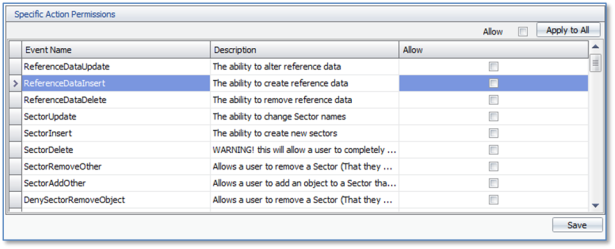
Here’s a working Example:
The role ‘admin’ has beenDenied access to the Candidate ‘Object’ in the top of the screen. In the bottom of the screen the role ‘Admin’ has been allowed access to Changecandidateactive (Manually change candidate active tick box).
Because the role of Admin already has been denied access to the whole of the candidate ‘object’, it doesn’t matter that they have been access to the change active tick box, since the candidate screen will not open for them
 A permission level of DENY anywhere against a user will override any other permissions that they may have. Access Rights can also be managed per User in User Administration.
|
Object |
|
|
Administration |
Administration Area |
|
Attachment |
Attachments against any record |
|
BusinessRule |
Business Rules |
|
Candidate |
Candidate Record |
|
CandidateAddress |
Candidate Address Area |
|
CandidateCV |
Candidate CV Area |
|
CandidatePhoto |
Candidate Photo in Candidate Page |
|
CandidateSearch |
Ad-hoc Candidate Searches |
|
CandidateTelecom |
Candidate Contact Area |
|
CommCentreTemplate |
Templates Area |
|
Company |
Company Record |
|
CompanyLogo |
Company Logo Area |
|
CompanySearch |
Ad-hoc Company Searches |
|
CompanyTelecom |
Company Telecom Area |
|
CompanyTier |
Location |
|
CompanyTierSearch |
Location Search |
|
CompanyTierTelecom |
Location Telecom |
|
Contact |
Contact Area |
|
ContactSearch |
Ad-hoc contact searches |
|
ContactTelecom |
Contact Area |
|
ConversionRate |
N/A |
|
Event |
Event Area in all records |
|
Interview |
Interview Page |
|
Job |
Job Page |
|
JobPlaces |
Addresses against a Job |
|
JobSearch |
AD-hoc Job Search |
|
Person |
A person is a candidate OR a contact |
|
PersonPhoto |
A person is a candidate OR a contact |
|
Placement |
Placement Page |
|
PlacementRate |
Rates Area on the Placement Page |
|
PlacementSearch |
Ad-hoc Placement Searches |
|
ReJobSearch |
Amending Criteria on a job search |
|
Sector |
Please ignore, no options on the front end. Sectors have not been implemented |
|
UmbrellaCompany |
Creating and Editing Umbrella Companies |
|
User |
You’ll need permissions to this to be able to log in using your user account. |
Database managers
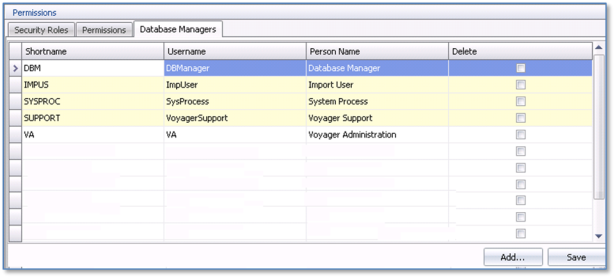
Database manager access is the highest level access and SHOULD NOT be granted as a default.
The Database Manager rights override ALL permissions. We advise you to proceed with caution when using this access level as misuse can result in damage.
- If your Database Manager is a dedicated IT resource, you can give access to the user in this screen.
- To do this click at the bottom of the screen and choose the user that you would like to be a Database Administrator.
- Click
 IMPORTANT - When you make any changes to the permissions, the user will need a log out of Infinity, and back in again to make the changes active

Contact Details
If you require further assistance please contact Ikiru People using the details published on www.ikirupeople.com
Visit our Customer Portal at https://portal.ikirupeople.com/ for future events and clinics.
FeedbackIf you would like to make suggestions or have found any errors with this Help section please contact our Support team.
Copyright © 2026 Voyager by Ikiru People Ltd. All rights reservedVersion 4.87
Voyager Software is a brand of Ikiru People Ltd, a subsidiary of Dillistone Group Plc. The group is a leading global provider of software and services that enable recruitment agencies and in-house recruiters to better manage their selection process and address the training needs of individuals. Across its brands – which include Voyager Software (recruitment software UK & Australia), Dillistone FileFinder executive search software, GatedTalent, the global database of the world’s leading executives, Talentis.Global – the next generation of recruitment software and also ISV.Online, provider of online pre-employment skills testing and training tools. Dillistone Group serves thousands of clients worldwide. Ikiru People Ltd: Registration Number 02043300. Registered in England & Wales.
 |  |  |  |