The Shortlist Processes

 Walkthrough
The step by step instructions below are just as guidance and does not go through all options, see more information at the bottom of this topic for more in depth details.
See Column views section for details on customising your shortlist columns
Step 1 - Calling Candidates
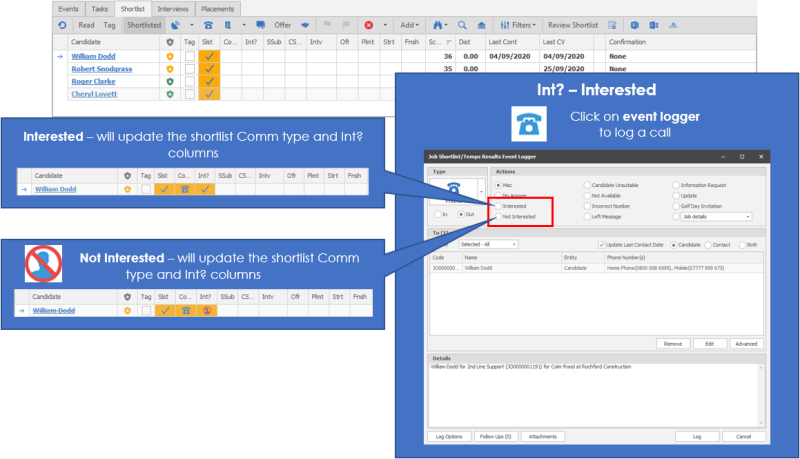
You can also review the shortlist via the Review Shortlist button. You can also mark candidates as interested by left clicking into appropriate cell, this will not log an event
Step 2 - Emailing Candidates
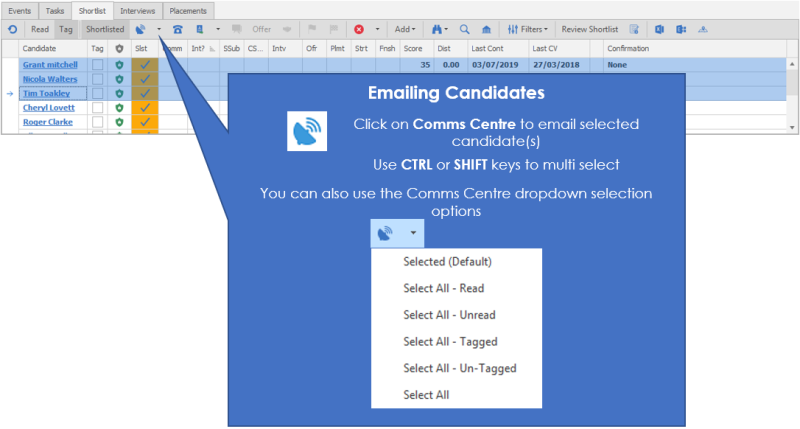
Utilise the Comms Centre to complete your email message (add attachments etc.)
Step 3 - Communicated
Step 4 (cont.)
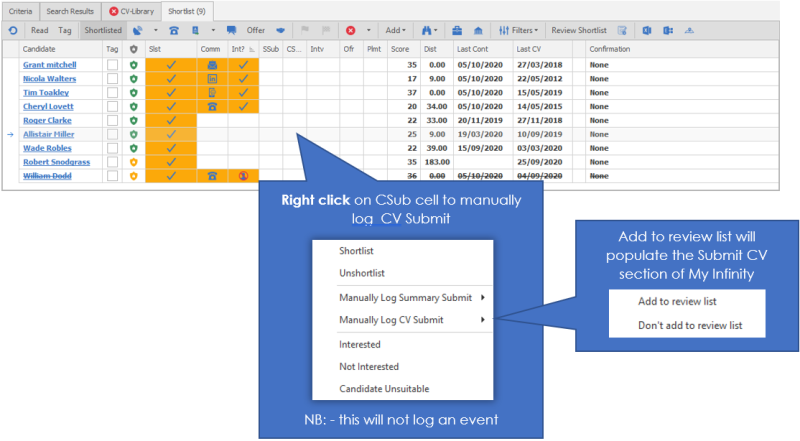
Step 5 - CV Submit Feedback
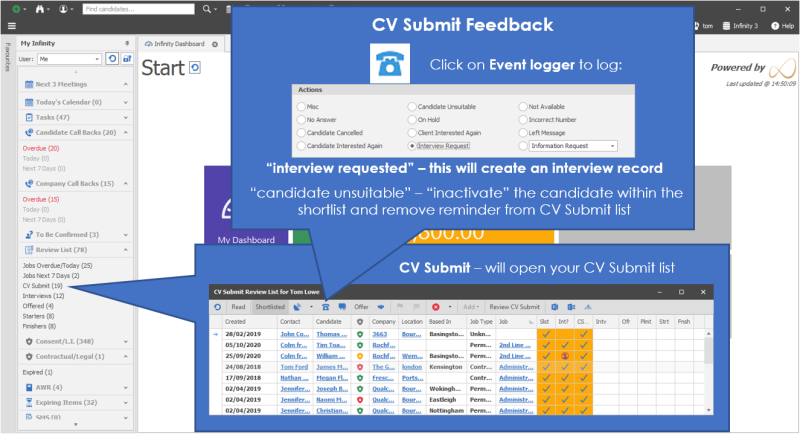
Step 5 (cont.)
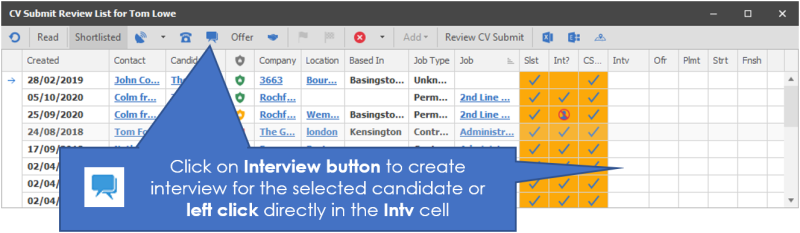
See Interview Section for more details on logging, confirming and feeding back on interviews
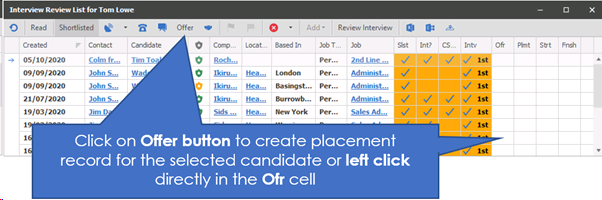
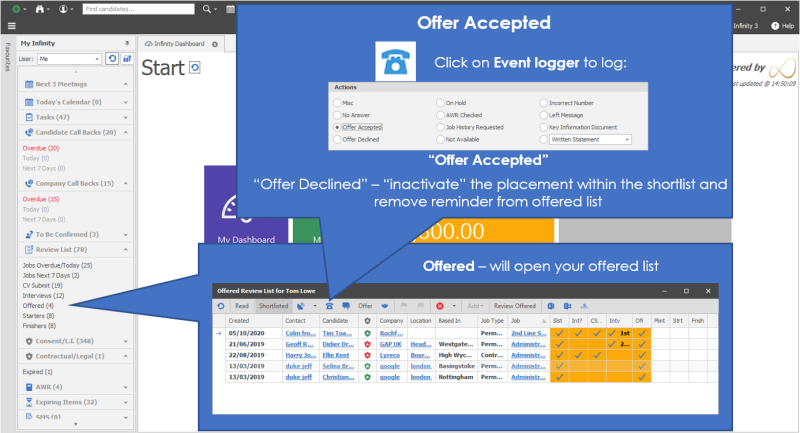
Step 6 Offer Process - Offer Accepted, Awaiting Confirmation, Confirmed
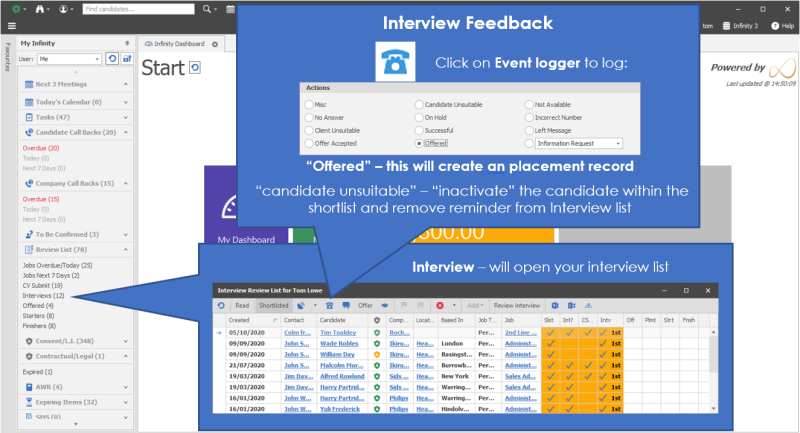
 AWAITING CONFIRMATION
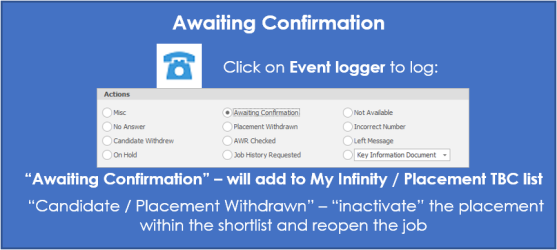
NB: - Business Rules will run at this point, failure to pass all prevent business rules will prevent you from confirming, read rule description and ensure you input required details, see your system administrator for more details
CONFIRMED
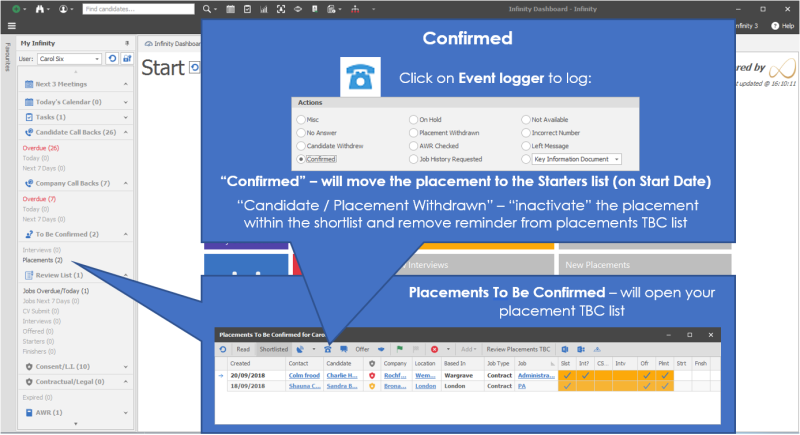
Withdrawing candidate or placement will reopen the job
Step 7 - Started
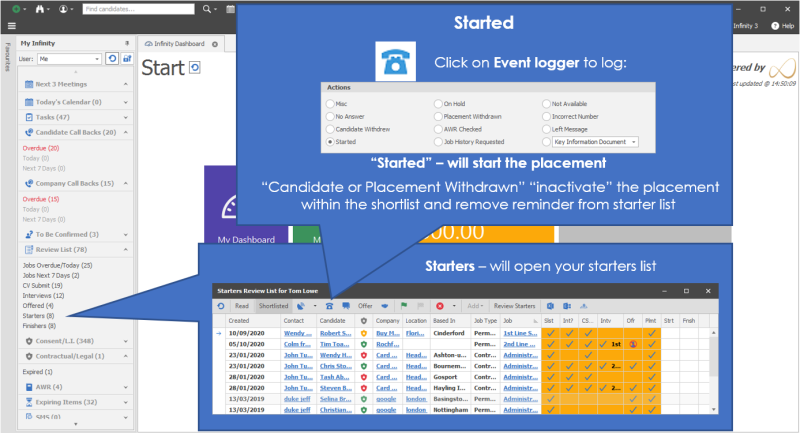
Withdrawing candidates will reopen the job
Left click in the Strt cell will also start the placement
Step 8 - Finished
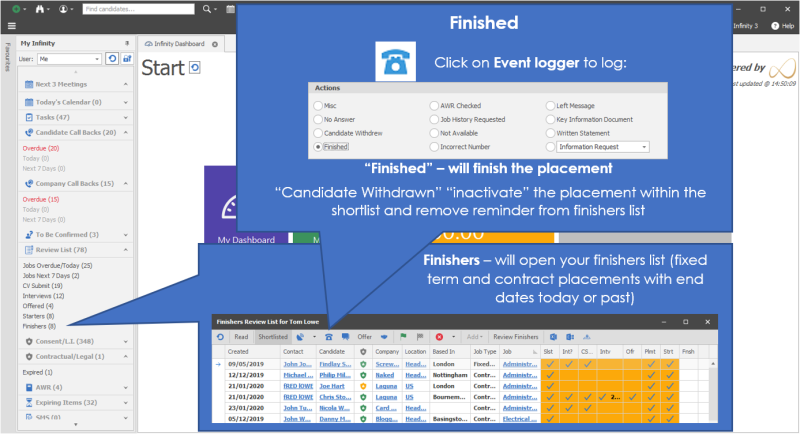


Need more information, click below:
General
It is here that you will control what Infinity knows about the work that has been done on a job and the candidate. This area should be used to submit the CV’s, create the interview and send emails advising your candidates of rejection.
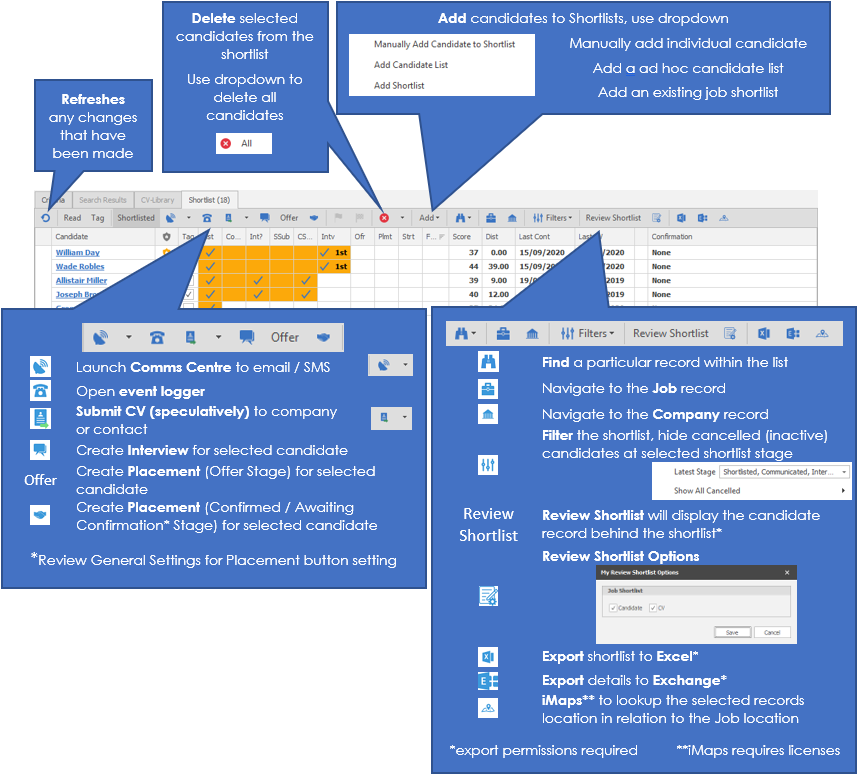 Shortlist stages
The shortlist is broken into 10 stages which you can move the candidate through.
The shortlist can be customised via column chooser
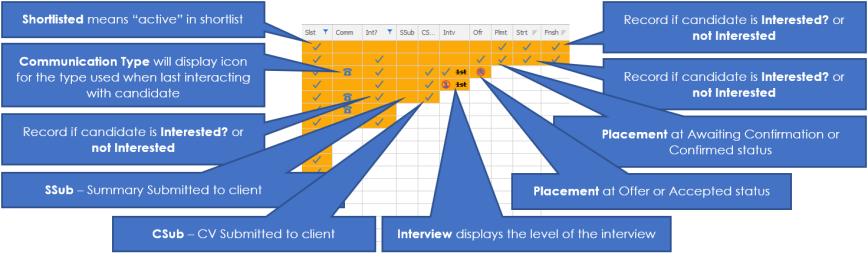
There are sub stages within each of these stages that will record if the candidate deviates from the positive recruitment process.
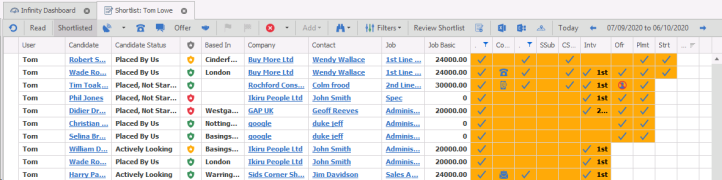
The shortlist shows the current status of a candidate along the recruitment process with orange blocks. Each if these orange blocks give an easy, immediate view of what the current status is.
In the example below you can see
- The orange highlight shows the distance along the process a candidate has progressed
- The ticks show which parts of the process have been completed. Remember that not all jobs will need a CV to be submitted or an interview to be conducted.
- Further information is available within the columns, e.g. the level of an interview or the end of a shortlist process. The ‘no-entry’ sign shows that the candidate is at the end of the process and will therefore progress no further, and the image beneath indicates who made that decision.
Stage 1 – Shortlisted (Slst)
Once you have decided that you would like to progress a candidate in the recruitment process move them to the shortlist either manually from candidate record or via add within the job shortlist or green thumb from within the results. Please see the Results (Re Job) section for more details.
Stage 2 – Communicated (Comm)
Communicate with the candidate to find out if they are interested in the role. This could be in the form of an email or in a telephone call, or both.
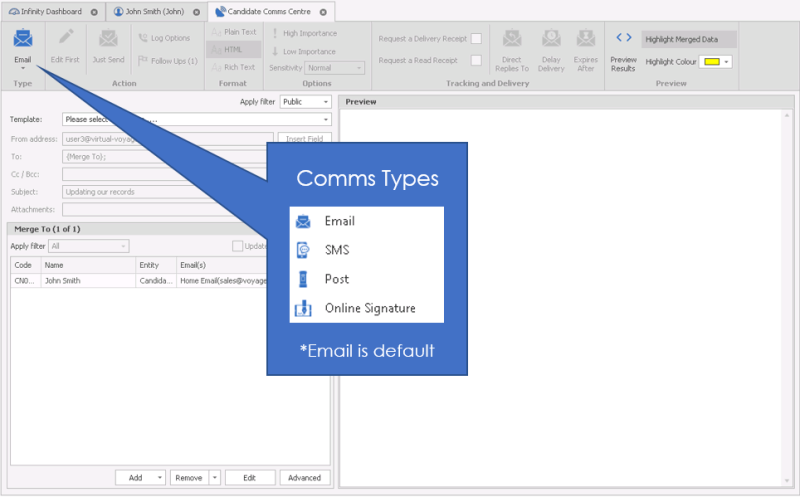
Email the candidate
On the shortlist use the comms centre option

This will open the following screen. See the section on the comms centre for more detail.
Phone the candidate
Use the Add event icon, this will open the events log screen

This will open the event logger with the appropriate next stage actions:
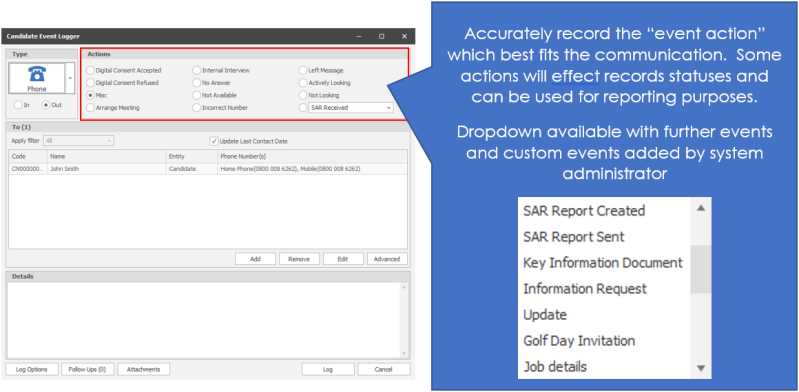
Choose the correct option and click log. See Add Events section for more detail.
Stage 3 – Interested (Int?)
There are two options on the Interested stage, a candidate is either interested in a role, or not. It could be that the candidate will change their mind and either became interested, or disinterested in a job after they had advised you of something different.
To mark a candidate as interested in the job
Click into the "Int?" Column and choose interested. This will Log the event and update the shortlist.
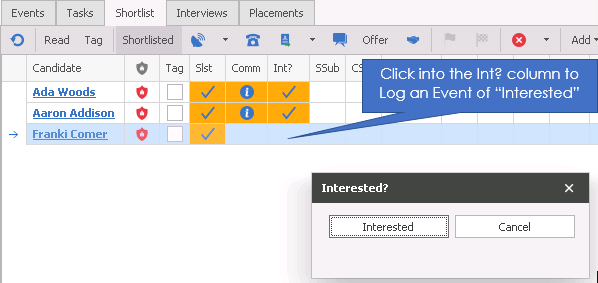
Once you have marked a candidate as interested in the job the shortlist will reflect this action with an orange highlight.

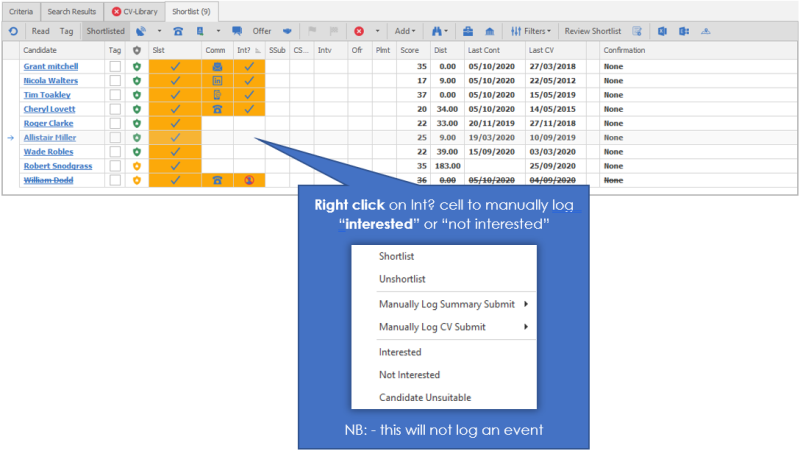
Alternatively you can right hand click the relevant candidate on the shortlist and choose Interested
To mark the candidate as not interested
At any stage the candidate can decide that they are not interested in the job. If the candidate has already been marked as interested, then you can just click into the "Int?" field against that Candidate in the shortlist and choose not interested. This will Log the event and update the shortlist.
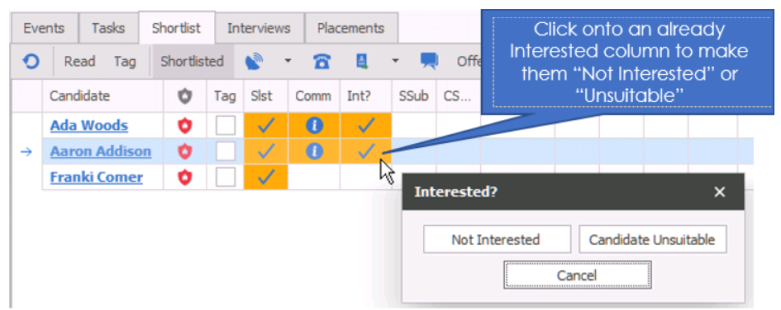
Alternatively you can right hand click the relevant candidate on the shortlist and choose not Interested
In this case the shortlist will show the new status on the shortlist with a new icon and will give you details when you hover over the shortlist.

 NOTE – Notice the line through the candidate, the new icon which shows the candidate with a no- entry sign and the not interested showing on the hover.
Stage 4 & 5 – Summary / CV Submit (SSub / CSub)
Stages 4 & 5 are rolled in together as they are the same process, but with different documents. Infinity will enable you to submit a candidate summary from the record and / or the CV document.
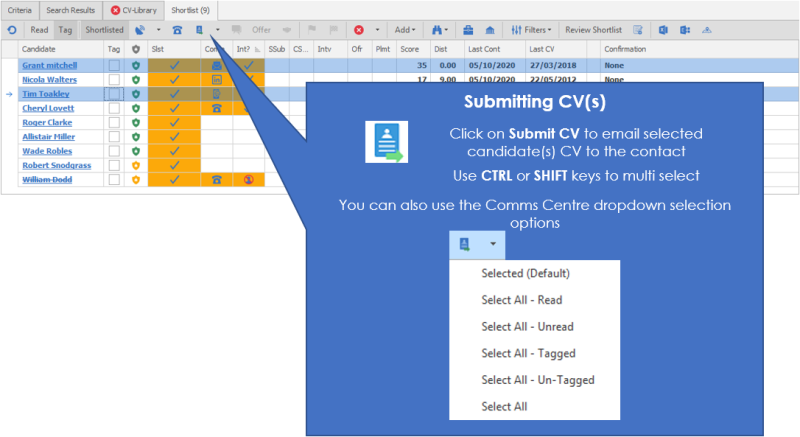
To submit the summary or CV to the contact use the submit CV icon or left click in the appropriate cell in the shortlist.
This will open the CV submit process that is detailed in the Submit CV section.
Alternatively you can
- Right hand mouse click on the correct name to manually record that you have submitted a CV (or Summary)
Choose if you want the log to be logged in your review list.
Stage 6 – Interview (Intv)
To create an interview

You can create an interview by:
- Right hand mouse click on the candidate line and choose Interview request
- Left hand mouse click in the Intv column.
- Clicking the Interview icon on the tool bar of the shortlist
- Choosing interview from the job screen
Each of these options will create an interview record. Please see the Interview Record for more details.
Create 2nd (and subsequent) interviews
See Creating more interview levels for more details.
Recording the outcome of the Interview
To record the outcome of an interview
- Right hand mouse click and choose the correct outcome
- Click the event logger and choose the correct outcome
If the outcome is not an offer the candidate will become rejected
Stage 7 – Offer (Ofr)
To record the outcome of an interview
- Right hand mouse click and choose Offer
- Click the event logger and choose Offer
Or
- Click the offer option on the tool bar
If you choose Offer, Infinity will open offer / placement record. See Placement Record for more details
The shortlist will have a tick in the box when an offer has been made and saved

At this stage it may be an informal offer and the candidate needs to decide whether they would like the company to send them written confirmation of the offer / a contract.
Recording the outcome of an offer
You can do this
- From the event logger on the shortlist (choose offer accept / decline)
- From the event logger on the offer to accept the offer
- By clicking on placement on the shortlist (to accept the offer)
- Right hand mouse clicking on the shortlist and choosing the correct status
Placement (Plmt)

Once the placement has been made a tick will show in the shortlist
At this stage it may be an informal offer and the candidate needs to decide whether they would like the company to send them written confirmation of the offer / a contract.
There are then several other stages that the process will go through if the candidate continues on a positive path and the initial offer is accepted;
- Awaiting confirmation – a candidate will be at this status until they have confirmed receipt of the written contract. handed in their notice, or formally accepted the contract of employment
- If you have Approval Requests switched on, you will need to select Awaiting Confirmation from the Approval drop down , this will notify the appropriate parties who will then confirm the placement
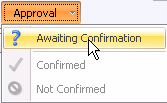
- Confirmed – this is usually that the candidate has handed in their notice, and/or formally accepted the contract of employment
- Obviously the candidate may still withdraw or decline at any stage in the process which would also be logged under events.
You can also bypass the stages by going straight to start from the shortlist.
Stage 8 – Start (Strt)

To start the placement, mark it as confirmed and either:
- Left hand click on the strt column
- Right hand mouse click and choose Start
- Click the green flag on the shortlist

Stage 9 – Finish (Fnsh)

To mark a candidate as a finisher:
- Left hand mouse click in the Fnsh column
- Right hand mouse click and choose Finish
- Click the chequered flag on the shortlist

Finish would normally only apply to a contract role, however you could also use it if your candidate withdrew from the role after they started.
iMaps
 Utilising Microsoft’s Bing maps, users can lookup the locations of candidates around a job, this ensures it is clear which candidate is best placed to fill a role.
See the iMaps section for more details
Contact Details
If you require further assistance please contact Ikiru People using the details published on www.ikirupeople.com
Visit our Customer Portal at https://portal.ikirupeople.com/ for future events and clinics.
FeedbackIf you would like to make suggestions or have found any errors with this Help section please contact our Support team.
Copyright © 2026 Voyager by Ikiru People Ltd. All rights reservedVersion 4.87
Voyager Software is a brand of Ikiru People Ltd, a subsidiary of Dillistone Group Plc. The group is a leading global provider of software and services that enable recruitment agencies and in-house recruiters to better manage their selection process and address the training needs of individuals. Across its brands – which include Voyager Software (recruitment software UK & Australia), Dillistone FileFinder executive search software, GatedTalent, the global database of the world’s leading executives, Talentis.Global – the next generation of recruitment software and also ISV.Online, provider of online pre-employment skills testing and training tools. Dillistone Group serves thousands of clients worldwide. Ikiru People Ltd: Registration Number 02043300. Registered in England & Wales.
 |  |  |  |