Housekeeping
Below are the different areas within Infinity, each include ways to identify 'poor data', to complete most of these housekeeping tasks you will need to be a DBManager
These processes are suggested ways to review your system, you can adapt the processes for your specific needs. Warning, the processes below assume you are utilising Infinity to record calls and have emails synchronising.
If you have any concerns please contact your account manager / customer success manager to organise some time with a trainer to review. We can also offer paid for consultation and / or data analyse of your system.
 Candidate
Duplicate Candidates
Candidate
Duplicate Candidates
Duplicate candidates should be avoided via iCapture matching or using the Find screen when manually adding candidates. You can utilise the Duplicate Candidate area to review Low, Medium or High likely matches. See Data Management section for more details
Searching for 'Bad Data'
Searching for candidates without key details
No Telecoms AND No Address AND No CV
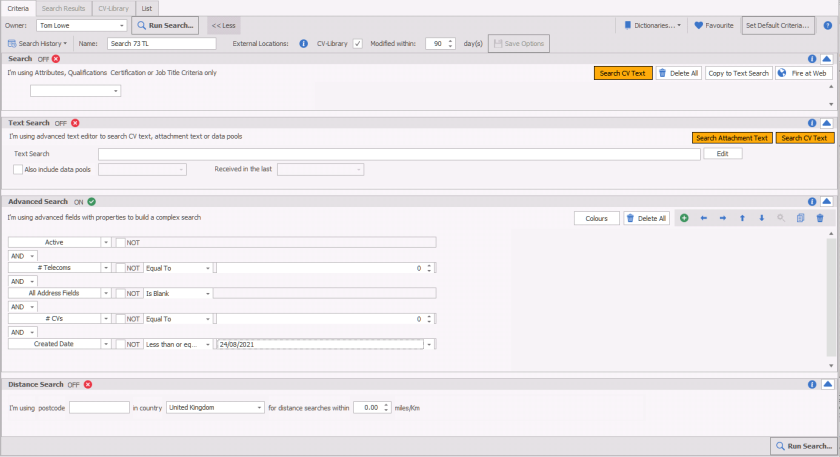
Advanced Search section only (disable all other sections)
| Active | Only returns records that are 'Active' |
|
# Telecoms = 0 |
No telecom content (emails / telephone numbers |
|
All Address Fields = Is Blank |
No address field content |
|
# CV's = 0 |
No CV's (alternative field 'Current CV' NOT) |
|
Created Date = Less Than DD/MM/YYYY |
Candidate Created Date is less than .... This ensures new candidates are not returned |
Candidates not contacted since
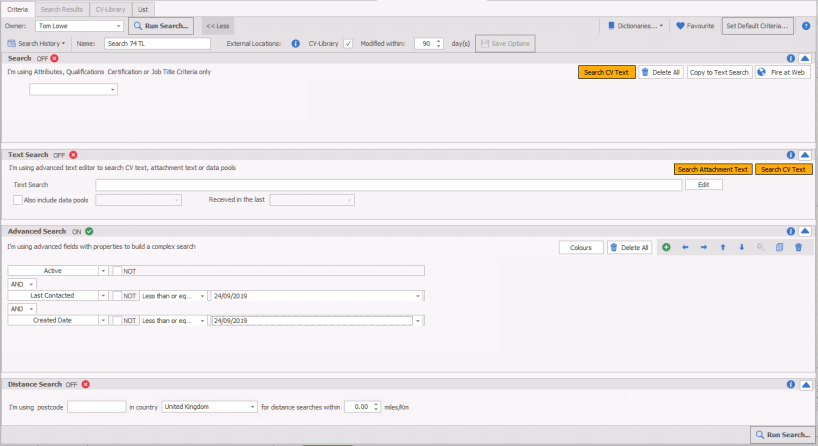
Advanced Search section only (disable all other sections)
| Active | Only returns records that are 'Active' |
|
Last Contacted = Less Than DD/MM/YYYY |
Candidates that have had 'no contact' since ... This will return candidates that have not had an (update last contacted) event logged against their record, see your Event Actions reference data to review events that update last contacted |
|
Created Date = Less Than DD/MM/YYYY |
Candidate Created Date is less than .... This ensures newer candidates are not returned |
Bulk Deleting Candidates
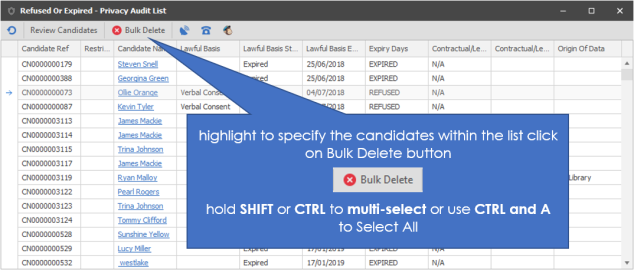
Although there is no direct facility to bulk delete candidate data, you can utilise the Privacy Audit Bulk Delete feature to remove up to 500 candidates at a time. In simple terms, you can complete a search and use Bulk Privacy Audit status update to mark them as 'Refused' / 'Expired', then from the Refused / Expired you can Bulk Delete (up to 500 candidates at a time.
NOTE:- If you already have over 500 candidates who have expired may mean that you will be unable to complete this process
Search
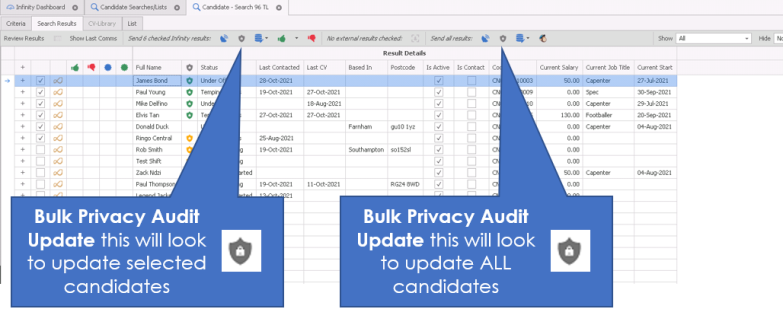
Complete your search using your desired criteria (we would suggest you use the candidate searches above although it is highly recommended to check through results to ensure you do not lose any valuable records), from the search results you can use the Privacy Audit button (left SELECTED or right ALL)
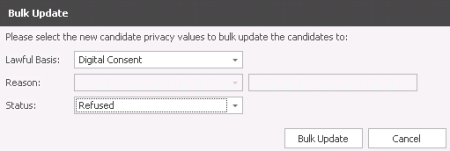
Select the Privacy Audit lawful basis (recommended to use a lawful basis you are not already using) and status (select Refused (recommended) or Expired)
Ensure you allow time for the candidates Privacy Audit statuses to get updated, this is completed via services and can take a few minutes depending on the quantity
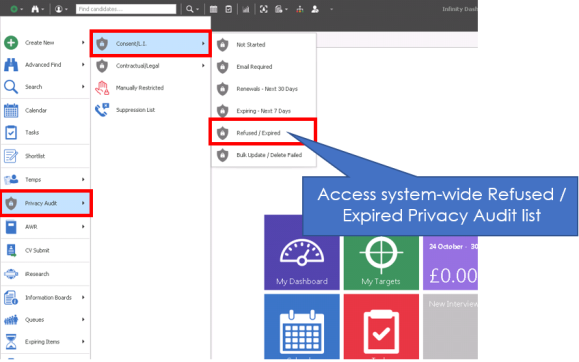
Access the Expired / Refused list via the Application Menu:
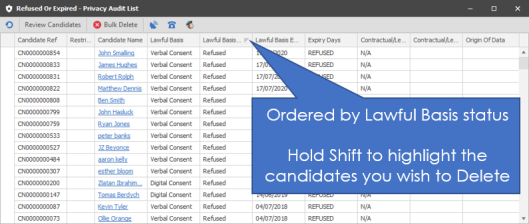
You can re-order the list to:
NOTE:- If you have 500 or more candidates already expired then you will need to complete the Privacy Audit process with those candidates or complete a bulk Privacy Audit update
Then you can bulk delete:
Company
Searching for 'Bad Data'
Search for Companies without Contacts
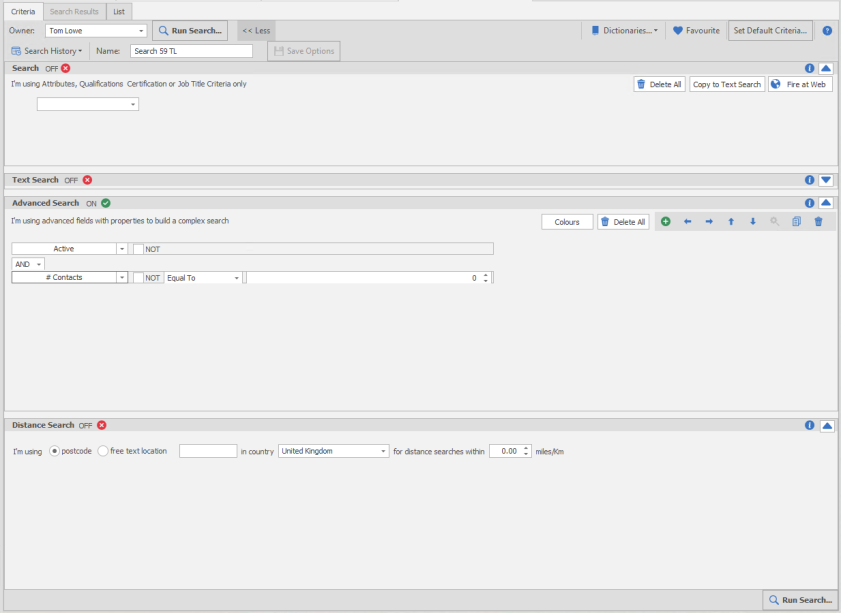
Note:- this will not include companies with inactive contacts
|
Active |
Only returns Company records that are active |
| #Contacts - Equals 0 | Not one contact record is present within the company |
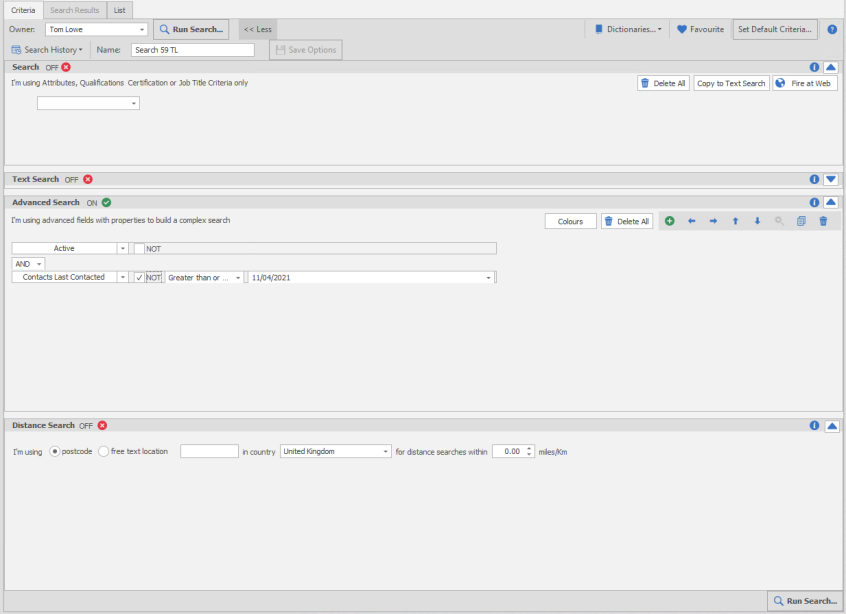
Search for Companies not contacted since
|
Active |
Only returns Company records that are active |
| Contacts Last Contacted - NOT Greater than DD/MM/YY | Not one contact has been 'contacted' since DD/MM/YY |
Jobs
Searching for 'Bad Data'
NOTE:- there is no facility to bulk update status' or delete, access each record one at a time and update, so it is recommended to run a search, this can then be reviewed, for quick access into each job record
Old Jobs via Find
This simply requires you to use the Find / Jobs and press Find will list all "Open" or "Partially Filled" jobs* along with any Temp jobs that have shifts today or in the future
*will include any jobs with an active status, as defined within reference data/job status
Old Jobs via Search
Setup a job search, using job status, please note that Temp jobs do not have a status and will not be returned, they will be considered inactive once the last shift date has passed.
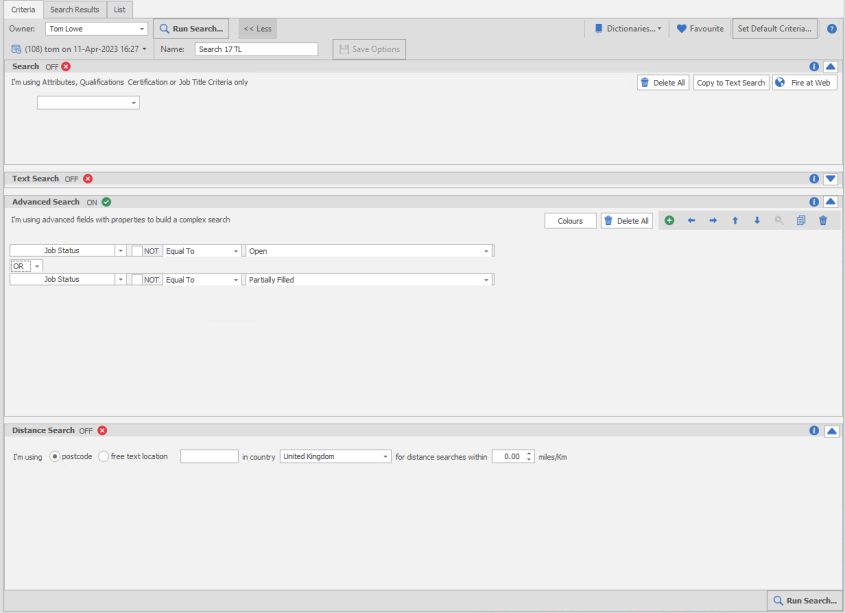
| Job Status equal to Open | Returns all jobs (Perm. Contract, Fixed Term) with an open status |
| Job Status equal to Partially Filled | Returns all jobs (Perm. Contract, Fixed Term) with an partially filled status |
Add any additional job statuses setup as active
Within the search results you can click on Review Results, to review each job individually, adjusting the status and saving.
Interviews
Searching for 'Bad Data'
Interviews not updated / closed
This simply requires you to use the Find / Interviews, select Interview status and press Find will list all interviews, allowing you to order by start date and ensure historical interviews are completed (open interview record and use the event logger to record result)
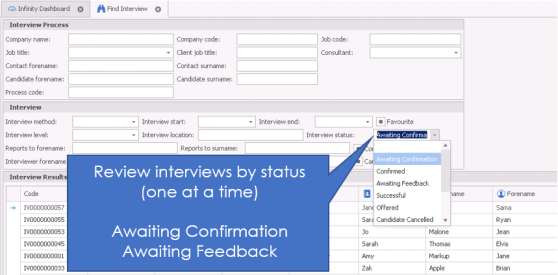
NOTE:- there is no facility to bulk update status' or delete, access each record one at a time and update
Placements
Searching for 'Bad Data'
Placements not updated / wrong status
Utilise the FInd / Placement or run search on Placement Status (searching offers the ability to review results, if dealing with large numbers of placements it is recommended to use search)
NOTE:- there is no facility to bulk update status' or delete, access each record one at a time and update
Admin
Dictionaries
Review unused skills
Use the job title and attribute reports to identify skills that have not been recorded against candidate records, this will not include contacts so complete contact searches if required.
Merging Skills
Review dictionary to identify any skills that can be merged, once merged ensure you add the old reference as a synonym.
Reference Data (dropdown contents)
Review event actions, candidate statuses, company types, business sectors and any other lists, inactivate any that are not required. Note: - there is no facility to delete reference data.
Inactivating Users
Users will automatically be made inactive (SaaS platform) but it is recommended that you make users inactive as soon as they no longer need access. In addition, you may wish to review old users profiles and remove licences.
Templates
Review email, postal, SMS, Online Signature templates and delete unused content. You can also create folders and move templates into folders to organise them.
Voyager can offer data cleansing, bulk deleting of records and bulk status changes, contact your Customer Success Manager for more details.
Contact Details
If you require further assistance please contact Ikiru People using the details published on www.ikirupeople.com
Visit our Customer Portal at https://portal.ikirupeople.com/ for future events and clinics.
FeedbackIf you would like to make suggestions or have found any errors with this Help section please contact our Support team.
Copyright © 2026 Voyager by Ikiru People Ltd. All rights reservedVersion 4.87
Voyager Software is a brand of Ikiru People Ltd, a subsidiary of Dillistone Group Plc. The group is a leading global provider of software and services that enable recruitment agencies and in-house recruiters to better manage their selection process and address the training needs of individuals. Across its brands – which include Voyager Software (recruitment software UK & Australia), Dillistone FileFinder executive search software, GatedTalent, the global database of the world’s leading executives, Talentis.Global – the next generation of recruitment software and also ISV.Online, provider of online pre-employment skills testing and training tools. Dillistone Group serves thousands of clients worldwide. Ikiru People Ltd: Registration Number 02043300. Registered in England & Wales.
 |  |  |  |