Mid Office Integration
 General
Voyager Mid-Office takes the strain out of all middle office processing whilst integrating seamlessly with Voyager Infinity as well as a host of back office products including Sage. This means that data is only entered once saving time and money, and reducing the chance of mistakes. For more details click here
The guide below shows all fields that need to be entered in order to send records over to Mid-Office. This is broken down in to the key records of candidates, clients and placements. Details are also provided of which product owns which fields and the writeback process.
Business Rules
Any Infinity installs where Mid-Office is also being used will come with preset business rules. This will ensure that the users fill in the correct information prior to exporting the data over to Mid-Office.
This rule should not be amended as it will cause items to fail validation when trying to import into Mid-Office.
Candidates
 The majority of the candidate data is maintained by Infinity due to most fields being contact and personal information. The key information that is required for Mid-Office is the financial data.
This can be found under the personal details section using the finance button.
You will need to determine what worker type a candidate is prior to sending the data over to Mid-Office for the first time.
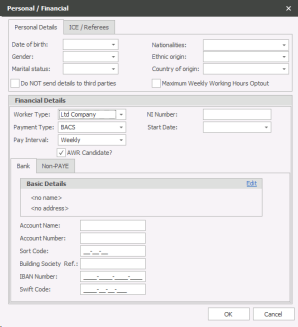
Once you have sent the candidate over to Mid-Office for the first time the financial details will lock for editing. This is because Mid-Office maintains the responsibility for any financial information.
If you have candidates who are likely to start their placements without having a chosen a payment method, then you can set them as TBC. Additional worker types can be added into Reference Data found in the Administration menu in Infinity. Please call the Voyager training team to set this up.
Infinity will inform MO that the candidate is deleted. It is planned that a future MO version will display this in MO
Clients / Companies
Similar to the candidate record the financial's are the most important fields to address when completing the record.
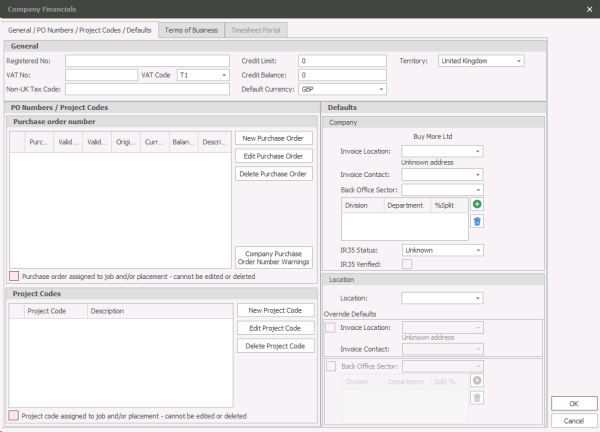
The company financial's can be accessed on the main toolbar from the client record in Infinity.
In here there are two fields that are required for exporting over to Mid-Office. The Default VAT code and the Default Currency.
Contract Placements
The placement record is the most important record to check when sending over to Mid-Office.

|
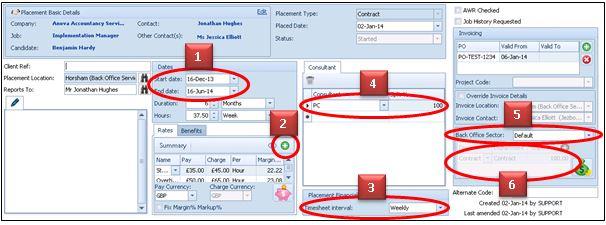
Start Date of the Placement. Add an end day if possible but if not this will default to the year 2049 in Mid-Office. |

|
Placement Rates - Clicking on the green plus will take you to the rate addition screen. These will need to be added prior to sending over to Mid-Office. |

|
Timesheet Interval - This will need to be selected in order for Mid-OIffice to determine which type of timesheet records to generate. |

|
Placement Ownership - A single placement owner will be required as a minimum requirement in order to use reports in Mid-Office. |

|
Back Office Sector - Known as a company sector in Mid-Office, this will determine which sector of the agency the placement will be put in to. |

|
Divisions and Departments - From an accounting perspective these two fields are the most important to be completed. These are needed for reporting and exports to accounts. |
ALERT: Once the placement has been exported you will see a message in the top right hand side of the placement record saying what time the placement exported.

Permanent Placements
When processing a permanent placement there are less details to check compared to the contract placements.
|
|
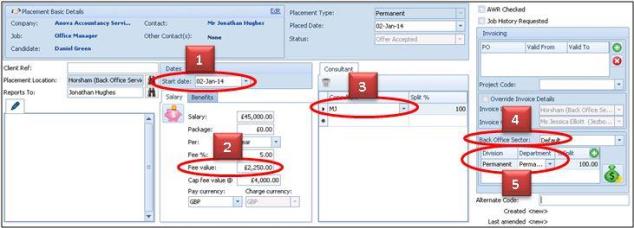
Start Date - of the Placement. This is a necessary field in order to export a permanent placement record. |
|
|
Fee Value - In the salary section of the record the minimum requirement is to fill in the fee value. Additional fields such as salary amount and fee % are optional. |
|
|
Placement Ownership - A single placement owner will be required as a minimum requirement in order to use reports in Mid-Office. |

|
Back Office Sector - Known as a company sector in Mid-Office, this will determine which sector of the agency the placement will be put in to. |
|
|
Divisions and Departments - From an accounting perspective these two fields are the most important to be completed. These are needed for reporting and exports to accounts. |


Field Dynamics
Appendix E details all fields that export from Infinity over to Mid-Office. If a field is owned by a product then it will be editable and if it’s not then it will be locked (greyed out). The data transfer works both ways, so any fields updated in Mid-Office will write back to Infinity. See Appendix E for more details.
Contact Details
If you require further assistance please contact Ikiru People using the details published on www.ikirupeople.com
Visit our Customer Portal at https://portal.ikirupeople.com/ for future events and clinics.
FeedbackIf you would like to make suggestions or have found any errors with this Help section please contact our Support team.
Copyright © 2026 Voyager by Ikiru People Ltd. All rights reservedVersion 4.87
Voyager Software is a brand of Ikiru People Ltd, a subsidiary of Dillistone Group Plc. The group is a leading global provider of software and services that enable recruitment agencies and in-house recruiters to better manage their selection process and address the training needs of individuals. Across its brands – which include Voyager Software (recruitment software UK & Australia), Dillistone FileFinder executive search software, GatedTalent, the global database of the world’s leading executives, Talentis.Global – the next generation of recruitment software and also ISV.Online, provider of online pre-employment skills testing and training tools. Dillistone Group serves thousands of clients worldwide. Ikiru People Ltd: Registration Number 02043300. Registered in England & Wales.
 |  |  |  |