TalentGraph 
Ikiru People are excited to offer TalentGraph integration, offering a state of the art database model along with Infinity's recruitment management solutions. A system wide implementation, offering access to all and no limitations to the data, a truly unique feature that gives you the edge.
 What is the TalentGraph?
Is a huge database of hundreds of millions profiles, the true definition of big data, each profile is enhanced with augmented data, ensuring TalentGraph's state of the art searching returns more people and profiles you would not find on any other platform.
Company Augmented Data
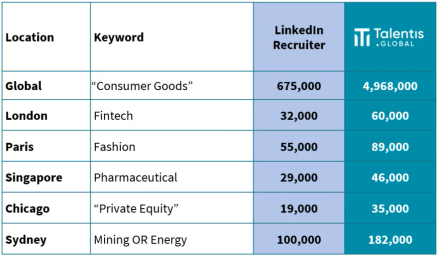
augmenting the profiles by utilising the company data linked to the profiles work histories, enabling hugely powerful searches, returning many more results than just searching profile data directly.
As an indicative sample of keyword results:
Key Reasons for using the TalentGraph
- Competitive Edge - Augmented data will find candidates that don't come up on LinkedIn searches
- You are in charge - You have more control on your searches
- Maintained Centrally - Data is refreshed automatically, no need for you to maintain people's details
- Diversity - You'll find more diverse candidates
- Access all Areas - You'll get access to far more results that you do on most LinkedIn memberships - regardless of your network
- Cost Effective - You can potentially save money on the level of LinkedIn membership*
- No ties - TalentGraph is offered as a rolling monthly contract
- Limitless - Search, search, search
- For all - All users are given access to the TalentGraph
Please contact your Customer Success Manager if you wish to sign up for TalentGraph.
TalentGraph Setup
TalentGraph is implements system wide and enabled by contacting your account manager (clientsuccess@ikirupeople.com). Once enabled it will be available for all users.
TalentGraph Searching (Ad-Hoc)
See TalentGraph Job Searching section below when resourcing for a particular role
Utilise ChatGPT to build search criteria, see Infinity CoPilot section for more details.
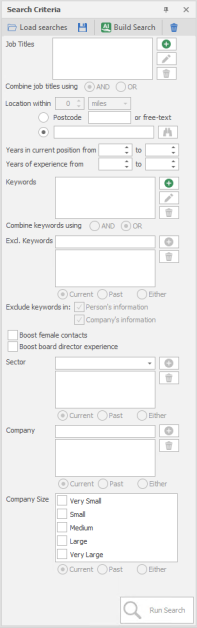
Access the search via the application menu, it is highly recommended that you right click on the section within the app menu and add it to your Quick Access Toolbar. The search criteria sections are in the left hand panel. This panel can be undocked / docked, when undocked it is then displayed as a vertical tab with the label Search Criteria
Managing Searches
Load Saved searches- gives you access to any searches you have previously saved
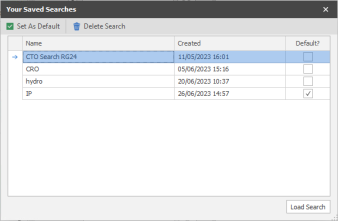
Remove As Default - you can unmark a search as default, launching TalentGraph will be blank
Delete Search - you can delete any of your historical searches
Load Search - will display criteria for the selected saved search, click run search to display current results
Save search - enables you to save all your search criteria, a dialogue box appears:
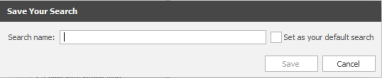
Name your search
Set as your default search (you can only have one default search, this will immediately run when launching TalentGraph)
Clear
Will remove all criteria from panel
Job Titles
Search current, past or either; job titles recorded against profiles, you can add job titles, as one group and add additional job title groups, enabling the ability to search for a job specific job title and adding another group for role level, for example:
Group 1 - sales, business development, account
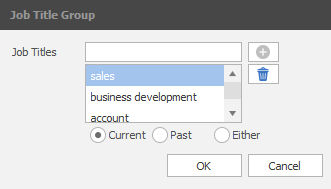
Group 2 - manager, head, director, executive
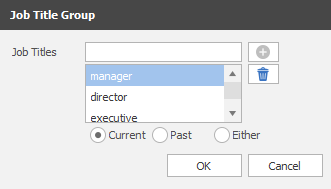
Current - within their current employment entry
Past - within their previous employment entries, not necessarily
Either - job title is present anywhere within their work history
Combine job titles using AND / OR - this allows you to control how the groups are treated, AND will ensure a result must have at least one word from group 1 and one from group 2. OR will return all profiles will at least one word from any group.
Location within
0 miles / KM - field is enabled once you have set a location (via below postcode or free-text below), either postcode or location name
Postcode - enter a UK postcode to set central postcode (full postcode must be entered
free-text - enter a location name, you can then press enter or click on binoculars to select the specific location
Years in current position from XX to XX - set the number of years of experience of their current employment
Years of experience from XX to XX - set the number of overall years of experience the person has
Keywords
Enables you to look for particular words that you would need to identify appropriate profiles. This facilitates entering groups of keywords and set how these should search:
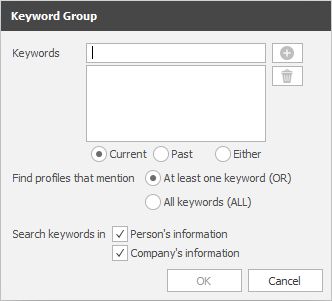
Current - keyword present within their current employment
Past - keyword present within their work history but not in present
Either - keyword is present past or present
Set whether multiple keywords entered are treated as an OR or AND, this can also be controlled by the Combine keywords using AND OR radio button, this affects the way keyword groups are treated
Search keyword in:
Person's information - search for data within the persons profile
Company's information - search for data within the company's that are recorded within work history
Combine keywords using AND or OR - this enables you to control how multiple keyword groups are treated
Exc. Keywords
Add keywords you wish to filter out of your results, to eliminate profiles that are not relevant to your search
Current - exclude keyword(s) present within their current employment
Past - exclude keyword(s) present within their work history but not in present
Either - exclude keyword(s) is present past or present
Boost females contracts - TalentGraph includes the facility to identify female genders, ticking this will filter by gender.
NB: - in some cases, gender cannot be ascertained
Board directors experience - TalentGraph will ascertain if the profile has board level experience and enable you to review this by ticking the box.
NB: - in some cases profile information may affect the results
Sector
Sectors are listed alphabetically, you can type and the list will filter as you type. You can add multiple sectors, these will be treated as OR's and list profiles in all sectors defined. You can also define if the sector(s) is Current, Past or Either, this utilises TalentGraph augmented company data to reference each profiles current or last work history.
Company
Enter company name(s) you wish to base your search on, multiple entries will be treated as an OR. Set if the profile is set as (Current) currently working for, (Past) previously worked for or (Either) has ever worked for listed company(s).
Company Size
Enables you to review profiles that work for (Current) or have worked for (Past) a company of a certain size.
TalentGraph Job Searching
Job searching is accessed within a job record and is saved against the job, so any criteria used remains within that job record and you are able to return to it when required.
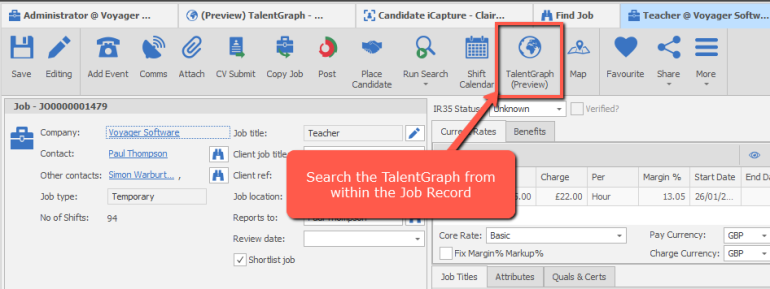
In addition, it also includes the facility to reject results, make notes, set progress and all of which is saved against the entry, if you choose to then add the profile as a candidate through iCapture, these notes and progress selection are then kept and imported into the shortlist*, along with the candidate themselves.
*Temp jobs will need to be marked as 'Shortlist Jobs'
Utilise ChatGPT to build search criteria, see Infinity CoPilot section for more details.
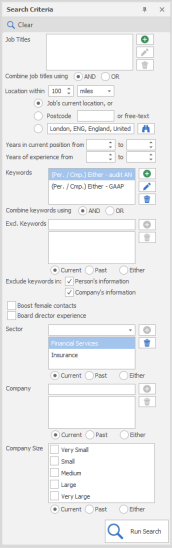
Job Titles
Search current, past or either; job titles recorded against profiles, you can add job titles, as one group and add additional job title groups, enabling the ability to search for a job specific job title and adding another group for role level, for example:
Group 1 - sales, business development, account
Group 2 - manager, head, director, executive
Current - within their current employment entry
Past - within their previous employment entries, not necessarily
Either - job title is present anywhere within their work history
Combine job titles using AND / OR - this allows you to control how the groups are treated, AND will ensure a result must have at least one word from group 1 and one from group 2. OR will return all profiles will at least one word from any group.
Location within
0 miles / KM - field is enabled once you have set a location (via below postcode or free-text below), either postcode or location name
Job's current location (default) - uses the address details recorded within the job record, this needs to be recognised for the search to run, in particular a full UK postcode.
Postcode - enter a UK postcode to set central postcode (full postcode must be entered
free-text - enter a location name, you can then press enter or click on binoculars to select the specific location
Years in current position from XX to XX - set the number of years of experience of their current employment
Years of experience from XX to XX - set the number of overall years of experience the person has
Keywords
Enables you to look for particular words that you would need to identify appropriate profiles. This facilitates entering groups of keywords and set how these should search:
Current - keyword present within their current employment
Past - keyword present within their work history but not in present
Either - keyword is present past or present
Set whether multiple keywords entered are treated as an OR or AND, this can also be controlled by the Combine keywords using AND OR radio button, this affects the way keyword groups are treated
Search keyword in:
Person's information - search for data within the persons profile
Company's information - search for data within the company's that are recorded within work history
Combine keywords using AND or OR - this enables you to control how multiple keyword groups are treated
Exc. Keywords
Add keywords you wish to filter out of your results, to eliminate profiles that are not relevant to your search
Current - exclude keyword(s) present within their current employment
Past - exclude keyword(s) present within their work history but not in present
Either - exclude keyword(s) is present past or present
Boost females contracts - TalentGraph includes the facility to identify female genders, ticking this will filter by gender.
NB: - in some cases, gender cannot be ascertained
Board directors experience - TalentGraph will ascertain if the profile has board level experience and enable you to review this by ticking the box.
NB: - in some cases profile information may affect the results
Sector
Sectors are listed alphabetically, you can type and the list will filter as you type. You can add multiple sectors, these will be treated as OR's and list profiles in all sectors defined. You can also define if the sector(s) is Current, Past or Either, this utilises TalentGraph augmented company data to reference each profiles current or last work history.
Company
Enter company name(s) you wish to base your search on, multiple entries will be treated as an OR. Set if the profile is set as (Current) currently working for, (Past) previously worked for or (Either) has ever worked for listed company(s).
Company Size
Enables you to review profiles that work for (Current) or have worked for (Past) a company of a certain size.
Search results
Profiles that match the search criteria are displayed for the user to review on the right-hand side
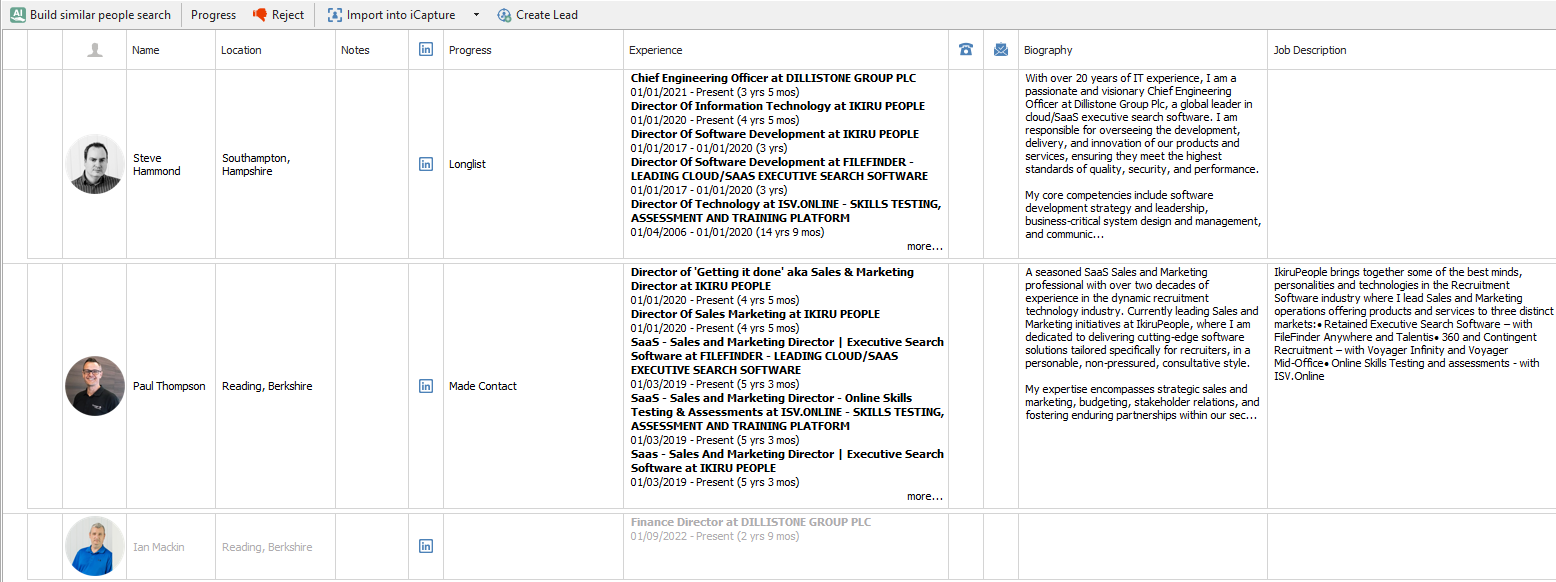
There is functionality on the toolbar to
- Build a similar people search using Copilot
- Set the progress field (Re:job TalentGraph only)
- Reject the result - the result appears greyed in the list. The rejection can be removed by highlighting the result and clicking on Remove Rejection button. (Re:job TalentGraph only)
- Import the selected results to candidate iCapture - on Re:job candidates will be added to the job shortlist once processed to Infinity.
- Create contact leads from the selected results
.
Contact Details
If you require further assistance please contact Ikiru People using the details published on www.ikirupeople.com
Visit our Customer Portal at https://portal.ikirupeople.com/ for future events and clinics.
FeedbackIf you would like to make suggestions or have found any errors with this Help section please contact our Support team.
Copyright © 2026 Voyager by Ikiru People Ltd. All rights reservedVersion 4.87
Voyager Software is a brand of Ikiru People Ltd, a subsidiary of Dillistone Group Plc. The group is a leading global provider of software and services that enable recruitment agencies and in-house recruiters to better manage their selection process and address the training needs of individuals. Across its brands – which include Voyager Software (recruitment software UK & Australia), Dillistone FileFinder executive search software, GatedTalent, the global database of the world’s leading executives, Talentis.Global – the next generation of recruitment software and also ISV.Online, provider of online pre-employment skills testing and training tools. Dillistone Group serves thousands of clients worldwide. Ikiru People Ltd: Registration Number 02043300. Registered in England & Wales.
 |  |  |  |