iMaps
General
Utilising Microsoft’s Bing maps, users can lookup the locations of candidates around a job, this ensures it is clear which candidate is best placed to fill a role.
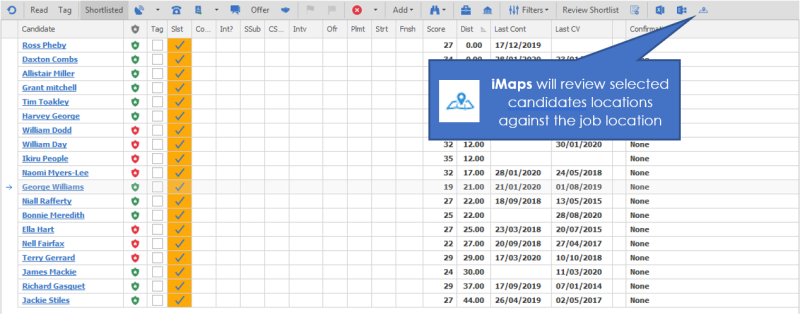
 From a shortlist or from the candidate panel within the Unfilled Temp Jobs panel you can select a candidate or multiple candidates and click on the map button. You can also select additional candidates in the shortlist to add them to the map.
iMaps is available for clients who utilise Distance Search licences, please contact customer services for more details
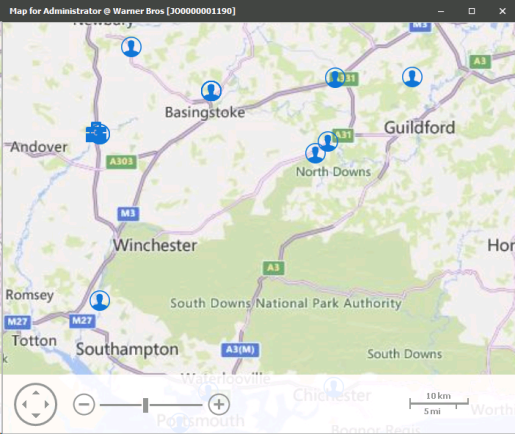
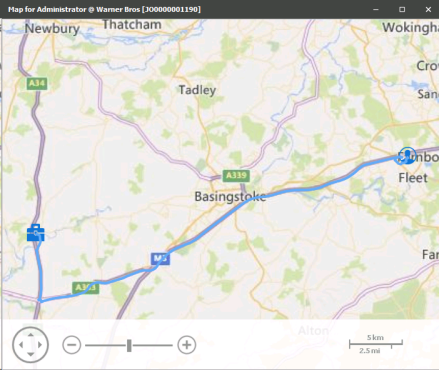
Automatically Bing maps is activated and you will view candidate symbols, in and around the job


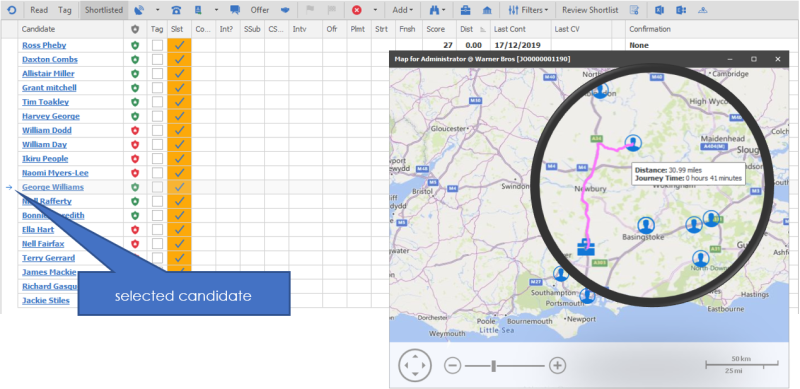
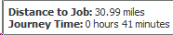 Clicking on each candidate will then highlight the candidate in the shortlist. Hovering your mouse over the candidate on the map will access the tooltip to show Distance and Journey Time, utilising Bing Maps® to map out the route
 Contact Details
If you require further assistance please contact Ikiru People using the details published on www.ikirupeople.com
Visit our Customer Portal at https://portal.ikirupeople.com/ for future events and clinics.
FeedbackIf you would like to make suggestions or have found any errors with this Help section please contact our Support team.
Copyright © 2026 Voyager by Ikiru People Ltd. All rights reservedVersion 4.87
Voyager Software is a brand of Ikiru People Ltd, a subsidiary of Dillistone Group Plc. The group is a leading global provider of software and services that enable recruitment agencies and in-house recruiters to better manage their selection process and address the training needs of individuals. Across its brands – which include Voyager Software (recruitment software UK & Australia), Dillistone FileFinder executive search software, GatedTalent, the global database of the world’s leading executives, Talentis.Global – the next generation of recruitment software and also ISV.Online, provider of online pre-employment skills testing and training tools. Dillistone Group serves thousands of clients worldwide. Ikiru People Ltd: Registration Number 02043300. Registered in England & Wales.
 |  |  |  |