Submit a CV (Re Job)

Submitting a candidates CV to a contact works with the same principal as sending emails, selecting a candidate within the shortlist and clicking on the CV submit button, left clicking within the CSub cell in the shortlist or simply clicking Submit CV within the candidate record (you will need to select Job as the submission type). This has the added benefit of being recorded in all relevant records and instigates My Infinity reminders.
 General
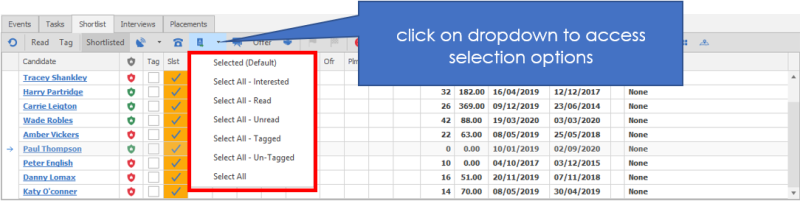
You can CV submit from a Job Shortlist, using the CV submit button
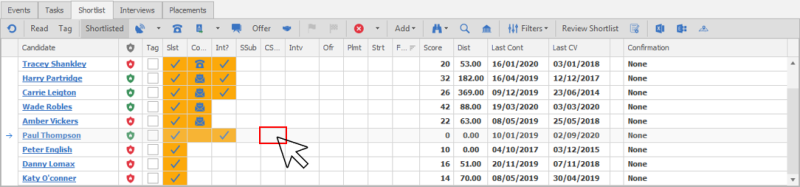
Alternatively you can left click in the CSub cell in the shortlist to submit a single CV
You can click on CV Submit button directly within a candidate record, you will need to ensure you set the submission type to Job and then find the job prior to accessing the Comms Centre to ensure it is correctly recorded.
Submit a CV
Follow the wizard through
- It will default to CV Document
- It will default to Job submission
- Make sure that there are ticks in against the candidates in the submit tick box for those that you’d like to submit
Which candidate would you like to submit
- If there are any candidates missing (i.e. you have entered this screen from somewhere other than the candidate record, or you would like to submit more than one candidate), Click the Add button
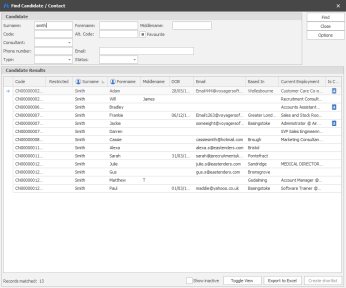
Enter the name of the candidate that you would include and click find.
Double click on the candidate when you have found the name
This will enter the candidate into the CV submit area. Remember to make sure that the submit box is ticked, i.e. you have selected which version of the CV you would like to submit..
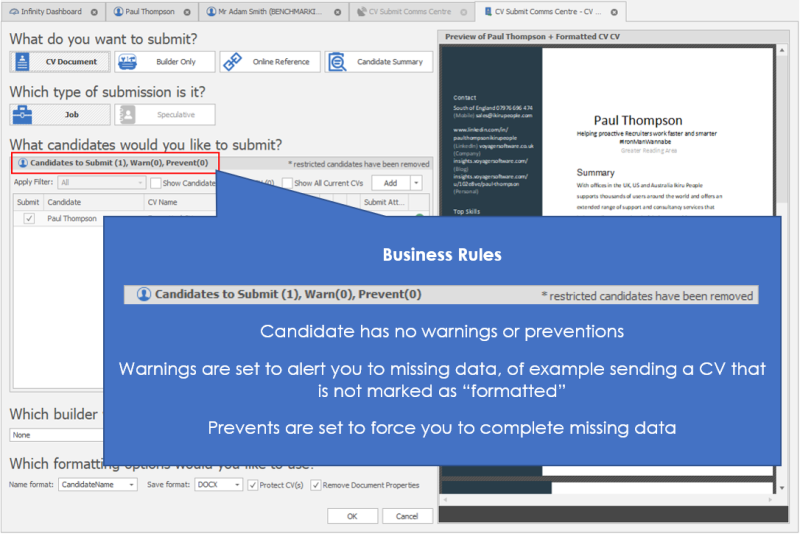

If a candidate has not matched the pre-defined criteria of the business rule, the numbers in brackets will reflect this. Please see the section on warnings and messages
If the candidate that you add manually does not have a CV, infinity will display the following.
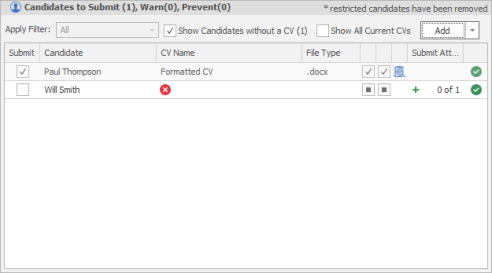
The candidates name will have a red x by the CV name because there is no CV to choose.
Remove the tick against the Show candidates without a CV to hide the candidates that have no CV document.
 NOTE – The CV’s shown are those that are marked in the candidates record as the default CV
If the candidates have more than 1 CV against their record, you may decide that you don’t want to use their default CV.
- Enter a tick against Show all Current CV’s to view all the CV’s available against the candidates
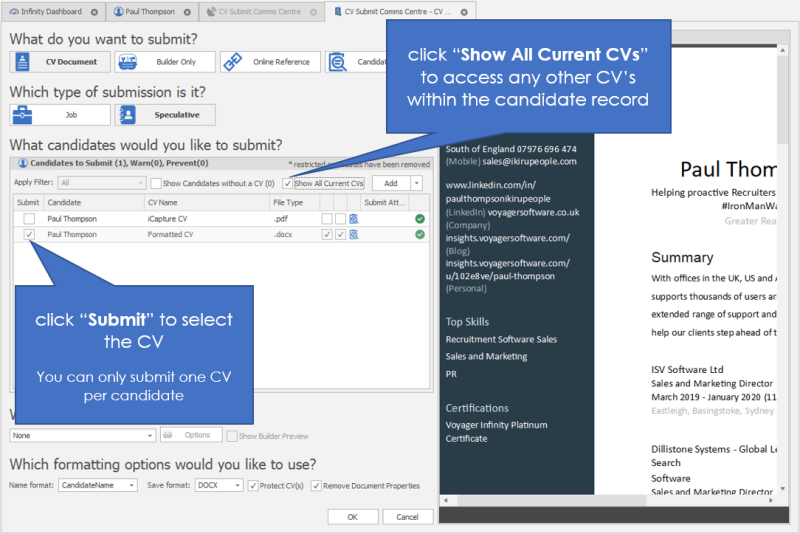
- You will now notice that all the CV’s are available and you can preview the CV on the right of the screen to check that you are choosing the correct one.
- When you have identified the correct CV to submit, enter a tick against the Submit column
- If you have already marked another CV to submit for the candidate, Infinity will ask you the following question

Choosing Yes will move the tick to the new CV
Choosing No will leave the tick against the original CV
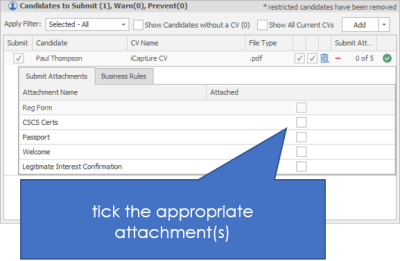
Adding candidate attachments with a CV
If you would like to attach other candidate documents with the builder, follow the steps below:
NOTE if you are looking to attach files from other locations (local computer, company record, job record etc.) you would attach the file from the Comms Centre
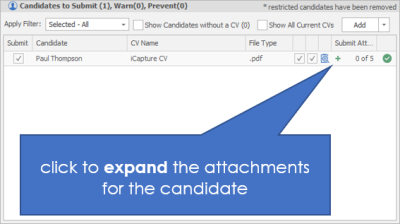
NOTE – This option will only be available if there are attachments to attach. If the candidates have no other attachments, this area will be empty.
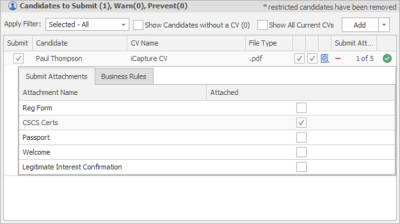
Applying a builder
Builders are ways that you can change the look and feel of the CV. You may decide that you would like to apply a builder when you send the CV.
The builders will have been already set up for you by your Administrator. (See Admin Manual for instructions on how to create a builder).
- Choose your builder
- Enter a tick into the Show Builder Preview to see a preview of the builder in the right hand panel
NOTE - You can change the options of the CV builder if necessary, by clicking on the Options button to the right of the builder. It is rare that you would need to do this, and is for advanced users only. See the administration manual for details of this screen.


Formatting options
Name format:Choose the format of the name of the CV Attachment. Candidatename (Robbie Red) or Candidatecode (CN00000005)
Save format:Choose the format of the CV. Native, DOCX, DOC, RFT, TXT, or PDF. Native is the default option to send the CV in the format that it has been saved in
Protect CV’s:Tick here to protect your CV. This will mean the CV will be sent in read only view will not be editable by the recipient.
Remove Document properties:Add a tick here to remove the document properties. This means that the CV attachment will have no document properties associated with it.
Suggestion – If you have made the Name format candidate code (which in effect makes the CV anonymous) it would be prudent to also remove the document properties. This means that the recipient is not able to view the properties of the CV and deduce the name of the candidate. This is important if true anonymity is needed.
- Click OK or Cancel
OK takes you to the comms centre. Please see the section on comms centre for more details. Choose the job or contact to submit to in the Comms centre.
Cancel closes the screen without saving changes.
Submit a Builder
Submitting a builder alone means that you are able to create a CV document each time you submit a candidate.
This is useful for candidates who have information that changes quickly and a static CV would not be relevant, e.g. Locum Doctors with expiring qualifications. It is also useful for candidates that traditionally wouldn’t have a CV e.g. labourers
Using a builder means that you are able to instantly send a relevant CV / document each time.
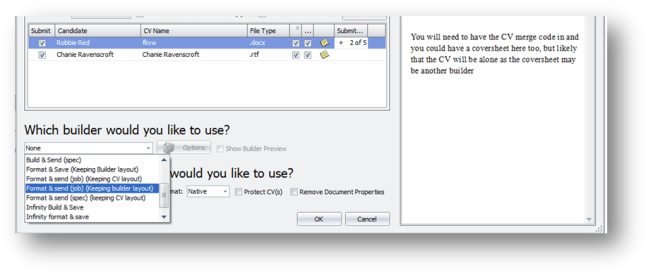
Follow the wizard through
- Choose Builder only
- Choose Job or Speculative submission
- Make sure that there are ticks against the candidates in the submit tick box for those that you’d like to submit
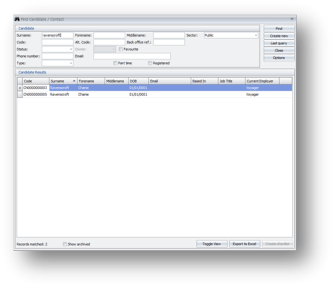
Which candidate would you like to submit
If there are any candidates missing (i.e. you have entered this screen from somewhere other than the correct candidate record, or you would like to submit more than one candidate), Click the Add button
Enter the name of the candidate that you would include and click find.
Double click on the candidate when you have found the name
This will enter the candidate into the Candidates to submit area. Remember to make sure that the submit box is ticked.
If a candidate has not matched the pre-defined criteria of the business rule, the numbers in brackets will reflect this. Please see the section on warnings and messages
Adding other attachments
If you would like to attach other candidate documents with the builder, follow the steps below:
NOTE if you are looking to attach files from other locations (local computer, company record, job record etc.) you would attach the file from the Comms Centre
NOTE – This option will only be available if there are attachments to attach. If the candidates have no other attachments, this area will be empty.
Choosing the builder
From the drop down list choose the builder that you would like to send.
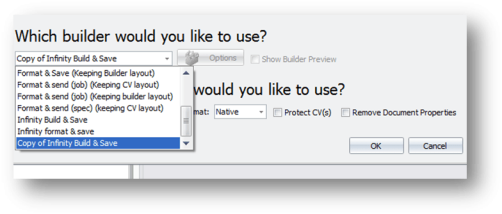
The builders will have been already set up for you by your Administrator.
- Choose your builder
- The Options button will not be enabled as there are no options on the builder only
- The show builder preview is not enabled, but the builder will show on the right hand side of the screen
Formatting options

Name format: Choose the format of the name of the Attachment. Candidatename (Robbie Red) or Candidatecode (CN00000005)
Save format: Choose the format of the attachment. Native, DOCX, DOC, RFT, TXT, or PDF. Native is the default option to send the attachment in the format that it has been saved in.
Protect CV’s: Tick here to protect your builder (CV). This will mean the attachment will be sent in read only view will not be editable by the recipient.
Remove Document properties: Add a tick here to remove the document properties. This means that the attachment will have no document properties associated with it.
Suggestion – If you have made the Name format candidatecode (which in effect makes the attachment anonymous) it would be prudent to also remove the document properties. This means that the recipient is not able to view the properties of the attachment and deduce the name of the candidate. This is important if true anonymity is needed.
Click OK or Cancel
OK takes you to the comms centre. Please see the section on comms centre for more details. Choose the job or contact to submit to in the Comms centre.
Cancel closes the screen without saving changes.
Submit an online reference
Submitting an online reference means that you are able to send a link to a website, to a job, or speculatively.
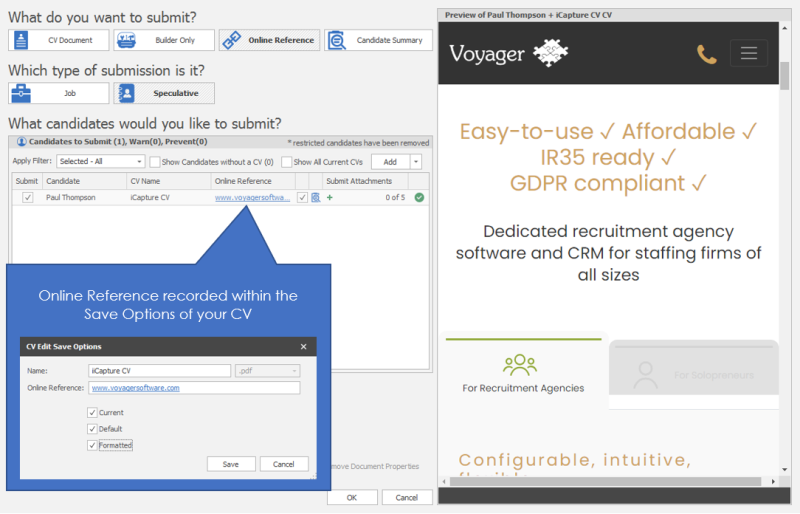
An online reference could be a link to an online CV (Innovate CV), a YouTube video, website, LinkedIn page or anything else the candidate would like to use a CV online. The Online Reference is stored against the CV document Save Options:
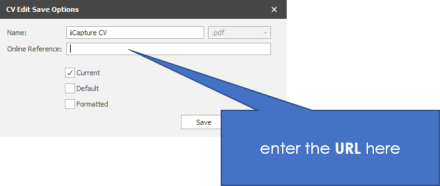
NOTE – If the candidate does not have a CV document, you can create a blank CV
- Choose Online Reference
- Choose Job or Speculative submission
- Make sure that there are ticks in against the candidates in the submit tick box for those that you’d like to submit
Adding other attachments with an online reference
If you would like to attach other candidate documents with the builder, follow the steps below:
NOTE if you are looking to attach files from other locations (local computer, company record, job record etc.) you would attach the file from the Comms Centre
NOTE – This option will only be available if there are attachments to attach. If the candidates have no other attachments, this area will be empty.
- Click OK or Cancel
OK takes you to the comms centre. Please see the section on comms centre for more details. Choose the job or contact to submit to in the Comms centre.
Cancel closes the screen without saving changes.
Submit a candidate summary
Submitting a candidate summary means that you are able to send the contents of the candidate summary tab as a submission to a job, or more likely speculatively, selecting Summary does not attach anything and although it previews the candidates summary box, it is the email template that is set to include the candidates summary field within the email message itself.
NOTE – The candidate does NOT need to have a CV to be able to submit a summary.
Follow the wizard
- Choose Candidate Summary
- Choose Job or Speculativesubmission
- Make sure that there are ticks in against the candidates in the submit tick box for those that you’d like to submit
Contact Details
If you require further assistance please contact Ikiru People using the details published on www.ikirupeople.com
Visit our Customer Portal at https://portal.ikirupeople.com/ for future events and clinics.
FeedbackIf you would like to make suggestions or have found any errors with this Help section please contact our Support team.
Copyright © 2026 Voyager by Ikiru People Ltd. All rights reservedVersion 4.87
Voyager Software is a brand of Ikiru People Ltd, a subsidiary of Dillistone Group Plc. The group is a leading global provider of software and services that enable recruitment agencies and in-house recruiters to better manage their selection process and address the training needs of individuals. Across its brands – which include Voyager Software (recruitment software UK & Australia), Dillistone FileFinder executive search software, GatedTalent, the global database of the world’s leading executives, Talentis.Global – the next generation of recruitment software and also ISV.Online, provider of online pre-employment skills testing and training tools. Dillistone Group serves thousands of clients worldwide. Ikiru People Ltd: Registration Number 02043300. Registered in England & Wales.
 |  |  |  |