Administration - Let’s get started!
Infinity is installed and ready to go. We’re going to guide you through the administration of your new recruitment system, explaining how it works, how you use it and, most importantly, how you can get the most from it.
Internal Company Setup
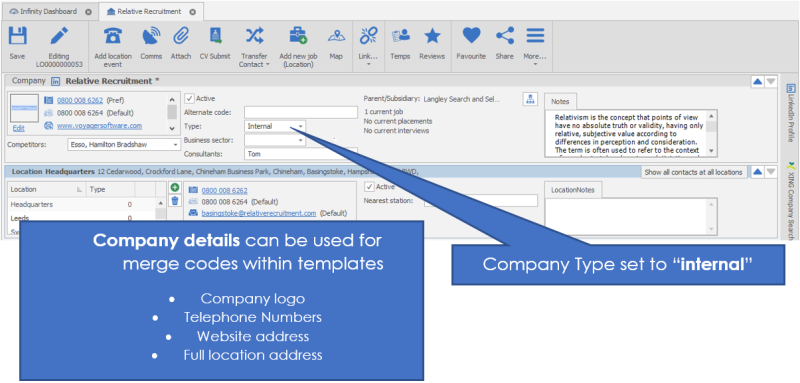
We recommend one of your first tasks is to add your business in Infinity as an Internal Company as this will provide you with key data to use when building master templates in the Comms Centre.
How to set up your business as an internal company
What will I need to do this?
Firstly, gather necessary information on your own organisation such as Company details, address, and user’s contact details. Take care to enter data in full and correctly punctuated. The data you enter for this company record can be used as part of the merging process with the Comms Centre templates.
- Create a company record in the database as described in the user manual (press F1 within Infinity to access User manual).
Important things to complete
- Company Name – Take care to enter this in full, correctly punctuated and spelt
- A Logo – The logo that is attached should be the correct size for the templates that you will be creating. Ideally this will be the correct size for emails, although adjustments can be made when creating templates
- Type – This needs to be set to be Internal.
- Location – These need to be created so that users can be added to the correct location address, enter each user’s locations as appropriate
- LinkedIn – The Company LinkedIn page URL – this is not essential but a nice to have
- Twitter – The Company twitter page – this is not essential but a nice to have
- Facebook – the Company Facebook page – this is not essential but a nice to have
You can create / add multiple internal companies if the structure of your organisation has companies / departments with different names. We’ll explain later how to assign a user to an internal company later. DO NOT add any contacts to your internal Company unless the user has been created via the wizard, this will automatically populate as you assign users to the internal company via user administration.

 Contact Details
If you require further assistance please contact Ikiru People using the details published on www.ikirupeople.com
Visit our Customer Portal at https://portal.ikirupeople.com/ for future events and clinics.
FeedbackIf you would like to make suggestions or have found any errors with this Help section please contact our Support team.
Copyright © 2026 Voyager by Ikiru People Ltd. All rights reservedVersion 4.87
Voyager Software is a brand of Ikiru People Ltd, a subsidiary of Dillistone Group Plc. The group is a leading global provider of software and services that enable recruitment agencies and in-house recruiters to better manage their selection process and address the training needs of individuals. Across its brands – which include Voyager Software (recruitment software UK & Australia), Dillistone FileFinder executive search software, GatedTalent, the global database of the world’s leading executives, Talentis.Global – the next generation of recruitment software and also ISV.Online, provider of online pre-employment skills testing and training tools. Dillistone Group serves thousands of clients worldwide. Ikiru People Ltd: Registration Number 02043300. Registered in England & Wales.
 |  |  |  |