Custom Fields
Custom fields can be added to Candidate, Company, Location, Contact, Job and Placement records. There are different types of field available, like lists, notes, numeric etc... Once added to your system these are then available within the appropriate records, search builder, available within some reports and also as merge codes for email, SMS, post (attachment) and online signature documents.
Need more information, click below:
 Custom Fields Tabs
Custom fields are available in Candidate, Company, Location, Contact and Job records
Types of Field
| Type | Setup | Example / Notes |
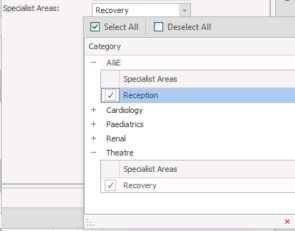
| Categorised Multi-Select |
|
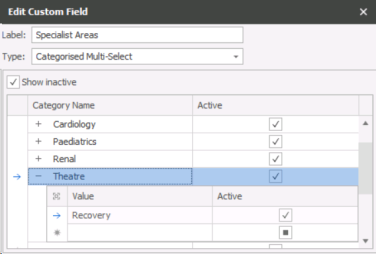
Categories and Values can be made inactive by un-ticking the adjacent Active column
|
| Check Box |

|
|
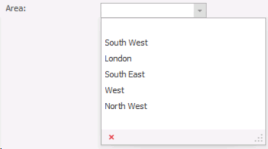
| Combo Box |
|
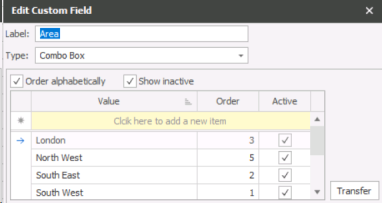
The values are ordered alphabetically as default. If Order alphabetically is un-ticked the order can be manually specified by entering the numbers in the order column (1 is top of the order) Values can be made inactive by un-ticking the adjacent Active column
|
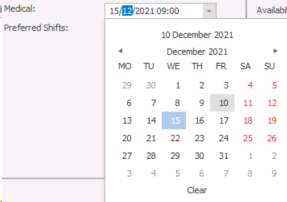
| Date / TIme Picker |
Date Only 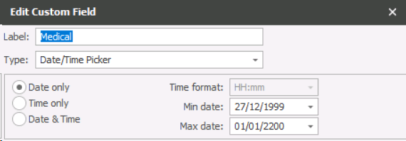
Time Only
Date and Time
|
Can be set as Date only, Time only or both Date & Time. The time format along with min and max dates can be specified if relevant Date & Time
|
| Decimal |
|
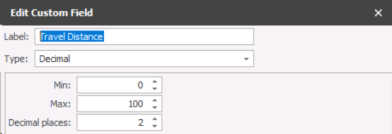
Min and max values can be set along with the number of decimal places
|
| Integer |
|
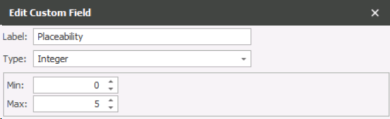
Min and max values can be set
|
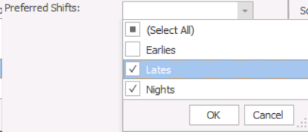
| Multi_Select List Box |
|
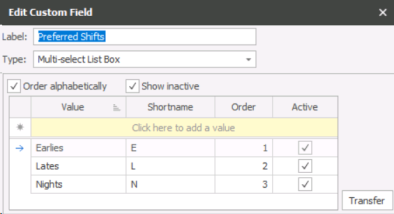
The values are ordered alphabetically by default. If ‘Order alphabetically’ is un-ticked, the order can be manually specified by entering the numbers in the order column (1 is top of the order). Values can be made inactive by un-ticking the adjacent Active column
|
| Note Control |

|
No further settings available
|
| Text Box |
|
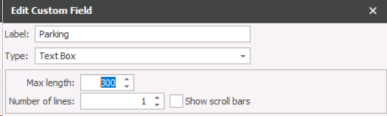
Max length can be specified and whether the field should go over multiple lines and display the scroll bar
|




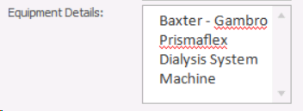
User Setup
Custom tabs will display once custom fields have been added to the appropriate records, the custom tab can be set to be the default tab when opening records via user options.
Searching Custom Fields
Adding Custom fields will automatically be available within the search builder's advanced search section. If you add custom fields within Company records then the fields are searchable in Company, Location and Contact searches.
Depending on type of field will offer the appropriate operators, for example date fields will offer greater than, less than, between and equal, where as Note fields offer Begins with, Contains, Equals and Is Blank.
| Type | Search |
| Categorised Multi-Select |
Search selected item in "Custom Field" NB:- use NOT to search records unselected specified item |
| Check Box |
Search "Custom Field" checked NB:- use NOT to search records not checked |
| Combo Box |
Search "Custom Field" selected in records NB:- user NOT to search records not selected |
| Date / TIme Picker |
Search "Custom Field" date / time, Greater than, Less Than, Between dates NB:- use NOT to search records without a date within a date range |
| Decimal |
Search "Custom Field" number, Greater than, Less than, Between NB:- Use NOT to search records without a number with a range |
| Integer |
Search "Custom Field" number, Greater than, Less than, Between NB:- Use NOT to search records without a number with a range |
| Multi_Select List Box |
Search "Custom Field" selected in records NB:- use NOT to search records not selected |
| Note Control | Search "Custom Note" that Begin With, Contains, Is Blank |
| Text Box | Search "Custom Note" that Begin With, Contains, Is Blank |
Custom Field Merge Codes
Adding Custom Fields will automatically be available as merge codes within the appropriate Comms Centre's for email, postal, SMS and Online Signature templates.
Depending on type of field will populate the appropriate merge code group and type, for example custom candidate note field will be available in a candidate group, in the text or picture type, where as a custom candidate integer field will be available in a candidate group, in the numeric type.
| Type | Merge Code |
| Categorised Multi-Select |
Merge List - output Name / Value |
| Check Box | Check Box - output as check box or Yes/No |
| Combo Box | Merge List - output Name / Value |
| Date / TIme Picker | Date / Time Field- output as short date / Long date / Day / Time / Date and Time |
| Decimal | Numeric - output Name / Value |
| Integer | Numeric - output Name / Value |
| Multi_Select List Box | Merge List - output Name / Value |
| Note Control | Text / Picture File - output full notes (as text or as Picture if note contains images or advanced formatting) |
| Text Box | Text / Picture File - output full notes (as text or as Picture if note contains images or advanced formatting) |
Delete Custom Field
Select the field you are deleting and click delete, a dialogue box will appear indicating the number of records this field has been used, click to delete the entries from the records, once all records have had the content delete you can then complete the deletion by clicking delete custom field.
Reports with Custom Fields
Below are reports that include the option of custom fields*:
| Report Name | Custom Field Group(s) |
| Temps Currently Working Report | Job, Placement |
| Temps Payroll Report | Job, Placement |
| Companies Added | Company, Location, Contact |
| Candidates Added | Candidate |
| Jobs Added | Job |
| Contract and Perm Starters | Job, Placement |
*Note: - please review latest release notes as we continue to add custom fields to reports

Contact Details
If you require further assistance please contact Ikiru People using the details published on www.ikirupeople.com
Visit our Customer Portal at https://portal.ikirupeople.com/ for future events and clinics.
FeedbackIf you would like to make suggestions or have found any errors with this Help section please contact our Support team.
Copyright © 2026 Voyager by Ikiru People Ltd. All rights reservedVersion 4.87
Voyager Software is a brand of Ikiru People Ltd, a subsidiary of Dillistone Group Plc. The group is a leading global provider of software and services that enable recruitment agencies and in-house recruiters to better manage their selection process and address the training needs of individuals. Across its brands – which include Voyager Software (recruitment software UK & Australia), Dillistone FileFinder executive search software, GatedTalent, the global database of the world’s leading executives, Talentis.Global – the next generation of recruitment software and also ISV.Online, provider of online pre-employment skills testing and training tools. Dillistone Group serves thousands of clients worldwide. Ikiru People Ltd: Registration Number 02043300. Registered in England & Wales.
 |  |  |  |