What is Placement Approval?
Infinity’s Placement Approval feature allows the Consultant to progress an accepted Offer / Placement through to a confirmed status. Approval works alongside My Infinity and prompts a Manager to review any Offers / Placements which have not been approved; these are displayed in a new panel called ‘Approval Requests’.
When an Offer / Placement is ready to be confirmed the Consultant can mark it as ‘Awaiting Confirmation’. This action triggers an entry in ‘Approval Requests’ for all users with the permission to change the Placement to Confirmed.
Approvals can be used in three scenarios:
- As a straightforward approval prompting system to assist Consultants and Managers with efficient Placement process management.
- Infinity installations using Middle Office [MO] can use Approvals and export Placement information to MO.
- Infinity installations using Astute Payroll can use Approvals and export to Astute.
There is a new Approval button on the Placement page -  Located below the Placement Status field.
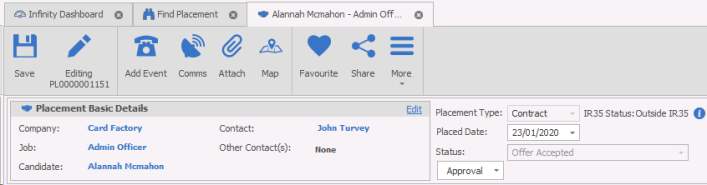
The Approval option is only available to users if the ‘Placement approval required’ option has been activated within the General Settings
The Approval button is activated when an Offer / Placement reaches the ‘Offer / Placement Accepted’ stage. Until the Offer / Placement reaches this stage the  option will be unavailable.
|
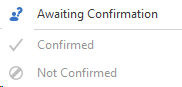
When the Offer / Placement is ready to be confirmed the Consultant should select the ‘Awaiting Confirmation’ option in the Approval drop down.
This will launch the Placement Event Logger with ‘Awaiting Confirmation’ selected.
If Business Rules are on, they will be checked. However, if the Business Rules fail, you will not be allowed to change the Offer / Placement to “Awaiting Confirmation”
The Event should be saved to move the Offer / Placement onto the next stage.
|
Awaiting Confirmation - Users set placement to Awaiting Confirmation
|
|
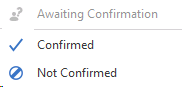
After the Offer / Placement status changes to ‘Awaiting Confirmation’ the Manager can select either ‘Confirmed’ or ‘Not Confirmed’ from the Approval drop down. The Placement Event Logger will be launched with ‘Confirmed’ or ‘Not Confirmed’ option selected.
The Event should be saved to move the Offer / Placement onto the next stage.
|
Approver can Confirm or Not Confirm the placement
|
|
When the Offer / Placement is finally confirmed the Approval button will be ‘greyed out’ and the status of the Offer / Placement along with the Manager’s name and date of Confirmation will be displayed.
|
|

Placements to Approve
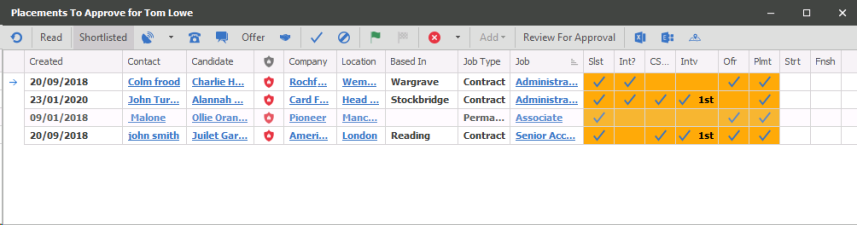
Approvers (users given permission to approve placements) can manage requests via My Infinity "Placements to Approve", this my need to be added to your My Infinity panel (right click and tick "Approval Requests"). Users can also add the "Not Confirmed" to their My Infinity to review their placements that have been marked as "Not Confirmed"
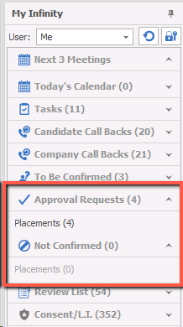
Clicking on Placements within Approval Requests will open the Placements to Approve list:

|
Confirm the selected placement |

|
Not Confirm the selected placement |
 Contact Details
If you require further assistance please contact Ikiru People using the details published on www.ikirupeople.com
Visit our Customer Portal at https://portal.ikirupeople.com/ for future events and clinics.
FeedbackIf you would like to make suggestions or have found any errors with this Help section please contact our Support team.
Copyright © 2026 Voyager by Ikiru People Ltd. All rights reservedVersion 4.87
Voyager Software is a brand of Ikiru People Ltd, a subsidiary of Dillistone Group Plc. The group is a leading global provider of software and services that enable recruitment agencies and in-house recruiters to better manage their selection process and address the training needs of individuals. Across its brands – which include Voyager Software (recruitment software UK & Australia), Dillistone FileFinder executive search software, GatedTalent, the global database of the world’s leading executives, Talentis.Global – the next generation of recruitment software and also ISV.Online, provider of online pre-employment skills testing and training tools. Dillistone Group serves thousands of clients worldwide. Ikiru People Ltd: Registration Number 02043300. Registered in England & Wales.
 |  |  |  |