WordPress Integration
We are excited to offer the facility to post jobs to your WordPress website. This feature uses the WP Job Manager plug-in available for all WordPress Business accounts (plug-ins are only available with this level of account).
Technical Notes
The WordPress Job Manager plugin must be installed to use this functionality in Infinity
https://en-gb.wordpress.org/plugins/wp-job-manager/
Infinity supports the use of WordPress application passwords
https://make.wordpress.org/core/2020/11/05/application-passwords-integration-guide/
- Requires WordPress 5.6 or higher
- Requires Application Passwords being enabled
- This is turned on by default on secure sites i.e. https
- If your site is not secure it will have to be manually configured by your WordPress hosting administrator
- Note: 3rd party security add-ons might disable app passwords by default, check within the settings of your add-ons to confirm
Infinity ‘job types’ should be set up in Job Manager by the customer. There is a ‘Job Listings’ tab in the WordPress admin page. In that tab there is a menu for "Job Types". Reference data should be setup to match the Infinity job types of Permanent, Fixed Term, Contract, Temporary
 Infinity Setup
There is a setting in Infinity Administration / Job Posting tab to post jobs to WordPress Job Manager
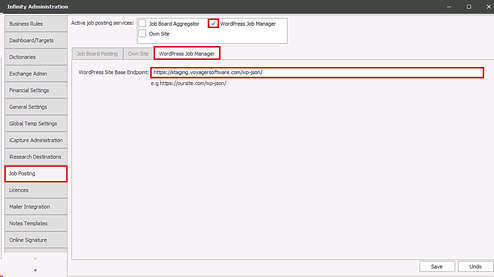
When the setting is ticked the WordPress Job Manager tab enables and the WordPress Site Base Endpoint URL can be entered
Configured Infinity databases will show the WordPress Job Manager tab on the job page
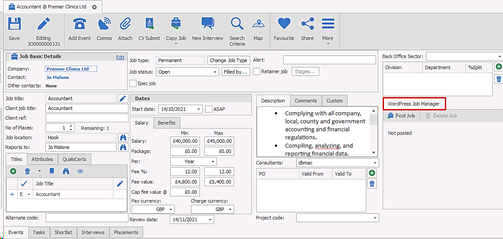
Authenticated Infinity users can post/update/delete jobs from Infinity to WordPress Job Manager. Users can be authenticated in Administration / User Administration / Edit User / WordPress tab
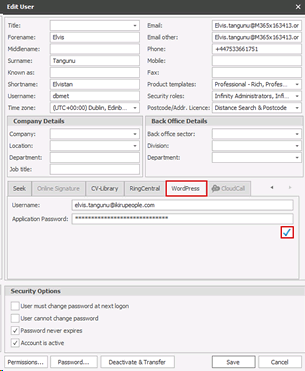
It is recommended users have their own WordPress Job Manager credentials and do not share
Post
The user can click on the ‘Post Job’ button on the WordPress Job Manager tab toolbar if the job is not already posted

The job should be saved before posting
An interim window called ‘Post Job’ displays for the user to complete
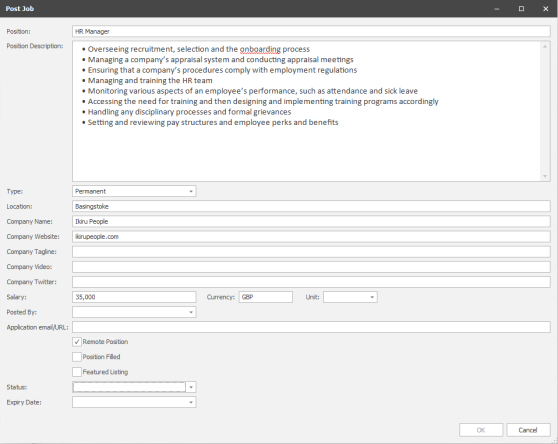
- All fields on the screen can be edited by the user
- Infinity fields are mapped where possible as per the field mapping section below
- WordPress fields default as follows
- Expiry Date - 1 month
- Status ‘Published’
- Position Filled - off
- Featured Listing - off
- Salary
- Salary Currency
- Salary Unit (interval Daily, Weekly, Monthly, Annually)
- Adding the ‘Application email/URL’ enables the ‘Apply for Job’ function in WordPress
- User can CLOSE and return to the job, losing any changes in the ‘post’ window
- User can POST the job
- If issues are encountered the user is informed straight away and must re-try posting
Field Mapping
| Infinity Job Field | Word Press Job Manager Field |
| Client Job Title | Position |
| Job Description | Position Description |
|
Job Type
|
Type - If Job Manager ‘type’ matches the Infinity ‘type’ name it will default Note Infinity ‘job types’ should be set up in Job Manager by the customer. There is a ‘Job Listings’ tab in the WordPress admin page. In that tab there is a menu for "Job Types". Reference data should be setup to match the Infinity job types of Permanent, Fixed Term, Contract, Temporary |
| Salary | Salary |
| Job Location Address | Location |
| Posting user’s WordPress public display name |
Posted By Note WordPress user accounts have a public display name setting that can be configured accordingly – e.g. forename and surname rather than email address |
If a job is successfully posted the user is returned to the job page and the job posting status is updated on the tab (first posted and last posted fields)
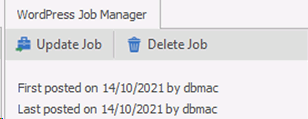
A job information event is logged with an action of ‘Job Website Advert Posted’. Further posting information is populated in the details field including the unique URL link to the post

Update
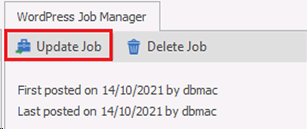
The user can click on the ‘Update Job’ button on the WordPress Job Manager toolbar if the job has previously been posted and exists on Word Press Job Manager (even if expired)
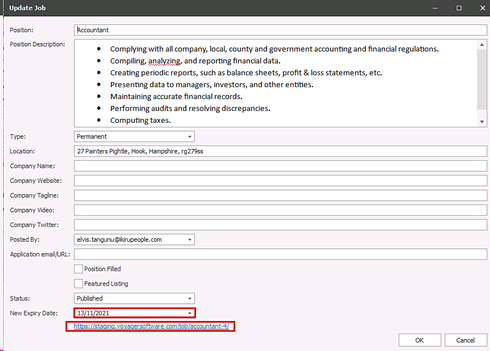
An interim window called ‘Update Job’ displays for the user to complete
-
The job details shown are taken from WordPress Job Manager post and not from the Infinity job
-
The expiry date field label displays as ‘New Expiry Date’
-
The unique URL hyperlink is displayed on the page, allowing the user to link to the job advert on the site
-
All fields on the screen (except the URL) can be edited by the user
-
User can CLOSE the posting window or press CANCEL and return to the job, losing any changes
-
User can press OK to update the job
-
If issues are encountered the user is informed straight away and must re-try updating
If a job is successfully updated the user is returned to the job page and the job posting status is updated on the tab (last posted fields)
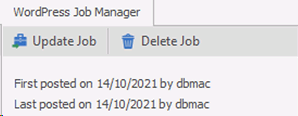
A job information event is logged with an action of ‘Job Website Advert Re-posted’. Further posting information is populated in the details field including the unique URL link to the post

Delete
The user can click on the delete button if the job has previously been posted and exists on Word Press Job Manager (even if expired)
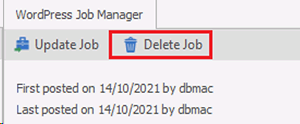
- If issues are encountered the user is informed straight away and must re-try deleting
If a job is successfully deleted the job posting status is updated on the tab (deleted on fields)
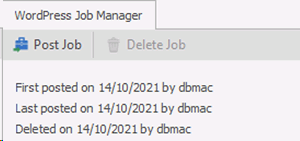
A job information event is logged with an action of ‘Job Website Advert Deleted’. Further posting information is populated in the details field including the unique ID of the post that was deleted

Note: deleting a job in WordPress Job Manager will not delete the job in Infinity automatically but will break the link. The job will need to be deleted manually in Infinity
Contact Details
If you require further assistance please contact Ikiru People using the details published on www.ikirupeople.com
Visit our Customer Portal at https://portal.ikirupeople.com/ for future events and clinics.
FeedbackIf you would like to make suggestions or have found any errors with this Help section please contact our Support team.
Copyright © 2026 Voyager by Ikiru People Ltd. All rights reservedVersion 4.87
Voyager Software is a brand of Ikiru People Ltd, a subsidiary of Dillistone Group Plc. The group is a leading global provider of software and services that enable recruitment agencies and in-house recruiters to better manage their selection process and address the training needs of individuals. Across its brands – which include Voyager Software (recruitment software UK & Australia), Dillistone FileFinder executive search software, GatedTalent, the global database of the world’s leading executives, Talentis.Global – the next generation of recruitment software and also ISV.Online, provider of online pre-employment skills testing and training tools. Dillistone Group serves thousands of clients worldwide. Ikiru People Ltd: Registration Number 02043300. Registered in England & Wales.
 |  |  |  |