 Online Signatures
The Infinity Comms Centre can be used to send ‘Online Signature’ documents e.g. Contracts for Candidates to electronically sign and return via email. Signed documents are automatically downloaded to Infinity and logged against the signer's record and within the Placement record.
This functionality is provided via an api integration with legalesign, who have various cost plans.
To setup Online Signatures, see Online Signatures Administration section
 Sending Online Signatures from the Comms Centre
- When sending an email a new ‘Online Signature’ option is available
- This option is only available if Online Signatures have been enabled on the database
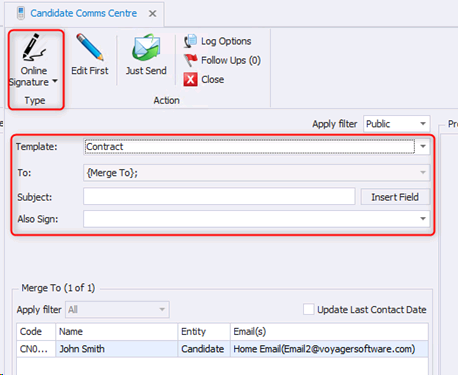
- If any recipients do not have a forename or surname, the email address will be blanked, and a warning given to the user.

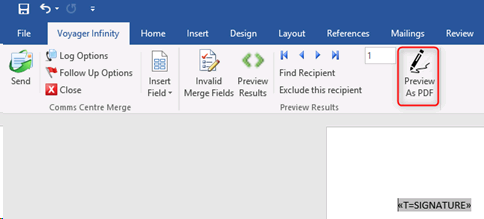
- To preview the document as a merged pdf document, click edit first, and select ‘Preview as PDF’
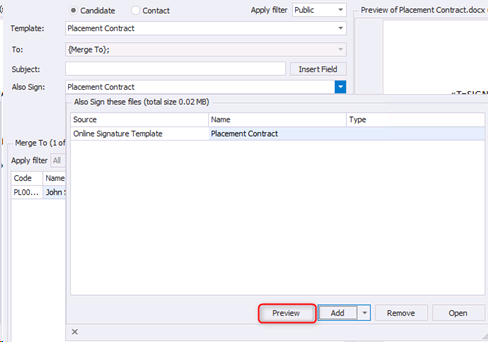
- The ‘Also Sign’ option has a ‘Preview’ button where you can see the ‘Also Sign’ attachment after it has been merged and converted to a pdf
When sending, the following is checked, and the user is prevented from continuing
- There is at least one merged recipient with an email address
- All attachments contain at least one signature merge field
- All merge fields are valid
The ‘Online Signature Preferences’ window appears, which allows users to select the Group (Groups are configured for your particularly legalesign account), and any personal message you wish to appear in the body of the email that legalesign sends. Additional people (candidates, contacts, or colleagues) can be added/removed in the Online Signature Preferences window at the time of sending -
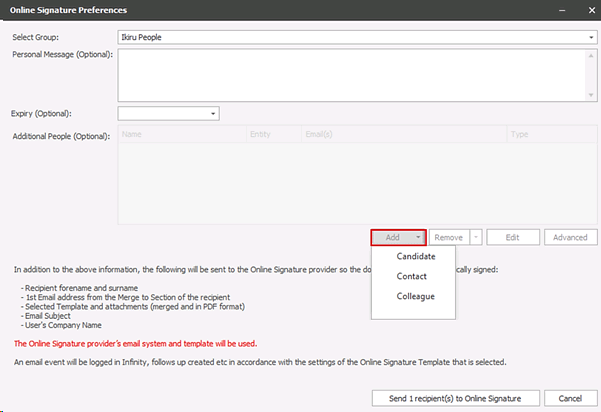
- When candidates and contacts are added, the email used is the ‘send as default’ email address
- When colleagues are added the email used is from their User Administration- ‘Email’ field
- The ‘edit’ button can be used to edit the email address shown. Changes are not saved to the database and are only applied for this send
- The ‘advanced’ button can be used to view all email addresses available on the record and change accordingly by ticking the ‘to’ column, as per standard Comms Centre functionality
The people added must be assigned the required ‘Type’
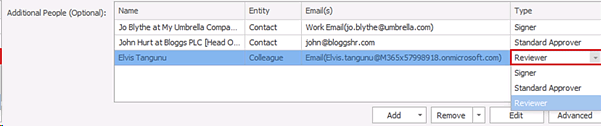
When the document is sent to Legalesign the system will assume the ‘signer’ number as per the order of the grid. E.g. the first record in the grid set as a type ‘signer’ will be ‘signer 2’. It is imperative that ‘signers’ are in the correct order that corresponds to the numbered text tags in the Infinity Online Signature template
For further information including setting up multiple signers see Text Tags - Legalesign Esignature
Note: There is a known issue documented by Legalesign. If a ‘standard approver’ is added, the document must contain a signer tag for them (even though they do not need to sign). This will be removed from the document by Legalesign before it is sent
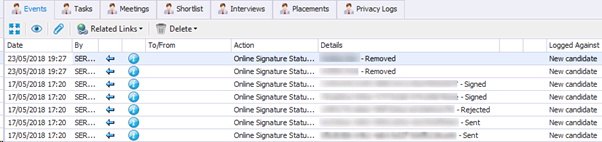
An event is logged when the document is sent to legalesign
Legalesign templates sent from Infinity pick up the default Legalesign automatic reminder schedules.
Legalesign limits documents to 100/hour, via a soft throttle. If you wish to send more than this, please contact legalesign.
Document Status Events
When the status of a document is changed, it’s automatically logged
Every 4 hours the status of documents is checked, and the latest status is logged against the page the merge was sent from.
The name of the template is also logged in the event details as well as the status
Contact Details
If you require further assistance please contact Ikiru People using the details published on www.ikirupeople.com
Visit our Customer Portal at https://portal.ikirupeople.com/ for future events and clinics.
FeedbackIf you would like to make suggestions or have found any errors with this Help section please contact our Support team.
Copyright © 2026 Voyager by Ikiru People Ltd. All rights reservedVersion 4.87
Voyager Software is a brand of Ikiru People Ltd, a subsidiary of Dillistone Group Plc. The group is a leading global provider of software and services that enable recruitment agencies and in-house recruiters to better manage their selection process and address the training needs of individuals. Across its brands – which include Voyager Software (recruitment software UK & Australia), Dillistone FileFinder executive search software, GatedTalent, the global database of the world’s leading executives, Talentis.Global – the next generation of recruitment software and also ISV.Online, provider of online pre-employment skills testing and training tools. Dillistone Group serves thousands of clients worldwide. Ikiru People Ltd: Registration Number 02043300. Registered in England & Wales.
 |  |  |  |