Driving Licence
General
NB: - Driving Licence feature is enabled within the general settings
| Minimum driving age | |
| Maximum driving licence points | |
| Driving licence major endorsement accepted | |
| Category Experience |
You can manage Driving Licence compliance via each candidate record, utilising expiry dates and the last checked date which triggers alerts within Expiring Items (My Infinity and Application Menu) lists.
Driving Licence Checks
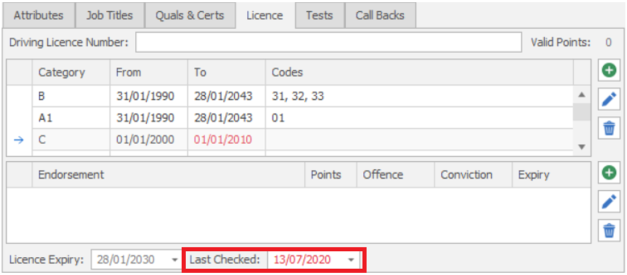
Candidate licence checks should occur every three months. The last checked field is stored on the candidate page driving licence tab
There is a new sub section in My Infinity ‘Expiring Items’ called ‘Candidate Licence Checks' that is only visible if ‘Enable driving licence functionality’ is ticked in the admin screen
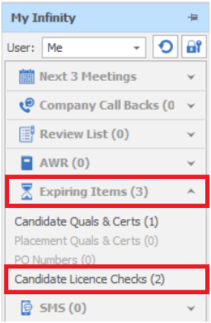
The ‘Candidate Licence Checks’ link, shows the number of candidates who have driving licence checks due, this covers the following criteria
- Candidates whose ‘Last checked’ field appears in red on their candidate page (the next check is overdue or within the next month)
- Candidates where the user is the owning consultant
- Candidates that are active
 Driving Licence Lists
When clicking the link, a grid opens listing the candidates with licences to be checked, ordered by the last checked date, oldest at the top
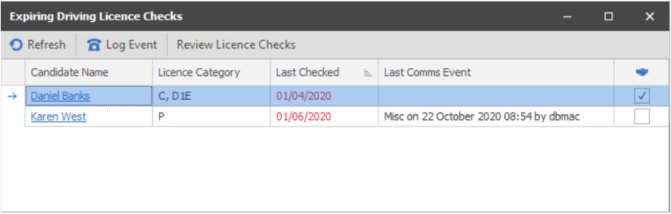
The grid has the following columns
- Candidate Name – with a hyperlink to the candidate page
- Licence Category – the list of licence categories assigned to the candidate
- Last Checked – the date the licence was last checked
- Last Comms Event – details of the last communication event with the candidate
- Has placement – whether the candidate has a current contract or temp placement
The toolbar has functionality to refresh the list, log a candidate event for the selected record and review the licence checks by opening the candidate page in review mode
When reviewing licence checks, the driving licence tab will be the active tab on the candidate page.
Candidate licence checks can be managed for all candidate owning consultants. This is available from the Application\Expiring Items\Expiring Candidate Licence Checks menu
Driving Licence Expiry
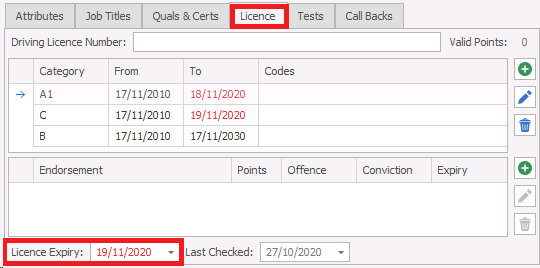
The candidate driving licence expiry field is stored on the candidate page driving licence tab. The date appears in red, if it has expired, or will expire in the next four weeks
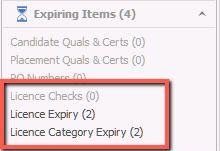
There is a new sub section in My Infinity ‘Expiring Items’ called ‘Licence Expiry’
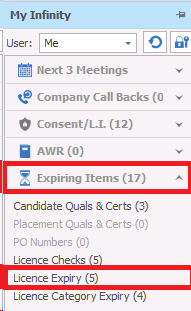
The ‘Licence Expiry’ link, shows the number of candidates who have an expired driving licence, this covers the following criteria
• Candidates whose ‘Licence Expiry’ field appears in red on their page
• Candidates where the user is the owning consultant
• Candidates that are active
When clicking the link, a grid opens listing the candidates with expired driving licences, ordered by licence expiry date, oldest at the top
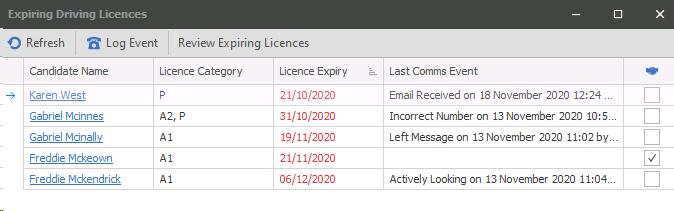
The grid has the following columns
• Candidate Name – with a hyperlink to the candidate page
• Licence Category – the list of licence categories assigned to the candidate
• Licence Expiry – the date the licence expired
• Last Comms Event – details of the last communication event with the candidate
• Has placement – whether the candidate has a current contract or temp placement
The toolbar has functionality to refresh the list, log a candidate event for the selected record and review the expired licence by opening the candidate page in review mode
When reviewing expired licences, the driving licence tab will be the active tab on the candidate page
Candidate licence expiries can be managed for all candidate owning consultants. This is available from the Application\Expiring Items\Expiring Licences menu
Driving Category Expiry
The driving licence category ‘to date’ is stored on the candidate page driving licence tab. The date appears in red, if it has expired, or will expire in the next four weeks
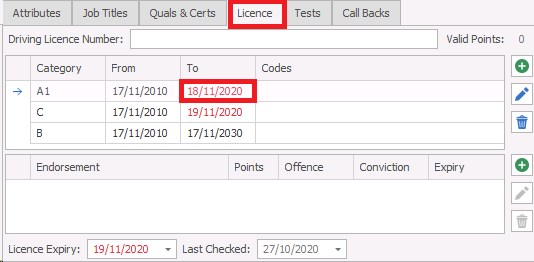
There is a new sub section in My Infinity ‘Expiring Items’ called ‘Licence Category Expiry'
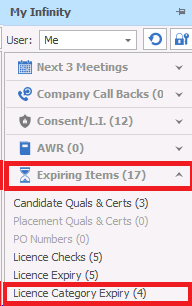
The ‘Licence Category Expiry’ link, shows the number of candidates who have expired driving licence categories, this covers the following criteria
• Candidates with at least one licence category ‘to date’ that appears in red on their page
• Candidates where the user is the owning consultant
• Candidates that are active
When clicking the link, a grid opens listing the candidates with expired driving licence categories, ordered by the licence category expiry date, oldest at the top
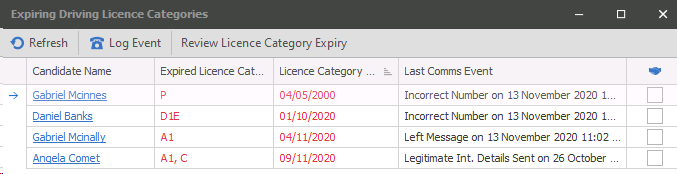
The grid has the following columns
• Candidate Name – with a hyperlink to the candidate page
• Expired Licence Category – the list of licence categories that have expired
• Licence Category Expiry – the oldest expiry date from all the expired categories
• Last Comms Event – details of the last communication event with the candidate
• Has placement – whether the candidate has a current contract or temp placement
The toolbar has functionality to refresh the list, log a candidate event for the selected record and review the expired licence categories by opening the candidate page in review mode
When reviewing expired licence categories, the driving licence tab will be the active tab on the candidate page
Candidate expired licence categories can be managed for all candidate owning consultants. This is available from the Application\Expiring Items\Expiring Licence Categories menu
Contact Details
If you require further assistance please contact Ikiru People using the details published on www.ikirupeople.com
Visit our Customer Portal at https://portal.ikirupeople.com/ for future events and clinics.
FeedbackIf you would like to make suggestions or have found any errors with this Help section please contact our Support team.
Copyright © 2026 Voyager by Ikiru People Ltd. All rights reservedVersion 4.87
Voyager Software is a brand of Ikiru People Ltd, a subsidiary of Dillistone Group Plc. The group is a leading global provider of software and services that enable recruitment agencies and in-house recruiters to better manage their selection process and address the training needs of individuals. Across its brands – which include Voyager Software (recruitment software UK & Australia), Dillistone FileFinder executive search software, GatedTalent, the global database of the world’s leading executives, Talentis.Global – the next generation of recruitment software and also ISV.Online, provider of online pre-employment skills testing and training tools. Dillistone Group serves thousands of clients worldwide. Ikiru People Ltd: Registration Number 02043300. Registered in England & Wales.
 |  |  |  |