 Ad Hoc List
 General
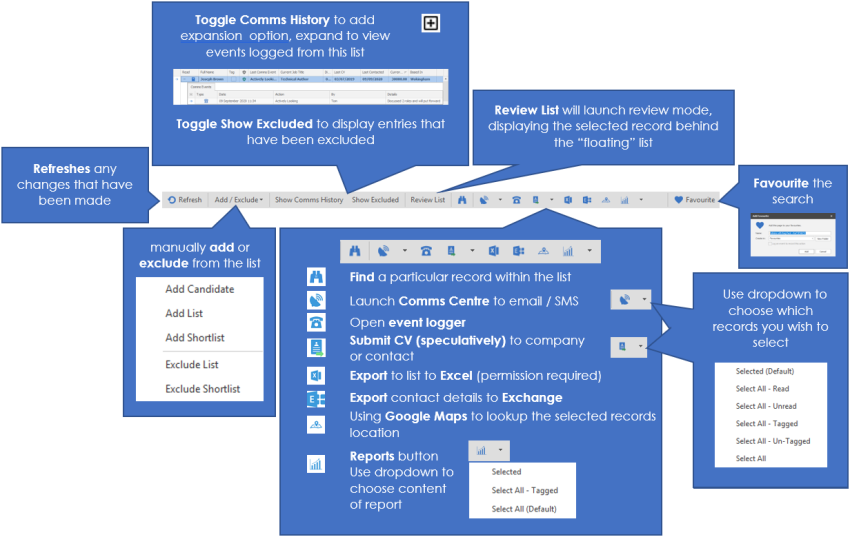
The list tab is the area that you will move records to when you have decided that you would like to action them further.
It is from here that you will be able to complete actions on the results.
These include
- Comms centre (emails, letters, faxes and SMS)
- Logging events
- Submitting speculative CV’s
- Exporting to Excel
- Automap
- Reports
Manually adding and removing records from the list
Add a single record
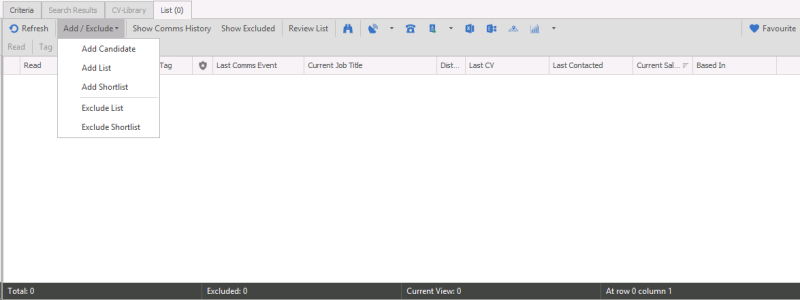
- Click the Add / Exclude
 icon on the toolbar for options.
- Choose Add Candidate
- Enter the information into the find screen that appears; choose the correct record in the bottom of the screen (if it appears automatically). Click Find to make Infinity search for the relevant record
- Choose the correct record in the bottom of the screen and double click to confirm
- The record will now be in the list
Add another list to your list
- Click the Add / Exclude icon on the toolbar for options.
- Click the Add list option
- Choose the list that you would lie to add and click OK
- You can also search from here.
Exclude a list
- Click the Add / Exclude icon on the toolbar for options.
- Choose the option to exclude list
- Choose the list that you would like to exclude and click OK
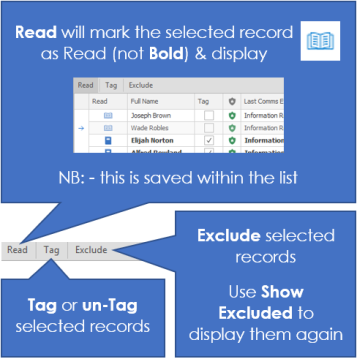
Candidate List Report
When launching reports you can access the candidate Search List report, which exports all the candidates with core details into a report. This will depend on your permissions, see your system administrator for more details.
Columns include:
Code, Title, Names, Known As, Address, Post Code, DOB, Age, Status, Preferred Location, Current Employer, Current Job Title, Expected Salary, Expected Contract Rate, Job Type, Notice, Created Date, Last Contacted Date, Next Call Back, Last Logged Event, Phone Number, Mobile Number, Email Address, Summary, Consultant(s), Attributes, Job Titles and Source(s)

Contact Details
If you require further assistance please contact Ikiru People using the details published on www.ikirupeople.com
Visit our Customer Portal at https://portal.ikirupeople.com/ for future events and clinics.
FeedbackIf you would like to make suggestions or have found any errors with this Help section please contact our Support team.
Copyright © 2026 Voyager by Ikiru People Ltd. All rights reservedVersion 4.87
Voyager Software is a brand of Ikiru People Ltd, a subsidiary of Dillistone Group Plc. The group is a leading global provider of software and services that enable recruitment agencies and in-house recruiters to better manage their selection process and address the training needs of individuals. Across its brands – which include Voyager Software (recruitment software UK & Australia), Dillistone FileFinder executive search software, GatedTalent, the global database of the world’s leading executives, Talentis.Global – the next generation of recruitment software and also ISV.Online, provider of online pre-employment skills testing and training tools. Dillistone Group serves thousands of clients worldwide. Ikiru People Ltd: Registration Number 02043300. Registered in England & Wales.
 |  |  |  |