Exchange Administration

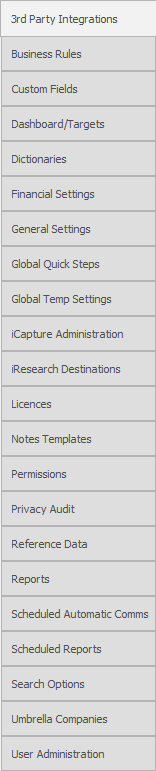 General
Within this section you will setup the exchange server(s), this will be used when setting up the users within the user administration area to turn on exchange sync allowing Infinity to automatically pick up emails, calendars and / or tasks from Exchange and ensure any appointments or emails sent using other Exchange programs (like Outlook) will show within Infinity as well. See user administration section for more details. Office 365 will be included by default.
It is very important to setup exclusions to ensure internal emails are not picked up into Infinity.
 If you do not have this information then you will need to contact your company’s IT / email provider
 Managing Exchange servers
NB: - As part of the installation process Voyager will usually add your exchange server details if you have supplied them within the hardware / software documentation
Adding a new Exchange server
- Click on
 . Existing Exchange server details will be displayed.

- Click on
 to set up a new Exchange Server connection
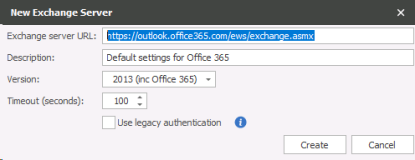
- Enter the details of the Exchange server. Note that you may need to speak to your System Administrator to ensure the correct information is entered
- Enter a description
- Select the Version of Exchange from the list of Versions
- Input the number of seconds to control a timeout between the server and Infinity
- Click
 and the Exchange server details will be assigned to the selected user
Edit an Exchange server
- Select the Exchange Server you wish to edit and click on
 .
. - Edit the details as necessary and click Save
Delete an Exchange Server
Select the Exchange Server you wish to delete and click 
The Exchange Server details will be deleted.
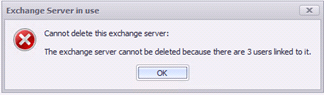
You cannot delete an exchange server if it is in use, whether it is used for a user account or iCapture or job posting.
Setting up Exclusions
 Please note all consultants email addresses must be added to the Internal Company in order for emails to sync properly. If you do not want internal emails to be copied into the database then you must set up all company domains as exclusions.
Use the Exchange Exclusions option to exclude individual email addresses or complete domains.
The example shows a complete domain is excluded by using the * wild card symbol as well as an individual email address. Use the Active tick box to include the domains and email addresses in Synchronisation.
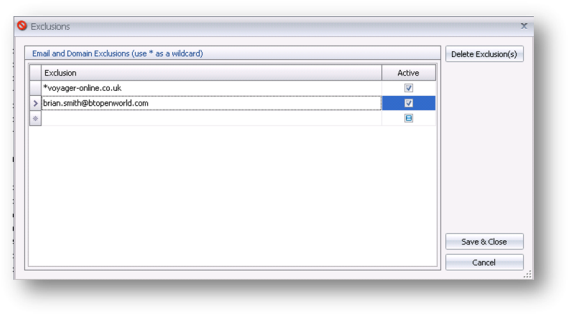
This works by recognising that the email is being sent from one user whose email address contains @voyager-online.co.uk to another user whose email address contains the same. If you have individuals whose emails are of a sensitive nature and should also not been copied in then simply add their email to the list of exclusions. In addition you will need to add your domain to the exclusions to avoid synchronisation of other external emails even if you are a single user account.
NB: - CC or BCC emails will also be sync’d into the database, this can cause duplicate logs if you CC or BCC a colleague. This also means if a user is not set to synchronise inbox and sent items CC’s or BCC’s a user that has inbox and sent items synchronising a copy will be recorded in the database

Contact Details
If you require further assistance please contact Ikiru People using the details published on www.ikirupeople.com
Visit our Customer Portal at https://portal.ikirupeople.com/ for future events and clinics.
FeedbackIf you would like to make suggestions or have found any errors with this Help section please contact our Support team.
Copyright © 2026 Voyager by Ikiru People Ltd. All rights reservedVersion 4.87
Voyager Software is a brand of Ikiru People Ltd, a subsidiary of Dillistone Group Plc. The group is a leading global provider of software and services that enable recruitment agencies and in-house recruiters to better manage their selection process and address the training needs of individuals. Across its brands – which include Voyager Software (recruitment software UK & Australia), Dillistone FileFinder executive search software, GatedTalent, the global database of the world’s leading executives, Talentis.Global – the next generation of recruitment software and also ISV.Online, provider of online pre-employment skills testing and training tools. Dillistone Group serves thousands of clients worldwide. Ikiru People Ltd: Registration Number 02043300. Registered in England & Wales.
 |  |  |  |