Restriction
Automatic Restriction
Automatic Restriction, restricts candidates when Consent / Legitimate Interest is Refused / Expired
Automatic Restriction is designed for candidates who have Consent / Legitimate Interest Refused / Expired and have a Contractual / Legal Lawful Basis i.e. They have a placement, but are no longer looking for work
- Restriction is designed to ‘Restrict Recruitment Processing’, which primarily restricts candidates from appearing in search results.
- Restricted candidates appear on the find screen, as they may call you regarding placements.
Automatic Restriction also Restricts candidates who have Consent / Legitimate Interest Refused / Expired and are due to be deleted
- It is recommended that these candidates are deleted
Automatic Restriction is off by default. We recommend that it is turned On
 Manual Restriction
A Candidate may wish to be manually restricted if their data is not accurate or they are contesting Legitimate Interest. They will be Restricted for a set period of time. (Up to 2 years)
A Candidate can be manually restricted, from the candidate page ‘Privacy Audit’ screen
This setting is off by default on all new and upgraded candidates
Users with the ‘MaintainRestrictedCandidates’ permission can manually restrict candidates
The restriction reason fields are mandatory for manually restricted candidates
Candidates can be restricted for a maximum or 2 years
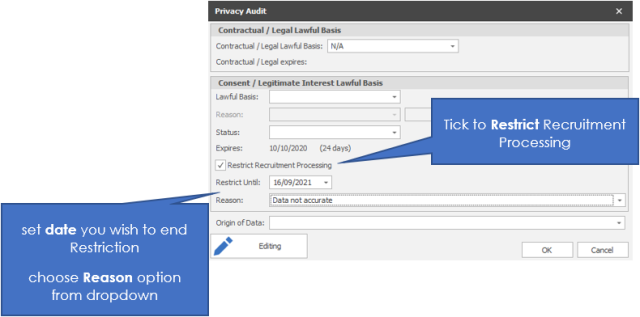
When manually restricting a candidate, the user is warned of several potential issues, but are not prevented from restricting the candidate:
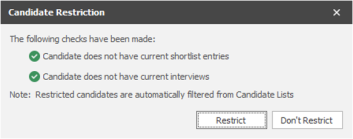
- The candidate has current shortlist records
- The candidate has a current interview
- There is also a note, informing users that restricted candidates are automatically filtered from candidate lists
- Each check either has a ‘pass’ or ‘warn’ symbol to indicate whether the candidate passes the checks or not
Un-Restricting Candidates who were manually restricted
Candidates are automatically un-restricted, if their ‘until’ date is today or in the past or you can manually un-tick Restrict Recruitment Process button (permissions required)
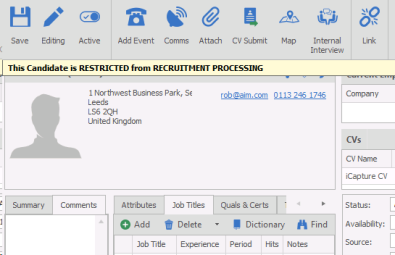
When Opening Restricted Candidates, users are warned that the candidate is restricted
Users with the ‘MaintainRestrictedCandidates’ permission can open restricted candidates (DBManagers have access all areas)
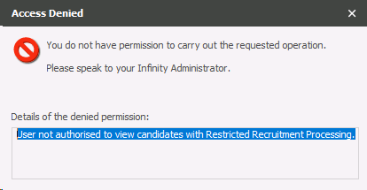
Users without permissions cannot open Restricted Candidates
Users without the ‘MaintainRestrictedCandidates’ permission can open restricted candidates
Restricted candidates are NOT displayed in search results
When the search is run, Restricted candidates are removed from the results
This includes:
• Re:Job Search Results
• Candidate Search Results
• Autosearch Results
Restricted candidates are NOT displayed in search lists
Restricted candidates are filtered from the lists
If a candidate is un-restricted, then he will re-appear in the list
Restricted candidates are NOT displayed the Temp Unfilled Jobs Screen
When a job is selected, restricted candidates are removed from the results
The Privacy Audit Icon indicates if the candidate is restricted
On the candidate page, the Icon and tooltip indicate that the candidate are restricted
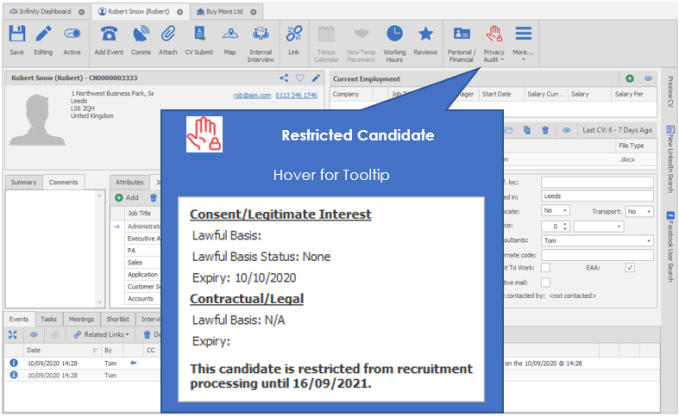
The Privacy Audit icon is displayed in various other grids in Infinity, and this icon now indicates if the candidate is restricted:

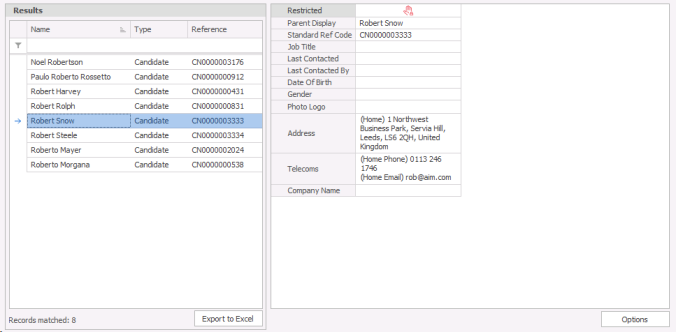
The Restricted column is added to the candidate find screen
Both Find screens have the Restricted column
Advanced Find
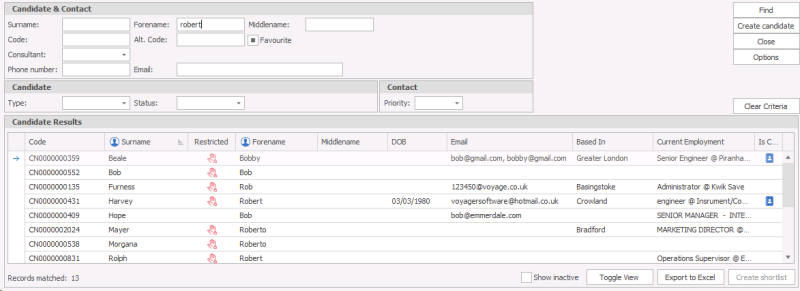
Quick Find
The Restricted Column is added to some My Infinity Grids
This column is added to:
- Refused / Expired
- Bulk Update / Delete Failed
Restricted candidates do NOT appear in some My Infinity Grids
To prevent users from emailing restricted candidates, they are removed from the following My Infinity Grids:
- Not Started
- Email Required
- Renewals – Next 30 Days
- Expiring – Next 7 Days
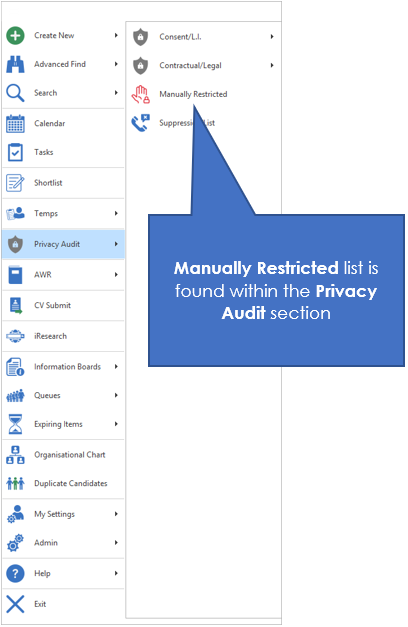
Users with permissions can see a list of manually restricted candidates

Users CAN post from iCapture to update a Restricted Infinity Candidate
Any user can post from iCapture to update a Restricted Infinity Candidate
If you select ‘Post and Open’ then the candidate is not opened in Infinity unless the user has the ‘MaintainRestrictedCandidates’ Permission
The ‘Job Shortlist Comms Centre’ will NOT send an email to a restricted candidate
Restricted candidates are not automatically removed from shortlists
Restricted candidates will not appear in the Jobs Comms Centre and will not allow CV to be submitted
Restricted candidates cannot be communicated with from the Jobs Shortlist i.e. You cannot communicate with a candidate from a shortlist unless they have an interview or placement that you wish to communicate with them about
If you have permissions to open a candidate page, then you can send them an email from their candidate page.
Permission to manually restrict / unrestrict / open a restricted candidate
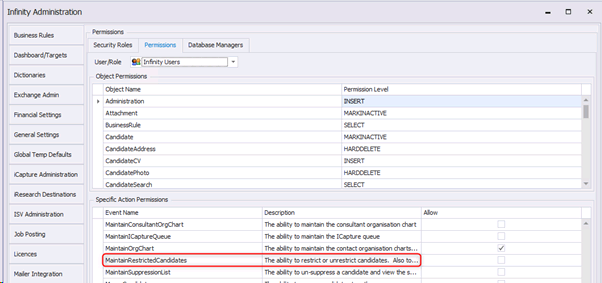
The ‘MaintainRestrictedCandidates’ permission allows users to:
- Restrict candidates
- Unrestrict candidates
- Open Restricted Candidates
This permission is On by default for administrators and Database Managers
This permission is Off by default for users
Restriction Reason reference data
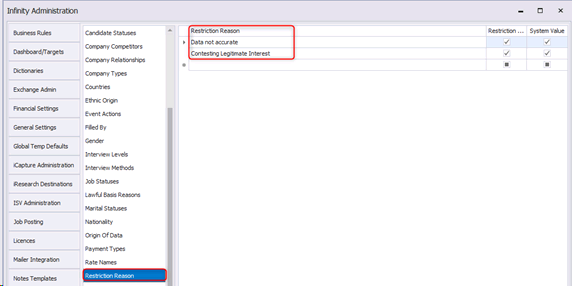
There is new ‘Restriction Reason’ reference data (This is separate from the “Lawful Basis Reason” Reference data)
There are two reasons included by default
See GDPR section for more details
See Candidate Privacy Audit section for more details
See Suppression Lists for more details
See Automatic Restrictions section for more details
See Subject Access Request for more details
Contact Details
If you require further assistance please contact Ikiru People using the details published on www.ikirupeople.com
Visit our Customer Portal at https://portal.ikirupeople.com/ for future events and clinics.
FeedbackIf you would like to make suggestions or have found any errors with this Help section please contact our Support team.
Copyright © 2026 Voyager by Ikiru People Ltd. All rights reservedVersion 4.87
Voyager Software is a brand of Ikiru People Ltd, a subsidiary of Dillistone Group Plc. The group is a leading global provider of software and services that enable recruitment agencies and in-house recruiters to better manage their selection process and address the training needs of individuals. Across its brands – which include Voyager Software (recruitment software UK & Australia), Dillistone FileFinder executive search software, GatedTalent, the global database of the world’s leading executives, Talentis.Global – the next generation of recruitment software and also ISV.Online, provider of online pre-employment skills testing and training tools. Dillistone Group serves thousands of clients worldwide. Ikiru People Ltd: Registration Number 02043300. Registered in England & Wales.
 |  |  |  |