Unsubscribe
Overview
This functionality is available for SaaS customers only.
Emails can be sent from the Infinity Comms Centre to candidates /contacts, offering an unsubscribe link. The recipient can click the link and unsubscribe on a website. This will update Infinity and untick the ‘OK to Mailshot’ field against the candidate’s / contact’s email address.
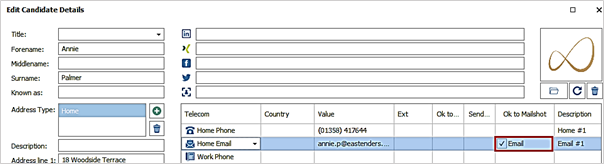
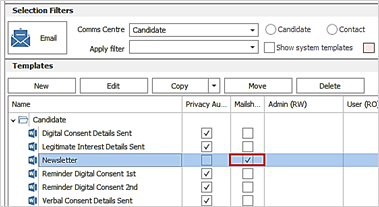
Note: Infinity Comms Centre templates ticked as ‘Mailshot’ require the candidate’s/contact’s email address to be ticked as ‘OK to Mailshot’, otherwise the send is prevented.
Administration
In Administration / General Settings there is a ‘Web Reviews / Unsubscribe’ tab.
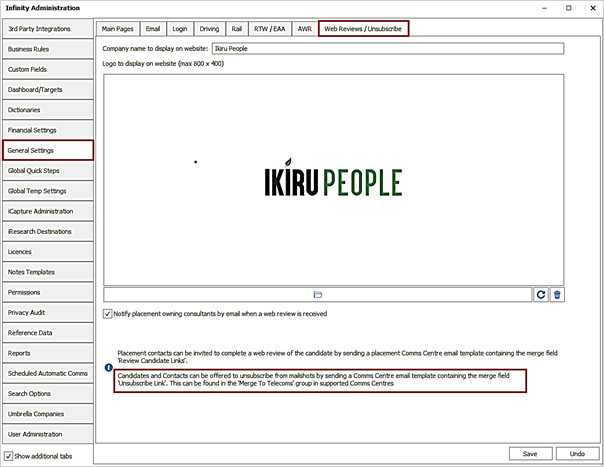
The company name and logo are also used to display on the ‘Unsubscribe’ website in addition to the ‘Web Reviews’ website.
There is a note on the screen advising the users to use the ‘Unsubscribe Link’ merge link in their candidate and contact related Comms Centre templates.
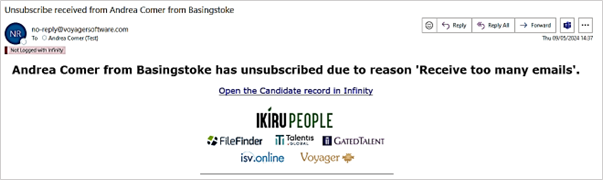
There is a setting to notify owning consultants by email when a candidate/contact unsubscribes.
- This setting is on as default.
- When enabled and a candidate / contact / location or company unsubscribes , an SMTP email notification is automatically sent to the owning consultants.
- The email is sent to each owning consultant of the page (one email with multiple 'to' addresses)
- If the page is location, the email is sent to company owners
- The user’s email address field is used from the User Administration screen, but if blank, the 'Email other' field is used
- The email is sent from the following Voyager email address: no-reply@voyagersoftware.com
- If the email address that is unsubscribing is against multiple entities an email is sent for each page. If this is a contact who matches a global telecom at multiple locations an email is sent for the contact at each location
- The email body contains a link to the Infinity page
Note – email notifications are also sent when Infinity receives an unsubscribe request from the Mailchimp integration (candidate and contact list only).
Comms Centre
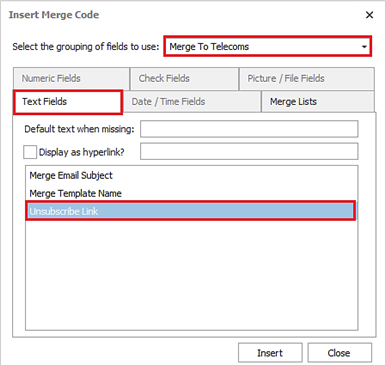
Comms Centre template setup - There is a new merge field called ‘Unsubscribe Link’ in the ‘Merge To Telecoms’ group / ‘Text Fields’ tab in candidate / contact related Email Comms Centres.
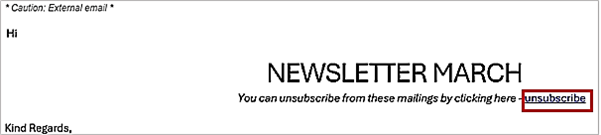
This merges as a clickable hyperlink field called ‘unsubscribe’.
When a recipient receives an email and presses the unsubscribe link, they are taken to a website with the admin screen’s website company name and logo displayed in the centre.
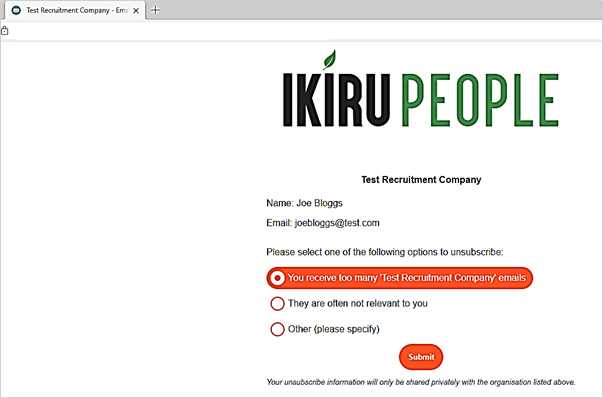
The name and email address shown is taken from the ‘Merge To Section’ when the email was originally sent from the Infinity Comms Centre.
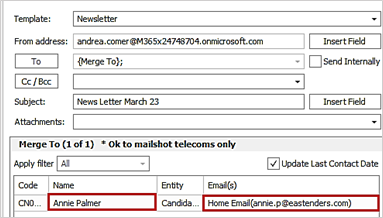
Note: Contact related Comms Centre can also merge to company and location levels. If there is a company or location email address in the merge to section, the unsubscribe link will work and untick the ‘Ok to Mailshot’ option against those email addresses.
If the email address is edited in the Merge To section before sending, then the unsubscribe link will not work as it would not find a matching email address on the Infinity record to update.
On the website, the recipient can select the required radio button and click unsubscribe or cancel out by closing the browser tab. If ‘Other’ is selected, then comments are mandatory.
If the recipient unsubscribes, all matching email addresses are unticked as ‘Ok to Mailshot’ on the Infinity database overnight. If the email address cannot be updated because a user has the record locked, the system will try again the next day.
An info event is logged by the service, with an action of "Mailer Unsubscribed" and the website unsubscribe radio button option is populated in the event details field.

Note: If the email address is already unticked as ‘Ok to Mailshot’, the event will still be logged.
.
 Contact Details
If you require further assistance please contact Ikiru People using the details published on www.ikirupeople.com
Visit our Customer Portal at https://portal.ikirupeople.com/ for future events and clinics.
FeedbackIf you would like to make suggestions or have found any errors with this Help section please contact our Support team.
Copyright © 2026 Voyager by Ikiru People Ltd. All rights reservedVersion 4.87
Voyager Software is a brand of Ikiru People Ltd, a subsidiary of Dillistone Group Plc. The group is a leading global provider of software and services that enable recruitment agencies and in-house recruiters to better manage their selection process and address the training needs of individuals. Across its brands – which include Voyager Software (recruitment software UK & Australia), Dillistone FileFinder executive search software, GatedTalent, the global database of the world’s leading executives, Talentis.Global – the next generation of recruitment software and also ISV.Online, provider of online pre-employment skills testing and training tools. Dillistone Group serves thousands of clients worldwide. Ikiru People Ltd: Registration Number 02043300. Registered in England & Wales.
 |  |  |  |