IR35 Off Payroll Working
The IR35 Off Payroll Rule is here to make sure that workers providing services through an intermediary to a medium / large client in the private sector pay broadly the same Tax and National Insurance contributions as an employee. It will not be the contractor / worker’s responsibility to establish whether the role they are working in falls within IR35 from April 2021. Instead the liability rests with the organisation receiving the individual’s service.
For further information see: https://www.gov.uk/guidance/understanding-off-payroll-working-ir35
Overview
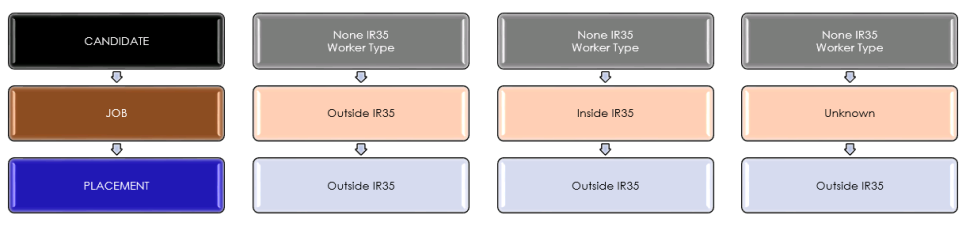
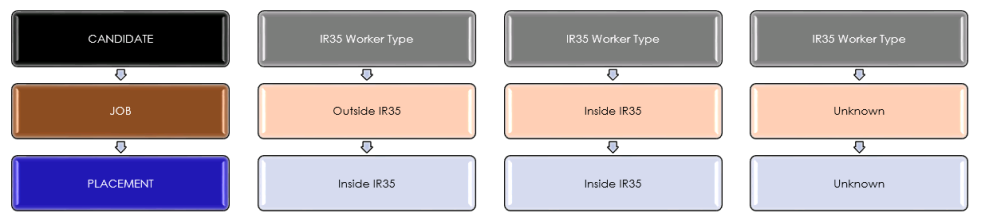
You can stipulate the Worker Type of a candidate within their financial details, generally it will utilise the Worker Type from within the candidates financials as these can be setup to be either inside or outside IR35. When adding jobs you can define it as inside or outside IR35 and this combination will determine whether the placement should be considered inside or outside IR35:
If you use a Worker Type that is defined as NOT IR35 (outside IR35)
If you use a Worker Type that is defined as IR35 (inside IR35)
 Job Record
‘Status’ (IR35, Outside IR35, Unknown) and ‘Verified check box’ fields have been added to Contract and Temp Jobs on UK databases:

We would suggest you utilise a Comms Centre template to request confirmation from the Company whether the job is inside or outside IR35
Tick verified once the client has confirmed whether the job is inside or outside IR35, this will ensure is passes any business rules (contract) or compliance checks (Temp) when a placement is made.
Company Default IR35 Status
with defaults available per company, to be completed when the Job’s IR35 Status determination has been received from the Client and confirmed
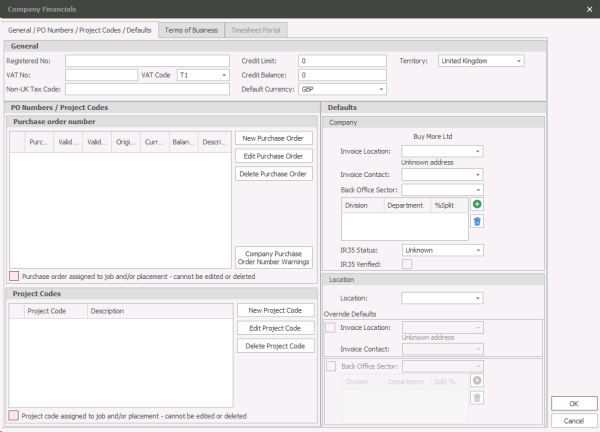
The Company ‘IR35 Status’, defaults to ‘Unknown’
Candidate Worker Type (IR35)
Within the Reference Data you can manage worker types and add a type (Ltd Company, Ltd Company IR35 etc...) this allows you to setup worker types that differentiate between inside IR35 and outside IR35:

The Candidate worker type must be set as IR35 where appropriate, for the IR35 status to be determined on the placement.
NOTE: - All existing worker types are NOT set as IR35.
When IR35 comes into force in April 2020, either existing worker types can be ticked as IR35, or new worker types can be created that are IR35, as appropriate.
Placement Record IR35 Status
‘Status’ (IR35, Outside IR35, Unknown) has been added to Contract and Temp Placements on UK databases:
- If the candidate has a worker type that is not ticked as IR35, then their placements will be ‘Outside IR35’
- If the candidate has a worker type that is ticked as IR35, and the job they are placed on is IR35, then the placement will be IR35
- If the candidate has a worker type that is ticked as IR35, and the job they are placed on is Unknown, then the placement will be Unknown
Changing IR35 Status
Note: When a placement is created, the placement worker type defaults to the candidates’ worker type. If a candidate changes their worker type, you can choose which placements have their worker type changed. If the ‘candidate worker type’ and ‘placement worker type’ are different, it is the ‘placement worker type’ that is used to calculate the IR35 Status
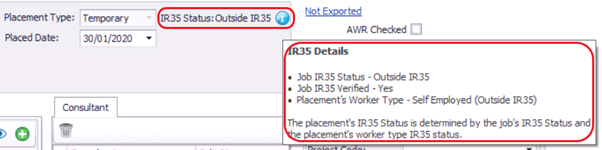
If the Jobs’ IR35 Status is changed, and it affects the status of placements that may have been processed through back office, a warning is displayed:
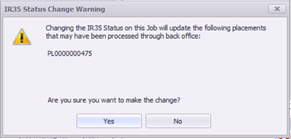
- All Existing companies will be set to ‘Unknown’
- Closed Contract / Temp Jobs will be set to ‘Outside IR35’ and ‘Verified’
- Current Contract / Temp Jobs will be set to ‘Unknown’ (Current is any Contract job with a status type of ‘current’, or any Temp job with a confirmed shift in the past month or in the future)
- Contract / Temp Placements will be set as per the standard rules for placements. See Enhancement 103471 for further details

The event cannot be deleted.
Temp Placement Rule
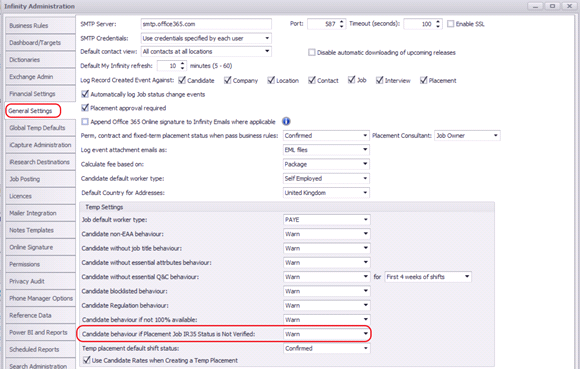
In the administration screen, Temp Placements can be configured to Warn / Prevent placements if the Job IR35 Status is not verified.
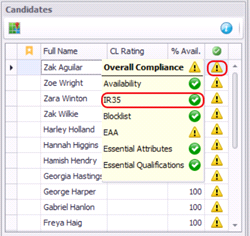
When placing a candidate on a Temp Job via the Unfilled Jobs screen, you are warned / prevented
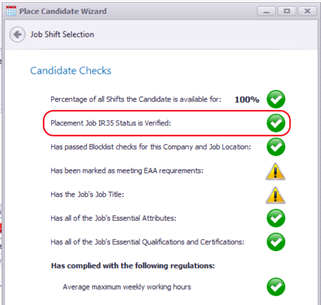
When placing a candidate on a Temp Job via the Place Candidate Wizard, and candidate checks screen, you are warned / prevented
Note: Temp Warn / Prevent options are only relevant to UK Databases, and not Australian Databases. (All databases are configured with either a UK or Australian territory, regardless of the location of the database)
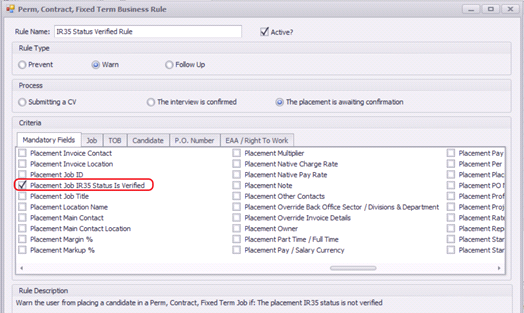
Contract Placement Rule
In the administration screen, Business Rules tab, Contract Placements can be configured to Warn / Prevent placements if the Job IR35 Status is not verified.
When setting a placement to ‘Awaiting confirmation’ on a Contract Job, you are warned / prevented
IR35 Status and Verification permissions
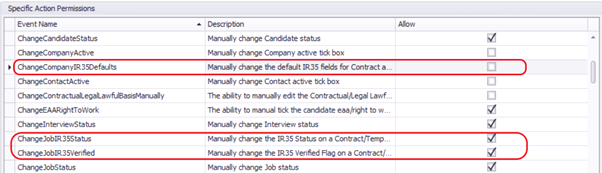
- All 3 permission are on by default for users in the Administrators security role
- ChangeCompanyIR35Defaults is off by default for users in the Users security role
- ChangeJobIR35Status and ChangeJobIR35Verified are on by default for users in the Users security role
Contact Details
If you require further assistance please contact Ikiru People using the details published on www.ikirupeople.com
Visit our Customer Portal at https://portal.ikirupeople.com/ for future events and clinics.
FeedbackIf you would like to make suggestions or have found any errors with this Help section please contact our Support team.
Copyright © 2026 Voyager by Ikiru People Ltd. All rights reservedVersion 4.87
Voyager Software is a brand of Ikiru People Ltd, a subsidiary of Dillistone Group Plc. The group is a leading global provider of software and services that enable recruitment agencies and in-house recruiters to better manage their selection process and address the training needs of individuals. Across its brands – which include Voyager Software (recruitment software UK & Australia), Dillistone FileFinder executive search software, GatedTalent, the global database of the world’s leading executives, Talentis.Global – the next generation of recruitment software and also ISV.Online, provider of online pre-employment skills testing and training tools. Dillistone Group serves thousands of clients worldwide. Ikiru People Ltd: Registration Number 02043300. Registered in England & Wales.
 |  |  |  |