Odro Integration
 General
The Infinity integration with the Odro platform allows candidates on a job shortlist to be invited to take a solo interview and to view the progress from within Infinity
Video Tutorial
An excerpt of the release highlight video:
Set up
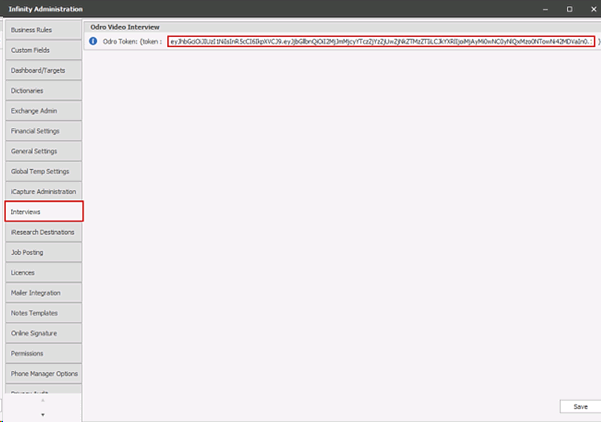
The Odro API token must be entered into the field in Administration / Interviews tab
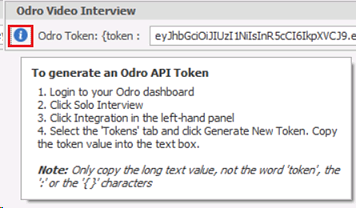
There is an info button that gives instructions on how to generate the token
Job shortlist
On Infinity databases enabled for Odro, the shortlist tab on the job page (perm/contract/fixed term) has additional functions available to all users

• a column called VIV (video Interview) that displays in front of the interview column (Intv). This is a tick box to show whether the candidate has been invited to a solo interview from this shortlist. The VIV column is not part of the Infinity shortlist process
• an ‘invite’ button (video icon) on the toolbar. The button is disabled if the candidate has already been invited from this shortlist
Multiple candidates can be highlighted in the shortlist and invited to complete a solo interview by clicking on the ‘invite’ button
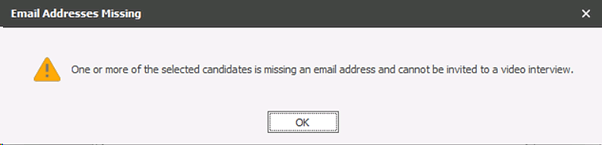
The first email address from the candidate page is used to send the solo interview invite to. If the candidate doesn’t have an email address a warning is given
The user is prompted with the ‘Invite Candidate’ window where an existing Odro solo interview can be selected or a new one created
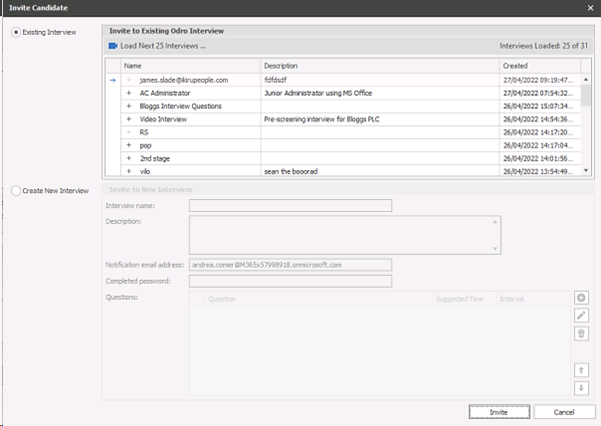
Selecting an existing solo interview
When the ‘Existing Interview’ radio button is selected the user will see a list of solo interviews for all users on the Odro account. The Odro API does not support user level / permission connectivity currently
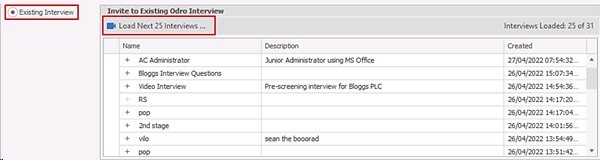
The interview list is loaded 25 at a time and there is a ‘Load Next 25 Interviews…’ button on the toolbar that will enable if applicable. The plus button at the start of the row will expand and display the interview questions when clicked
The user can select the required solo interview and click the ‘Invite’ button at the bottom of the screen. The candidate(s) will be invited to complete the solo interview on Odro
Creating a new solo interview
When the ‘Create New Interview’ radio button is selected the user can complete the key Odro solo interview fields in the window
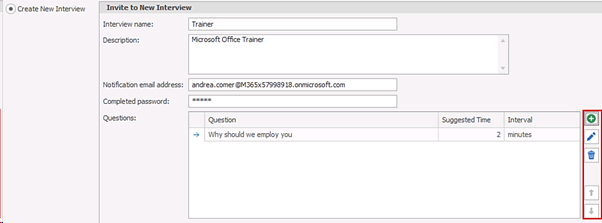
- Interview Name (mandatory)
- Description
The Odro Welcome Message
- Notification email address
This email address will be sent notification emails when interviews are completed. It will also be used as the reply to address for interview emails sent automatically. The user’s Infinity email address is used to populate the notification email address. This is taken from the Infinity User Administration ‘email’ field. If this is blank, ‘email other’ field is used
- Completed Password
Will be applied to all completed interviewee recording links on this solo interview
- Questions
Can be added (along with the time / interval), edited, removed and the ordering set. At least one question is required
Note: Odro ‘requested document’ solo interview functionality is not currently available in the API
The user can click the ‘Invite’ button at the bottom of the screen. The solo interview is created in Odro with the ‘creator’ field set to the client name as specified in your Odro account. The candidate(s) will be invited to complete the new solo interview on Odro using the Personalised Invitation email template
Viewing the status of a solo interview
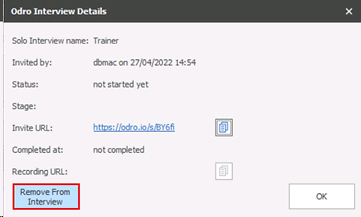
After inviting candidates, the user is returned to the shortlist and the VIV column will be ticked against the invited candidates. Clicking on the ‘tick’ will display further details about the solo interview for each candidate
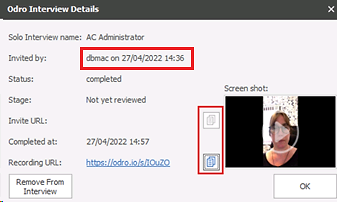
The ‘Invited by’ field shows the Infinity user that invited the candidate and the date and time
The Invite and Recording URL field is available to copy from this screen using the adjacent copy buttons. The link could be pasted into an Infinity Comms Centre email if required
Removing a candidate from a solo interview
Candidates can be removed from a solo interview by clicking the ‘Remove From Interview’ button in the Odro Interview Details screen
The user will be given the following warning
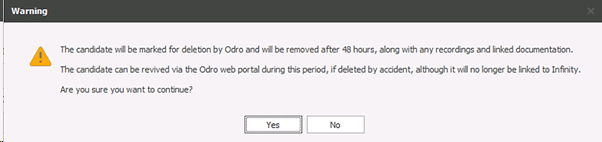
The VIV column will be unticked, and this performs the Odro delete interviewee functionality that allows recovery up to 48 hours afterwards from within Odro. If the interviewee is revived in Odro they will no longer be linked to the Infinity shortlist

Candidates can be re-invited to the same solo interview from the shortlist if they are permanently deleted from the solo interview in Odro
Contact Details
If you require further assistance please contact Ikiru People using the details published on www.ikirupeople.com
Visit our Customer Portal at https://portal.ikirupeople.com/ for future events and clinics.
FeedbackIf you would like to make suggestions or have found any errors with this Help section please contact our Support team.
Copyright © 2026 Voyager by Ikiru People Ltd. All rights reservedVersion 4.87
Voyager Software is a brand of Ikiru People Ltd, a subsidiary of Dillistone Group Plc. The group is a leading global provider of software and services that enable recruitment agencies and in-house recruiters to better manage their selection process and address the training needs of individuals. Across its brands – which include Voyager Software (recruitment software UK & Australia), Dillistone FileFinder executive search software, GatedTalent, the global database of the world’s leading executives, Talentis.Global – the next generation of recruitment software and also ISV.Online, provider of online pre-employment skills testing and training tools. Dillistone Group serves thousands of clients worldwide. Ikiru People Ltd: Registration Number 02043300. Registered in England & Wales.
 |  |  |  |