Queues
 General
These are lists of data that you may want to access within Infinity.
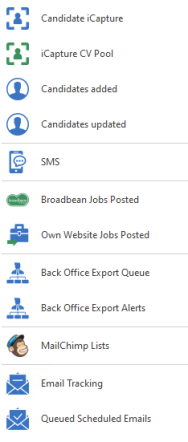
Candidate iCapture
Candidate iCapture – You can access iCapture from here, see the iCapture section for more details.
iCapture CV Pool
iCapture CV Pool – You can access iCapture's CV Pool from here, see the iCapture section for more detail.
Candidate Added
Candidates added in the last 30 days – This is a list of the candidates that have been added to Infinity from iCapture in the last 30 days
Candidates Updated
Candidates updated in the last 30 days – This is a list of the candidates that have had new CV's updating an existing candidate record in the last 30 days.
SMS
SMS – This allows you to view SMS awaiting to send, sent and received, to enable SMS facility please contact Voyager Customer Services. See the SMS messaging section for more details.
Broadbean Job Posted
Broadbean Jobs posted – This is a list of jobs that have been posted through Broadbean with information related to them. See the Job Posting section for more detail
Seek Jobs Posted
Seek Jobs Posted -  Australian Version only
Own Website Jobs Posted
Own Website Jobs Posted– This is a list of the jobs that have been posted through to your website. See the Job Posting section for more detail.
Astute Export Queue
Astute Export Queue - Australian Version only
Back Office Export Queue
Access Placements awaiting to be exported to Mid Office
Back Office Export Alerts
Access Placements that require attention as they have failed to export to Mid Office
MailChimp Lists
This is a list of lists sent to MailChimp, split into candidate lists and contacts lists. You are able to inactivate a list or delete a list.
- All users can see the 'MailChimp Lists' from the Application Menu
- Permission 'MailChimpManageList' controls the ability to delete MailChimp lists, and to mark MailChimp Lists as inactive, see Permissions section for more details
- This permission is ON by default for 'Infinity Administrators'
- This permission is OFF by default for ‘Infinity Users'
Marking a list Inactive
Mark a MailChimp List as inactive, so that it cannot be used by any users
- To mark a MailChimp list as ‘Inactive’, Un-tick the ‘Active’ tick box
- The MailChimp list is NOT removed
- You will NOT be able to export to this list
Deleting a list
- Click the
 icon
icon - You are required to enter your password
- The MailChimp list is removed from Infinity and from MailChimp
- This cannot be undone
Email Tracking
Review opens and clicks that have occurred in emails sent out with tracking switched on, see email tracking section for more details
Queued Scheduled Emails
Review emails awaiting to be sent, sent and failed scheduled emails from here, see scheduled automated comms section for more details
Contact Details
If you require further assistance please contact Ikiru People using the details published on www.ikirupeople.com
Visit our Customer Portal at https://portal.ikirupeople.com/ for future events and clinics.
FeedbackIf you would like to make suggestions or have found any errors with this Help section please contact our Support team.
Copyright © 2026 Voyager by Ikiru People Ltd. All rights reservedVersion 4.87
Voyager Software is a brand of Ikiru People Ltd, a subsidiary of Dillistone Group Plc. The group is a leading global provider of software and services that enable recruitment agencies and in-house recruiters to better manage their selection process and address the training needs of individuals. Across its brands – which include Voyager Software (recruitment software UK & Australia), Dillistone FileFinder executive search software, GatedTalent, the global database of the world’s leading executives, Talentis.Global – the next generation of recruitment software and also ISV.Online, provider of online pre-employment skills testing and training tools. Dillistone Group serves thousands of clients worldwide. Ikiru People Ltd: Registration Number 02043300. Registered in England & Wales.
 |  |  |  |