Reviews
General
The reviews feature enables you to input 'scores' for placements that candidates have completed or against companies from feedback from candidates. This feedback will serve as an easy way to identify candidates who have a positive rapport with a company. Company review scores are displayed within the Shift Planner. The Reviews can be recorded against specific placements and therefore enable users to record multiple reviews of a candidate / Company for each placement they have completed.
The star ratings are below (1 is low, 5 is high)
 |

|
1 star Poor and will also mark them as blocked and potentially prevent the candidate from being placed with the company or location within the company . See the Shift Planner for more details on blocking candidates when removing or cancelling Temp shifts |
|
|
2 star Below Average score |
|
|
|
3 star Satisfactory score
|
|
|
|
4 star Good score
|
|
|
|
5 star Excellent and mark as favourite for the company / location
|
|
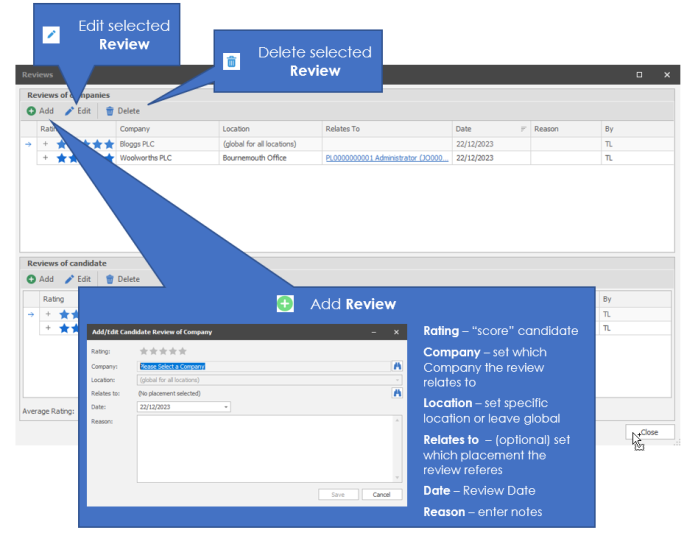
Reviews have 2 types, Companies and Candidate. Enabling you to record feedback from the client and from the candidate. These can reference a particular placement and also includes the facility to record multiple reviews as required.
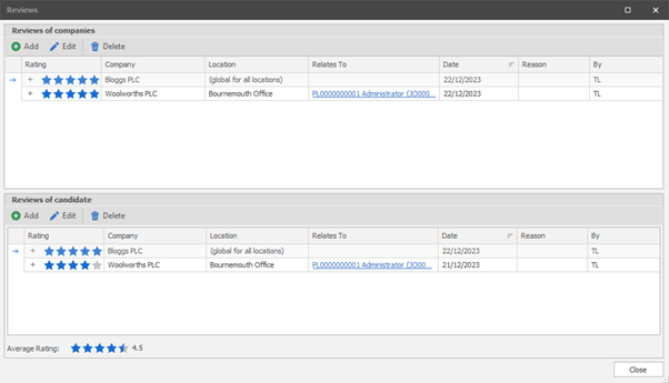
Both the Client specific feedback and the Average Rating are columns available within the quick search panel in the shift planner and also via search criteria within the search builder, see below section on Searching Review Scores.
Candidate Reviews
When receiving feedback from a client regarding a candidate you can add a candidate review, this can be instigated from the candidate record, company record or directly from the shift planner (right click on applicable shift)

Company reviews
When receiving feedback from a candidate regarding the client you can add a company review, this can be instigated from the candidate record, company record or directly from the shift planner (right click on applicable shift)
Searching Review Scores
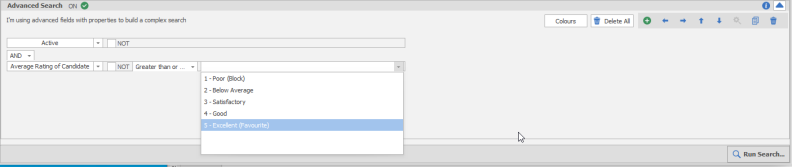
You can utilise review scores as criteria when completing searches:
Searching on Average Review score of candidate:
Searching on review type candidate:

Searching on review type company / location:

See Shift Planner for information on how review scores are used during the Temp process
See Candidate record for information on where to input a review
See Company record for information on where to input a review
See Global Temp Settings for information on setting Candidate blocklisted behaviour
 Contact Details
If you require further assistance please contact Ikiru People using the details published on www.ikirupeople.com
Visit our Customer Portal at https://portal.ikirupeople.com/ for future events and clinics.
FeedbackIf you would like to make suggestions or have found any errors with this Help section please contact our Support team.
Copyright © 2026 Voyager by Ikiru People Ltd. All rights reservedVersion 4.87
Voyager Software is a brand of Ikiru People Ltd, a subsidiary of Dillistone Group Plc. The group is a leading global provider of software and services that enable recruitment agencies and in-house recruiters to better manage their selection process and address the training needs of individuals. Across its brands – which include Voyager Software (recruitment software UK & Australia), Dillistone FileFinder executive search software, GatedTalent, the global database of the world’s leading executives, Talentis.Global – the next generation of recruitment software and also ISV.Online, provider of online pre-employment skills testing and training tools. Dillistone Group serves thousands of clients worldwide. Ikiru People Ltd: Registration Number 02043300. Registered in England & Wales.
 |  |  |  |