Voyager Infinity – Release Notes
Version: 5.38
Release Date: 22nd May 2026
What have we released?
- Infinity 5.38 has been released
Release overview
Here’s a snapshot of what we’ve delivered in this release:
- Make contacts active/inactive at other locations from the contact page
- Improvements to the toolbars and filtering on Call Backs, Tasks and Meetings tabs
- Synchronised meetings, created in Exchange, are matched to candidates / contacts
- Longer names for notes templates
- Portal Onboarding – users without permission can view non-verified documents
- ‘Candidate Portal Statistics’ report changed to the consultant that did the task
Enhancements
Enhancement 138653 Make a contact active/inactive at other locations
On the contact page / Contact’s Other Location area, when a contact is active at other locations, the user can select a location one at a time and make the contact active/inactive at that location.
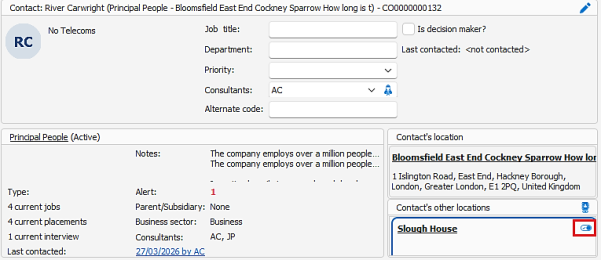
- An active/inactive button has been added in a 3rd column after location telecom.
- The button depicts whether user is active or inactive at that location
- The button has tooltip saying 'Contact is currently inactive at this location, click to make active' if inactive
- The button has tooltip saying 'Contact is currently active at this location, click to make inactive' if active
- User permission ‘changeContactActive’ is required to change the contact active/inactive flag
- User can click button to change contact to active at that location if inactive
- User is prompted are you sure you want to make the contact active at this location?
- User can click button to change to inactive at that location if active
- User is prompted are you sure you want to make the contact inactive at this location?
- If the user clicks yes, the contact is changed
- If the contact at that location is locked, the user is informed they cannot change it
- An event is logged the same as when marking a contact active/inactive from the contact page main toolbar
Enhancement 138651 Contact page ‘Contacts other locations’ changes
When on an active contact page, the ‘Contact’s other locations’ is controlled by the User Option to 'Show inactive linked contacts on contact page'.
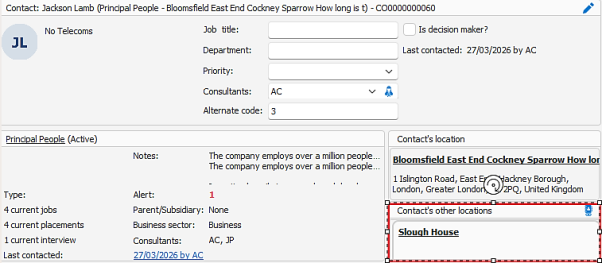
The location doesn't show if the User Option / Filter setting is off to 'Show inactive linked contacts on contact page'.
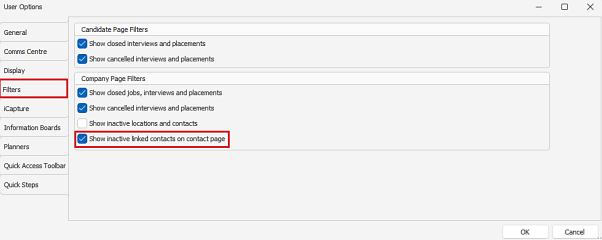
If the User option is on, the location is shown as per existing functionality.
Enhancement 138863 Prompt when making a contact active / inactive
On contact page main toolbar, if a contact is made active / inactive the user is prompted 'Are you sure you want make the contact active/inactive at this location?'
The user can answer Yes / No as required.
Enhancement 138897 Improvements to filtering on Call backs, Tasks and Meetings tabs
The filtering options and toolbar buttons have been changed on the Call Backs, Tasks and Meetings tabs on the main pages and Leads screen (Call Backs only).
Call Backs
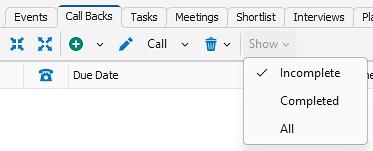
- The ‘Show’ filter drop down menus have been renamed as below with functionality remaining the same:
- Incomplete
- Completed
- All
Tasks
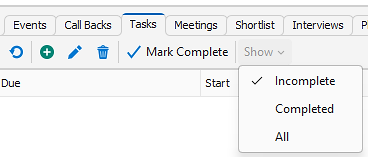
- ‘Show all’ button has been removed
- Order of buttons has been changed to ‘Refresh, ‘Add’, ‘Edit’, ‘Delete, ‘Mark Complete’
- ‘Show’ filter button has been added at the end with the following menu options and functioning as per on the ‘Show all’ screen:
- Incomplete
- Completed
- All
- Defaults to Incomplete
Meetings
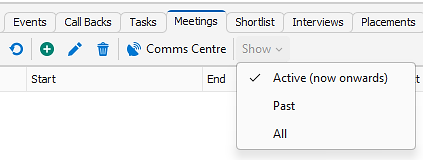
- ‘Show all’ button has been removed
- The order of buttons has been changed to ‘Refresh, ‘Add’, ‘Edit’, ‘Delete, ‘Comms Centre’
- ‘Show’ filter button has been added at the end with the following menu options and functioning as per on the ‘Show all’ screen:
- Active (now onwards)
- Past
- All
- Defaults to Active
Enhancement 138753 Meetings created in Exchange are matched to candidates/contacts
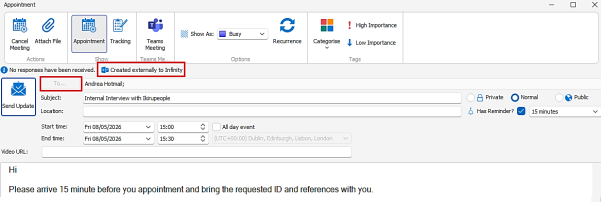
Meetings created in Exchange are shown on the Meetings tab in Infinity if the user is synchronising their calendar and an attendee match is found.

- Candidates if the candidate is an attendee of the meeting
- A single email address must match to exchange recipient email address
- Contacts if the contact is an attendee of the meeting
- A single email address must match to exchange recipient email address
If more than one record is matched, no record is linked.
Meetings created in Exchange show the Attendees in the To field, but cannot be edited. All other meeting information can be updated.
Enhancement 138568 Longer names for note templates
In Administration / Notes Templates tab, the name has been increased to 100 characters.
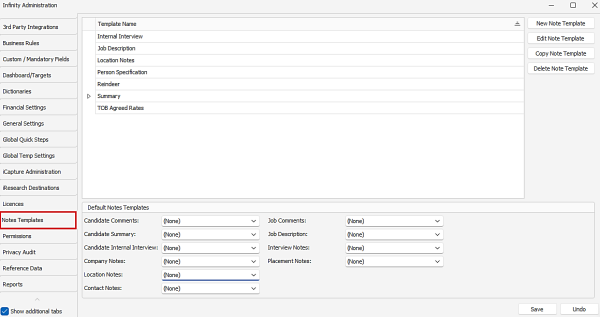
The default notes templates field in admin or inserting a template into a notes field in Infinity, lists the templates in the drop down and resizes the width based on longest template name value.
Enhancement 138885 Improvements in Administration to RTW/EAA combination settings
In Administration / General Settings / RTW/EAA tab, when ‘Auto populate Candidate page RTW/EAA’ is enabled, the selection of Quals & Certs combinations has been improved.
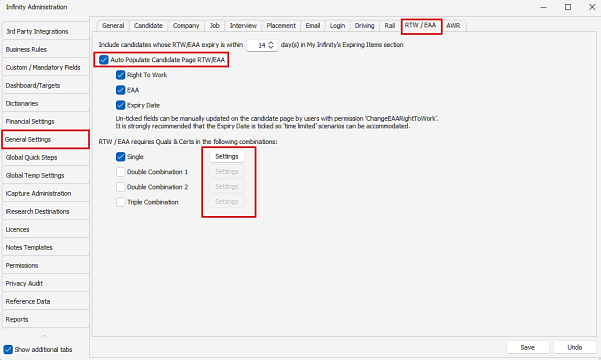
- The user can tick the required combination
- When ticked the adjacent 'Settings' button is enabled
- When the ‘Settings’ button is pressed the applicable ‘Enter EAA/RTW’ screen is opened
- User can select Q&Cs
- User can unselect Q&Cs
- User can save changes
- User can cancel and not save changes
- User can hit the cross and is prompted to save changes
- If the user clicks the Administration ‘Save’ button, without selecting any Q&Cs in the settings screen the user is warned its mandatory
- The user can untick the combination
- The ‘Settings’ button disables
- Any selected Q&Cs are retained in the ‘Settings’ button
Enhancement 138870 Icons added to the right-hand side tabs on the candidate page
On the new candidate page, an icon has been added to the following right-hand side tabs:
- Suitable companies - company icon
- Suitable jobs - job icon
- Preview cv - cv icon
Enhancement 138871 Icons added to the right-hand side tabs on the Planners
On the Shift Planner, an icon has been added to the following right-hand side tabs:
- Candidate search - magnify icon
- Shift offers - shift offer icon
On the Temp Planner, an icon has been added to the following right-hand side tabs:
- Suitable jobs - job icon
Enhancement 138655 Shortlist - Find company menu label change
Find Company on candidate shortlist and user shortlist has been renamed to Find Company (Spec Shortlists).
Enhancement 136803 My Infinity refresh options removed
My Infinity refresh options have been removed from Infinity as they are redundant due to the Signal R near-instant updating enhancement.
- My Infinity panel - refresh button
- My Infinity panel - right click menu refresh button
- Admin / General Settings / Main Pages tab - default refresh minutes
- User Options / General / Main Pages tab - refresh minutes
Enhancement 138656 DevX / PDF search/list removed
The following DevX (PDF) reports have removed from Infinity as they have been superseded by the Excel versions:
- Candidate search results/list
- Contact search results/list
Upon upgrade any generated reports are removed from My Infinity.
Enhancement 138660 Onboarding - users without permission can view non-verified docs
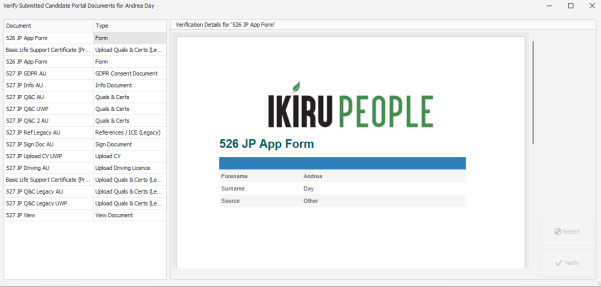
Onboarding screen
- Users without 'PortalOnboardingDocumentVerify' permissions can click the 'Verification' button and enter the verification screen
- When the 'Verify Submitted Candidate Portal Documents' screen opens, all documents are displayed
- User without 'PortalOnboardingDocumentVerify' permissions, can see documents configured as verified by: Users with permissions
- Users without ‘PortalOnboardingDocumentVerify' permissions cannot edit any of the fields on any of the documents configured as 'Users with permissions'
- 'Quals & Certs', 'Upload Quals & Certs (Legacy) and 'Info Documents linked to a quals and cert' Documents:
- Linked qualification cannot be edited
- Linked qualification cannot be deleted
- All fields cannot be edited
- If there are multiple images, you can view them all
- 'Driving Licence' Documents:
- Licence Number field cannot be edited
- If there are multiple images, you can view them all
- Form with photo:
- Photo cannot be edited
- Users without 'PortalOnboardingDocumentVerify' permissions, cannot press the verify button on documents configured as 'Users with permissions'
- Users without 'PortalOnboardingDocumentVerify' permissions cannot press the reject button on documents configured as 'Users with permissions'
Candidate page Portal screen
- Users without 'PortalOnboardingDocumentVerify' permissions can click the 'Verification' button and enter the verification screen
- When the 'Verify Submitted Candidate Portal Documents' screen opens, all documents are displayed
- User without 'PortalOnboardingDocumentVerify' permissions, can see documents configured as verified by Users with permissions
- Users without 'PortalOnboardingDocumentVerify' permissions, cannot edit any of the fields on any of the documents configured a 'Users with permissions'
- 'Quals & Certs', 'Upload Quals & Certs (Legacy) and 'Info Documents linked to a quals and cert' Documents:
- Linked qualification cannot be edited
- Linked qualification cannot be deleted
- All fields cannot be edited
- If there are multiple images, you can view them all
- 'Driving Licence' Documents:
- Licence Number field cannot be edited
- If there are multiple images, you can view them all
- Form with photo:
- Photo cannot be edited
- Users without 'PortalOnboardingDocumentVerify' permissions, cannot press the verify button on documents configured as 'Users with permissions'
- Users without 'PortalOnboardingDocumentVerify' permissions cannot press the reject button on documents configured as 'Users with permissions'
Enhancement 138756 Candidate Portal Statistics report changes
The existing 'Candidate Portal Statistics’ report has been changed so that column stats are based on the consultant that did the task, rather than the owner.
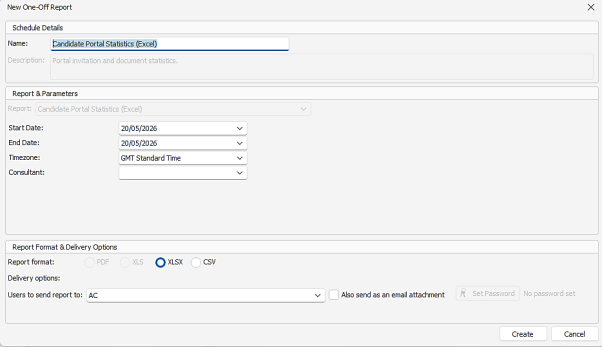
Candidates Invited
- Number of candidates the consultant has invited in the date range
- Column header = Candidates Invited by
Documents Added
- Number of Documents added by the consultant in the date range
- Column header = Documents Added by
Documents Submitted
- Number of Documents submitted, that were added by the consultant in the date range
Documents Verified
- Number of Documents verified, that were added by the consultant in the date range
Availability Updated
- Column header = Availability Updated by Owned Candidates
Average time to submit documents, after added
- Average time for documents added by the consultant in the date range
Average time to verify documents, after added
- Average time for documents added by the consultant in the date range
 Contact Details
If you require further assistance please contact Ikiru People using the details published on www.ikirupeople.com
Visit our Customer Portal at https://portal.ikirupeople.com/ for future events and clinics.
FeedbackIf you would like to make suggestions or have found any errors with this Help section please contact our Support team.
Copyright © 2026 Voyager by Ikiru People Ltd. All rights reservedVersion 4.87
Voyager Software is a brand of Ikiru People Ltd, a subsidiary of Dillistone Group Plc. The group is a leading global provider of software and services that enable recruitment agencies and in-house recruiters to better manage their selection process and address the training needs of individuals. Across its brands – which include Voyager Software (recruitment software UK & Australia), Dillistone FileFinder executive search software, GatedTalent, the global database of the world’s leading executives, Talentis.Global – the next generation of recruitment software and also ISV.Online, provider of online pre-employment skills testing and training tools. Dillistone Group serves thousands of clients worldwide. Ikiru People Ltd: Registration Number 02043300. Registered in England & Wales.
 |  |  |  |