Voyager Infinity – Release Notes
Version: 5.3
Release Date: 24th January 2025
What have we released?
- Infinity 5.3 has been released
Release overview
Here’s a snapshot of what we’ve delivered in this release:
- Attach the default CV in email Comms Centres that have an associated candidate
- Sending emails is restricted to 30 a minute in line with Microsoft policy
- Optionally display candidate age on the page
- ‘Piece’ per interval available on temp and contract rates
- Candidate Portal – Availability and minor enhancements
Feedback please
We are continuously looking to improve Voyager Infinity and are keen to hear your thoughts. Please email suggestions@ikirupeople.com with any feedback on existing functionality or ideas for new functionality.
Enhancements
Enhancement 131305 Attach the CV in email Comms Centres with an associated candidate
In Comms Centre Template administration, there is an option on email templates that have an associated candidate, to attach the default CV when sending.
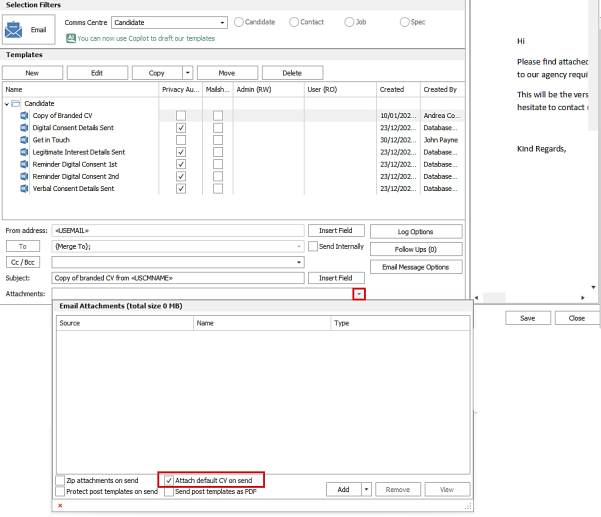
This is off as default and can also be changed on the fly when sending from the Comms Centre. The setting is available in following Comms Centres:
- Candidate
- Interview - candidate
- Placement - candidate
When set, the default CV for the associated candidate is attached to the email that is sent. This uses the filename as per shown on the candidate’s CV grid. The function works for single and list Comms Centres.
Note: the CV attachment itself is not seen in the Comms Centre screen ‘Attachments’’ field, it is attached only when the email is sent in the background.
Enhancement 131298 Sending emails is restricted to 30 a minute in line with Microsoft policy
Sending emails from the Infinity Comms Centre is now restricted to 30 a minute. This is in line with Microsoft policy.
This is counted per Comms Centre send and if reached, the process is suspended temporarily. The details of the suspension are shown in the ‘Merge Progress’ window.
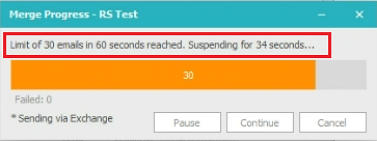
Once the next minute period happens, the process will automatically resume sending and counting the emails.
Note: the count does not include any emails a user may be sending directly from their Outlook account at the same time.
Enhancement 131368 Optionally display candidate age on the page
There is a setting in Administration / General Settings / Main Pages tab to show the candidate age on the page.
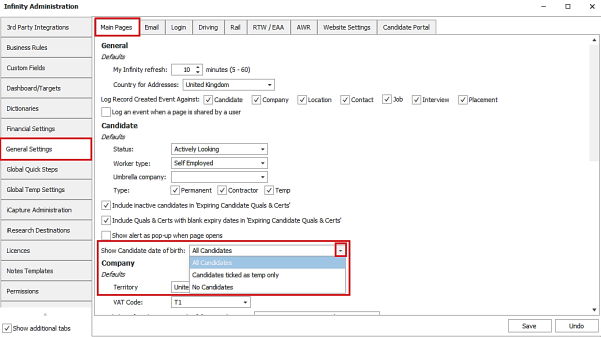
The default is set to ‘No candidates’ and it can be enabled for ‘All candidates’, or only those ticked as ‘Temp’.
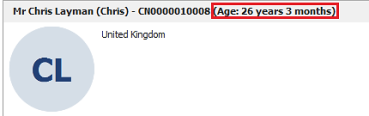
When enabled, the candidate’s age is shown in read-only text, in years and months, on the basic details section title bar.
Enhancement 131268: ‘Piece’ per interval available on temp/contract rates
Temp
The temp rate ‘per’ drop down field has a new value of ‘Piece’.

This is available in the following areas of Infinity:
- Administration / Global Temp Settings
- General tab - default temp rate interval
- Job Titles tab - rates grid
- Company page / Temp Settings - Job Title rates grid
- Temp job page rates grid
- Candidate page rates per job title grid
- Temp placement rates grid
- Candidate page expected rates – temp rate
Temp revenue reporting
Temp job / placement rates set as ‘Piece’ are excluded from temp revenue calculations in Infinity.
Dashboard
The following widgets are affected, and the info tip has been updated to reflect this.
- Estimated Perm fee / Contract margin / Temp revenue
- Temp unfilled revenue
- Temp filled shift revenue
- Temp Revenue Over Time
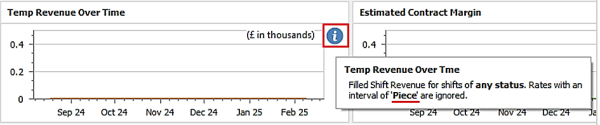
Consultant Statistics Landscape (Excel) report
The following columns are affected, and the report description has been updated to reflect this.
- Time worked revenue
- Started shift revenue
- Confirmed revenue
- Awaiting confirmation revenue
- Unfilled revenue

Temps Currently Working and Temp Payroll (Excel) reports
The following ‘Total’ columns are affected, and the report descriptions have been updated to reflect this.
- Total Pay
- Total Charge
- Total Profit

Contract
The contract rate ‘per’ drop down field has a new value of ‘Piece’.
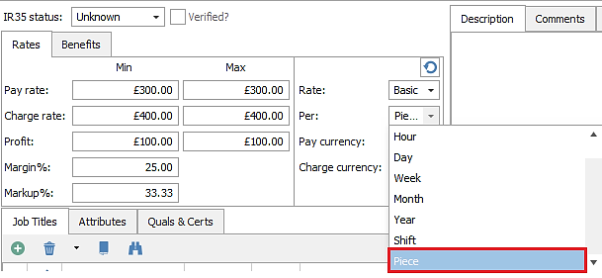
This is available in the following areas of Infinity:
- Contract job page rate
- Contract placement page rates grid
- Candidate page expected rates – contract rate
Contract margin reporting
Contract job / placement rates set as ‘Piece’ are excluded from contract margin calculations in Infinity.
Dashboard
The following widgets are affected, and the info tip has been updated to reflect this.
- Estimated Perm fee / Cont margin / Temp revenue
- Contract Actual
- Contract Forecast
- Contract Pipeline
- Estimated Contract Margin
- Average Contract Hourly Profit
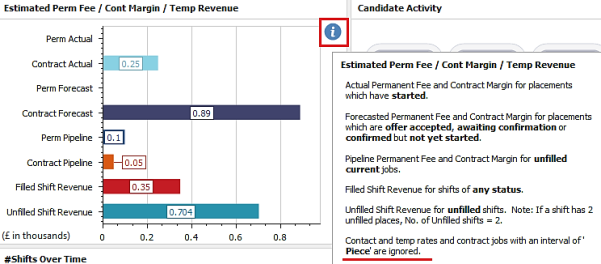
Consultant Statistics Landscape (Excel) report
The following columns are affected, and the report description has been updated to reflect this.
- Contract Actual Margin
- Contract Forecast Margin
- Contract Pipeline Margin

Mid-Office
Placements with ‘Piece’ rates are sent to Mid-Office.
BI Portal
‘Piece’ rates are not currently supported in the Infinity BI Portal.
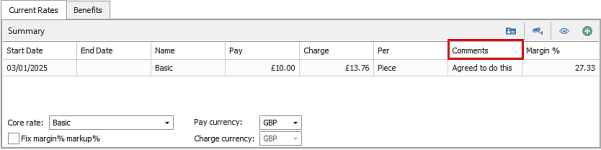
Enhancement 131391 ‘Comments’ column is available on main page rates grid
The ‘Comments’ column is available to add and save via the column chooser, on temp job / placement and contract placement rates grid.
Enhancement 131026 Integrated Data Services –details on types of records created/updated
In Administration / Licences / Show Integrated Data Services Credit Usage window, further details can be shown on the credits used by each user.
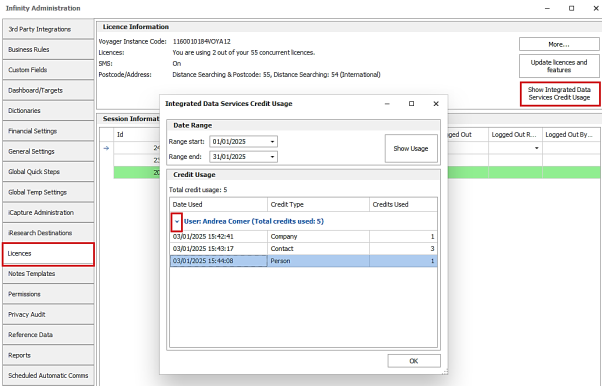
Clicking on the drop-down arrow will show the date and time the credits were used and for what type of record. This could be a company, contact or person (lead).
Enhancement 131381 TrustID admin tooltip update
In Administration / 3rd Party integrations / TrustID tab, the ‘RTW Company Name’ field has an info tooltip.
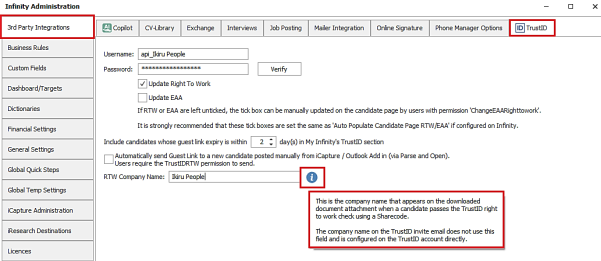
This is the name that appears on the downloaded attachment when a candidate passes the checks using a Sharecode.
The company name on the TrustID invite email does not use this field and is configured directly on the TrustID platform.
Enhancement 131231 Candidate Portal – Comms Centre Added to the onboarding grid
The Candidate comms centre has been added to the Application menu and My Infinity onboarding grids.

You can multi-select candidates using Ctrl-Click and Shift-Click
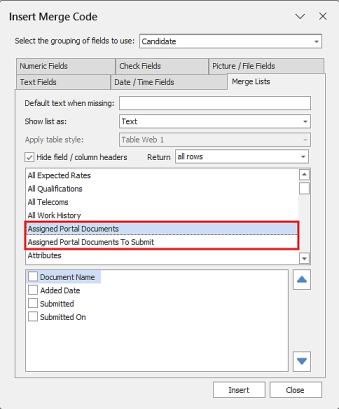
There are new merge codes:
Assigned Portal Documents – lists all documents assigned to the candidate
Assigned Portal Documents To Submit – lists all documents assigned to the candidate which have not been submitted.
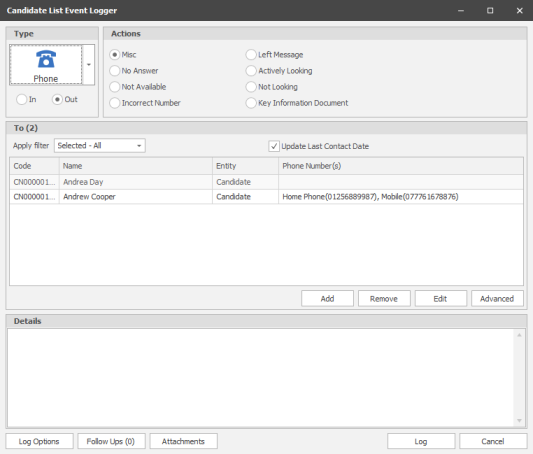
Enhancement 131232 Candidate Portal – Event logger added to the onboarding grid

You can multi-select candidates using Ctrl-Click and Shift-Click.
Enhancement 131242 Candidate Portal – ‘Last Login’ field on onboarding grid changed to ‘Last Used’

The ‘Last Used’ field records when the candidate last interacted with the portal, e.g. logged in or submitted a document.
Enhancement 131056 / 131301 Candidate Portal - Quals & Certs Uploads of types PDF / DOC / DOCX now supported
PDF / DOC / DOCX files are added to the list of file types supported by Quals & Certs documents.
- If the Quals & Certs have a front and back, they must both be of the same file type.
- The Verify screen displays the document as per other file types.
- If the document is password protected, Infinity will fail to display the file in the Verify screen.
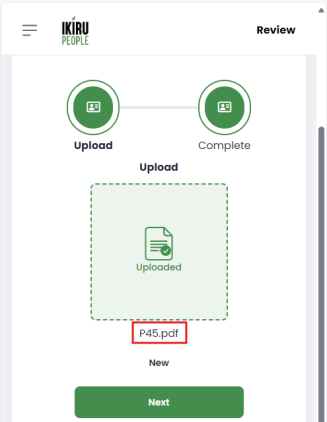
Enhancement 131302 Candidate Portal – CVs can be uploaded via the portal
A new document type ‘Upload CV’ allows candidates to upload CVs.
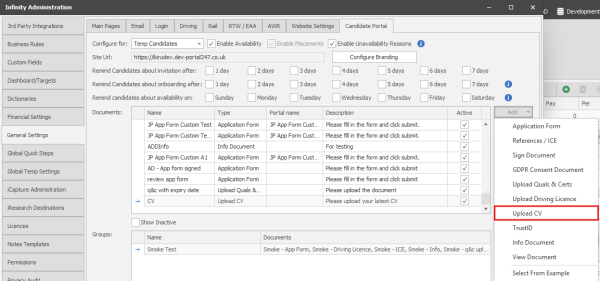
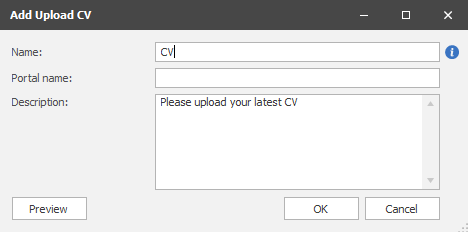
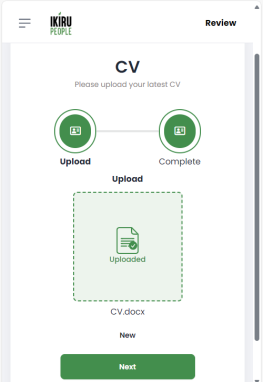
The portal displays the CV document in a similar way to other upload documents.
Enhancement 131401 Candidate Portal – Can edit candidate photos when verifying them
Photos can be edited before they are verified.
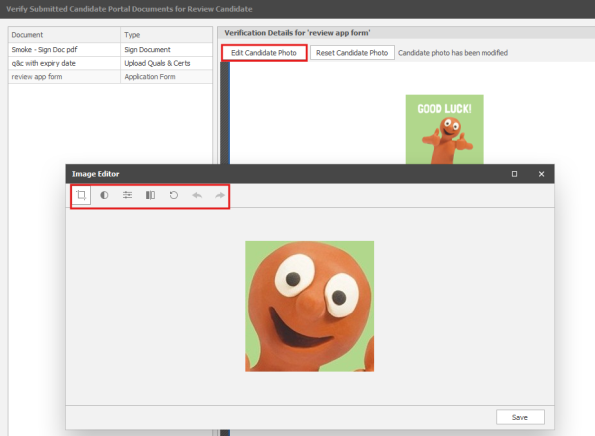
Options are:
- Crop
- Desaturate
- Adjust colours (contrast, brightness, saturation)
- Mirror
- Rotate
- Undo
- Redo
The Original photo is stored in attachments.
The cropped / altered photo is stored as the candidate photo.
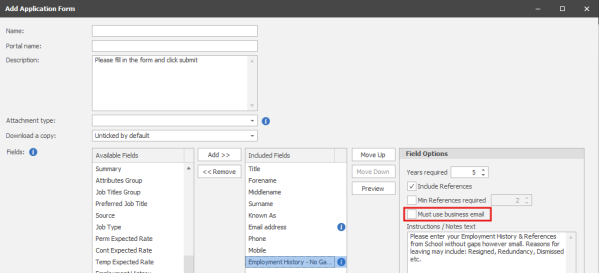
Enhancement 131287 Candidate Portal – Application form ‘Employment History – no gaps’ can insist that email addresses are business emails and not personal emails
For certain industries, references must be from a ‘business email’
- A business email would typically have their own domain name, e.g. ikirupeople.com
- A non-business email would have a generic domain name using by an email provider, e.g. outlook.com / gmail.com
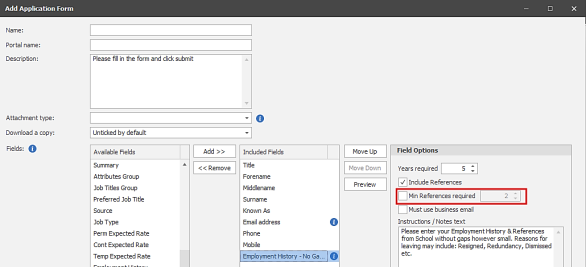
Enhancement 131286 Candidate Portal – Application Form ‘Employment History – no gaps’ can insist that at least x references are added, even if there is only one employment history
The ‘Employment History – no gaps’ field allows candidates to enter employment history, alongside references for each of the employments. The employment history and references are mandatory.
If the candidate has been at the same employer for several years, then they may only have one employment history, and one reference.
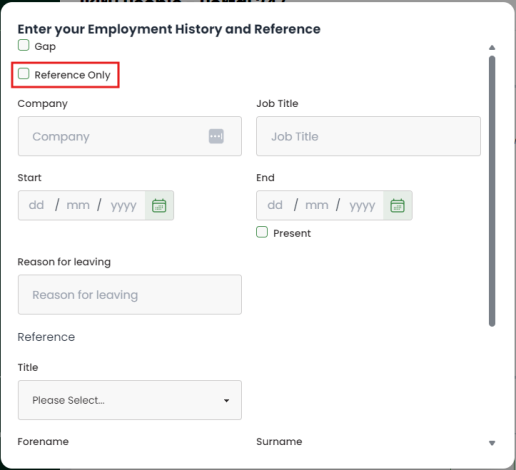
If you require at least x (e.g. two) references, this option insists that the candidate adds another reference to the portal, before they can submit the document.
On the portal, the candidate selects the ‘Reference Only’ option, which allows them to add a reference that isn’t linked to an employment.
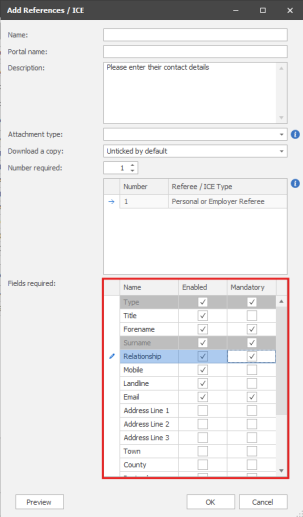
Enhancement 131162 / 130349 Candidate Portal – Individual reference fields in the Reference Document can be enabled and/or set to mandatory
Previously in the Reference Document, all reference fields were visible, and Type and Surname were mandatory.
It is now possible to control the list of fields that are visible (e.g. remove address fields) and/or make some more fields mandatory (e.g. Email)
The Type and Surname must be visible and mandatory, and cannot be disabled.
Enhancement 131237 Candidate Portal – IP addresses are stored when documents are signed
On Sign Documents and Application Forms, IP addresses are stored on the PDF underneath the signature and signature time/date in the format:
IP Address: 192.168.22.33
The PDF is stored in Infinity when the document is verified.
The candidate can optionally download the PDF when they submit the document. This does not apply for tick-based signatures.
Enhancement 130465 Candidate Portal – date picker improved
All dates use the new date picker.
On a narrow resolution device, e.g. a mobile phone, dates display as below, where you scroll up and down the dd, mm and yyyy components:
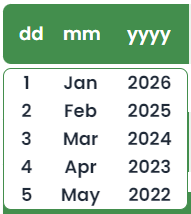
On a wider resolution device, e.g. an iPad or a computer, they display differently and allow you to type in the date:

Enhancement 131072 Candidate Portal – Temp Availability
Overview
- ‘Temp Daily Availability’ is currently in the final stages of Beta testing, and is likely to release alongside or shortly after Infinity version 5.3
- You must have the ‘Onboarding’ functionality, alongside the ‘Availability’ functionality
Configuring Availability
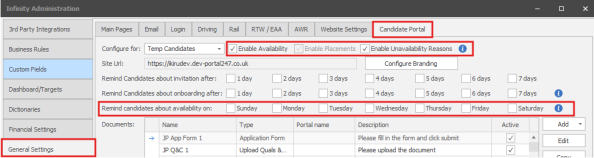
Configure for:
- Only ‘Temp Candidates’ are currently supported for the Availability Module.
Enable Availability
- Enables the Availability feature, if purchased (Off by default).
Enable Placements
- This is automatically enabled, if Temps availability is enabled, as Temp Availability and Placements are shown together.
Enable Unavailability Reasons
- You can optionally request candidates enter a reason, when they mark themselves as unavailable
Availability Reminder emails
- When enabled, all portal candidates who haven’t updated their availability within the last 7 days will receive the availability reminder email on the selected day/s, including those who have yet to login
- This is sent every week
Configuring Unavailability Reasons
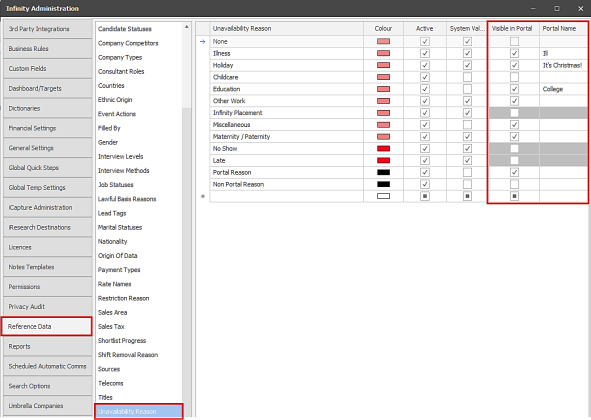
Not all Unavailability Reasons in Infinity are viewable via the portal.
- Infinity Placement, No Show and Late are not available as Unavailability Reasons in the Portal
- The ‘Visible in Portal’ column controls which Unavailability reasons are displayed on the Portal
- The ‘Portal Name’ column allows you to display a different name in the Portal, compared with the name in Infinity
- If the ‘Portal Name’ column is blank, the Infinity ‘Unavailability Reason Name’ is used:
Candidate Portal
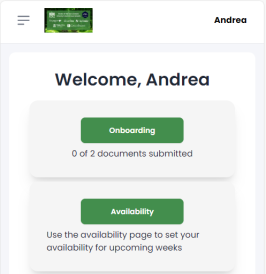
The Candidate will see the ‘Availability’ option on the home page:
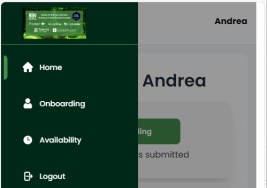
The Candidate will also see the ‘Availability’ option on the menu:
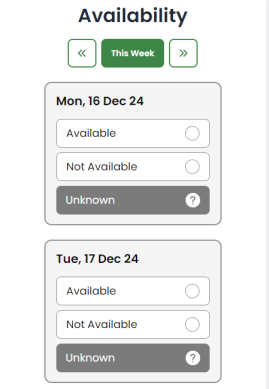
The candidate will see all ‘24 hour’ availability currently stored in Infinity.
- The ‘Availability’ page defaults to ‘This Week’
- The candidate can mark themselves as ‘Available’, ‘Not Available’ or ‘Unknown’
- Changes to Availability do not need to be verified and are added to the database when the candidate updates their availability
- Availability / Unavailability is automatically pushed out to all Infinity users
- i.e. If you are viewing the ‘Temp Planner’ and a candidate updates their availability, you will see the change on the Planner without requiring a refresh
- If the candidate adds Availability for any day, any unavailability on that day is removed
- If the candidate adds Unavailability for any day, any availability on that day is removed
If ‘Unavailability Reasons’ is enabled in Admin, the candidate must select a reason:
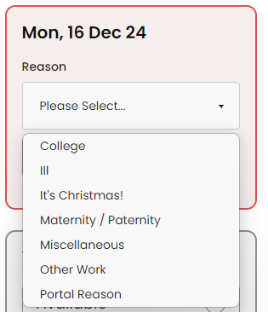
If the candidate has 24 hour unavailability in Infinity, with a reason that is not ticked as ‘Visible on Portal’. The portal marks the candidate as ‘unavailable’ but does not display a reason.
If ‘Unavailability Reasons’ is not enabled in Admin, the candidate does not see the ‘reasons’ drop down.
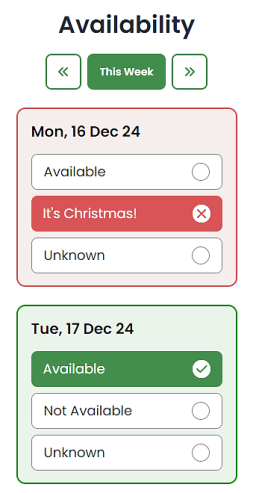
Unavailability displays in Red, and Availability displays in green:
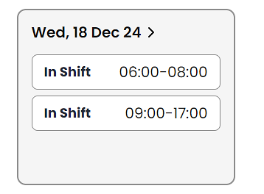
If the candidate has one or more shifts on a given day, they do not see the availability options, but do see the shifts they are scheduled to work:
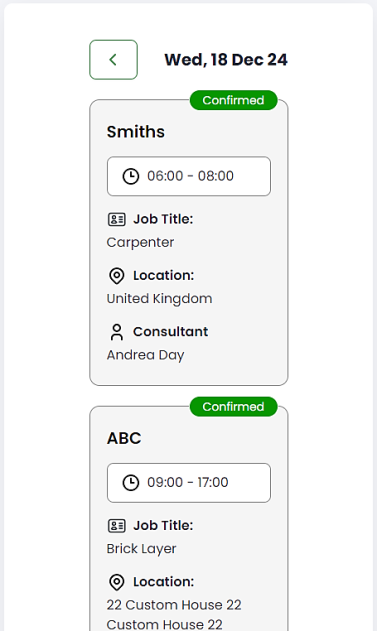
If they select the shift, they are shown the details:
Candidate Page
The Infinity candidate page shows when the candidate last updated their availability:

Searching
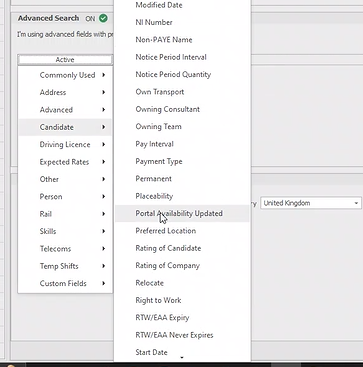
You can search for candidates who have updated their availability via the portal:
 Contact Details
If you require further assistance please contact Ikiru People using the details published on www.ikirupeople.com
Visit our Customer Portal at https://portal.ikirupeople.com/ for future events and clinics.
FeedbackIf you would like to make suggestions or have found any errors with this Help section please contact our Support team.
Copyright © 2026 Voyager by Ikiru People Ltd. All rights reservedVersion 4.87
Voyager Software is a brand of Ikiru People Ltd, a subsidiary of Dillistone Group Plc. The group is a leading global provider of software and services that enable recruitment agencies and in-house recruiters to better manage their selection process and address the training needs of individuals. Across its brands – which include Voyager Software (recruitment software UK & Australia), Dillistone FileFinder executive search software, GatedTalent, the global database of the world’s leading executives, Talentis.Global – the next generation of recruitment software and also ISV.Online, provider of online pre-employment skills testing and training tools. Dillistone Group serves thousands of clients worldwide. Ikiru People Ltd: Registration Number 02043300. Registered in England & Wales.
 |  |  |  |