Release Notes Version: 5.26
Release Date: 8th December 2025
What have we released?
• Infinity 5.26 has been released
Release overview
Here’s a snapshot of what we’ve delivered in this release:
• Permission to edit candidate financials
• Social media icons have a right click menu to launch in an external browser
• Work history ‘Current Agency Used’ field added to candidate search list/shortlist
• Shift Planner – candidate temp calendar button added to search results
Feedback please
We are continuously looking to improve Voyager Infinity and are keen to hear your thoughts. Please email suggestions@ikirupeople.com with any feedback on existing functionality or ideas for new functionality.
Enhancement 136570 Permission to edit candidate financials
In Administration / Permissions / Permissions tab, there is a new permission called ‘ChangeCandidateFinancials’ that gives users the ability to modify any of the fields in the candidate financial details screen.
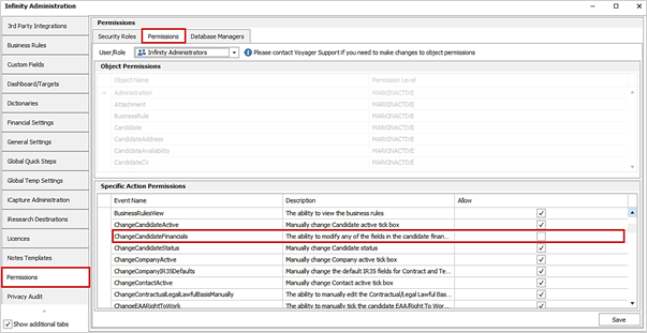
This will be ticked as default on upgrade for Infinity Administrators and Infinity Users security roles.
When ticked, works as per current functionality and the user can edit all fields in the candidate financial details section, unless owned by Mid-Office.
When unticked, all fields in the candidate page personal / financial window - candidate financial details section are greyed and read only, regardless of Mid-Office ownership.
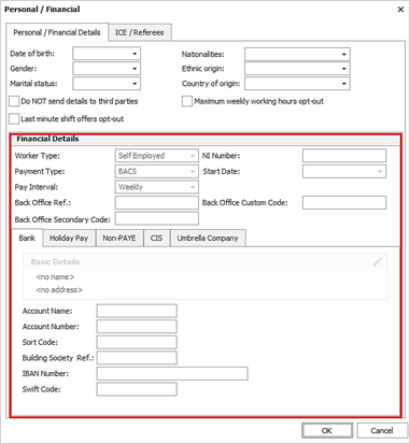
Launching candidate financials from the placement page salary / rates section adheres to the permissions.
On blank databases, this will be on for Administrators and off for Users security roles.
Enhancement 136411 User option to open social media links externally
In User Options / General / Main Pages tab there is a new setting to open social media icon links in an external web browser.
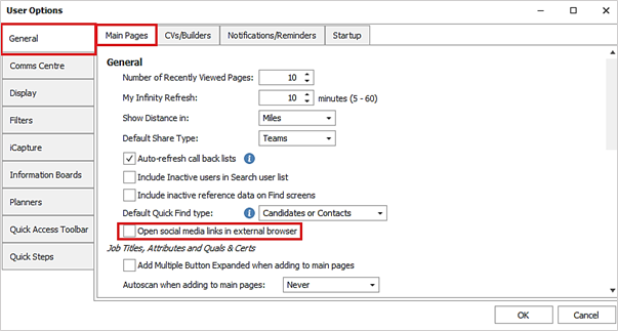
The setting is off as default and works as per existing functionality.
When ticked social media icons open the link using the default external web browser rather than iResearch.
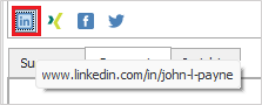
This is on the following pages:
• Candidate
• Company
• Contact
Enhancement 136545 'Current agency used' field added to search list / shortlist
The candidate work history column called ‘Current Agency Used’ is available via the column chooser to add to your search lists / shortlists.

This is available on:
• Candidate search list
• Candidate re: job shortlist
Enhancement 136389 Scheduled Auto Comms – ‘Send From’ label change on consultant roles
In Administration / Scheduled Automatic Comms, add/edit screens, the ‘Send From’ options related to consultant roles have been renamed from {top active [Consultant role]} to {top active consultant with role [Consultant role]}.

The window has been widened so that 50 characters are visible in the ‘Send From’ drop-down.
Enhancement 136543 SMS setting to convert ‘Em’ and ‘En’ dashes to hyphens
In Administration / 3rd Party Integrations / Phone Manager Options, there is a setting to convert ‘Em’ and ‘En’ dashes to hyphens when sending SMS.
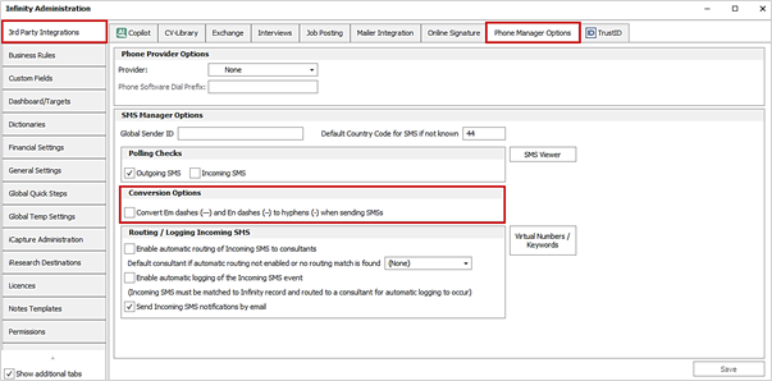
This setting is off by default.
These characters are not in the standard SMS character set (GSM-7) and cause each message to be broken into 70-character segments (rather than 160/153), increasing the charge per message.
Enhancement 136409 Shift Planner – candidate temp calendar on search results
On the Shift Planner / Candidate Search results panel, the candidate’s temp calendar is available to access via a button on the toolbar.
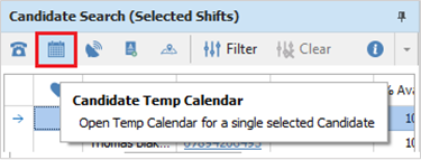
• This is available when a single candidate is selected in search results
• This loads the selected candidate's temp calendar which can be updated and saved
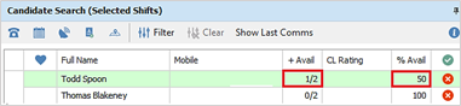
If availability is updated for the selected shifts, the results are updated in the %Avail and +Avail columns accordingly.
 Contact Details
If you require further assistance please contact Ikiru People using the details published on www.ikirupeople.com
Visit our Customer Portal at https://portal.ikirupeople.com/ for future events and clinics.
FeedbackIf you would like to make suggestions or have found any errors with this Help section please contact our Support team.
Copyright © 2026 Voyager by Ikiru People Ltd. All rights reservedVersion 4.87
Voyager Software is a brand of Ikiru People Ltd, a subsidiary of Dillistone Group Plc. The group is a leading global provider of software and services that enable recruitment agencies and in-house recruiters to better manage their selection process and address the training needs of individuals. Across its brands – which include Voyager Software (recruitment software UK & Australia), Dillistone FileFinder executive search software, GatedTalent, the global database of the world’s leading executives, Talentis.Global – the next generation of recruitment software and also ISV.Online, provider of online pre-employment skills testing and training tools. Dillistone Group serves thousands of clients worldwide. Ikiru People Ltd: Registration Number 02043300. Registered in England & Wales.
 |  |  |  |