Release Notes Version: 5.25 November 2025
Release Date: 29th November 2025
What have we released?
• Infinity 5.25 has been released
Release overview
Here’s a snapshot of what we’ve delivered in this release:
• Company meetings board
• Candidate reviews report
• Duplicate candidates export
• Connect app – search by phone number
• Shift Planner Comms Wizard – Total Charge merge fields
Infinity Release Notes Highlight Video - December 2025
Feedback please
We are continuously looking to improve Voyager Infinity and are keen to hear your thoughts. Please email suggestions@ikirupeople.com with any feedback on existing functionality or ideas for new functionality.
Enhancement 136315 Company meetings board
A new information board is available called Company Meetings Board.
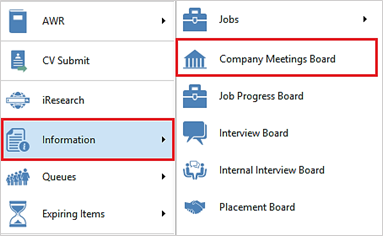
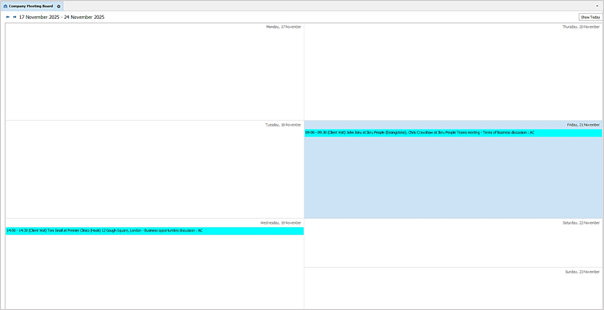
The Board displays a weekly view of meetings where contacts are an attendee.
• This is available in the Apps Menu / Information Boards menu above Job Progress Board
• The Board displays a weekly view of meetings against contacts.
• The meetings shown are where meeting start date is in that week
• The meetings shown are normal and public meetings, and private meetings you have permission to.
• The weekly display is Monday – Sunday
• Meeting date / times are displayed in the user’s Infinity time zone
• It defaults to show the current week when first opened
• There is a forward and backward week navigator button
• The selected week dates are displayed to the user
• There is a today button that takes the user back to the week of today’s date
• Meeting entry shows on one row with the following fields:
o Start and End Time
o Meeting Category in brackets
o Company Name
o Title Contact Forename Surname at company location in brackets
o Meeting Location
o Meeting Subject
o Meeting Organiser in shortname format
• The entry is shown in the category colour as per admin settings
• Double clicking on a meeting opens the meeting record adhering to permissions
Enhancement 135991 Candidate reviews report
A new report is available called ‘Candidate Reviews (Excel)’ in the central ‘reports’ option on the main toolbar and in the ‘Candidate’ folder.
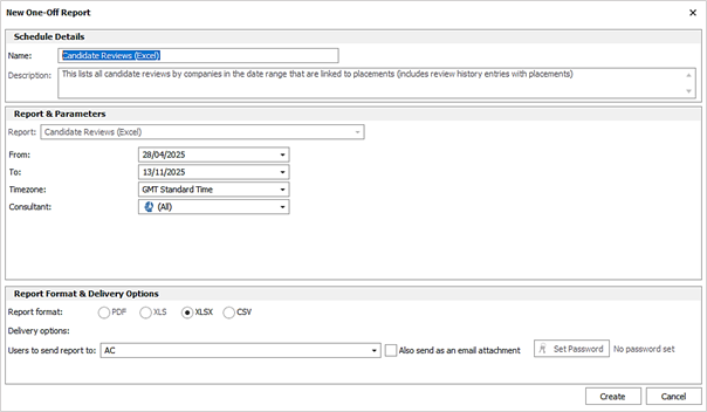
This lists all candidate reviews by companies that are in the date range and that are linked to placements (includes review history entries with placements).
The Review date range (from and to) and consultant / team that owns the placement can be selected in the parameters.
The report is ordered by Review Date – latest at the top.

The following Infinity fields are reported on:
• Placement ID
• Placement Type
• Candidate ID
• Candidate Name – forename and surname
• Client Name
• PL Job Title
• PL Location
• PL Start Date
• PL End Date
• PL Consultant(s) – in short name format with consultant type in brackets if exist, comma separated
• PL Main Contact – forename and surname
• PL Main Contact job title
• Rating given – number format 1-5
• Reason
• PL Custom field(s) – a column for each custom field
Enhancement 136206 Duplicate Candidates export
In Application / Data Management / Manage Duplicate Candidates menu, there is an ‘Export to Excel’ button on the toolbar.

This is only available to users with the ‘Exportgrid’ permission.
When selected, all the records in the current view are loaded, flattened and downloaded locally to Excel. It reports on what is currently displayed i.e. if the consultant filter is set, it only reports on that consultant.
The user is prompted to save the file called ‘Duplicate Candidates.xls’ in windows explorer, and the Excel file is then automatically opened.

The Excel columns are:
• ID
o E.g. 1, 2, 3
o This is generated when the excel document is created
o If it is run more than once, different groups are likely to get a different ID
o The ID indicates the group of duplicate candidates
• Candidate Name
• # of High Matches
• # of Medium Matches
• # of Low Matches
• Code
• Name
• Status
• Mobiles
• LinkedIn Url
• Other Telecoms
• Address Line 1
• Postcode
• Date of Birth
• Last CV
• Last Contacted
• Is Contact?
• # of EV
• # of SL
• # of IV
• # of PL
• Consultants
o Comma delimited and including the consultant role in brackets if present
Enhancement 136204 Attachment types to be ordered alphabetically when renaming
On the attachment screen, after selecting an attachment and pressing the Rename button, the attachment types the filter is in alphabetical order from the follow screens:
• Candidate
• Company / Location / Contact
• Job
• Interview
• Placement
• Calendar appointment/meeting
• Task
Enhancement 135547 Infinity Connect app search by phone number
In the Infinity Connect Phone app, the user can search for candidate and contact phone numbers.
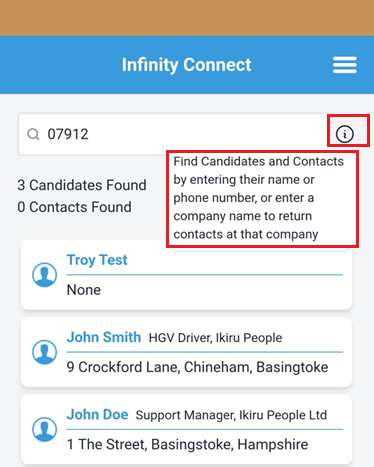
• If all numbers are entered in the search field, Connect assumes to search phone numbers, stripping out any pluses, brackets and spaces first
• If characters are entered it works as per existing functionality and searches names
• When searching phone numbers, Connect returns landline and mobile number matches for candidates and contacts
• The info button has been updated to say 'Find Candidates and Contacts by entering their name or phone number’
Enhancement 136025 Shift Planner Comms Wizard - Total charge merge fields
In the Shift Planner Comms Wizard, new merge fields have been added to merge the total charge for the shifts.
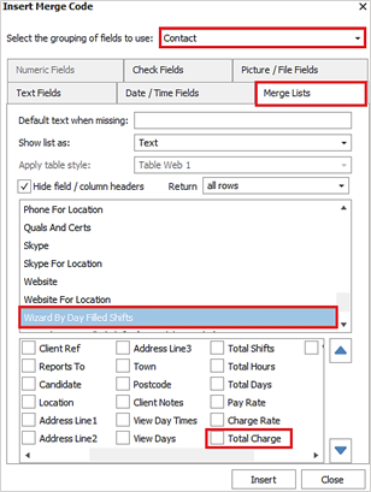
Wizard by Day Filled Shifts merge lists – new column
All ‘Wizard by Day Filled Shifts merge lists’ have a new column called ‘Total Charge’. The merge lists are available in candidate, contact, job and placement Comms Centre when used from the Shift Planner Comms Wizard.
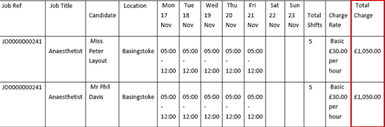
This is calculated for all shifts merged in the row.
If shift's relevant rate per field is:
• Hourly rates: is calculated by multiplying the number of hours in the shift, by the charge rate for the relevant rate
• If placement is set to unpaid and uncharged breaks, the break hours are first deducted from the shift hours, this should already be reflected in the merged total hours column
• Shift rates: is the charge rate from the relevant rate
• Daily rates: is the charge rate from the relevant rate
• Piece rates - not calculated
• Blank rates - not calculated
Merges as 2 decimal places and displays the currency.
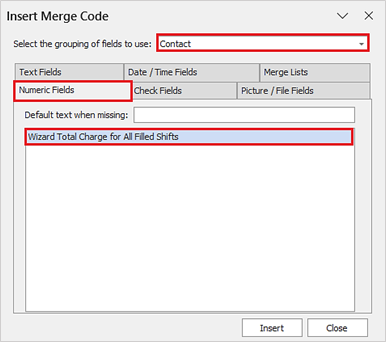
Wizard Total Charge for All Shifts – new merge field
There is new merge field called ‘Wizard Total Charge for All Shifts’ in the ‘Numeric Fields’ tab. This is available in candidate, contact, job and placement Comms Centre when used from the Shift Planner Comms Wizard.
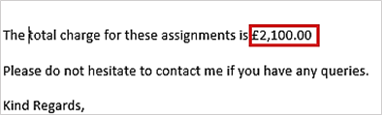
This is the sum of all rows merged, total charge value.
Merges as 2 decimal places and displays the currency. The currency displayed is taken from the charge of the first merged row.
 Contact Details
If you require further assistance please contact Ikiru People using the details published on www.ikirupeople.com
Visit our Customer Portal at https://portal.ikirupeople.com/ for future events and clinics.
FeedbackIf you would like to make suggestions or have found any errors with this Help section please contact our Support team.
Copyright © 2026 Voyager by Ikiru People Ltd. All rights reservedVersion 4.87
Voyager Software is a brand of Ikiru People Ltd, a subsidiary of Dillistone Group Plc. The group is a leading global provider of software and services that enable recruitment agencies and in-house recruiters to better manage their selection process and address the training needs of individuals. Across its brands – which include Voyager Software (recruitment software UK & Australia), Dillistone FileFinder executive search software, GatedTalent, the global database of the world’s leading executives, Talentis.Global – the next generation of recruitment software and also ISV.Online, provider of online pre-employment skills testing and training tools. Dillistone Group serves thousands of clients worldwide. Ikiru People Ltd: Registration Number 02043300. Registered in England & Wales.
 |  |  |  |