Release Notes 5.20 September 2025
Release Date: 3rd September 2025
What have we released?
• Infinity 5.20 has been released
Release overview
• Placement Comms Centre – store ‘send to’ contacts with the template
• Email tracking information on search results
• Infinity Connect app – candidate status field added
• Temp comms – merge shift placement location details
• Shift Planner Comms Wizard – merge the shift pay rate
Infinity Release Highlights Video - October 2025
Feedback please
We are continuously looking to improve Voyager Infinity and are keen to hear your thoughts. Please email suggestions@ikirupeople.com with any feedback on existing functionality or ideas for new functionality.
Enhancement 134727 Placement Comms Centre – store ‘send to’ contacts with the template
In Comms Centre Template Administration, the Placement Contact Email Comms Centre has the ‘Include’ field to store which placements contacts the email is to be sent to.
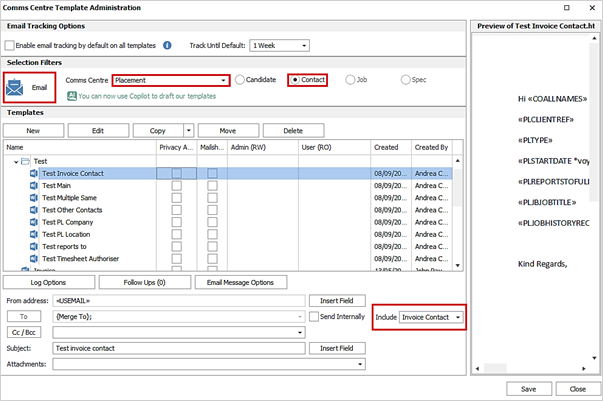
The following placement contact(s) can be included:
• Main Contact
• Other Contacts
• Reports to
• Invoice contact
• Timesheet Authoriser
• PL Location
• PL Company
For upgrades and newly created templates this will default to ‘Main Contact’ so functionality is the same.
As part of this enhancement, the ‘Log Options’, ‘Follow Ups’ and ‘Email Message Options’ buttons have been moved below the template grid.
When the template is selected in the Placement Contact Email Comms Centre, the ‘Include’ contacts stored with the template are set in the Comms Centre screen and are applied to the ‘Merge To’ section. Each valid contact in the ‘Merge To’ grid is sent the email, as per existing functionality.
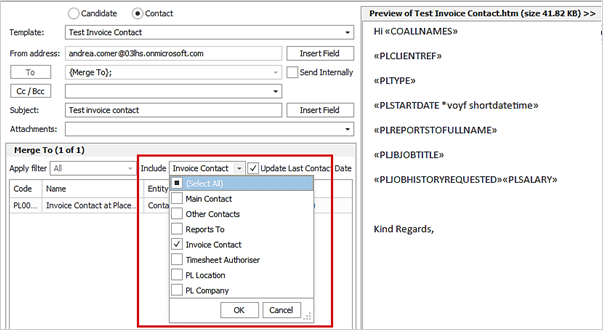
The template can also be sent by applicable Placement page contact-related conditions in Scheduled Automatic Comms. If a contact matches multiple ‘Include’ options, e.g. is the main contact, reports to and invoice contact on the placement, only one email is sent. The contacts must be active and have a ‘Send as default’ email address to be sent the email.
Enhancement 135304 Email tracking information on search results/list
The ‘Show Last Comms’ functionality on search results now includes the display of the event email tracking column called 'Opens'. When emails are sent from the search results Comms Centre with tracking enabled, the ‘Opens’ column will display how many times the email has been opened by the recipient.
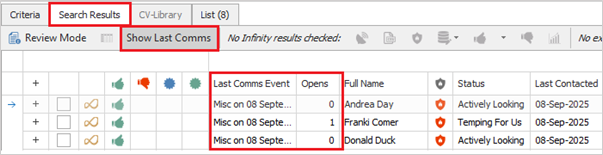
• This is the same email tracking information that the main page event shows
• Displays after the ‘Last Comms Event’ column
• Is a separate column that can be sorted
• If other communications e.g. Event logger phone calls, are made from the search result, then email tracking is not relevant to those results and the column will be blank
• The column disappears when the button is toggled off
• The button tooltip has been updated to reflect that it also displays the email tracking 'Opens' column
The ‘Show Last Comms’ button is on the following search areas:
• Candidate search results
• Contact search results
• Company search results
• Location search results
• Job search results
• Placement search results
• Shift planner search results
Enhancement 135196 Connect app - candidate status added
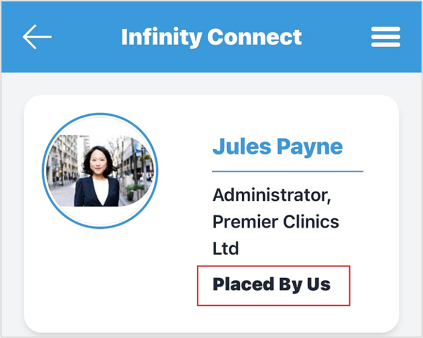
The status field has been added to the candidate record in the In the Infinity Connect mobile app.
Enhancement 135217 Shift Planner Comms Wizard – merge shift pay rate
In the Shift Planner Comms Wizard, all ‘Wizard by Day Filled Shifts’ merge lists have a new field to merge the shift pay rate.
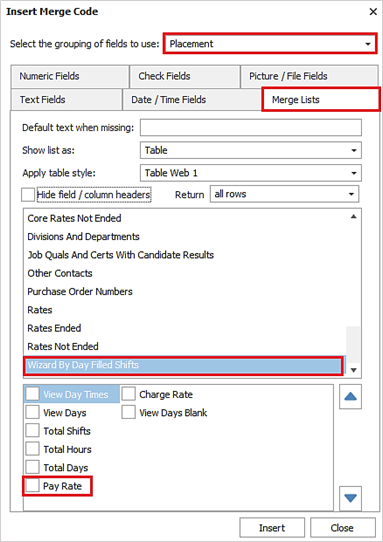
This is available in candidate, contact, job and placement Comms Centre when the templates are used via the Shift Planner Comms Wizard.
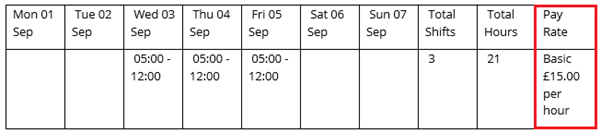
• This merges the placement shift core rate if exists
• This will be the shift pay rate for the shifts being merged in the period
• If all the shifts use the same rate, there is only one rate listed
• If multiple rates, then these are listed in the field along with the shifts date / times they are applicable to
• The rate type is prefixed to the pay rate
• The pay is 2 decimal places with currency prefixed
• The pay rate is appended with ‘per’ then value e.g. ‘per hour’, ‘per day’
Enhancement 135305 Temp comms – merge shift placement location details
The temp placement location address fields ‘Address line 1, 2, 3, Town and Postcode have been added to the following temp shift merge lists:
• All variations of ‘Book Dates…’
• All variations of ‘Booked By Day...’
• ‘Wizard by Day Filled Shifts’ including the ‘(in candidate order)’ version
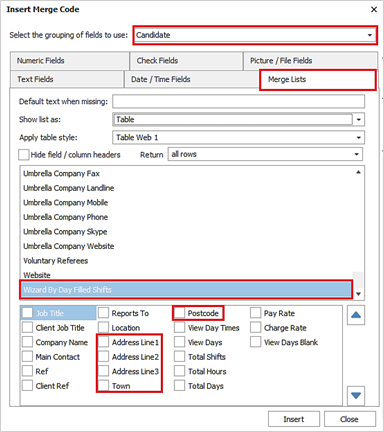
These merge lists are available in candidate, contact and job related Comms Centres.
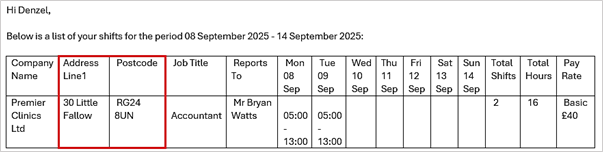
When merged, the address details from the placement’s linked location or custom location address fields are displayed.
Enhancement 134509 Candidate Portal Availability Admin changes
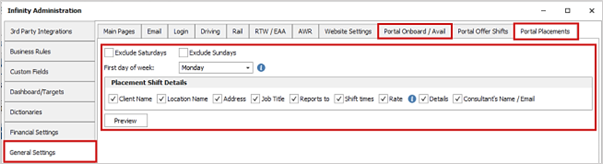
The admin screen has been re-arranged in preparation for new ‘Portal Offer Shifts’ functionality, currently in development.
• 'Candidate Portal' Tab in Admin 'General Settings' is renamed to 'Portal Onboard / Avail'.
• The ‘Portal Offer Shifts’ tab, will not be visible.
• The following existing fields are renamed and moved to the new 'Portal Placements' tab:
o Exclude Saturdays
o Previously called 'Exclude Saturdays from availability'
o Exclude Sundays
o Previously called 'Exclude Sundays from availability'
o First day of week
o Previously first day of week for availability
• The following 'Placement Shift' fields can be enabled / disabled per database, to control the ‘In Shift’ functionality used by ‘Availability’ on the Candidate Portal and at least one option must be ticked:
o Client name
On by default
o Location name
If 'display location names when displaying placement shift data' was on, this setting should be on after upgrade
The old 'display location names when displaying placement shift data' is removed
o Address
On by default
o Job title
On by default
o Reports to
Off by default
o Shift times
If 'display placement shift times when displaying shift data' was on, this setting should be on after upgrade
The old 'display placement shift times when displaying shift data' setting is removed
o Rate
Off by default
o Details
Off by default
o Consultants name / email -this has been added for use by future functionality
On by default
 Contact Details
If you require further assistance please contact Ikiru People using the details published on www.ikirupeople.com
Visit our Customer Portal at https://portal.ikirupeople.com/ for future events and clinics.
FeedbackIf you would like to make suggestions or have found any errors with this Help section please contact our Support team.
Copyright © 2026 Voyager by Ikiru People Ltd. All rights reservedVersion 4.87
Voyager Software is a brand of Ikiru People Ltd, a subsidiary of Dillistone Group Plc. The group is a leading global provider of software and services that enable recruitment agencies and in-house recruiters to better manage their selection process and address the training needs of individuals. Across its brands – which include Voyager Software (recruitment software UK & Australia), Dillistone FileFinder executive search software, GatedTalent, the global database of the world’s leading executives, Talentis.Global – the next generation of recruitment software and also ISV.Online, provider of online pre-employment skills testing and training tools. Dillistone Group serves thousands of clients worldwide. Ikiru People Ltd: Registration Number 02043300. Registered in England & Wales.
 |  |  |  |