Release Notes 5.19 September 2025
Release Date: 3rd September 2025
What have we released?
- Infinity 5.19 has been released
Release overview
- Here’s a snapshot of what we’ve delivered in this release:
- Average review rating added to candidate search results/lists
- Scheduled Automatic Comms for shortlisted candidates
- Option to submit CVs in original format
- SMS - legislation changes sending to Irish numbers (+353)
Infinity Release Notes Highlights video - October 2025
Feedback please
We are continuously looking to improve Voyager Infinity and are keen to hear your thoughts. Please email suggestions@ikirupeople.com with any feedback on existing functionality or ideas for new functionality.
Enhancement 124603 Average review rating added to candidate search results/lists
The candidate's average review rating is available as a column called ‘Avg Rating’ on candidate searches.
The column is available via the ‘Column chooser’ menu to add to the following search grids:
- Candidate search results
- Candidate search list
- Candidate re: job search results
- Candidate re: job search shortlist
The search grid can be sorted by this column.
Enhancement 134963 Scheduled Automatic Comms for shortlisted candidates
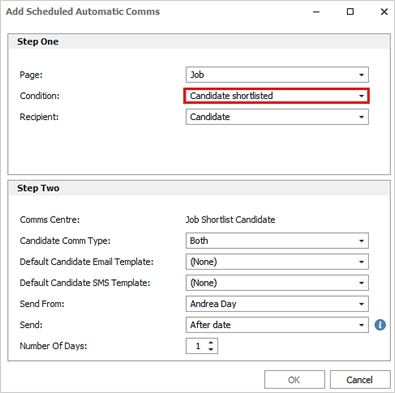
In Administration / Scheduled Automatic Comms there is a new job page condition called ‘Candidate shortlisted’ to send comms to candidates that have been added to a job shortlist.
The recipient is candidate only
The Job Shortlist / Temp Results Comms Centre is available to select templates from:
- This can be Email templates
- This can be SMS templates if configured on the system
The template can be sent from:
- a selected active consultant
- top active owning consultant
- top active consultants using the active consultant role reference data - e.g. 'Resourcer'
This can be sent X days after the candidate was added to the job shortlist
When enabled, this sends comms automatically to candidates that have been added to a job shortlist as configured. The candidates must be active, and their shortlist row stage must be at ‘shortlisted’ on the job.
Enhancement 134877 Option to submit CVs in their original format
In the CV Submit Comms Centre, a new option has been added to submit the CV in its original format, as stored on the candidate page. The option is called ‘Submit CV in original format?’
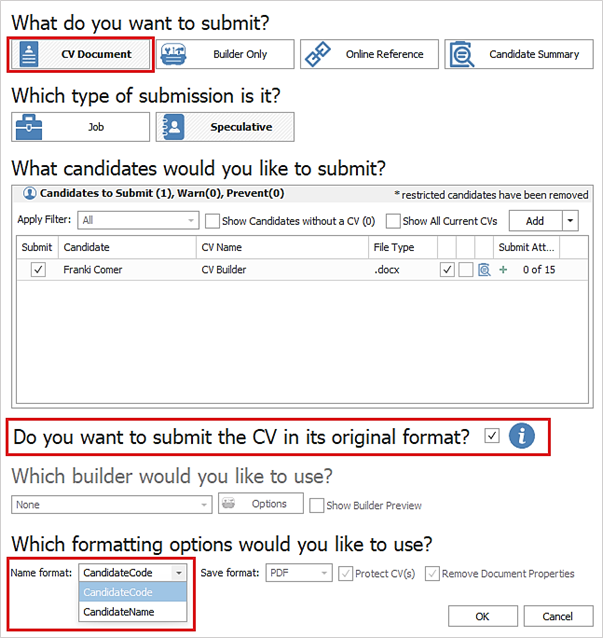
- The option is only available when the ‘CV Document’ button is selected
- The default is set as per configured in User Options
- There is an adjacent Info button giving details of what the option does
Note: the CV document is not merged when sending by this method and the option should not be used if the CV(s) contain merge fields.
When un-ticked, the CV submission works as per existing functionality.
When ticked the CV submission works as follows:
The below fields are not available to use and are disabled on the screen:
- CV Builder drop-down
- CV Builder Options button
- Show Builder Preview checkbox
- Save Format drop-down
- Protect CV(s) checkbox
- Remove Document Properties checkbox
The ‘Name Format’ drop-down can be used to change the CV document name as per existing functionality
When sent, the CVs included in the submission are renamed as per the ‘Name Format’ setting and attached to the email without any other processing
In User Options / Comms Centre tab / Submit CV section, the default can be set.
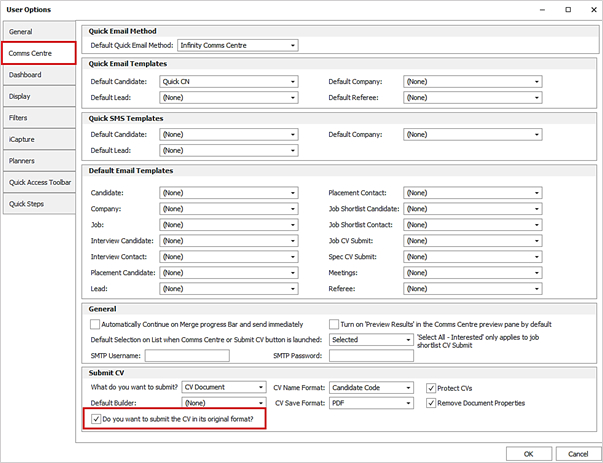
This is unticked as default.
Enhancement 134967 Microsoft’s New Outlook – drag/drop to Infinity is prevented
Microsoft’s New Outlook version does not support the dragging and dropping of files to Infinity.
Infinity has been updated to show the 'no entry' symbol when the user attempts to do this from Microsoft’s New Outlook. This affects all areas of Infinity that have drag and drop functionality.
Instead, the files must first be dragged to the desktop (or another local/network folder), and from there to Infinity.
Enhancement 134846 SMS - legislation changes sending to Irish numbers (+353)
The Irish Commission for Communications Regulation (ComReg) have recently announced plans to combat SMS fraud by only allowing Sender ID’s that are alphanumeric and that have been registered with ComReg directly on their SMS Sender IT Protection Registry. Using an unregistered Sender ID will result in SMS being blocked by the networks, not delivered to handsets and you may still be charged for the SMS.
Person-to-Person SMS messages sent from phone numbers, i.e., SMSes sent from a handset, and SMS short codes will not be affected.
To register your sender ID, you will need to apply for your sender ID by following the instructions here: Ireland Sender ID Registration Guide.
Please contact the support team at support@ikirupeople.com if you have any queries.
Infinity SMS functionality has been updated to give warning about this change.
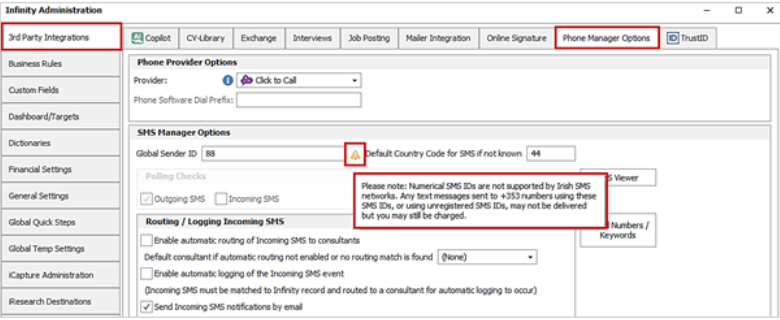
In Administration / 3rd Party Integrations / Phone Manager Options tab, when a numerical Global Sender ID is entered, a warning triangle displays and the hover over information displays the details.
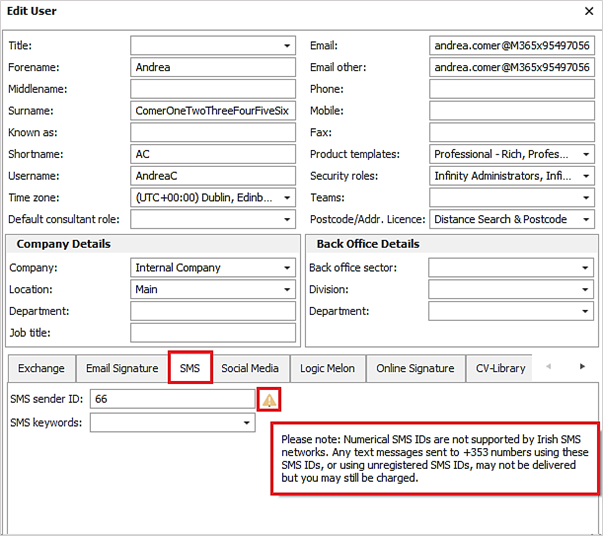
In User Administration / SMS tab, when a numerical Sender ID is entered, a warning triangle displays and the hover over information displays the details.
In the SMS Comms Centre, when a user sends an SMS to one or more Irish (+353) numbers, a mobile icon and warning triangle displays on the Merge To section toolbar and the hover over information displays the details.

 Contact Details
If you require further assistance please contact Ikiru People using the details published on www.ikirupeople.com
Visit our Customer Portal at https://portal.ikirupeople.com/ for future events and clinics.
FeedbackIf you would like to make suggestions or have found any errors with this Help section please contact our Support team.
Copyright © 2026 Voyager by Ikiru People Ltd. All rights reservedVersion 4.87
Voyager Software is a brand of Ikiru People Ltd, a subsidiary of Dillistone Group Plc. The group is a leading global provider of software and services that enable recruitment agencies and in-house recruiters to better manage their selection process and address the training needs of individuals. Across its brands – which include Voyager Software (recruitment software UK & Australia), Dillistone FileFinder executive search software, GatedTalent, the global database of the world’s leading executives, Talentis.Global – the next generation of recruitment software and also ISV.Online, provider of online pre-employment skills testing and training tools. Dillistone Group serves thousands of clients worldwide. Ikiru People Ltd: Registration Number 02043300. Registered in England & Wales.
 |  |  |  |