Release Notes 5.18 September 2025
Release Date: 3rd Sep 2025
What have we released?
• Infinity 5.18 has been released
Release overview
Here’s a snapshot of what we’ve delivered in this release:
• CC/BCC umbrella contacts in placement Comms Centre
• Store CC/BCC placement contacts with the Comms Centre template
• Load the Job Progress board automatically when logging in
• iCapture – improved management of ‘Parser skills not in dictionaries’
Infinity Release Notes Highlights Video - September 2025
Feedback please
We are continuously looking to improve Voyager Infinity and are keen to hear your thoughts. Please email suggestions@ikirupeople.com with any feedback on existing functionality or ideas for new functionality.
Enhancement 134445 CC/BCC umbrella contacts on the fly in placement Comms Centre
In the single placement email Comms Centre, the CC/BCC ‘Add Related’ menu includes an option for the Umbrella Company Contact.
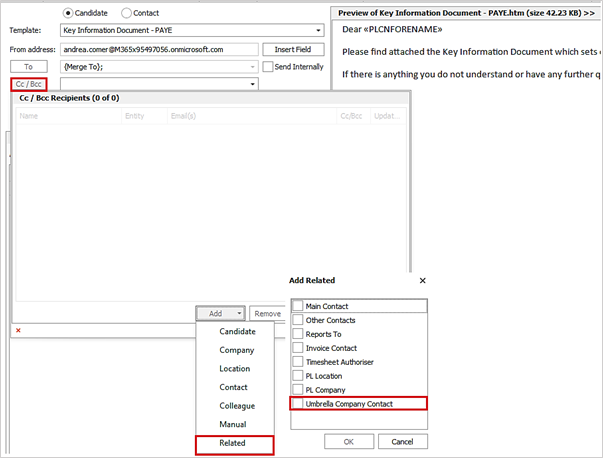
When selected, if the placement is set to an umbrella worker type it pulls through the umbrella contact name and email address to the CC/BCC grid.

• The umbrella company assigned to the candidate must have at least 1 email address ticked as send as default, against the contact
o If multiple email addresses are ticked all addresses are pulled through
• If the placement is not set to an umbrella worker type, no contact is pulled through
When the email is sent the umbrella contact receives a CC/BCC to their email address(s).
Enhancement 134302 Store CC/BCC placement contacts with the Comms Centre template
In Comms Centre Template Administration / Placement Email Comms Centre, templates have a ‘Related’ menu option in the CC/BCC area.
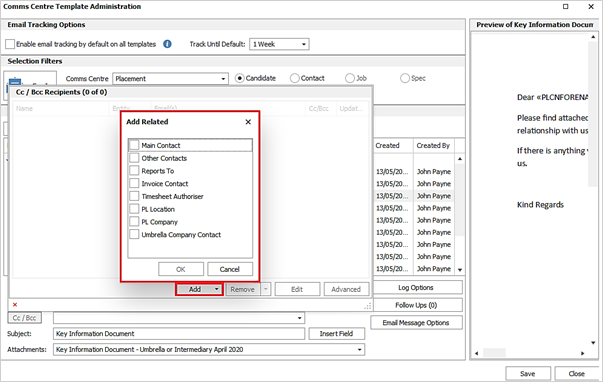
The options available are as per the single placement page Comms Centre and when selected, the related options are added and stored with the template as merge fields.

In the placement Comms Centre when the template is selected, the merge fields are shown in the CC/BCC field.
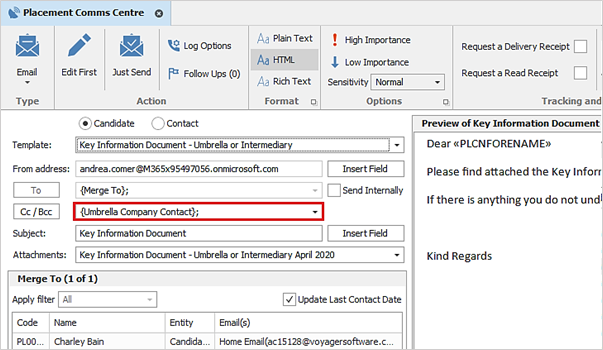
• When sent, the details of the selected related entity, specific to each placement, is merged
• The template can be sent manually by the user or by Scheduled Automatic Comms to multiple placements as required
• If the related entity exists with a ‘send as default’ email address, they are CC/BCC’d on the email
• If the related entity doesn't exist or has no email address, the entity is not CC/BCC'd on the email
Enhancement 133590 Automatically load Job Progress Board
The Job Progress Board is available in User Options / Startup tab to show on startup.
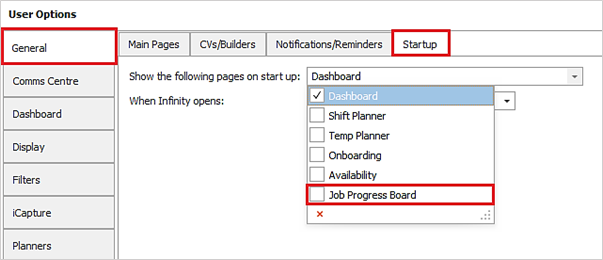
This is unticked as default and when selected, the Job Progress Board is loaded automatically when the user logs into Infinity along with any others selected.
Enhancement 134351/134693 iCapture –Parser Skills Not in Dictionaries changes
On databases configured to use iCapture Parser Dictionary. In Administration / Dictionary tab, changes have been made to the ‘Parser Skills Not In Dictionaries list.
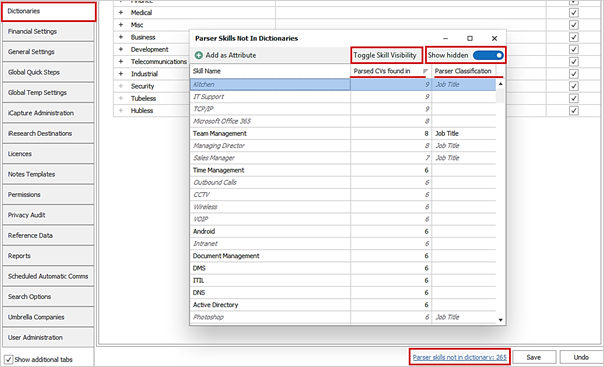
• A skill can be hidden by clicking the ‘Toggle Skill Visibility’ button
o This can be used for entries you do not wish to add to your dictionaries
o Hidden entries do not show as default when the list is opened
o Hidden entries can be viewed by clicking the ‘Show Hidden’ slider button
o Hidden entries appear in italics and in grey font
o Hidden entries can be added to the dictionary
o Hidden entries’ ‘Parsed CVs found in’ statistic is still counted
o Hidden entries can be unhidden by clicking the ‘Toggle Skill Visibility’ button
• The ‘No of CVs found in’ column has been renamed to 'Parsed CVs found in'
• A new column has been added called Parser Classification
o This will say ‘Job Title’ if found by the Parser’s job title scanning process
o This will say ‘Skill’ if found by Parser’s skill (attribute) scanning process
o Classification is taken from the first time the entry is found by the Parser
o On upgrade, existing entries are set to blank
o After upgrade, if a 'blank' entry is found, it is given its correct classification
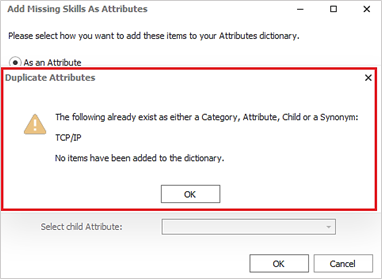
Duplicate checking is now done up front when the user adds entries to the Infinity dictionaries. If they already exist as a category, parent, child or synonym, the user is notified and prevented from doing so.
 Contact Details
If you require further assistance please contact Ikiru People using the details published on www.ikirupeople.com
Visit our Customer Portal at https://portal.ikirupeople.com/ for future events and clinics.
FeedbackIf you would like to make suggestions or have found any errors with this Help section please contact our Support team.
Copyright © 2026 Voyager by Ikiru People Ltd. All rights reservedVersion 4.87
Voyager Software is a brand of Ikiru People Ltd, a subsidiary of Dillistone Group Plc. The group is a leading global provider of software and services that enable recruitment agencies and in-house recruiters to better manage their selection process and address the training needs of individuals. Across its brands – which include Voyager Software (recruitment software UK & Australia), Dillistone FileFinder executive search software, GatedTalent, the global database of the world’s leading executives, Talentis.Global – the next generation of recruitment software and also ISV.Online, provider of online pre-employment skills testing and training tools. Dillistone Group serves thousands of clients worldwide. Ikiru People Ltd: Registration Number 02043300. Registered in England & Wales.
 |  |  |  |