Release Notes 5.15 July 2025
Release Date: 11th July 2025
What have we released?
• Infinity 5.15 has been released
Release overview
Here’s a snapshot of what we’ve delivered in this release:
• Comms Centre – improved handling of Exchange authentication issues
• Temp History screen - number of shifts worked and export functionality added
Infinity Release Notes Highlight Video - July 2025
Feedback please
We are continuously looking to improve Voyager Infinity and are keen to hear your thoughts. Please email suggestions@ikirupeople.com with any feedback on existing functionality or ideas for new functionality.
Enhancement 133835 Comms Centre - improved handling of Exchange authentication issues
When sending emails from the Infinity Comms Centre, if it fails due to an Exchange authentication error, the Merge Progress window notifies the user to re-authenticate.
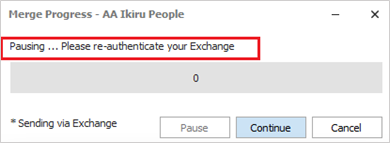
The sending is paused, and the Authenticate Exchange Account window pops up.
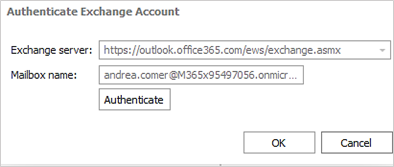
• The user can enter the password and authenticate
• If the authentication is successful and user clicks OK:
o The Merge Progress window will automatically start sending the comms again
o The record that failed will be resent
• If the authentication is unsuccessful:
o The user can try to authenticate again
o If the user clicks Cancel, the comms send is cancelled and user must close the Merge Progress screen
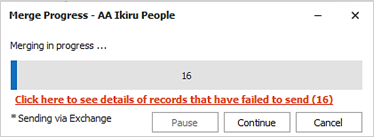
For non-authentication failures, the merge progress window displays the 'failed' hyperlink as per existing functionality but is now in a red, bold font with more detailed instructions.
Enhancement 134042 Temp History - no of shifts worked
In the candidate page Temp History screen, there is a new column called ‘No of Shifts’ and a ‘Total Number of Shifts’ field at the bottom.
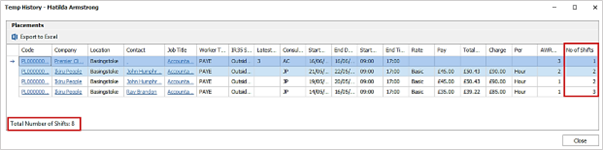
• No of Shifts – this is the number of shifts that are applicable for that row and is the count of days (as there is a shift on each day) from the Start Date to the End Date (note - if there is a day’s gap between shifts, they show on a different row)
• Total Number of Shifts - this is the total shifts across all rows
Enhancement 134041 Temp History - export
There is an ‘Export to Excel’ button on the Temps History screen toolbar.
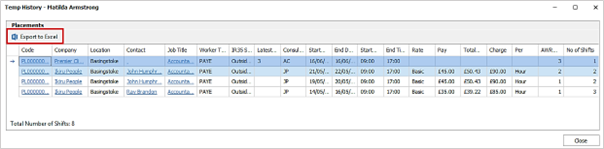
• Users with ‘Export grid’ permission can export the Temp History grid to Excel
• This downloads it locally to Excel and the file is titled ‘Temp History - {candidate name}’
• User can choose where in Windows Explorer to save the file
• When saved, the file is opened in Excel automatically
The columns and data are output to Excel as per the user’s current view of the grid.

 Contact Details
If you require further assistance please contact Ikiru People using the details published on www.ikirupeople.com
Visit our Customer Portal at https://portal.ikirupeople.com/ for future events and clinics.
FeedbackIf you would like to make suggestions or have found any errors with this Help section please contact our Support team.
Copyright © 2026 Voyager by Ikiru People Ltd. All rights reservedVersion 4.87
Voyager Software is a brand of Ikiru People Ltd, a subsidiary of Dillistone Group Plc. The group is a leading global provider of software and services that enable recruitment agencies and in-house recruiters to better manage their selection process and address the training needs of individuals. Across its brands – which include Voyager Software (recruitment software UK & Australia), Dillistone FileFinder executive search software, GatedTalent, the global database of the world’s leading executives, Talentis.Global – the next generation of recruitment software and also ISV.Online, provider of online pre-employment skills testing and training tools. Dillistone Group serves thousands of clients worldwide. Ikiru People Ltd: Registration Number 02043300. Registered in England & Wales.
 |  |  |  |