Release Notes 5.14 June 2025
Release Date: 27th June 2025
What have we released?
• Infinity 5.14 has been released
Release overview
Here’s a snapshot of what we’ve delivered in this release:
• Schedule automatic comms to a candidate when their CV is submitted against a job
• Multiselect teams / consultants in the Job Progress Board and Open Jobs lists
• New photo images are stored as a thumbnail
• Portal – lots of minor enhancements plus
o merge linked work history information in the Referee Comms Centre
Infinity Release Notes Highlights Video - July 2025
Feedback please
We are continuously looking to improve Voyager Infinity and are keen to hear your thoughts. Please email suggestions@ikirupeople.com with any feedback on existing functionality or ideas for new functionality.
Enhancement 133712 Scheduled Automatic Comms when a CV is submitted against a job
In Administration / Scheduled Automatic Comms tab, there is a condition on the job page for when a candidate’s CV is submitted to the job.
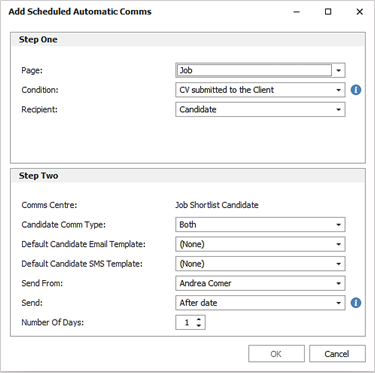
• The recipient is candidate only
• Select a template from the Job Shortlist Comms Centre
• This can be Email templates
• This can be SMS templates if configured on the system
• This can be sent from the following:
o a selected active consultant
o top active owning consultant
o top active consultants using the active consultant role reference data, e.g., 'Resourcer'
• This can be sent 1-7 days after the CV was submitted
When enabled, this sends to candidates that are active, whose CV was submitted to a job in the specified period and are at the CV Submit stage on that job.
Enhancement 133591 Job Progress Board - multiselect teams and consultants
On the Application / Information / Job Progress board, the Teams/Consultant filter has been changed to a multiselect field.
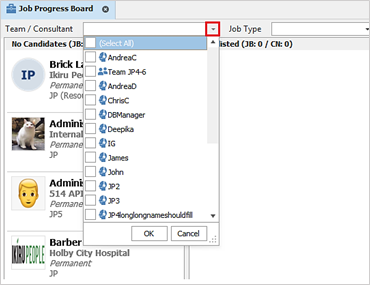
The setting defaults to blank and shows all jobs, including jobs with no owners. The drop-down field lists the team names and username field as per other areas of Infinity, e.g., Planners and Find.
Results are returned where the owning consultant of the job matches the consultant(s) or is in the team(s) selected.
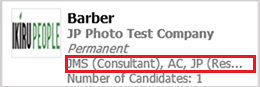
The job results displayed have been updated to show the owning consultant and their role type:
• Displays user’s short name
• Displays role type in brackets if set
• Is comma separated if there are multiple owners
• Displays an ellipsis if the owners do not fit on the screen
Enhancement 133839 Open Jobs - multiselect teams and consultants
On the Application / Information / Perm/Cont and Temp Shortlist Open Job lists, the Teams/Consultant filter has been changed to a multiselect field.
The setting defaults to blank and shows all jobs, including jobs with no owners. The drop-down field lists the team names and username field as per other areas of Infinity, e.g., Planners and Find.
Results are returned where the owning consultant of the job matches the consultant(s) or is in the team(s) selected.
Enhancement 133962 New photo images are converted to thumbnails
On Infinity SaaS and On Premise, when a new photo image is added to Infinity, a copy is taken, and the size is reduced. A fixed thumbnail size of no dimension being bigger than 200px is created, whilst maintaining the image’s aspect ratio.
The following fields are affected:
• Candidate page photo
• Contact page photo
• Company photo
• Lead photo
All methods of adding photo images invoke this:
• Manually adding to the page
• Candidate Portal – verification screen
• Candidate API
• Company API
• Contact API
• Lead API
Existing photo images on the Infinity database are not changed.
The main page shows the thumbnail; when the thumbnail is clicked on, it shows the original full version.
When the image is rotated, the original full version is rotated, and the thumbnail is updated.
All areas of Infinity that return a photo will continue to work and will return either the thumbnail or original image.
The following areas are affected:
• Quick Find result panel
• Outlook Connector - candidate/contact records
• Photo merge in Comms Centre
• API
• Infinity Connect mobile app
• Job Progress board
Enhancement 39521 Tasks - ‘Send notification’ tick box removed
The ‘Send Notification’ tick box has been removed from the ‘create new’ task screen. No functionality has been changed by this action.
Enhancement 133947 Dashboard - pipeline revenue curtailed to jobs created in last 2 years
Only non-temp jobs created in the last two years will be used for pipeline revenue calculations on the Dashboard.
Other standard reports that calculate pipeline revenue will also be affected, e.g., Consultant Statistics report.
Enhancement 133836 Portal - merge linked work history details in the Referee Comms Centre
In the candidate page Referee Comms Centre there is a new merge list called Linked Work History. This is in the Insert Merge Code window / Referee Group / Merge Lists tab.
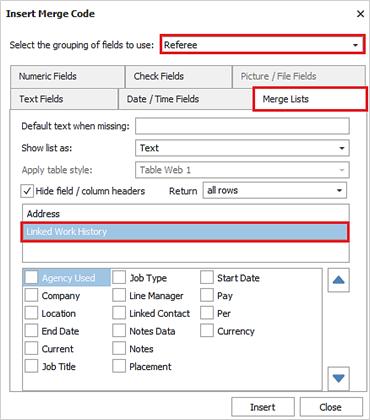
• This works as per existing work history merge lists, with the same fields available
• When added to a template, the linked work history's fields are merged when the referee is sent communication from the Referee Comms Centre
• If there is no linked work history entry, nothing is merged
Enhancement 133724 Portal - postcode lookup on References / ICE addresses
On the Portal, the candidate can look up the postcode to populate the address of References / ICE records.
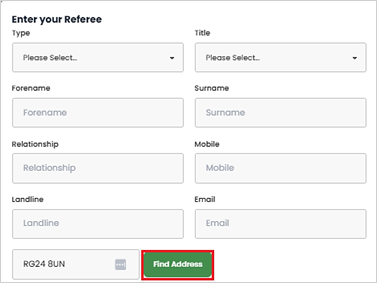
This is available only when the form contains an address.
Enhancement 133841 Portal - notification if custom fields are already on the form
In Administration / General Settings / Candidate Portal tab / Form documents, if a custom field is added to a conditional question, it is not listed in the available fields list for other conditional questions.
Enhancement 133539 Portal - see current examples only when configuring branding
In Administration / General Settings / Candidate Portal tab / Configure Branding window, ‘Legacy’ documents have been removed from examples and the following functionality removed:
• 'Reference Tab'
• 'Focus me to see content'
Enhancement 133587 Portal - candidate data removed when no longer licensed
When the Infinity database is no longer licensed for the Portal:
• All Portal data and functionality is removed
• All Infinity Portal related data and functionality is removed/set to default. This includes:
o Admin settings inc. Portal URL
o Branding
o Candidate Portal information
o Candidate Portal documents including previews
 Contact Details
If you require further assistance please contact Ikiru People using the details published on www.ikirupeople.com
Visit our Customer Portal at https://portal.ikirupeople.com/ for future events and clinics.
FeedbackIf you would like to make suggestions or have found any errors with this Help section please contact our Support team.
Copyright © 2026 Voyager by Ikiru People Ltd. All rights reservedVersion 4.87
Voyager Software is a brand of Ikiru People Ltd, a subsidiary of Dillistone Group Plc. The group is a leading global provider of software and services that enable recruitment agencies and in-house recruiters to better manage their selection process and address the training needs of individuals. Across its brands – which include Voyager Software (recruitment software UK & Australia), Dillistone FileFinder executive search software, GatedTalent, the global database of the world’s leading executives, Talentis.Global – the next generation of recruitment software and also ISV.Online, provider of online pre-employment skills testing and training tools. Dillistone Group serves thousands of clients worldwide. Ikiru People Ltd: Registration Number 02043300. Registered in England & Wales.
 |  |  |  |