Release Notes 5.13 June 2025
Release Date: 12th June 2025
What have we released?
• Infinity 5.13 has been released
Release overview
Here’s a snapshot of what we’ve delivered in this release:
• Quick Find improvements
• Search for non-geocoded candidates
• Job Progress Board – temp shortlist jobs added
• Shift Planner – search for candidates at ‘Available’ statuses
• Portal – lots of minor enhancements plus
o see candidate location in the onboarding grid
o disable availability reminders for certain candidates
Release Notes Highlights Video - June 2025
Feedback please
We are continuously looking to improve Voyager Infinity and are keen to hear your thoughts. Please email suggestions@ikirupeople.com with any feedback on existing functionality or ideas for new functionality.
Enhancement 133451 Quick Find improvements
Guidance text
Guidance text is displayed in the Quick Find criteria field and is different depending on the find type selected.

• For candidate, contact and candidate, or contact alone it is 'Find name, phone or email'
• For companies this is 'Find company/location name or email
• When the user clicks in the field to type the criteria, the guidance text disappears
Find Options
Infinity displays a drop-down list of find options based on the entered criteria.
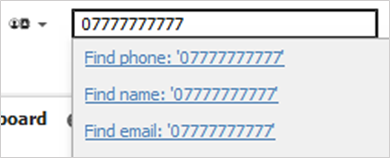
If the user presses enter, the top find option is run to find the records. Alternatively, the user can click the required find option to run the find.
For candidate, contact and candidate or contact finds:
• If only a number is entered, the find options available are displayed and ordered as follows:
o Find phone
o Find name
o Find email
• If a character is entered, the find options available are displayed and ordered as follows:
o Find name
o Find email
• If an @ character is entered the find options available are and in order
o Find email
For companies finds:
• If only a number is entered, the find options available are displayed and ordered as follows:
o Find phone
o Find name
o Find location name
o Find email
• If a character is entered, the find options available are displayed and ordered as follows:
o Find name
o Find location name
o Find email
• If an @ character is entered, the find options available are displayed and ordered as follows:
o Find email
Default Find
The user can set the default Quick Find type in User Options / General / Main Pages tab / General section.
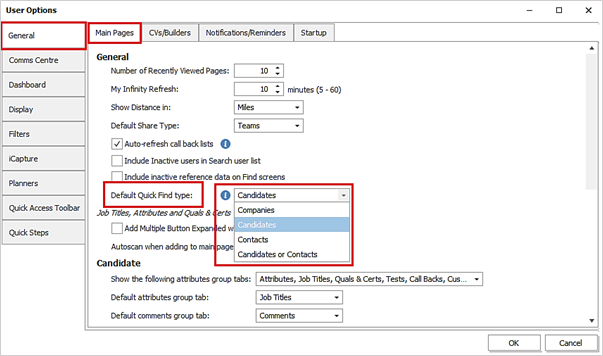
• This can be one of candidates, companies, contacts, or candidates or contacts
• For upgrades, existing users will default to candidates as per existing functionality
• For new users the default is candidates or contacts
• Once changed, the setting takes effect when the user next logs in
• There is an adjacent ‘Info’ button that explains this
Enhancement 133737 Search for candidates without a geocoded address
There is a new search field in candidate Search Criteria / Advanced Section / Address menu, to search for candidates without a geocoded address.
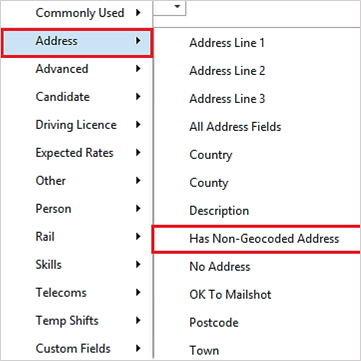
This is available on adhoc and re:job candidate searches.
When searched, candidates are returned that do not have any geocoded addresses.
The search field does not have a NOT check box
Enhancement 133683 Cc/Bcc recipients in the Referee Comms Centre
In the Referee Email Comms Centre, recipients can be added via the 'Add' button in the Cc/Bcc window.
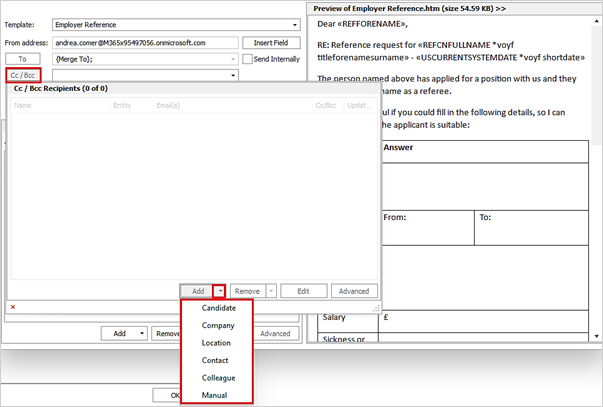
This works as per existing Comm Centre functionality, whereby Candidate, Company, Location, Contact. Colleague or Manual recipients can be added as Cc/Bcc recipients to the email.
Enhancement 133757 Notification if qualifications are deleted and linked to attachment types
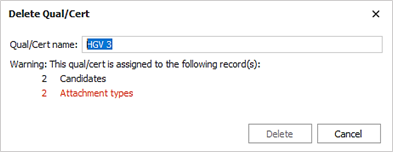
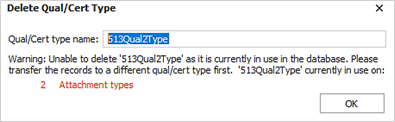
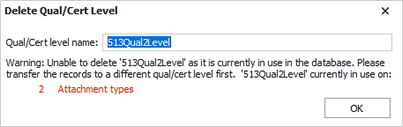
In Administration / Dictionaries / Quals & Certs tab, the user is notified if deleting qualifications, types or levels that are linked to attachment types.
The user cannot delete a qualification that is linked to an attachment type(s), and is told the number of attachment types that a qualification is linked against.
The user cannot delete a qualification type that is linked to an attachment type, and is told the number of attachment types that a qualification type is linked against.
The user cannot delete a qualification level that is linked to an attachment type, and is told the number of attachment types that a qualification level is linked against.
Enhancement 133460 Date field calendar control input improvements
All date time controls have been consolidated and when typing numbers into the day part, the cursor automatically moves to the month when finished, and typing numbers into the month part, the cursor automatically moves to the year when finished.
Enhancement 133586 Comms Status field removed from search lists
‘Comms Status’ column has been removed from all relevant search lists.
Enhancement 133747 Online Signature - ‘Also Sign / Attach’ files stored in the event
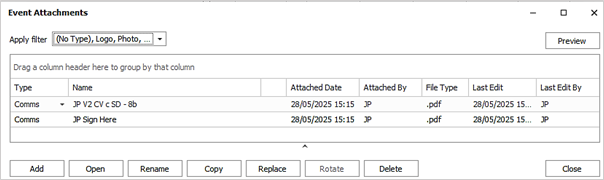
In the Online Signature Comms Centre, ‘Also Sign / Attach’ files are stored with the event when sent, if the template Log Options ‘Log Comms Event’ and ‘Attach Files’ are ticked.

The user can click on the Event ‘Paper Clip to see the attachments.

The ‘Also Sign / Attach’ files are displayed along with the main template.
Enhancement 133615 API - log events against candidates and contacts
An API integrator can create events against candidate and contact records.

The following fields can be set:
• Log against - ID
• Event By Consultant – use the GET /Entity/Consultants API endpoint to retrieve a list
• Event Type – use the GET /Entity/Reference/EventTypes endpoint to retrieve a list, e.g. Phone, Email, Info
• Event direction
• Event Action – use the GET /Entity/Reference/EventActions endpoint to retrieve a list of active event actions that are available for the nominated page type, e.g. candidate, company etc...
• Event Details
Event is created against the ID record specified.
A more detailed technical API guide for developers is available here https://live.vslcloud.com/swagger
Enhancement 133555 RingCentral phone functionality is ‘End of Life’
The RingCentral phone integration is now ‘End of Life and is no longer supported or maintained. Existing integrations should continue to work.
A warning is given in Administration / 3rd Party Integrations / Phone Manager Options / Phone Provider Options section when "RingCentral" is selected.

Enhancement 133899 Mid-Office exports native rates (and not base)
Infinity always exports the native value on rates to Mid-Office and not the base rate.
Enhancement 133261 Temp shortlist jobs added to the Job Progress Board
The existing Job Progress Board now includes open Temp Shortlist jobs.
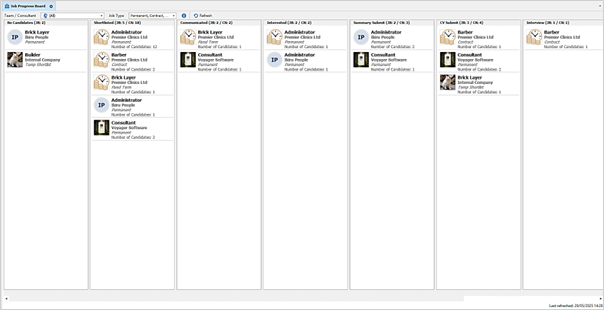
Each job appears on the board once, based on its latest shortlist stage and ‘Open’ Temp Shortlist Jobs are defined as:
• Having at least one unfilled shift today or in the future for all stages except for placed
• For ‘placed’ stage, jobs that haven’t started (start date in the future and does not include those starting today)
An ‘Info’ button is available on the toolbar giving details.
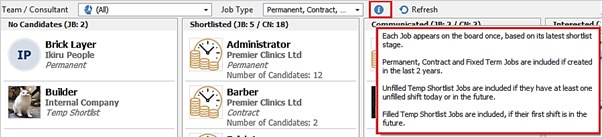
The existing team/consultant toolbar filter to view the jobs by owner works off the Temp Shortlist Job owners. When Temp Shortlist Jobs are being viewed, they are included in each stage as follows:
No Candidates
• Jobs with no candidates on the shortlist
• Jobs owned by the selected consultant or team
• Temp SL jobs
• A stat is shown for the number of jobs
Shortlisted
• Jobs where latest non cancelled stage out of all its entries is Shortlisted
• Jobs owned by the selected consultant or team
• Temp SL jobs
• A stat is shown for the number of jobs
• A stat is shown for the number of candidates at that stage across all the jobs matched
Communicated
• Jobs where latest non cancelled stage out of all its entries is Communicated
• Jobs owned by the selected consultant or team
• Temp SL jobs
• A stat is shown for the number of jobs
• A stat is shown for the number of candidates at that stage across all the jobs matched
Interested
• Jobs where latest non cancelled stage out of all its entries is Interested
• Jobs owned by the selected consultant or team
• Temp SL jobs
• A stat is shown for the number of jobs
• A stat is shown for the number of candidates at that stage across all the jobs matched
Summary Submit
• Jobs where latest non cancelled stage out of all its entries is Summary Submit
• Jobs owned by the selected consultant or team
• Temp SL jobs
• A stat is shown for the number of jobs
• A stat is shown for the number of candidates at that stage across all the jobs matched
CV Submit
• Jobs where latest non cancelled stage out of all its entries is CV Submit
• Jobs owned by the selected consultant or team
• Temp SL jobs
• A stat is shown for the number of jobs
• A stat is shown for the number of candidates at that stage across all the jobs matched
Interview
• Jobs where latest non cancelled stage out of all its entries is Interview
• Jobs owned by the selected consultant or team
• Temp SL jobs
• A stat is shown for the number of jobs
• A stat is shown for the number of candidates at that stage across all the jobs matched
Placed
• Jobs where latest non cancelled stage out of all its entries is Placed
• Jobs owned by the selected consultant or team
• Temp SL jobs
• A stat is shown for the number of jobs
• A stat is shown for the number of candidates at that stage across all the jobs matched
A multi-select ‘Job Type’ filter has been added to the toolbar. Only the jobs of the selected type(s) are shown on the board.
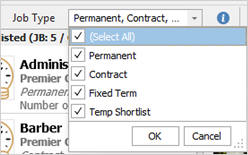
All job types are ticked by default and the following values can be selected:
• Perm
• Contract
• Fixed Term
• Temp Shortlist
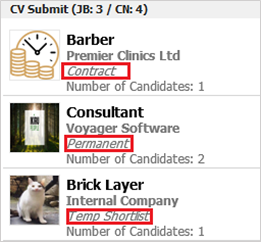
The ‘Job Type’ field has been added to the job result details.
Enhancement 130397 Shift Planner – option to search candidates at an ‘Available Status’
There is a new Shift Planner setting in Administration / Global Temp Settings / General / Planners section to search for candidates that are at statuses ticked as 'Available Status'.
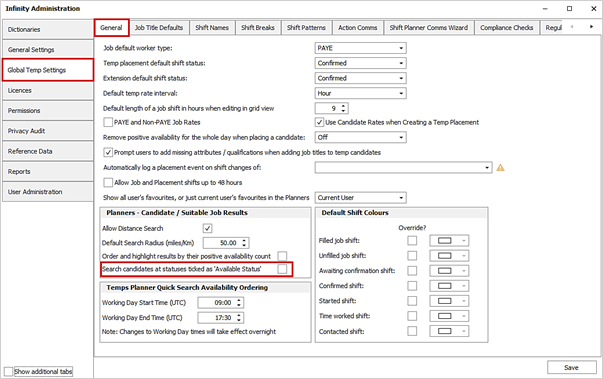
This is un-ticked as default.
Note - Statuses are ticked as ‘Available Status’ in Administration / Reference Data / Candidate Status tab.
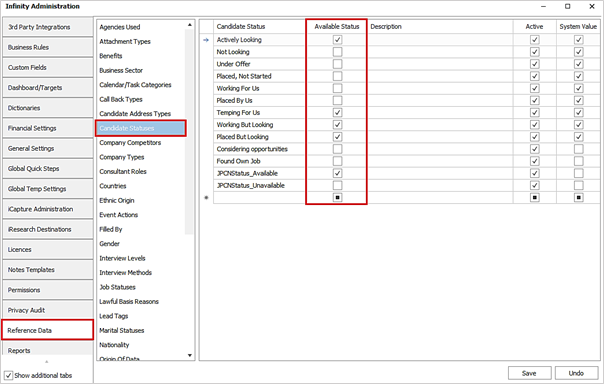
When the Shift Planner setting is ticked, candidates are searched for and returned in the Candidate Search panel that are at the statuses ticked as 'Available Status' in the admin screen. This is instead of excluding those at status 'Working for us' and 'Placed by us' only, as per existing functionality.
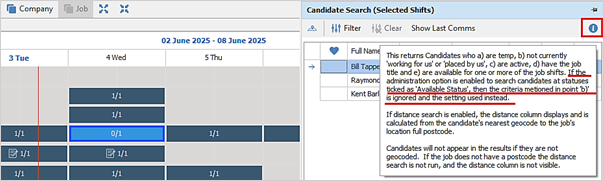
The Shift Planner / Candidate Search panel ‘Info’ button has been updated to explain the setting.
Enhancement 133607 Portal - disable availability reminders for specific candidates
On databases configured for ‘Availability’, a candidate can be excluded from receiving availability reminders. There is toggle button in the candidate page / Candidate Portal Status window.
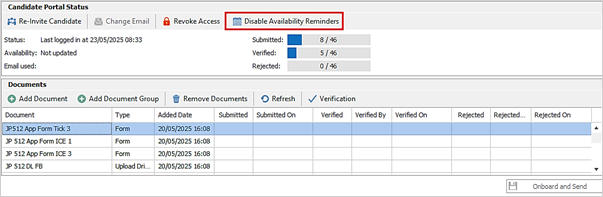
When toggled, the wording on the button changes to either ‘Disable’ or ‘Enable’ as applicable.
Enhancement 133698 Portal – candidate location fields added to Infinity onboarding grids
The 'Based In' column has been added as default to the following Infinity Portal grids:
• Application menu / Onboarding
• My Infinity / Requires Verification

The home address 'Town' and ‘Postcode’ columns are available on the column chooser on the following Infinity Portal grids:
• Application menu / Onboarding
• My Infinity / Requires Verification
Enhancement 133744 Portal – 'Ref / ICE’ & ‘Upload Quals & Certs’ docs marked as ‘Legacy’
The following docs have been replaced with newer documents with extra functionality.
• Reference / ICE
• Upload Quals & Certs
Both documents have been marked as ‘Legacy’
It is recommended that any existing documents of these types are replaced.
They remain in the list to allow you to continue to use them in the short term.
 Contact Details
If you require further assistance please contact Ikiru People using the details published on www.ikirupeople.com
Visit our Customer Portal at https://portal.ikirupeople.com/ for future events and clinics.
FeedbackIf you would like to make suggestions or have found any errors with this Help section please contact our Support team.
Copyright © 2026 Voyager by Ikiru People Ltd. All rights reservedVersion 4.87
Voyager Software is a brand of Ikiru People Ltd, a subsidiary of Dillistone Group Plc. The group is a leading global provider of software and services that enable recruitment agencies and in-house recruiters to better manage their selection process and address the training needs of individuals. Across its brands – which include Voyager Software (recruitment software UK & Australia), Dillistone FileFinder executive search software, GatedTalent, the global database of the world’s leading executives, Talentis.Global – the next generation of recruitment software and also ISV.Online, provider of online pre-employment skills testing and training tools. Dillistone Group serves thousands of clients worldwide. Ikiru People Ltd: Registration Number 02043300. Registered in England & Wales.
 |  |  |  |