Voyager Infinity – Release Notes
Version: 4.122
Release Date: 29th November 2024
What have we released?
- Infinity 4.122 has been released
Release overview
Here’s a snapshot of what we’ve delivered in this release:
- Consultant Role functionality (e.g. consultant/resourcer)
- Minor enhancements
Feedback please
We are continuously looking to improve Voyager Infinity and are keen to hear your thoughts. Please email suggestions@ikirupeople.com with any feedback on existing functionality or ideas for new functionality.
Enhancements
Enhancement 125058 Consultant Role functionality (e.g. consultant/resourcer)
Administration – configure Consultant Role reference data
In Administration / Reference Data there is a new tab called ‘Consultant Roles’.
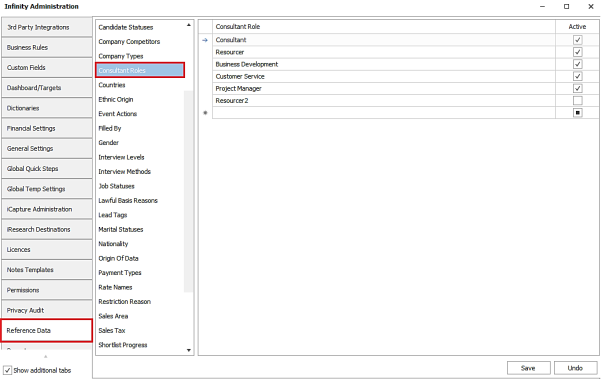
- Roles can be added and saved
- Roles can be made inactive
- Length of field is 20 characters
- 'Consultant' and 'Resourcer' roles are added to blank and upgraded databases as default
Main pages - assign a Consultant Role to owning consultants
Candidate, Company, Contact, Job and Interview page
A Consultant Role can be set against each owning consultant on the page and is edited off a separate button adjacent to the ‘Consultants’ field.
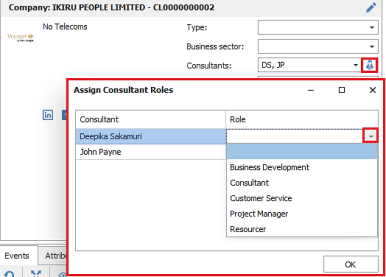
- The user can select a single Consultant Role from a drop-down list of active reference data on the database
- The Consultant Role field can be edited for owners that are assigned to the page (so are ticked in the drop-down list)
- The Consultant Role is set per page
- The default Consultant Role is blank if there is no default configured for that consultant in User Administration (details covered later in this section)
- The Consultant Role can be removed and left blank
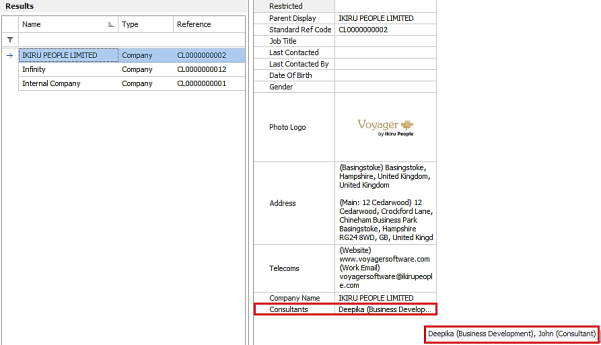
The Consultant Role, if set, is displayed in brackets after the name in the ‘Consultants’ field.

- An ellipsis has been added to show all consultants and their role if the contents do not fit on the screen
Placement page
A Consultant Role can be set against each owning consultant on the page and is a new column in the grid.
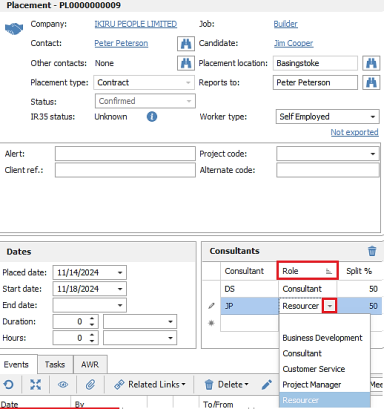
- The user can select a single Consultant Role from a drop-down list of active reference data on the database
- The Consultant Role is set per page
- The default Consultant Role is blank, if no default is set against the user in User Administration (covered later in this section)
- The Consultant Role can be removed and left blank
Defaults – default a consultant role when owning consultants are assigned
User Administration
In Administration / User Administration / Edit User screen, a default Consultant Role can be set against the user.
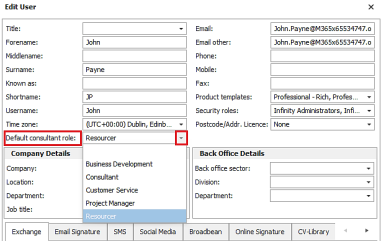
Users can also change this field in their My Settings / User Profile screen.
Defaulting the Consultant Role
- When a main page (candidate, company, contact, job, interview and placement) is created by a user, and they are automatically assigned ownership, their default Consultant Role from User Administration is applied.
- If in Administration / General Settings tab, Jobs are configured to pull owners from the contact page, then Consultant Role is also pulled and is not defaulted from User Administration.
- If in Administration / General Settings tab, Placements are configured to pull owners from other pages, then Consultant Role is also pulled and is not defaulted from User Administration.
- If users manually assign owning consultants on an opened main page (candidate, company, contact, job, interview and placement), the default Consultant Role from User Administration is applied.
- When a candidate page is created or updated from iCapture, the owning consultants are pulled from iCapture and the Consultant Role is defaulted from User Administration. This is because Consultant Role is not available on the iCapture page.
- If users bulk update from search results (candidate, company and contact) and assign owning consultants to the records, the default Consultant Role from User Administration is applied.
Find results
Find results display the Consultant Role in brackets, if exists, in the ‘Consultants’ column / field along with an ellipsis if the contents do not fit on the screen.
Advanced Find results

Quick Find results
Reports
Reports with column choosers
The Role field has been added as a column chooser in the following reports:
- Contractors Currently working
- Contract and Perm Starters
- Temps Currently Working and Temps Payroll Export
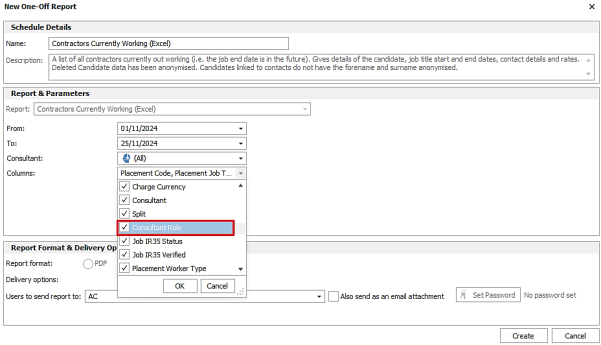
If the column is selected, this outputs the Role column and value for each ‘Consultant 1’, 2 etc column.

Reports without column choosers and but with separate consultant columns
The Role column and value, is output after each ‘Consultant 1’, 2 etc column on the following reports (note there is no column chooser on these reports):
- Placements Added
- Interviews Occurring

Reports with a single ‘Consultant(s)’ column
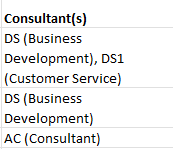
The Role field value appears in brackets, after each consultant's name within the ‘Consultant(s)’ column/field in the following reports:
- Jobs Added
- Job Details
- Candidate Search Results/List Excel report
- Contact Search Results /List Excel report
Business Rules – assign follow up tasks by Consultant Role
In Administration / Business Rules tab, Follow Up tasks that are created as part of a Perm/Contract/Fixed Term business rule, can be added to owning consultants based on their role.
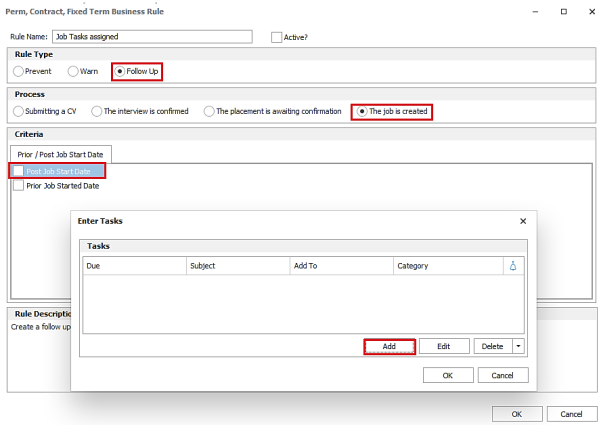
The ‘Add To’ field in the Task screen additionally shows a list of active ‘Consultant Roles’ on that database in curly brackets. The user can select a role to create the task against.
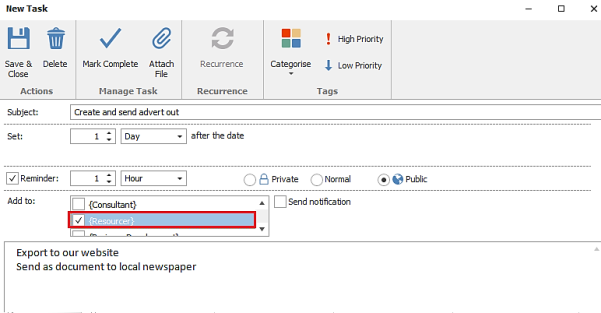
When the business rule is invoked, the task is created against the owning consultant(s) who are assigned that role on the interview, job or placement page (as configured in the business rule).
Scheduled Automatic Comms – send communication from Consultant Role
In Administration / Scheduled Automatic Comms tab, the Step Two / ‘Send From’ field can be configured to send from a Consultant Role.
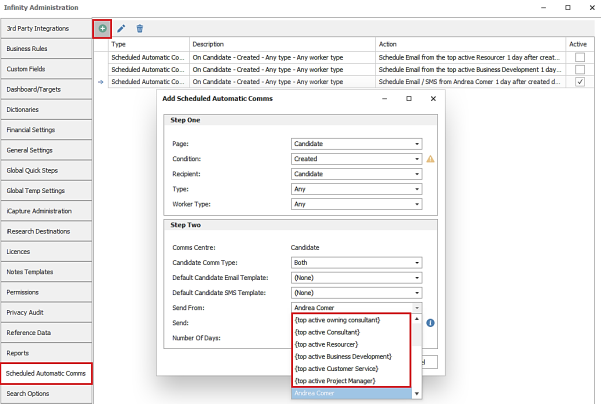
The ‘Send From’ field additionally shows a list of active Consultant Roles on the database and is available for all page conditions. If multiple owners of the page have the same Consultant Role, the top active owner is used only. This is so only one comms is sent (this uses the earliest inserted/created date to determine the top owner).
When the comms is invoked, the email / sms is sent from the top active owning consultant that is assigned that role on the page.
Comms Centre – merge Consultant Role
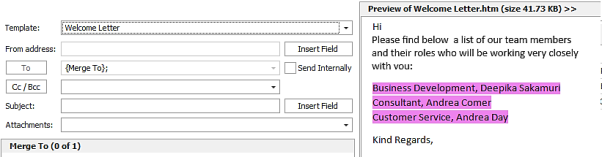
In the Comms Centre, the ‘Consultants’ merge lists in candidate, company, contact, job, interview and placement related groups have the Consultant Role field to select.
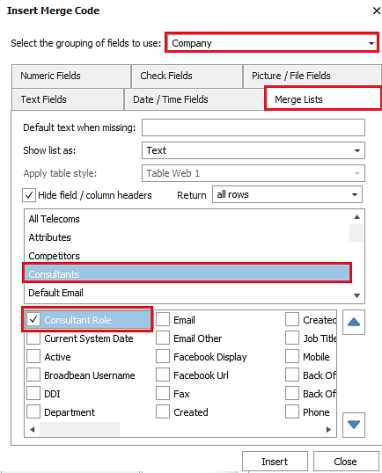
When selected, if the owning consultant of the page has a Consultant Role assigned, it is merged into the field.
API
The Consultant Role field is available in the API as follows:
- The Get reference data endpoint for roles
- The default consultant role field with the consultant Get endpoint
- The owning consultant role field to GET / POST / PUT on all available main pages
Enhancement 130596 Changes to the default rate start date on contract placements
When a contract placement is created, the default rate that is applied from job, has a start date of the placed date (today) or placement start date if earlier.
When a rate is added manually to the grid it has a start date of the placed date (today) or placement start date if earlier.
Enhancement 130603 Leading and trailing spaces removed from email addresses
New and edited email telecoms with leading or trailing spaces, have the spaces removed on saving. This happens on the following pages:
- iCapture
- Candidate
- iResearch
- Company / Location / Contact
- Leads
Enhancement 130537 Object permissions accessible only by Voyager Support accounts
In Administration / Permissions tab, object permissions can now only be changed by Voyager Support accounts. If changes are required, please contact Voyager Support who will be able to assist.
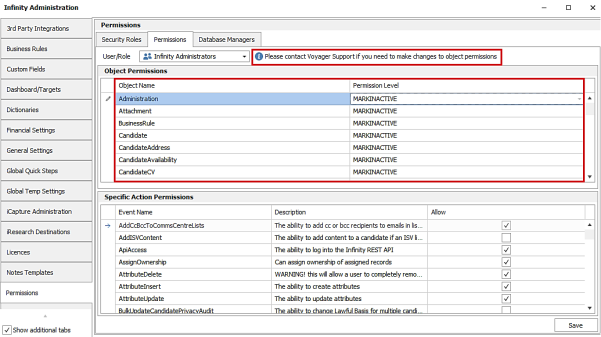
The ‘Restore object permissions’ button when selecting a single user is only visible to Voyager Support accounts.
In the ‘Permissions’ button on the Edit User screen, object permissions are only available to change by Voyager Support accounts.
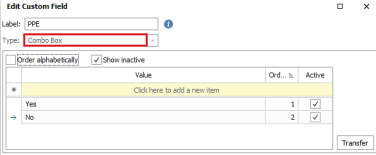
Enhancement 130685 Prevent users from changing a custom field from one type to another
In Administration / Custom Fields tab / Edit Custom field screen, once a custom field has been created and saved, the ‘Type’ cannot be changed and is greyed out.
Enhancement 130604 Separate consultant, splits and role column on temps reports
Temps Currently Working and Temps Payroll Export report have three new columns in the column chooser for ‘Consultant, Split and Role’.
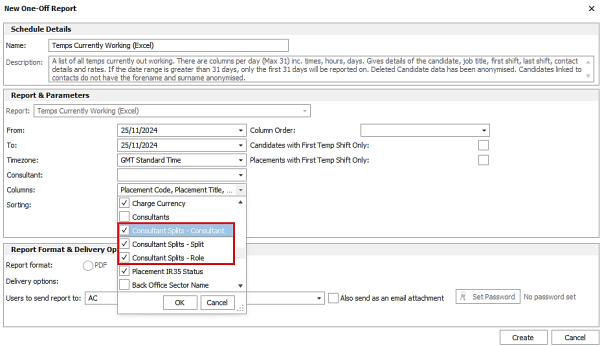
These appear after the existing ‘Consultants’ column which combines the consultant and split in one column.
When selected, they output all the owning consultants of the placement and their details in separate columns.

For users that have never run these reports before, the ‘Consultant’ and ‘Role’ columns are ticked as default and the existing 'Consultants 'column is no longer ticked as default.
Enhancement 130544 Placement updated date is modified when shifts are changed
Placement shift changes, cancellations and additions all modify the placement's updated date.
INTERNAL ONLY
Enhancement 130561 Voyager Support accounts can access all active users' My Infinity
Voyagersupport and Voyagersupport2 user accounts have access to all active users in the My Infinity user drop-down control.
Fixes Included
7 other defects or issues have been fixed in this release.
If you require further information regarding a specific defect or issue, please contact Voyager.
|
ID |
Title |
|
My Infinity Expiring Items - Placement Quals & Certs figure includes Qs & Cs that expire in the future, and does not tally with grid results |
|
|
The Auto Filter Row causes object reference errors when added or hovered over in many grids |
|
|
IDS disclaimer "i" tooltip timer is far too quick to read the text |
|
|
"Candidate Job Title Dictionary Statistics" report includes deleted candidates, when it should not |
|
|
SEC: Update OpenAI to v2 |
|
|
Investigate: Reports that may return deleted data. As a user, I want all reports to ignore deleted data, so that I am sure that I am viewing correct statistics – RTC |
|
|
NF: Address AccountProvision api call to return existing account key rather than a 400 error so that Dynamics can sync failed accounts |
 Contact Details
If you require further assistance please contact Ikiru People using the details published on www.ikirupeople.com
Visit our Customer Portal at https://portal.ikirupeople.com/ for future events and clinics.
FeedbackIf you would like to make suggestions or have found any errors with this Help section please contact our Support team.
Copyright © 2026 Voyager by Ikiru People Ltd. All rights reservedVersion 4.87
Voyager Software is a brand of Ikiru People Ltd, a subsidiary of Dillistone Group Plc. The group is a leading global provider of software and services that enable recruitment agencies and in-house recruiters to better manage their selection process and address the training needs of individuals. Across its brands – which include Voyager Software (recruitment software UK & Australia), Dillistone FileFinder executive search software, GatedTalent, the global database of the world’s leading executives, Talentis.Global – the next generation of recruitment software and also ISV.Online, provider of online pre-employment skills testing and training tools. Dillistone Group serves thousands of clients worldwide. Ikiru People Ltd: Registration Number 02043300. Registered in England & Wales.
 |  |  |  |