Voyager Infinity – Release Notes
Version: 4.117
Release Date: 19th September 2024
Sprint 2024.18 (4.117)
What have we released?
- Infinity 4.117 has been released
Release overview
Here’s a snapshot of what we’ve delivered in this release:
- Users can access some user admin settings and configure their Exchange
- Option to use retainer job stage fees on reports and dashboard figures
- New lead statistics and Dashboard widget
- Send post template attachments in PDF format from the Email Comms Centre
Feedback please
We are continuously looking to improve Voyager Infinity and are keen to hear your thoughts. Please email suggestions@ikirupeople.com with any feedback on existing functionality or ideas for new functionality.
Enhancements
Enhancement 129356 Users can access some user admin settings
In Application/My Settings there is a new menu at the top called ‘User Profile’.
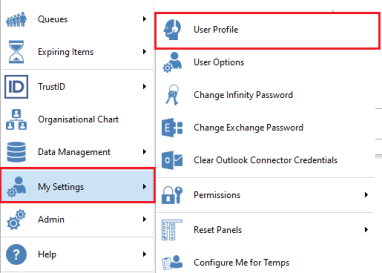
This loads the User Profile screen for that user. This is the same screen as available in Edit User in User Administration, with parts locked down.
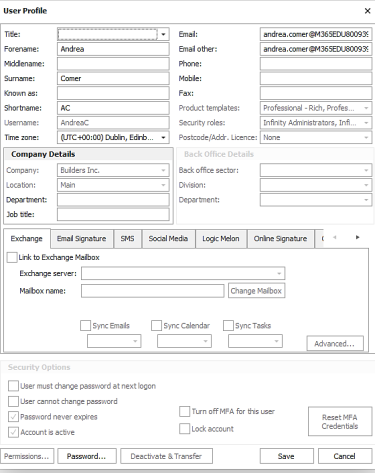
The following fields/sections are not available to edit and are greyed out:
- Username
- Company Details – company and location
- Back Office Sector section
- Product Templates
- Security Role
- Postcode Licence
- Advanced button – processing options section
- Security section
- Permissions button
- Deactivate and Transfer button
The user can complete all other fields and save changes.
If the user ticks the ‘Link to Exchange Mailbox’ or ‘Change Mailbox’ setting:
- If only one Exchange server this is defaulted
- If not currently authorised, the user is taken to the Microsoft authentication screen automatically
- The user can complete and authorise their account as per existing functionality
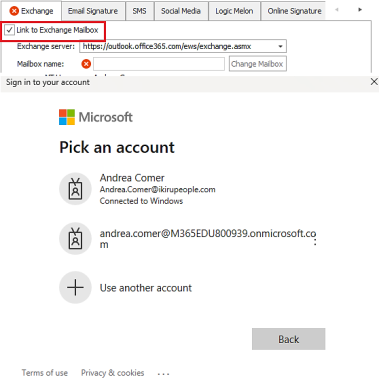
The same behaviour will occur if the setting is ticked from the User Administration/Edit User screen.
Note – this will only happen if the Exchange Server is not configured to use Legacy Auth in Administration / 3rd Party Integrations / Exchange.
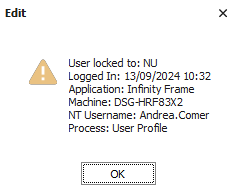
If a user has their User Profile screen open, an administrator cannot edit it from the User Administration screen and vice-versa. A warning window is displayed saying that it is locked to another user.
Enhancement 111747/111943 Option to use job retainer stage fees on reports and dashboard
There is a setting in Administration/General Settings/Main pages tab/Job section to use job retainer stage fees on report and dashboard calculations.
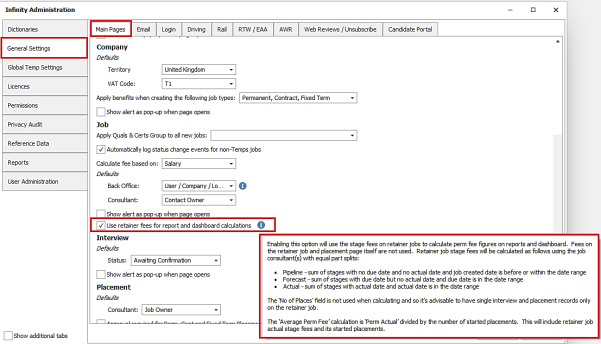
There is an adjacent info button giving more information about the functionality.
When enabled, any jobs/placements ticked as ‘Retainer’ are removed from the current perm fee calculations on reports and dashboard (Perm Pipeline/ Perm Forecast/Perm Actual).
Instead, retainer jobs are calculated using the stage fees only with equal part splits across the job owning consultants:
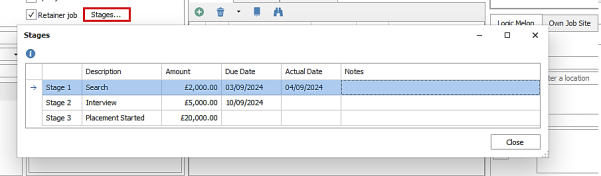
- Perm Pipeline - sum of stages with no due date and no actual date and job created date is before or within the date range
- Perm Forecast - sum of stages with due date but no actual date and due date is in the date range
- Perm Actual - sum of stages with actual date and actual date is in the date range
Note - The ‘No of Places’ field on the job is not used when calculating and so it’s advisable to have single interview and placement records only on the retainer job. A note has been added to the job retainer stages window information button

The following reports calculate perm fees and are affected:

- Consultant Statistic Landscape (Excel)
- Consultant Statistics (Portrait)
The following Dashboard widgets calculate perm fees, and the tooltip has been updated:
- Estimated Perm Fee / Cont Margin / Temp revenue
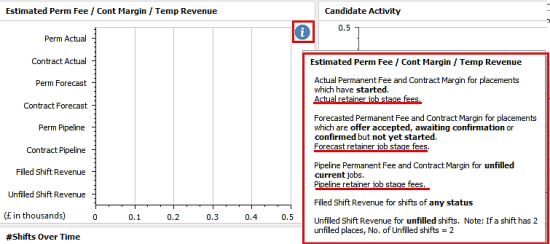
- Estimated permanent fees

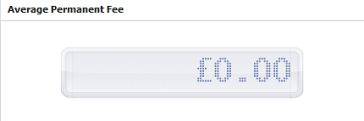
On Dashboard the ‘Average Permanent Fee’ widget calculation is ‘Perm Actual’, divided by the number of started placements. This will include retainer job actual stage fees and its started placements.
Note – this setting is not currently available in the BI Portal.
Enhancement 129352 Lead dashboard widget ‘Average Time Between Adding a Lead…’
There is a new leads widget on the Dashboard called 'Average Time Between Adding a Lead...'.
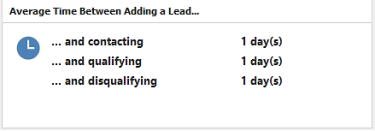
This is available on all dashboard default layouts and appears before the ‘Spec CV activity’ widget.
The following statistics are shown:
- … and contacting
the date the lead was first contacted in the date range - this is when the status is first changed to contacted
- … and qualifying
the date of the first qualified event logged in the date range
- … and disqualifying
the date of the first disqualified event logged in the date range
For User Dashboard - this is the number of leads created in the dashboard range that are owned by the user.
For Team Dashboard - this is the number of leads created in the dashboard range and owned by all users in the selected team.
For Company Dashboard - this is the number created in the dashboard range and owned by all users at that company.
The average for each statistic is calculated across the leads identified and is reported in format X day(s).
Enhancement 129353 Lead first contacted figures in Consultant Stats report
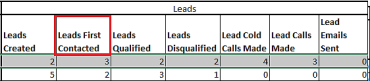
There is a new column called ‘Leads First Contacted’ on the Consultant Stats Landscape (Excel) report.
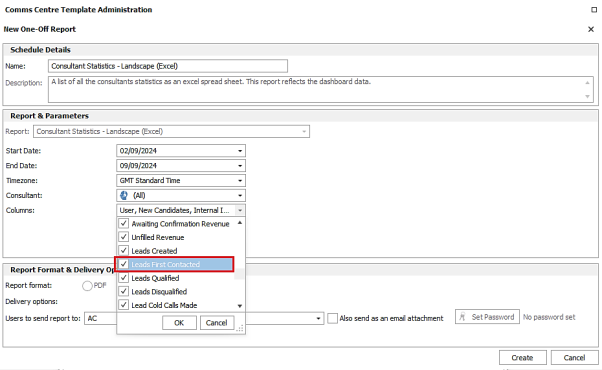
The column is ticked as default if the report has not been run before, otherwise it’s unticked.
This counts the number of leads that the user owns that have been first contacted in the date range - this is when the status was first changed to ‘Contacted’.
Enhancement 129354 Lead first contacted figures on Dashboard
There is a new statistic called ‘Leads First Contacted’ on the Dashboard ‘Leads Activity’ widget.
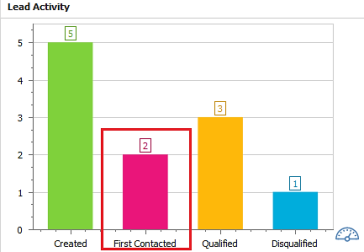
This counts the number of leads that the user owns that have been first contacted in the date range - this is when the status was first changed to ‘Contacted’.
For Team Dashboard -this is the number of leads owned by all users in the selected team
For Company Dashboard - this is the number of leads owned by all users at that company
Enhancement 129355 Send attached post templates as PDF from the Email Comms Centre
There is an option in all Email Comms Centres to send attached post templates in PDF format.
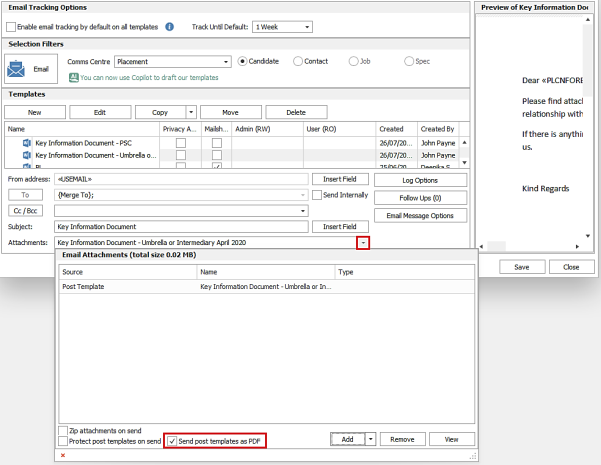
The ‘Protect post template on send’ and ‘Send post template as PDF’ options cannot be set at the same time (but can both be unchecked).
This can be set in template administration and saved with the template or changed on the fly when sending from the Comms Centre.
When selected, the post template is merged and converted to PDF and attached to the email that is sent.
Enhancement 129357 Manually log a Microsoft Teams meeting via Event Logger
All event loggers have a communication type for Microsoft Teams Meeting.
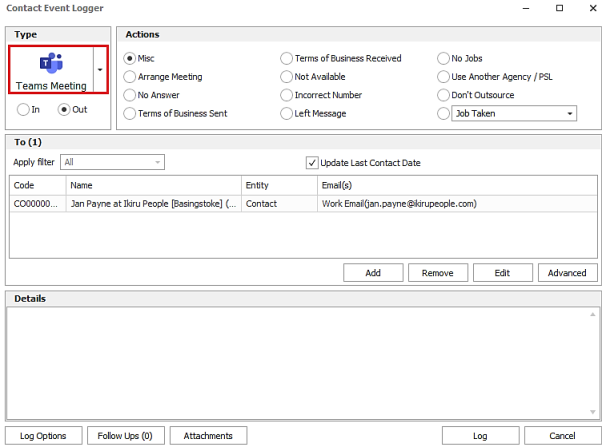
When selected, the 'To (x)' section shows the send as default emails for that entity, in the ‘Email(s)’ column.
All other event logger behaviour is per existing functionality.
When the event is logged, the ‘type’ column shows the Microsoft Teams meeting icon.

Reports and BI Portal charts that display events will show the type as ‘Teams Meeting’.
Enhancement 129393 API (SaaS only) retrieve jobs based on current or closed status
A new job ‘Status Type’ filter is available on the GET/Entity/Jobs entity.

The following options are available on the filter:
- All (represented by null / blank in swagger)
returns Perm, Contract and Fixed-term jobs regardless of status, and Temp jobs
- Current
returns Perm, Contract and Fixed-term jobs with a Current status type, and Temp jobs with a shift today or in the future
- Closed
returns Perm, Contract and Fixed-term jobs with a Closed status type, and Temp jobs with no shifts today or in the future
‘All’ is the default value if none is specified.
 Contact Details
If you require further assistance please contact Ikiru People using the details published on www.ikirupeople.com
Visit our Customer Portal at https://portal.ikirupeople.com/ for future events and clinics.
FeedbackIf you would like to make suggestions or have found any errors with this Help section please contact our Support team.
Copyright © 2026 Voyager by Ikiru People Ltd. All rights reservedVersion 4.87
Voyager Software is a brand of Ikiru People Ltd, a subsidiary of Dillistone Group Plc. The group is a leading global provider of software and services that enable recruitment agencies and in-house recruiters to better manage their selection process and address the training needs of individuals. Across its brands – which include Voyager Software (recruitment software UK & Australia), Dillistone FileFinder executive search software, GatedTalent, the global database of the world’s leading executives, Talentis.Global – the next generation of recruitment software and also ISV.Online, provider of online pre-employment skills testing and training tools. Dillistone Group serves thousands of clients worldwide. Ikiru People Ltd: Registration Number 02043300. Registered in England & Wales.
 |  |  |  |