Voyager Infinity – Release Notes
Version: 4.114
Release Date: 5th August 2024
What have we released?
- Infinity 4.114 has been released
Release overview
Here’s a snapshot of what we’ve delivered in this release:
- New company ‘Alert’ field and optional pop out page ‘Alerts’
- Inactive location filter on Contact Navigator panel
- Company created stats on Consultant Statistic report and Dashboard
- Leads - more reporting and new Dashboard widgets
Feedback please
We are continuously looking to improve Voyager Infinity and are keen to hear your thoughts. Please email suggestions@ikirupeople.com with any feedback on existing functionality or ideas for new functionality.
Enhancements
Enhancement 128469 New ‘Alert’ field on company page
There is a new ‘Alert’ field on the company page.
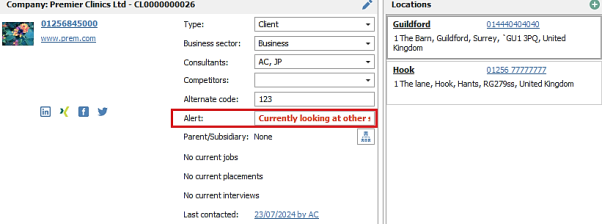
The text displays in red and can be 255 characters long.
When viewing location or contact pages, the alert field is shown in red, in the company section.
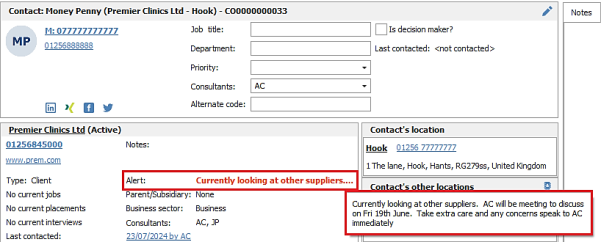
Hovering over the ellipsis will display the full contents of the field.
Enhancement 128466 Configurable pop out ‘Alert’ warnings per page
In Administration / General Settings / Main Pages tab there is a new setting against each page to pop out alerts when the page is opened.
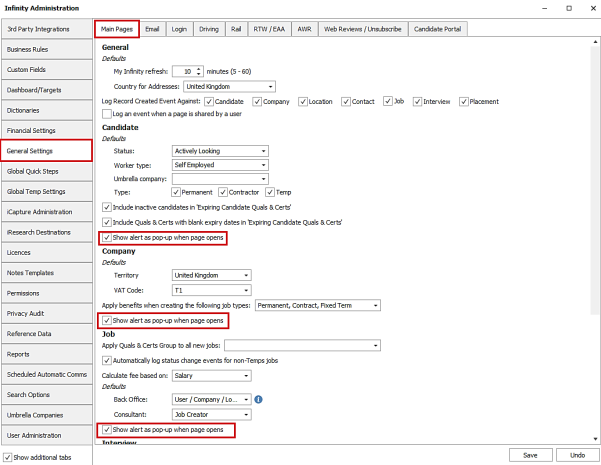
The setting is un-ticked as default and is available on all main pages:
- Company - this includes location and contact pages
- Candidate
- Job
- Interview
- Placement
When enabled and the user opens a page that has the ‘Alert’ field populated, a window is displayed with the details. The user must click OK to close the window and load the page.
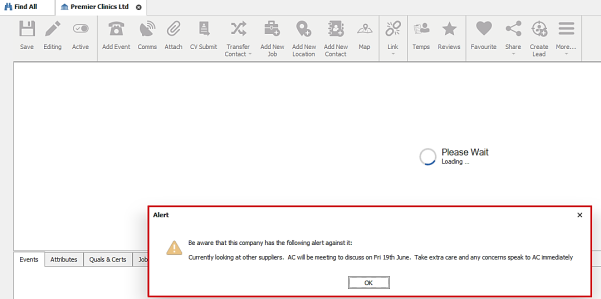
For companies, the ‘Alert’ window displays once for the first entity opened for that company. This could be a contact page, a location page or the company page itself. If the user navigates to a different entity on the same company, the window does not pop up again.
Enhancement 128485 Candidate alert column on shortlist
The candidate ‘Alert’ field is available in the shortlist right-click column chooser to add to the grid.

The column can be added via the Right-Click column chooser menu and layout saved. This is available on job, company, candidate and user shortlist grids.
Enhancement 128417 Filter out inactive locations in the Contact Navigator panel
On the company page Contact Navigator panel, the tick box to ‘Show inactive contacts’ has been renamed to ‘Show inactive locations and contacts’.
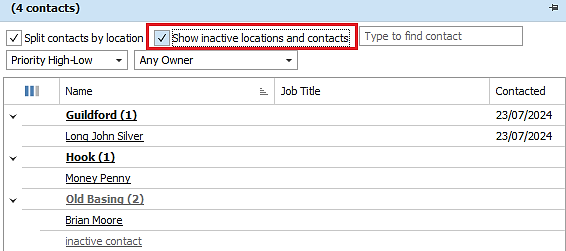
When ‘Show inactive locations and contacts’ is ticked:
- Inactive locations are shown in the grid and are in grey text
- Inactive contacts are shown in the grid and are in grey text
When ‘Show inactive locations and contacts’ is unticked:
- Inactive locations are not shown in the grid, unless there is an active contact at that location
- Inactive contacts are not shown in the grid
Note: locations made inactive whilst the company page is open will be greyed-out but still visible in the navigator until the page is closed and reopened.
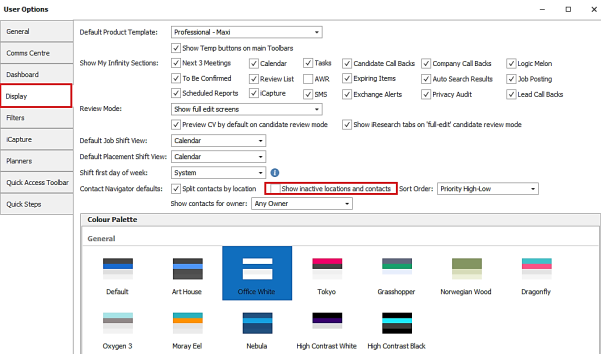
In User Options / Display tab, the default setting has been renamed to ‘Show inactive locations and contacts’.
Enhancement 128420 Company logos reverted to display in a square
The company page logo is shrunk to fit and displays in a square. This is as per previous versions before it was changed to display in a circle.
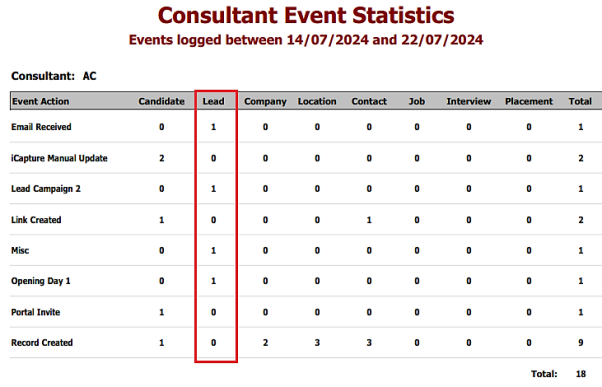
Enhancement 128396 Leads added to Consultant Event Statistics report
The Consultant Event Statistics report includes events logged by consultants against lead records.
Enhancement 128381 Leads added to Consultant Event Details report
The Consultant Event Details report includes events logged by consultants against lead records.
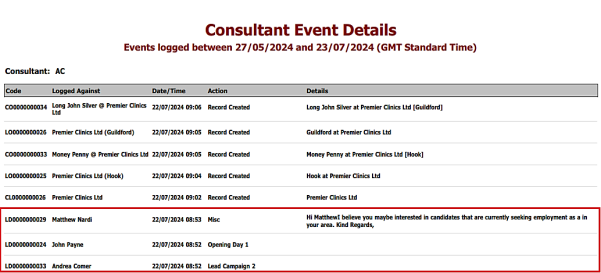
Lead records have a code / id field that begins with ‘LD’.
Enhancement 128418 Company created stats on Consultant Statistics Landscape Excel report
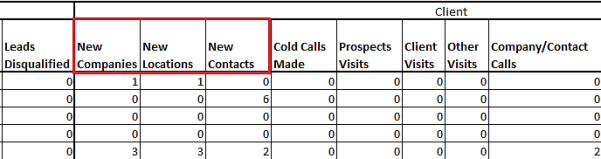
There are three new columns on the Consultant Statistics Landscape (Excel) report that calculate the following company statistics:
- New Companies - number of companies created by the consultant in the date range
- New Locations - number of locations created by the consultant in the date range
- New Contacts - number of contacts created by the consultant in the date range
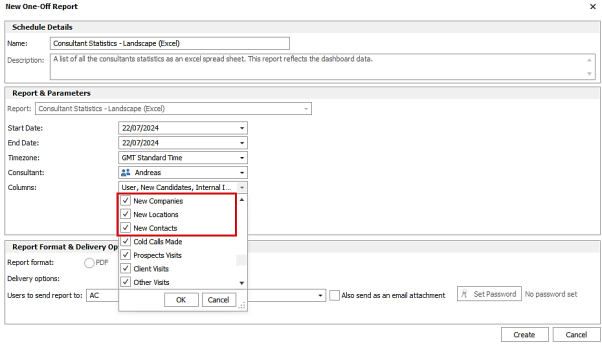
If the report has not been run before, the new columns are ticked as default for the user.
The columns show as the first three columns within the ‘Client’ group in the Excel spreadsheet.
Enhancement 128436 Company created stats added to Dashboard
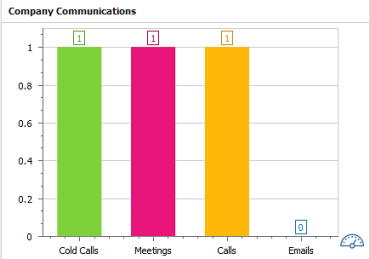
The existing Company Activity Widget has been renamed to Company Communications.
There is a new Company Activity widget.
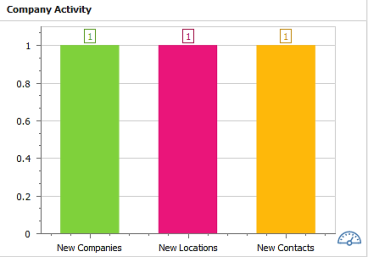
This calculates the following company statistics:
- New Companies - number of companies created in the date range
- New Locations - number of locations created in the date range
- New Contacts - number of contacts created in the date range
The statistics show as follows when viewing the different types of Dashboards:
- ‘User Dashboard’ - this is the number created by the user
- ‘Team Dashboard’ - this is the number created by all users in the selected team
- ‘Company Dashboard’ - this is the number created by all users at that company
As per existing widget functionality the user can toggle between viewing a bar chart and a gauge.
The widget is available on all default Dashboard layouts (Contract/Fixed Term, Permanent and Temporary). It appears before the Company Communications widget on the default layout.
Upon upgrade if the user has customized their Dashboard layout, the new widget will need to be added manually via the right click menu.
Enhancement 128402 Lead stats added to Consultant Stats Landscape (Excel) report
There are three new columns on the Consultant Statistics Landscape (Excel) report that calculate the following lead statistics:
- Cold Calls Made - number of lead ‘Cold Call’ action events created by the consultant in the date range
- Calls Made - number of lead outgoing phone type events created by the consultant in the date range and excluding ‘Cold Calls Made’
- Emails Sent - number of lead outgoing email type events created by the consultant in the date range
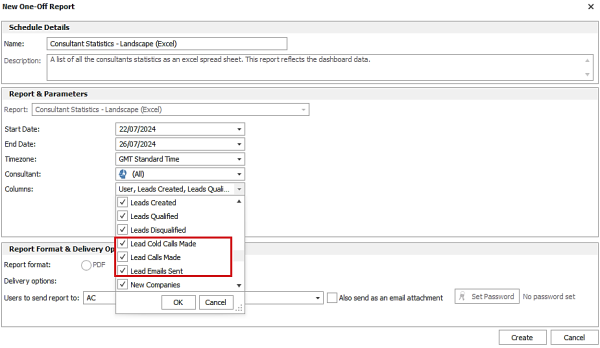
If the report has not been run before, the new columns are ticked as default for the user.
The columns show as the last three columns within the ‘Leads’ group in the Excel spreadsheet.
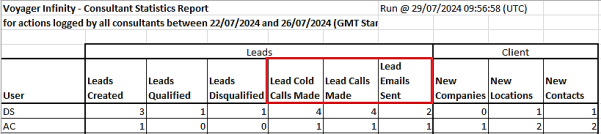
Enhancement 128543 Leads stats added to Dashboard
There is a new Lead Activity widget.
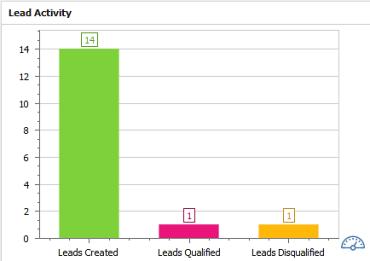
This calculates the following lead statistics:
- Leads Created - number of leads created in the date range
- Leads Qualified - number of leads qualified in the date range
- Leads Disqualified - number of leads disqualified in the date range
There is a new Lead Communications widget.
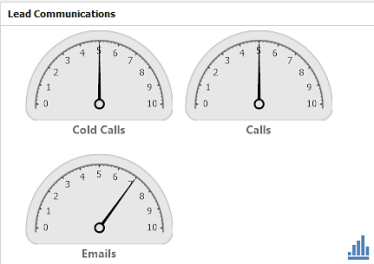
This calculates the following lead statistics:
- Cold Calls - number of lead ‘Cold Call’ action events created by the consultant in the date range
- Calls - number of lead outgoing phone type events created by the consultant in the date range and excluding ‘Cold Calls Made’
- Emails - number of lead outgoing email type events created by the consultant in the date range
The statistics show as follows when viewing the different types of Dashboards:
- ‘User Dashboard’ - this is the number created/qualified/disqualified by the user
- ‘Team Dashboard’ - this is the number created/qualified/disqualified by all users in the selected team
- ‘Company Dashboard’ - this is the number created/qualified/disqualified by all users at that company
As per existing widget functionality the user can toggle between viewing bar chart and gauges.
The widgets are available on all default Dashboard layouts (Contract/Fixed Term, Permanent and Temporary). They appear before the Company Activity widget on the default layout.
Upon upgrade if the user has customized their Dashboard layout, the new widget will need to be added manually via the right click menu.
Enhancement 128398 Leads added to Communication (Excel) report
Communication events logged against leads by the user and in the date range, appear on the Communication (Excel) Report.

Enhancement 128382 Leads added to Call Backs report
The ‘Entity Types’ drop-down field on the Call Backs report now includes 'Leads'.
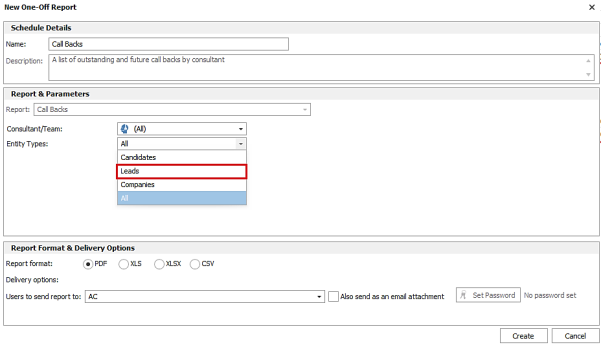
- When ‘Leads’ is selected, only the lead call backs appear on the report
- ‘Both' has been renamed to 'All'. When 'All' is selected candidate, company and lead call backs appear on the report
Lead call backs that are outstanding or in the future are listed for each consultant.
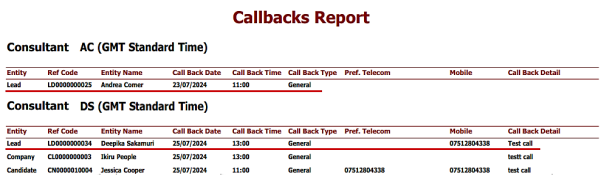
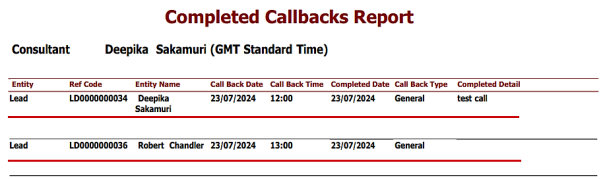
Enhancement 128385 Leads added to Completed Call Backs report
Lead call backs that have been completed by the user and are in the date range, are listed in the Completed Call Backs Report.
Enhancement 128404 Leads added to User Defined Events report
The ‘Entity Types’ drop-down field on the User Defined Events report includes 'Leads'.
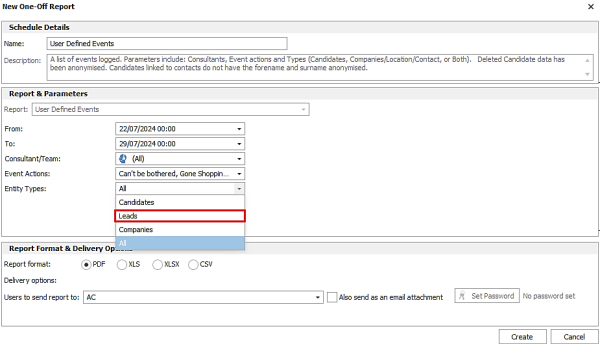
- When ‘Leads’ is selected, only the lead events appear on the report
- ‘Both' has been renamed to 'All'. When 'All' is selected candidate, company and lead events appear on the report
Lead events that match the event action type and are logged by the user in the date range, are listed under their own heading.
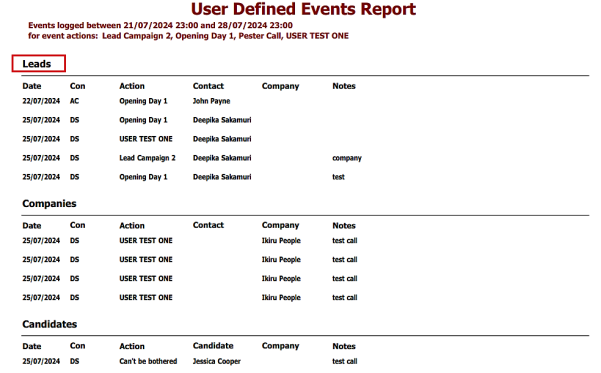
- Lead forename and surname is shown in the ‘Contact’ column
- Lead company name is shown in the ‘Company’ column
Enhancement 126620 Job Quals & Cert candidate results mergelist in alphabetic order
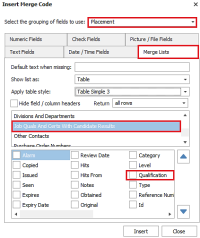
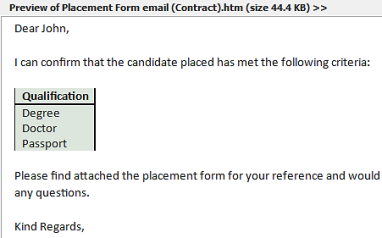
The ‘Job Quals and Certs with Candidate Results’ merge list in the Placement Comms Centre orders the merged list alphabetically by ‘Qualification’ name.
Enhancement 128231 System ‘Company Types’ reference data cannot be edited
In Administration / Reference Data / Company Type tab, users are no longer able to modify system reference data.
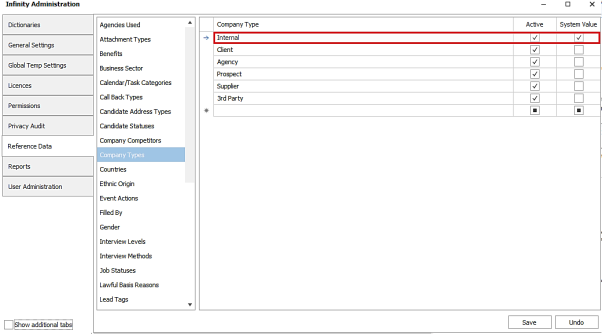
System reference data has the ‘System Value’ column ticked.
Upon upgrade, the system entry is returned to a name of 'Internal' and active, if it had previously been changed.
Enhancement 128109 TalentGraph - Mail and phone columns not shown as default
In TalentGraph search results, the phone and email columns are no longer shown as default.
- If the user has saved their results grid layout with the columns there, they will persist
- The columns are still available in the column chooser should the user require them to view previously downloaded contact data
Enhancement 128268 Candidate API (SaaS only) financial data validation change
When updating or creating candidate bank account details in the API, the fields below are accepted in the following format only:
- IBAN Number - up to 34 starting with 2 letters, 2 numbers then up to 30 alphanumeric
- Swiftcode - 8 or 11 - 4 letters, 2 letters, 2 alphanumeric, 3 alphanumeric optional
Enhancement 128477 TrustID (SaaS only) Agency’s name on Share Code documents
There is a new field in Administration / 3rd Party Integrations / TrustID tab to record the company name that will appear on TrustID Online RTW Share Code documents.
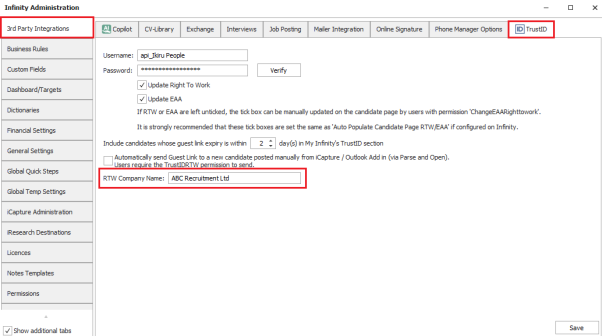
This is blank as default. This should be populated with the Agency’s company name.
For candidates that complete a Share Code check, the document attached to the Infinity candidate record will show this company name.
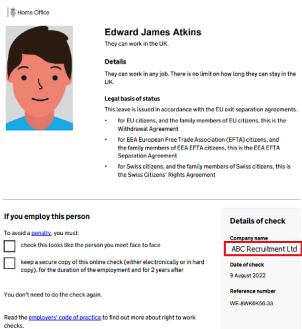
Note – company name field is blank upon upgrade. It is advisable to set this field as required before further use of the Infinity TrustID integration.
 Contact Details
If you require further assistance please contact Ikiru People using the details published on www.ikirupeople.com
Visit our Customer Portal at https://portal.ikirupeople.com/ for future events and clinics.
FeedbackIf you would like to make suggestions or have found any errors with this Help section please contact our Support team.
Copyright © 2026 Voyager by Ikiru People Ltd. All rights reservedVersion 4.87
Voyager Software is a brand of Ikiru People Ltd, a subsidiary of Dillistone Group Plc. The group is a leading global provider of software and services that enable recruitment agencies and in-house recruiters to better manage their selection process and address the training needs of individuals. Across its brands – which include Voyager Software (recruitment software UK & Australia), Dillistone FileFinder executive search software, GatedTalent, the global database of the world’s leading executives, Talentis.Global – the next generation of recruitment software and also ISV.Online, provider of online pre-employment skills testing and training tools. Dillistone Group serves thousands of clients worldwide. Ikiru People Ltd: Registration Number 02043300. Registered in England & Wales.
 |  |  |  |