Voyager Infinity – Release Notes
Version: 4.110
Release Date: 11th June 2024
What have we released?
- Infinity 4.110 has been released
Release overview
Here’s a snapshot of what we’ve delivered in this release:
- Contact and candidate search results report (permission required)
- iCapture – employment history location field is parsed
- Leads and Temp Planner screen resolution improvements
Feedback please
We are continuously looking to improve Voyager Infinity and are keen to hear your thoughts. Please email suggestions@ikirupeople.com with any feedback on existing functionality or ideas
Enhancements
Enhancement 127118 Contact search list report available from results
The existing contact search ‘List’ reports are now available from contact search ‘Results’.

The toolbar has two report buttons, and the user can send ‘checked’ results, or send ‘all’ results to the report. Send ‘all’ results sends the ‘total results’ as shown on the status bar at the bottom of the grid.
When sending the results, the existing ‘Contact Search Reports’ area is opened showing folders and reports within (if the user has permission to the report folder).
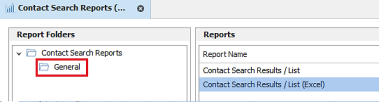
Note: Permissions to the ‘General’ report folder are off by default for all users except for database manager. Permission can be assigned users / security roles in Administration / Reports / Reports tab.
The existing reports have been renamed to:
- Contact Search Results / List
- Contact Search Results / List (Excel)
When run, the selected contact search results are output on the report as per existing functionality.
The header on the report will say whether it is a ‘Search Results’ or ‘Search List’ report.
Enhancement 127126 Candidate search list report available from results
The existing candidate search ‘List’ reports are now available from candidate search ‘Results’.

The toolbar has two report buttons, and the user can send ‘checked’ results, or send ‘all’ results to the report. Send ‘all’ results sends the ‘total results’ as shown on the status bar at the bottom of the grid.
When sending the results, the existing ‘Candidate Search Reports’ area is opened showing folders and reports within (if the user has permission to the report folder).
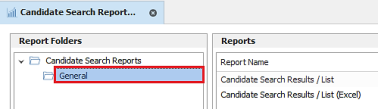
Note: Permissions to the ‘General’ report folder are off by default for all users except database managers. Permission can be assigned to users / security roles in Administration / Reports / Reports tab.
The existing reports have been renamed to:
- Candidate Search Results / List
- Candidate Search Results / List (Excel)
When run, the selected candidate search results are outputted in the report as per existing functionality.
The header on the report will say whether it is a ‘Search Results’ or ‘Search List’ report.
Enhancement 127168 iCapture location of employment history entries parsed
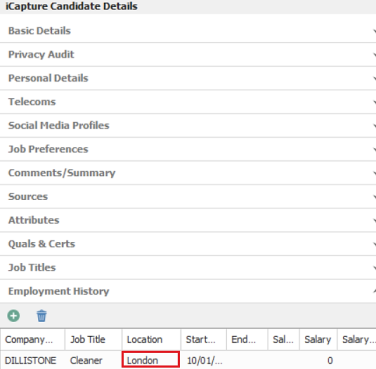
iCapture parses the location of work history entries in CVs and puts the data in the Employment History "Location" field.
Enhancement 127171 Leads – see more event rows on lower resolutions
The height of the lead page and grid have been reduced to allow more event rows to be displayed at the bottom of the screen. This is required for some lower resolutions and 125% zoom modes.
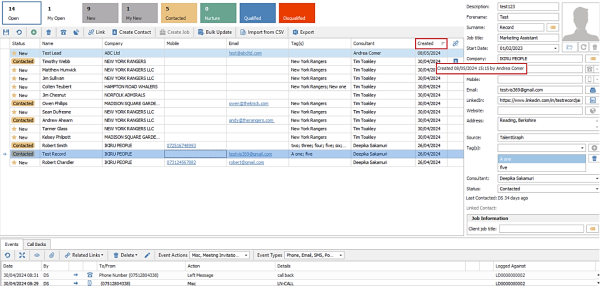
- The ‘created date’ and ‘by’ fields have been removed from the lead page.
- The ‘created date’ field appears on the grid as default and has a tooltip that displays ‘created date, time and by’.
- The ‘created by’ field is available in the column chooser to add to the grid if required.
- The address field has been made half a row smaller.
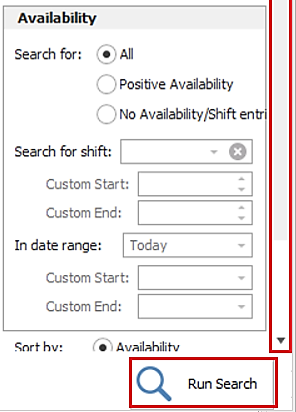
Enhancement 127170 Temp Planner - "Run Search" button always shown
The ‘Run Search’ has been fixed at the bottom on the Temp Planner Search Criteria panel, on the Quick tab, and a vertical scroll bar is available. This is required for some lower resolutions and 125% zoom modes.
Enhancement 127179 Temp shortlist jobs screen displays current jobs only
In the Application / Information / Jobs / Temp Shortlist menu, current jobs only are displayed.

‘Current’ is defined as having an unfilled shift today or in the future.
 Contact Details
If you require further assistance please contact Ikiru People using the details published on www.ikirupeople.com
Visit our Customer Portal at https://portal.ikirupeople.com/ for future events and clinics.
FeedbackIf you would like to make suggestions or have found any errors with this Help section please contact our Support team.
Copyright © 2026 Voyager by Ikiru People Ltd. All rights reservedVersion 4.87
Voyager Software is a brand of Ikiru People Ltd, a subsidiary of Dillistone Group Plc. The group is a leading global provider of software and services that enable recruitment agencies and in-house recruiters to better manage their selection process and address the training needs of individuals. Across its brands – which include Voyager Software (recruitment software UK & Australia), Dillistone FileFinder executive search software, GatedTalent, the global database of the world’s leading executives, Talentis.Global – the next generation of recruitment software and also ISV.Online, provider of online pre-employment skills testing and training tools. Dillistone Group serves thousands of clients worldwide. Ikiru People Ltd: Registration Number 02043300. Registered in England & Wales.
 |  |  |  |