Voyager Infinity – Release Notes
Version: 4.107
Release Date: 2nd May 2024
What have we released?
- Infinity 4.107 has been released
Release overview
Here’s a snapshot of what we’ve delivered in this release:
- Images display in a circle
- AWR further improvements
- My Infinity Temp Shortlist section shows unfilled temp jobs only
Feedback please
We are continuously looking to improve Voyager Infinity and are keen to hear your thoughts. Please email suggestions@ikirupeople.com with any feedback on existing functionality or ideas for new functionality.
Enhancements
Enhancement 126811 Main page images display in a circle
Candidate page
The candidate’s photo image is displayed in a circle.

If no image is present, the candidate forename and surname initials are shown in the circle and if there is no name a question mark is shown.

Clicking on an image or using ‘edit basic details’ will display the original image.
Company page
The company logo image is displayed in a circle.

If no image is present, the company name initials are shown for up to two words (first and last words).

Contact page
The contact’s photo image is displayed in a circle.
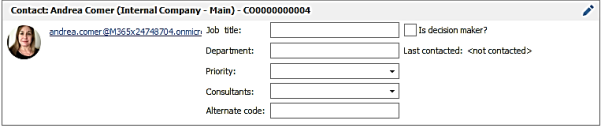
If no image is present, the contact forename and surname initials are shown in the circle and if there is no name, a question mark is shown.
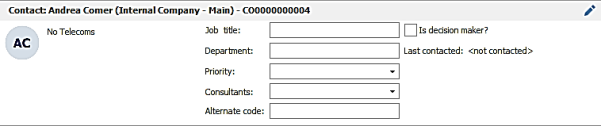
Double clicking to view an image or using ‘edit basic details ‘will display the original image.
Outlook add in
The candidate’s and contact’s photo image is displayed in a circle.
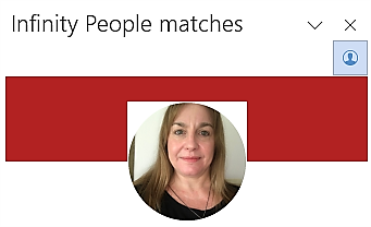
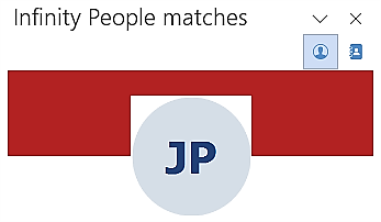
If no image is present, the contact’s / candidate’s forename and surname initials are shown in the circle and if there is no name, a question mark is shown.
TalentGraph
Results display the photo image in a circle.
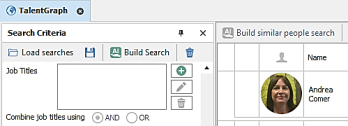
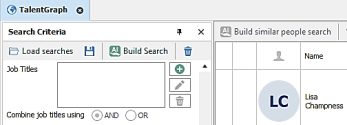
If no image is present, the persons forename and surname initials are shown in the circle and if there is no name, a question mark is shown.
Enhancement 126815 AWR week count goes back to Oct 2011
When AWR is enabled in the Administration / General Settings / AWR tab, the counts go back to October 1st, 2011. The information tooltip has been updated to reflect this change.
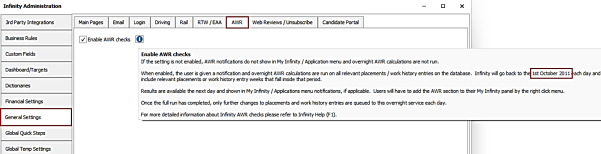
Within 24 hours after the upgrade, existing databases enabled with AWR are recalculated using this date also.
Note: When historical AWR clocks are identified, the clock continues to run for up to 1 week regardless of there being a 6-week gap. This may result in some false ‘10-12’ AWR notifications appearing in Infinity. These notifications will automatically disappear when the clock ends.
Historical AWR clocks that have gone over 12 weeks will remain in notifications until ‘AWR Checked’ is ticked.
Enhancement 126759 AWR 10-12 weeks notifications are not shown if the clock has ended
AWR notifications for 10 - 12 weeks do not show in My Infinity / Apps menu if the AWR clock has ended.
Note: AWR clocks end if there is a gap of 6 weeks.
Enhancement 126753 AWR tabs show on temp and contract placements only
When AWR is enabled on the database, the AWR tab no longer shows on perm and fixed term placements. It is shown on temp and contract placements only.
Enhancement 126754 AWR placement search on ‘AWR weeks’ is changed
Placement search field ‘AWR Weeks’ has been changed. When the ‘Not’ operand is used, search returns placements that are in at least one AWR group that does not have the specified 'No of Weeks.

Enhancement 107281 Reset button on Object Permissions
In Administration / Permissions tab a 'Restore Default Object Permissions' button is available.
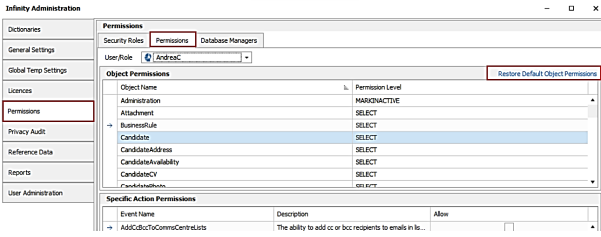
This is available when a user is selected in the drop-down list (not a security role) and for administrators with ‘Database Manager’ permission only.
The function restores all of the selected user's object permissions to ‘SELECT’ permission level, which is the default for new users.
The button is also available when listing user permissions in Administration / User Administration / Edit User / ‘Permission’ button.
Enhancement 126655 API (SaaS only) - post candidate attachments with a type of 0/no type
- Infinity API users can post candidate attachments with a type of 0
- Infinity API users can post candidate attachments with no type
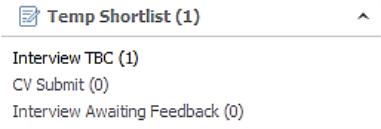
Enhancement 126788 Temp Shortlist section of My Infinity shows open jobs only
My Infinity's Temp Shortlist section only displays data for jobs with at least one unfilled shift today or in the future.
Enhancement 126803 Shift Planner export does not automatically show PL/JB codes
Shift Planner export has been changed to only output the job and placement code columns if the user has them on their results grid.
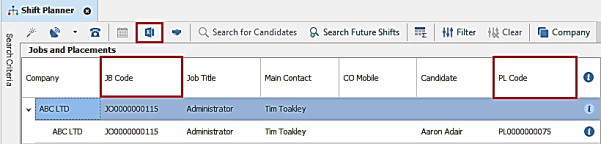
The codes are outputted as the first columns in the Excel Report, as per previous versions.

Enhancement 126808 Temps Currently Working report email address output is changed
The Temps Currently Working report outputs the following email addresses as per the Contractors Currently Working report:
- Candidates: Top (earliest id) email, regardless of type
- Contacts: Top Send by Default email address
 Contact Details
If you require further assistance please contact Ikiru People using the details published on www.ikirupeople.com
Visit our Customer Portal at https://portal.ikirupeople.com/ for future events and clinics.
FeedbackIf you would like to make suggestions or have found any errors with this Help section please contact our Support team.
Copyright © 2026 Voyager by Ikiru People Ltd. All rights reservedVersion 4.87
Voyager Software is a brand of Ikiru People Ltd, a subsidiary of Dillistone Group Plc. The group is a leading global provider of software and services that enable recruitment agencies and in-house recruiters to better manage their selection process and address the training needs of individuals. Across its brands – which include Voyager Software (recruitment software UK & Australia), Dillistone FileFinder executive search software, GatedTalent, the global database of the world’s leading executives, Talentis.Global – the next generation of recruitment software and also ISV.Online, provider of online pre-employment skills testing and training tools. Dillistone Group serves thousands of clients worldwide. Ikiru People Ltd: Registration Number 02043300. Registered in England & Wales.
 |  |  |  |