Voyager Infinity – Release Notes
Version: 4.105
Release Date: 5th April 2024
What have we released?
- Infinity 4.105 has been released
Release overview
Here’s a snapshot of what we’ve delivered in this release:
- Warn/Prevent Placements if they don’t have a PO Number (configurable per company)
- API (SaaS Only) includes Candidate Attachments and Candidate References
- ‘Company Business Sector’ column added to ‘Cont and Perm Starters’ report
Feedback please
We are continuously looking to improve Voyager Infinity and are keen to hear your thoughts. Please email suggestions@ikirupeople.com with any feedback on existing functionality or ideas for new functionality.
Enhancements
Enhancement 126286 New Company Page field to indicate if the company requires all placements to have a PO Number
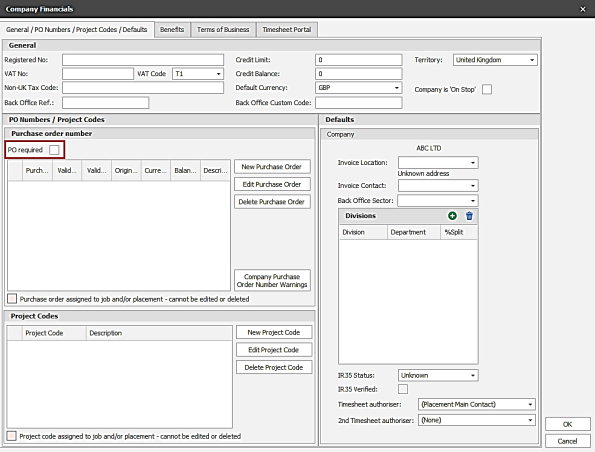
This is unticked by default.
Note: The Business rule or Temp Compliance check will need to be enabled for this setting to be enforced.
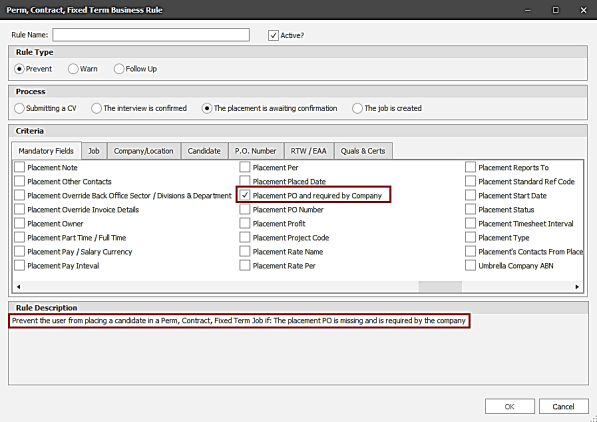
Enhancement 126287 New Perm/Cont/Fixed Term Business rules to prevent/warn if the placement doesn’t have a PO Number
If the Company Financials ‘PO Required’ field is ticked, then Perm/Cont/Fixed Term placements are prevented/warned from being set as ‘awaiting confirmation’ status, unless the placement has a PO Number.
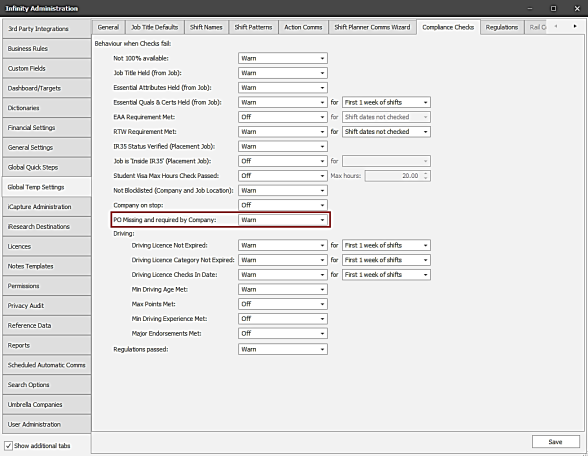
Enhancement 126292 New Temp Compliance Check to prevent/warn if the placement doesn’t have a PO Number
If the Company Financials ‘PO Required’ field is ticked, then Temp placements are prevented/warned from being created, unless the placement has a PO Number.
If a new placement is to be created, the Job PO Number is checked, as that will be the default PO Number on the newly created placement.
If a placement already exists, the PO Number is checked on the placement.
Enhancement 126269 API (SaaS Only) can retrieve candidate attachments
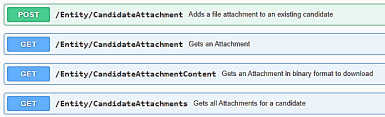
- can get all attachments for a candidate with a filter available on attachment type.
- can get an attachment by its ID.
- can get an attachment content by ID.
Enhancement 126278 API (SaaS Only) can retrieve candidate referees
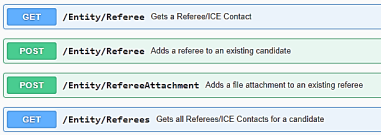
- can get all referees for a candidate -all fields are returned.
- can get a referee by its ID- all fields are returned.
- Can get a referee attachment.
Enhancement 126411 ‘Company Business Sector’ column added to ‘Cont and Perm Starters’ report
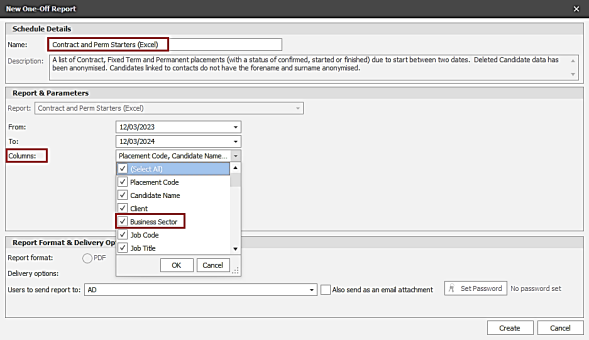

The column is available from the Columns Parameter
If the report has been previously run, the column will not display by default.
If the report has not been previously run, the column will display by default.
Enhancement 126239 Comms Centre Template Admin UI Improvement
Comms Centre Template Admin retains the Comms Centre and radio buttons when the type e.g. mail/post is changed.
Enhancement 126265 Note to indicate Copilot can draft templates
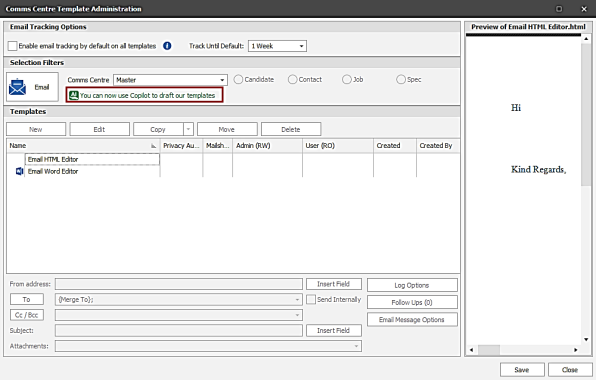
When you are editing a template a ‘Copilot’ button is available.
Enhancement 126248 Heading of ‘Expired and Expiring Qualifications’ report improved

Enhancement 126270 Redundant fields removed from Comms Centre admin
System Templates and Filter have been removed from the UI.
 Contact Details
If you require further assistance please contact Ikiru People using the details published on www.ikirupeople.com
Visit our Customer Portal at https://portal.ikirupeople.com/ for future events and clinics.
FeedbackIf you would like to make suggestions or have found any errors with this Help section please contact our Support team.
Copyright © 2026 Voyager by Ikiru People Ltd. All rights reservedVersion 4.87
Voyager Software is a brand of Ikiru People Ltd, a subsidiary of Dillistone Group Plc. The group is a leading global provider of software and services that enable recruitment agencies and in-house recruiters to better manage their selection process and address the training needs of individuals. Across its brands – which include Voyager Software (recruitment software UK & Australia), Dillistone FileFinder executive search software, GatedTalent, the global database of the world’s leading executives, Talentis.Global – the next generation of recruitment software and also ISV.Online, provider of online pre-employment skills testing and training tools. Dillistone Group serves thousands of clients worldwide. Ikiru People Ltd: Registration Number 02043300. Registered in England & Wales.
 |  |  |  |