Voyager Infinity – Release Notes
Version: 4.104
Release Date: 15th March 2024
What have we released?
- Infinity 4.104 has been released
Release overview
Here’s a snapshot of what we’ve delivered in this release:
- Candidates / contacts can unsubscribe to mailshots (SaaS only)
- AWR tab on placement and candidate pages
- Mailchimp – added to re:job candidate search results
- API (SaaS only) – Umbrella companies
Feedback please
We are continuously looking to improve Voyager Infinity and are keen to hear your thoughts. Please email suggestions@ikirupeople.com with any feedback on existing functionality or ideas for new functionality.
Enhancements
Enhancement 126024/126025 Unsubscribe from mailshots (SaaS only)
Overview
This functionality is available for SaaS customers only.
Emails can be sent from the Infinity Comms Centre to candidates /contacts, offering an unsubscribe link. The recipient can click the link and unsubscribe on a website. This will update Infinity and untick the ‘OK to Mailshot’ field against the candidate’s / contact’s email address.
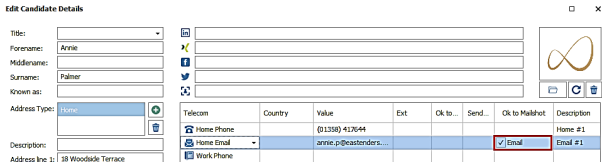
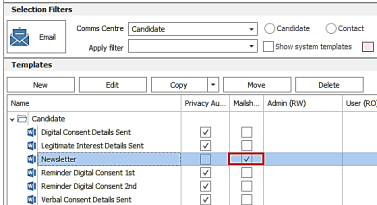
Note: Infinity Comms Centre templates ticked as ‘Mailshot’ require the candidate’s/contact’s email address to be ticked as ‘OK to Mailshot’, otherwise the send is prevented.
Administration
The ‘Web Reviews’ tab in Administration / General Settings has been renamed to ‘Web Reviews / Unsubscribe’.
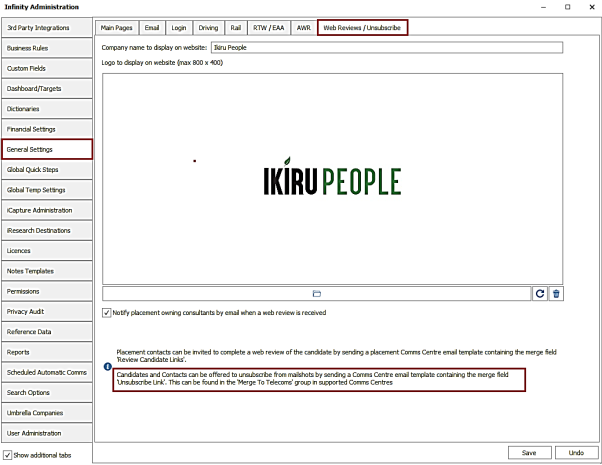
The field labels for the company name and logo have been made generic as they are also used to display on the ‘Unsubscribe’ website in addition to the ‘Web Reviews’ website.
There is a note on the screen advising the users to use the ‘Unsubscribe Link’ merge link in their candidate and contact related Comms Centre templates.
Comms Centre template setup
There is a new merge field called ‘Unsubscribe Link’ in the ‘Merge To Telecoms’ group / ‘Text Fields’ tab in candidate / contact related Email Comms Centres.
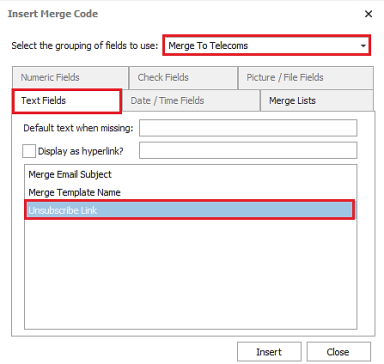
This merges as a clickable hyperlink field called ‘unsubscribe’.
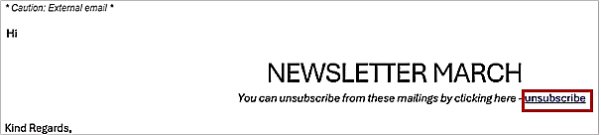
When a recipient receives an email and presses the unsubscribe link, they are taken to a website with the admin screen’s website company name and logo displayed in the centre.
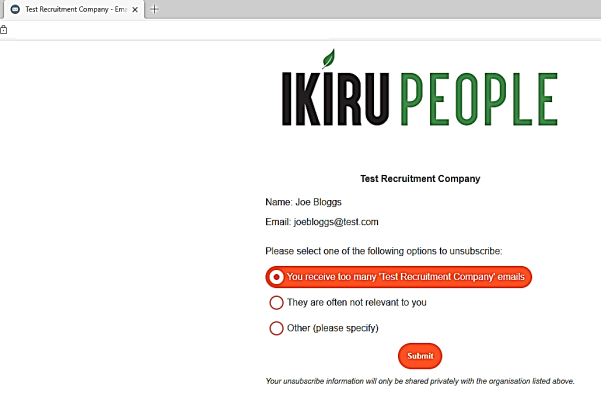
The name and email address shown is taken from the ‘Merge To Section’ when the email was originally sent from the Infinity Comms Centre.
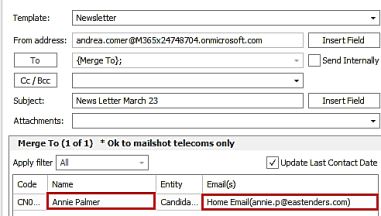
Note: Contact related Comms Centre can also merge to company and location levels. If there is a company or location email address in the merge to section, the unsubscribe link will work and untick the ‘Ok to Mailshot’ option against those email addresses.
If the email address is edited in the Merge To section before sending, then the unsubscribe link will not work as it would not find a matching email address on the Infinity record to update.
On the website, the recipient can select the required radio button and click unsubscribe or cancel out by closing the browser tab. If ‘Other’ is selected, then comments are mandatory.
If the recipient unsubscribes, all matching email addresses are unticked as ‘Ok to Mailshot’ on the Infinity database overnight. If the email address cannot be updated because a user has the record locked, the system will try again the next day.
An info event is logged by the service, with an action of "Mailer Unsubscribed" and the website unsubscribe radio button option is populated in the event details field.

Note: If the email address is already unticked as ‘Ok to Mailshot’, the event will still be logged.
Enhancement 126023/126140 AWR tab on placement and candidate pages
The ‘AWR Checked’ field on the placement page has been removed. AWR compliance checking is now controlled solely by the status of the ‘AWR Checked?’ field on each AWR Group (clock).

AWR group (clocks) ticked as ‘AWR Checked?’ do not show in My Infinity / Apps menu notifications. Upon upgrade, if at least one placement in an AWR Group was un-ticked as ‘AWR Checked?’ on the placement page, the AWR Group (clock) is unticked.
An AWR tab has been added to the placement and candidate page, that shows all AWR groups (clocks) the placement/candidate is in going back 6 months. (Not just the ones shown in My Infinity / App menu notifications).

- Functionality / display of the AWR group (clock) is the same as per My Infinity / App menu notifications
- The ‘No of weeks’ is the count as of today, regardless of whether it’s still running or not
- Order is latest AWR group (clock) start date at the top
- The placement ID and candidate columns are not hyperlinks if the user is on that page
- The toolbar does not have the review mode button
- The user can tick / untick the ‘AWR checked’ column for the AWR group
Note: If there is a temp placement and there is a 6 week gap between shifts, a new clock is created, and the placement will show as being in more than one AWR group (clock).
When the AWR group (clock) ‘AWR Checked?’ field is ticked / un-ticked, an info event is logged on all placement pages in that group, for that user.

- Event action is ‘AWR Checked’ or ‘AWR Un-Checked’
- Event details show the AWR group (clock) information: {start date}, {end date} {no of weeks}
- Events cannot be deleted
- Events can be seen on the related candidate, company and job pages
The placement page ‘AWR checked’ field has also been removed from the following areas of Infinity:
- Placement Comms Centre
- Placement API
- Placement tab on the Candidate Subject Access report
The placement page event logger action ‘AWR Checked’ does not update the AWR group (clock tick box.
Searching
The existing AWR fields in placement search have been updated to work with the new placement page AWR tab.

‘AWR Checked’
- Search returns placements that are in at least one AWR group (clock) that is ticked as ‘AWR Checked’
- When the ‘Not’ operand is used, search returns placements that are in at least one AWR group that is not ticked as AWR ‘Checked’
‘AWR Weeks’
- Search returns placements that are in at least one AWR group (clock) that has the specified ‘No of Weeks’.
- When the ‘Not’ operand is used, search returns placements that do not have an AWR group (clock) at the specified ‘No of Weeks’ (including placements without any AWR groups (clocks)
Known issue:– this should return placements that are in at least one AWR group (clock) that is not at the specified number of weeks. This will be fixed in a future release.
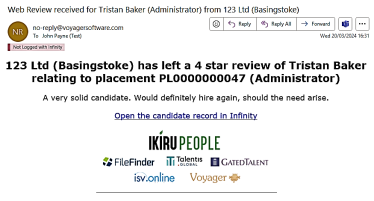
Enhancement 125997 Web review (SaaS only) email notifications show comments
When a client contact populates a review and enters a comment:
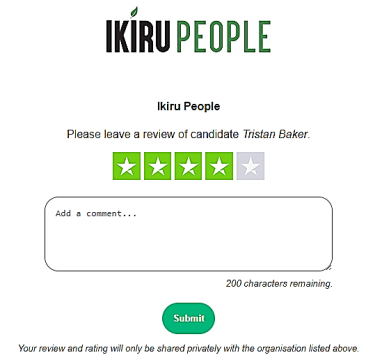
the comment is included in the notification window the consultant is sent:
Enhancement 126162 Mailchimp on re:job search results
On Infinity databases configured for Mailchimp, the export functionality has been added to the candidate re:job search results.

The export functions as per existing search results functionality, and the users require the ‘Mailchimp export’ permission to see the button on the toolbar.
The Mailchimp button sends all candidate records in the results, and the 'Export Mailshot File' window is displayed that allows the user to create a new Mailchimp Infinity list (“audience”) or select an existing Infinity list.
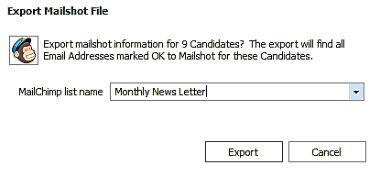
The export finds all email addresses marked ‘OK to mailshot’ for the candidates.
When the user clicks ‘Export’, the records are queued to the Mailchimp service ready for export and the user is informed in the window.
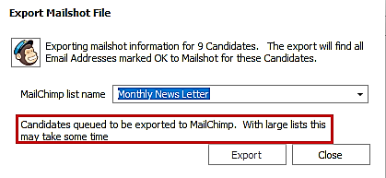
The user can then close the window and return to their search results.
Once the records are successfully exported to Mailchimp by the service, an information event is logged against each record with an action of 'Mailer Exported' and the list name in the details as per existing functionality.
NOTE: If a candidate/contact record with multiple email addresses is exported, separate records will be shown in Mailchimp.
Enhancement 126084 / 126085 Leads -CSV import improvements
The 'LinkedCompanyId' and 'LinkedCompanyTierContactId' columns are no longer mandatory and can be left blank if no linking is required.
The Contact Notes, Company Notes, Client Job Title and Job Description can be left blank, and do not require quotes.
Enhancement 126150/126151/126157 API (SaaS only) – Umbrella companies
API

The GET/Entity/Candidate endpoint returns the umbrella company ID - regardless of current worker type.
A new endpoint GET /Entity/UmbrellaCompanies provides a list of umbrella companies including the following data:
- Id
- Umbrella Company (name)
- Active/Inactive status
Inactive umbrella companies can optionally be included/excluded.
The PUT/Entity/Candidate endpoint allows an umbrella company ID to be sent to Infinity.
The POST/Entity/Candidate endpoint allows an umbrella company ID to be sent to Infinity.
If the candidate worker type is umbrella, an Umbrella Company ID is mandatory.
Note: An umbrella company id is allowed if the worker type is not umbrella
 Contact Details
If you require further assistance please contact Ikiru People using the details published on www.ikirupeople.com
Visit our Customer Portal at https://portal.ikirupeople.com/ for future events and clinics.
FeedbackIf you would like to make suggestions or have found any errors with this Help section please contact our Support team.
Copyright © 2026 Voyager by Ikiru People Ltd. All rights reservedVersion 4.87
Voyager Software is a brand of Ikiru People Ltd, a subsidiary of Dillistone Group Plc. The group is a leading global provider of software and services that enable recruitment agencies and in-house recruiters to better manage their selection process and address the training needs of individuals. Across its brands – which include Voyager Software (recruitment software UK & Australia), Dillistone FileFinder executive search software, GatedTalent, the global database of the world’s leading executives, Talentis.Global – the next generation of recruitment software and also ISV.Online, provider of online pre-employment skills testing and training tools. Dillistone Group serves thousands of clients worldwide. Ikiru People Ltd: Registration Number 02043300. Registered in England & Wales.
 |  |  |  |