Quals & Certs
 General
Quals & Certs can be put against candidates, contacts, companies or locations. These allow you to record expiry dates against the qualification or certificate and generate a reminder to users or via the application menu, to ensure compliance. The reminder timeframe is setup by the system administrator, so they can dictate how many days prior the reminder is set to.
Candidate
For candidates click on the Quals & Certs tab
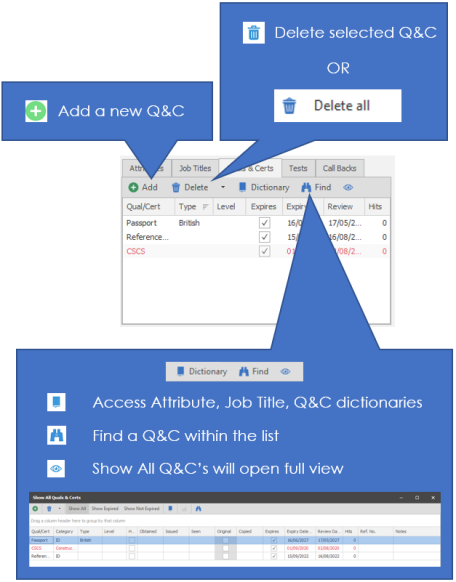
Use the Add button 
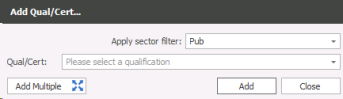
You will be able to assign a single item by using the dropdown Qual/Cert box or by typing directly into the box.
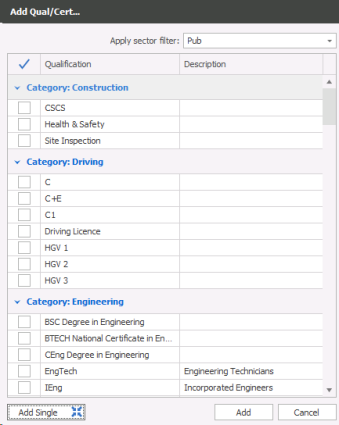
Alternatively you can use the Add Multiple button to tick appropriate Quals / Certs for that candidate. The list will be grouped by category for quick access to appropriate attributes.
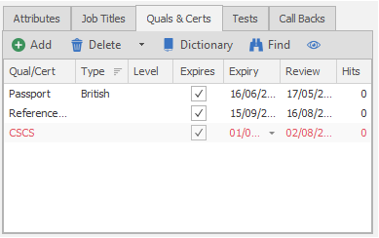
Once the qualification or certificate is added to the record you can input the expiry date into the appropriate cell. Once the record is saved it will autofill the review date (reminder date) which will then appear in the users My Infinity Expiring Items section. Q&C's added will display in red if they are marked as an expirable Q&C, therefore it is expecting an expiry date to be added, although it can be added to the record at a later date.
Contact / Company / Location
To add Quals & Certs to a contact, company or company location you go to the appropriate company record and click on the location or contact as appropriate, you will see the appropriate tab labels available, see screenshots below:
Company

Location

Contact

To add a Qualification or Certificate to a contact you can click on Add Qual / Cert by either using the drop down list or directly typing the qualification and adding a single qualification.
Alternatively you can use the Add Multiple and tick appropriate qualifications or certificates that you wish to add to the contact.
You will then be able to complete further details of the qualification or certificate, like expiry dates and level depending on your system setup.
Contact Details
If you require further assistance please contact Ikiru People using the details published on www.ikirupeople.com
Visit our Customer Portal at https://portal.ikirupeople.com/ for future events and clinics.
FeedbackIf you would like to make suggestions or have found any errors with this Help section please contact our Support team.
Copyright © 2026 Voyager by Ikiru People Ltd. All rights reservedVersion 4.87
Voyager Software is a brand of Ikiru People Ltd, a subsidiary of Dillistone Group Plc. The group is a leading global provider of software and services that enable recruitment agencies and in-house recruiters to better manage their selection process and address the training needs of individuals. Across its brands – which include Voyager Software (recruitment software UK & Australia), Dillistone FileFinder executive search software, GatedTalent, the global database of the world’s leading executives, Talentis.Global – the next generation of recruitment software and also ISV.Online, provider of online pre-employment skills testing and training tools. Dillistone Group serves thousands of clients worldwide. Ikiru People Ltd: Registration Number 02043300. Registered in England & Wales.
 |  |  |  |