Job Titles
 General
Job Title(s) can be put against candidates, contacts, companies or company locations. The candidate Job Titles are either picked up automatically from the CV or you are able to manually add / remove as appropriate.
Candidate
Job titles are separate to attributes, but work in the same way. If you utilise iCapture to automatically find skills then you will have a hit score (number of times the job title (or one of its synonyms) was found within the CV)
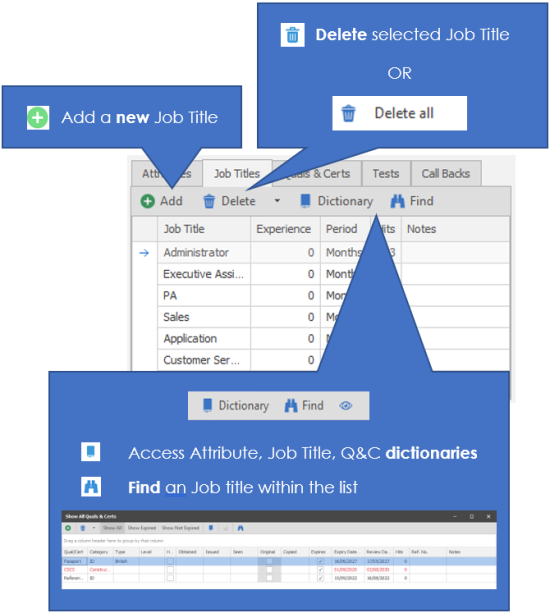
You can add a job title manually or Infinity can pick it up from the CV.
To add a Job Title click the Add New button 
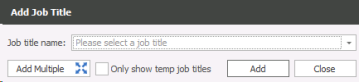
Choose from the available list of Job titles. The list is editable by your System Administrator.
If you have added a candidate through iCapture, the Job titles will be added automatically (if you have selected this option).
You will be able to assign a single job title by using the dropdown box or by typing directly into the box. If you wish to only view Temp Job Titles you can tick "Only show temp job titles"
NB: - If you tick "Only show temp job titles" it will remember this the next time you access the Add Job Title box.
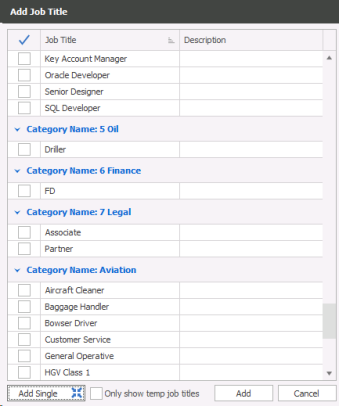
Alternatively you can use the Add Multiple button to tick appropriate job title(s) for that candidate. The list will be grouped by category for quick access to appropriate job titles.
Contact / Company / Location
The contact, company or location Job Titles are manually added but all using the same technique. It is important that you assign Job Titles to the correct entity within a Company record so that these can be utilised when searching, see example below regarding inferred skills:
If I add a skill to a contact and it’s already at Company Level it will not let me as it’s inferred the contact already has it.
Searching will work as follows:
Searching for Companies and entering Job Title of SQL Developer
- Will return Companies with SQL Developer
- Will return Companies with any location with Job Title SQL Developer
- Will return Companies with any contact with Job Title of SQL Developer
Searching for Locations and entering Job Title of SQL Developer
- Will return Locations with Company with SQL Developer
- Will return Locations with SQL Developer
- Will return Locations with any contact with SQL Developer
Searching for Contacts and entering Job Title of SQL Developer
- Will return Contacts with Company with SQL Developer
- Will return Contacts with Contact’s Location SQL Developer
- Will return Contacts with SQLs Developer
Go to the appropriate company record and click on the location or contact as appropriate, you will see the appropriate tab labels available, see screenshots below:
Company

Location

Contact

Preferred Job Title
In addition to recording Job Title(s) on candidate records you can also define which is the preferred job title.
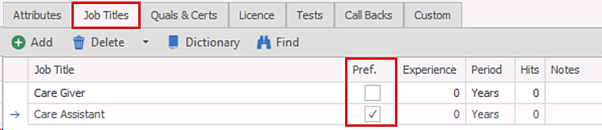
- The column appears after the job title name
- The setting is un-ticked as default
- Only one job title can be ticked
- The column is not available in iCapture or MS Word’s CV Autoscan Panel / Job Titles section
- The column is available to view only in iResearch and changes should not be made here
Preferred Job Title in Temp Planner
The candidate’s ‘preferred job title’ is available in the column chooser and can be added to the Temp Planner candidate results grid
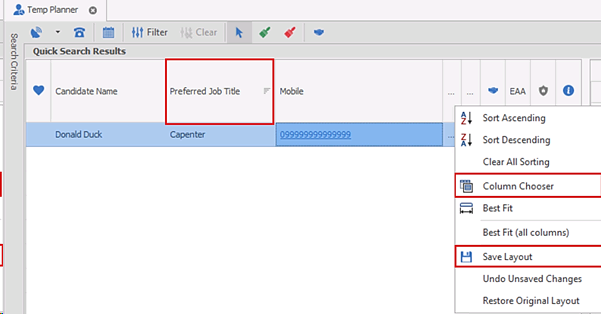
The grid’s layout must be saved to permanently show the column
Contact Details
If you require further assistance please contact Ikiru People using the details published on www.ikirupeople.com
Visit our Customer Portal at https://portal.ikirupeople.com/ for future events and clinics.
FeedbackIf you would like to make suggestions or have found any errors with this Help section please contact our Support team.
Copyright © 2026 Voyager by Ikiru People Ltd. All rights reservedVersion 4.87
Voyager Software is a brand of Ikiru People Ltd, a subsidiary of Dillistone Group Plc. The group is a leading global provider of software and services that enable recruitment agencies and in-house recruiters to better manage their selection process and address the training needs of individuals. Across its brands – which include Voyager Software (recruitment software UK & Australia), Dillistone FileFinder executive search software, GatedTalent, the global database of the world’s leading executives, Talentis.Global – the next generation of recruitment software and also ISV.Online, provider of online pre-employment skills testing and training tools. Dillistone Group serves thousands of clients worldwide. Ikiru People Ltd: Registration Number 02043300. Registered in England & Wales.
 |  |  |  |