RingCentral Setup
 Setup
Setup
More Information
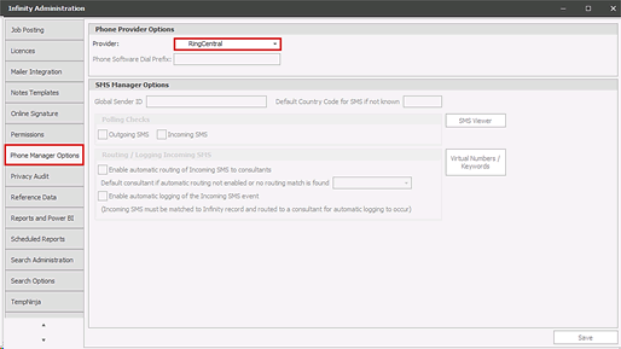
Within Phone Manager Options you can select RingCentral from the Provider dropdown:
User setup
More Information
Within each user you can setup Phone number (needs to match the user phone number within your RingCentral account), the format must conform to the E.164 international standard and cannot be blank.
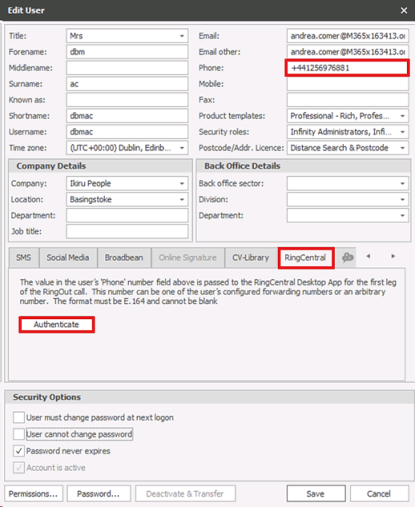
Once authenticated the user can interact with RingCentral when they next login to Infinity and the buttons on the tab change as follows:
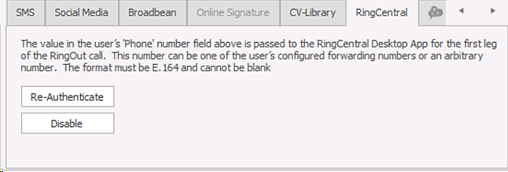
The user can be re-authenticated or disabled. If disabled, the user can no longer interact with RingCentral when they next login to Infinity. The authentication token expires if the user does not log into Infinity for 7 days. If this occurs the user will be prompted to re-authenticate when they log into Infinity.
Telecoms that can launch a RingCentral call are ticked as type ‘Phone Software’ in Administration \ Reference Data \ Telecoms tab
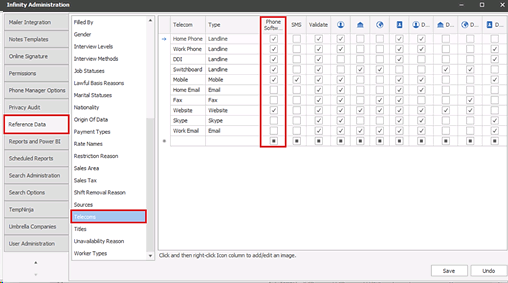
System telecoms of home phone, work phone, DDI, switchboard and mobile are ticked as default and cannot be changed. Telecoms added by the user can be ticked / unticked as required
Windows Notifications
For users to utilise the integration Windows notifications will need to be enabled, this allows the user to receive the pop-up notification required to then log events against records or copy numbers, if multiple records are found to match the incoming number.

Note:- this setting may require your IT to enable
Contact Details
If you require further assistance please contact Ikiru People using the details published on www.ikirupeople.com
Visit our Customer Portal at https://portal.ikirupeople.com/ for future events and clinics.
FeedbackIf you would like to make suggestions or have found any errors with this Help section please contact our Support team.
Copyright © 2026 Voyager by Ikiru People Ltd. All rights reservedVersion 4.87
Voyager Software is a brand of Ikiru People Ltd, a subsidiary of Dillistone Group Plc. The group is a leading global provider of software and services that enable recruitment agencies and in-house recruiters to better manage their selection process and address the training needs of individuals. Across its brands – which include Voyager Software (recruitment software UK & Australia), Dillistone FileFinder executive search software, GatedTalent, the global database of the world’s leading executives, Talentis.Global – the next generation of recruitment software and also ISV.Online, provider of online pre-employment skills testing and training tools. Dillistone Group serves thousands of clients worldwide. Ikiru People Ltd: Registration Number 02043300. Registered in England & Wales.
 |  |  |  |